Direct Database Debugging Mode
Direct Database Debugging mode allows you to debug PL/SQL programs by using the Step Into command from either a PL/SQL program node in Server Explorer or a PL/SQL program source window.
Before debugging starts, Oracle Developer Tools saves and recompiles the PL/SQL program if the PL/SQL program is updated in Oracle Developer Tools, but has not yet been saved in the database.
This section includes the following topics:
Requirements for Direct Database Debugging Mode
Prior to using Direct Database Debugging, perform all the setup requirements listed in PL/SQL Debugging Setup.
Debugging a PL/SQL Program Directly
This section describes how to debug a PL/SQL program directly. You can begin by executing either the Step Into or Run Debug command.
Both the Step Into and Run Debug command launch the Oracle PL/SQL Debugger:
-
Step Into
Stops at the line of the program being debugged.
-
Run Debug
Stops at the breakpoint encountered in the program being debugged or in programs that are called by that program.
If the program is compiled for release, and you do not to recompile it with debug information, then the execution stops at the breakpoint encountered in any called program that is compiled with debug information.
Note: To debug triggers, you cannot use Step Into. You must set a breakpoint in the trigger and execute Run Debug. Execution will stop in the trigger when the trigger is fired.
To begin debugging a PL/SQL program, do one of the following:
-
From Server Explorer: Expand the node that contains the program being debugged, right-click on that program, and from the menu, select Step Into or Run Debug.
To step into a package method, right-click on the method, and select Step Into or Run Debug from the menu.
Note: You cannot directly run from Server Explorer or debug any PL/SQL program that contains composite type parameters as
INorINOUTparameters. You can debug this by creating a PL/SQL wrapper or calling the PL/SQL program from .NET code. -
From a source window: Right-click, and from the menu, select Step Into or Run Debug.
This option is not available to debug a package procedure or function. Use Server Explorer instead.
When execution stops, in the PL/SQL program you can proceed to debug the PL/SQL program. See Common PL/SQL Debugger Operations.
See Also PL/SQL Program Refresh Behavior |Stepping Through a PL/SQL Program
Behavior for PL/SQL Programs Compiled Without Debug Information
If you execute the Step Into or Run Debug commands on a PL/SQL program that is not compiled with debug information, a message box appears indicating this, and asks if you want to compile it with debug information.
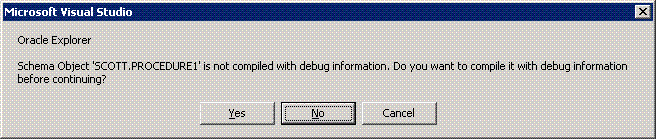
Description of the illustration compiled_without_dbg.gif
Depending on your response, the Oracle PL/SQL Debugger behaves as follows:
Cancel: If you select Cancel or close the message box, then no action is performed and the debugging session is canceled.
No: If you select No, then the code executes and does not compile with debug information.
The execution does not stop at the beginning or at the breakpoints inside the PL/SQL program. However, if this program calls another PL/SQL program that has been compiled with debug information, then the execution stops at the breakpoints set in the that program.
Yes: If you select Yes, then the program is recompiled with debug information, it is launched, and the execution stops at the beginning of the program.
See Also Stepping Through a PL/SQL Program