Create an OCI Generative AI Credential and AI Profile

An AI credential stores authentication details used by the database to access the selected AI provider or related cloud resources. The AI credential comprises information such as user_ocid, tenancy_ocid, private_key and fingerprint. An AI Profile is information about a user and their attributes, such as provider, credential_name, and object_list.

Prerequisites
  • DBMS_CLOUD_AI package
  • user_ocid
  • tenancy_ocid
  • private_key
  • fingerprint
You can create and manage your AI profiles using the DBMS_CLOUD_AI package.
To create an OCI Generative AI credential and AI Profile:
  1. Create a notebook and in a %script paragraph, run the following command to create an AI credential:
    %script
    DECLARE
    	credential_name VARCHAR2(128) := 'OCI_CRED';
    BEGIN
    	BEGIN
    		dbms_cloud.drop_credential(credential_name => credential_name);
    	EXCEPTION
    		WHEN OTHERS THEN
    			NULL;
    	END;
    	dbms_cloud.create_credential(
    		credential_name => credential_name,
    		user_ocid       => '<ocid1.user.oc1..>',
    		tenancy_ocid    => '<ocid1.tenancy.oc1..>',
    		private_key     => '<private_key>',
    		fingerprint     => '<fingerprint>'
    	);
    END;
    /
    
    This PL/SQL script calls the DBMS_CLOUD.CREATE_CREDENTIAL procedure to create a new credential with the given parameters:
  2. In another %script paragraph in the same notebook, run the following command to create an AI profile by the name GROK_4_3_PROFILE.
    %script
    DECLARE
        profile_name VARCHAR2(128) := 'GROK_4_3_PROFILE';
    BEGIN
        dbms_cloud_ai.drop_profile(
            profile_name,
            TRUE
        );
        dbms_cloud_ai.create_profile(
            profile_name => profile_name,
            attributes   => '{
                "credential_name": "OCI_CRED",
                "model": "xai.grok-4.3",
                "provider": "oci",
                "temperature": 1,
                "max_tokens": 8192,
                "oci_compartment_id": "<ocid1.compartment.oc1..>"            
            }'
        );
    END;
    /
    Define the following attributes for this profile:
    • profile_name: A name for the AI profile. The profile name must follow the naming rules of Oracle SQL identifier. The maximum profile name length is 125 characters.
    • credential_name: This is the name of the credential used to authenticate requests to the selected AI provider.
    • model: The name of the AI model being used to generate responses in the conversation. In this example, it is xai.grok-4.3. For more information, see Recommended Models.
    • provider: This is the provider of the model. It is a mandatory field. Supported providers are:
      • openai
      • cohere
      • azure
      • database
      • oci
      • google
      • anthropic
      • huggingface
      • aws
    • max_tokens: Specify the maximum number of tokens (words and pieces of words) in the response. Prevents overly long outputs and manages cost.
    • oci_compartment_id: This is the OCID of the compartment you are permitted to access when calling the OCI Generative AI service. The compartment ID can contain alphanumeric characters, hyphens and dots.
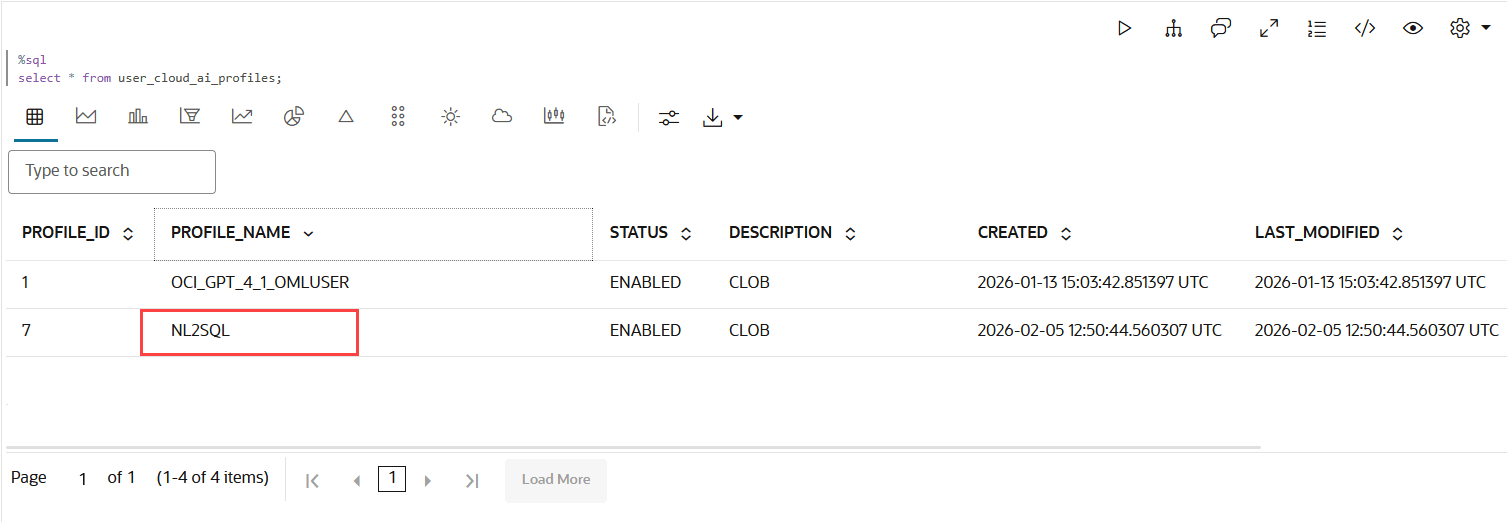
  3. Check the status of the profile creation by running the following:
    %sql select * from
        user_cloud_ai_profiles;
This completes the task of creating an AI credential and AI Profile.