Creating CTXCAT Subindexes
An online auction site that must store item descriptions, prices, and bid-close dates for ordered look-up is a good example for creating a CTXCAT index.
Figure 1: Auction Table Schema and CTXCAT Index
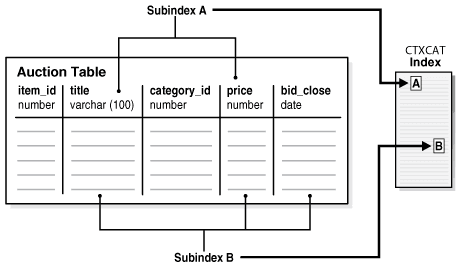
Description of the illustration ccapp_pb_010a.png
Figure 4-1 shows a table called AUCTION with the following schema:
create table auction(
item_id number,
title varchar2(100),
category_id number,
price number,
bid_close date);
To create your subindexes, create an index set to contain them:
begin
ctx_ddl.create_index_set('auction_iset');
end;
Next, determine the structured queries that you are likely to enter. The CATSEARCH query operator takes a mandatory text clause and optional structured clause.
In the example, this means that all queries include a clause for the title column, which is the text column.
Assume that the structured clauses fall into the following categories:
| Structured Clauses | Subindex Definition to Serve Query | Category |
|---|---|---|
'price < 200' 'price = 150' 'order by price' |
‘price’ | A |
'price = 100 order by bid_close' 'order by price, bid_close' |
‘price, bid_close’ | B |
Structured Query Clause Category A
The structured query clause contains an expression only for the price column as follows:
SELECT FROM auction WHERE CATSEARCH(title, 'camera', 'price < 200')> 0;
SELECT FROM auction WHERE CATSEARCH(title, 'camera', 'price = 150')> 0;
SELECT FROM auction WHERE CATSEARCH(title, 'camera', 'order by price')> 0;
These queries can be served by using subindex B. However, for efficiency, you can also create a subindex only on price (subindex A):
begin
ctx_ddl.add_index('auction_iset','price'); /* sub-index A */
end;
Structured Query Clause Category B
The structured query clause includes an equivalent expression for price ordered by bid_close, and an expression for ordering by price and bid_close, in that order:
SELECT FROM auction WHERE CATSEARCH(
   title, 'camera','price = 100
   ORDER BY bid_close')> 0;
SELECT FROM auction
   WHERE CATSEARCH(
   title, 'camera','order by price, bid_close')> 0;
These queries can be served with a subindex defined as follows:
begin
ctx_ddl.add_index('auction_iset','price, bid_close'); /* sub-index B */
end;
Like a combined b-tree index, the column order that you specify with CTX_DDL.ADD_INDEX affects the efficiency and viability of the index scan which Oracle Text uses to serve specific queries. For example, if two structured columns p and q have a b-tree index specified as 'p,q', Oracle Text cannot scan this index to sort 'ORDER BY q,p'.