Introduction to Oracle Database Integration with Microsoft Azure AD
Before you begin configuring Microsoft Azure AD to access an Oracle database, you must understand the overall process.
-
About Integrating Oracle Database with Microsoft Azure AD
Oracle Database and Microsoft Azure AD can be configured to allow users and applications to connect to the database using their Azure AD credentials. -
Architecture of Oracle Database Integration with Microsoft Azure AD
Microsoft Azure Active Directory access tokens follow the OAuth 2.0 standard with extensions. -
Azure AD Users Mapping to an Oracle Database Schema and Roles
Microsoft Azure users must be mapped to an Oracle Database schema and have the necessary privileges (through roles) before being able to authenticate to the Oracle Database instance. -
Use Cases for Connecting to an Oracle Database Using Azure AD
Oracle Database supports several use cases for connecting to the database. -
General Process of Authenticating Microsoft Azure AD Identities with Oracle Database
The Oracle Database administrator and the Microsoft Azure AD administrator play roles to allow Azure AD users to connect to the database using Azure AD OAuth2 access tokens.
About Integrating Oracle Database with Microsoft Azure AD
Oracle Database and Microsoft Azure AD can be configured to allow users and applications to connect to the database using their Azure AD credentials.
Azure AD users and applications can log in with Azure AD Single Sign On (SSO) credentials to access the standalone and CDB multitenant databases. This is done with an Azure AD OAuth2 access token that the user or application first requests from Azure AD. This OAuth2 access token contains the user identity and database access information and is then sent to the database. Refer to Refer to the Microsoft article Passwordless authentication options for Azure Active Directory for information about configuring multi-factor and passwordless authentication.
You can perform this integration in the following Oracle Database environments:
-
On-premises Oracle Database release 19.18 and later, excluding 21c
-
All Oracle Database server platforms: Linux, Windows, AIX, Solaris, and HPUX
-
Oracle Autonomous Database Serverless
-
Oracle Autonomous Database on Dedicated Exadata Infrastructure
-
Oracle Autonomous Database on Exadata Cloud@Customer
-
Oracle Exadata Database Service on Dedicated Infrastructure
-
Oracle Exadata Database Service on Cloud@Customer
-
Oracle Base Database Service
The instructions for configuring Azure AD use the term “Oracle Database” to encompass these environments.
This type of integration enables the Azure AD user to access an Oracle Database instance. Azure AD users and applications can log in with Azure AD Single Sign On (SSO) credentials to get an Azure AD OAuth2 access token to send to the database.
The Azure AD administrator creates and registers Oracle Database with Azure AD. Within Azure AD, this is called an app registration, which is short for application registration. This is the digital information that Azure AD must know about the software that is using Azure AD. The Azure AD administrator also creates application (app) roles for the database app registration in Azure AD. App roles connect Azure users, groups, and applications to database schemas and roles. The Azure AD administrator assigns Azure AD users, groups, or applications to the app roles. These app roles are mapped to a database global schema or a global role or to both a schema and a role. An Azure AD user, group, or application that is assigned to an app role will be mapped to a database global schema, global role, or to both a schema and a role. An Oracle global schema can also be mapped exclusively to an Azure AD user. An Azure AD guest user (non-organization user) or an Azure AD service principal (application) can only be mapped to a database global schema through an Azure AD app role. An Oracle global role can only be mapped from an Azure app role and cannot be mapped from an Azure user.
Tools and applications that are updated to support Azure AD tokens can authenticate users directly with Azure AD and pass the database access token to the Oracle Database instance. You can configure existing database tools such as SQL*Plus to use an Azure AD token from a file location. In these cases, Azure AD tokens can be retrieved using tools like Microsoft PowerShell or Azure CLI and put into a file location. An Azure AD OAuth2 database access tokens are issued with an expiration time. The Oracle Database client driver will ensure that the token is in a valid format and that it has not expired before passing it to the database. The token is scoped for the database, which means that there is information in the token about the database where the token will be used. The app roles the Azure AD principal was assigned to in the database Azure AD app registration are included as part of the access token. The directory location for the Azure AD token should only have enough permission for the user to write the token file to the location and the database client to retrieve these files (for example, just read and write by the user). Because the token allows access to the database, it should be protected within the file system.
Azure AD users can request a token from Azure AD using a number of methods to open an Azure login window to enter their Azure AD credentials.
Oracle Database accepts tokens representing the following Azure AD principals:
-
Azure AD user, who is registered user in the Azure AD tenancy
-
Guest user, who is registered as a guest user in the Azure AD tenancy
-
Service, which is the registered application connecting to the database as itself with the client credential flow (connection pool use case)
Oracle Database supports the following Azure AD authentication flows:
-
Interactive flow (also called authorization code flow) using Proof Key for Code Exchange (PKCE), most commonly used for human users (not applications) to authenticate to Azure AD in an client environment with a browser
-
Client credentials, which are for database applications that connect as themselves (and not the end-user)
-
On-Behalf-Of (OBO), where an application requests an access token on behalf of a logged-in user to send to the database
-
Resource owner password credential (ROPC), which is not recommended for production use, but can be used in test environments where a pop-up browser user authentication would be difficult to incorporate. ROPC needs the Azure AD user name and password credential to be part of the token request call.
Architecture of Oracle Database Integration with Microsoft Azure AD
Microsoft Azure Active Directory access tokens follow the OAuth 2.0 standard with extensions.
The Azure AD access token will be needed before you access the database from the database client (for example, with SQLPlus or SQLcl). The Oracle clients (for example, OCI, JDBC, and ODP) can be configured to pick up an Azure AD token from a file location or the token can be passed to the client through the database client API. An Azure user can use a script (examples available from Microsoft) to retrieve a token and put it into a file location for the database client to retrieve. Applications can use the Azure SDK to get an access token and pass the token through the database client API. Command-line tools such as Microsoft PowerShell or the Azure command-line interface can be used to retrieve the Azure AD token if the application cannot directly get the token.
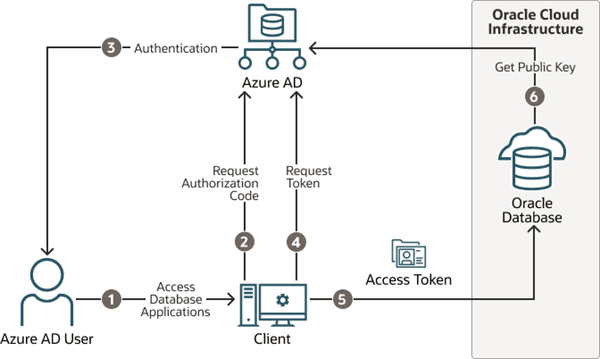
The following diagram is a generalized flow diagram for OAuth 2.0 standard, using the OAuth2 token. See Authentication flow support in MSAL in the Microsoft Azure AD documentation for more details about each supported flow.
Description of the illustration azure-authentication.png
The authorization code flow is an OAuth2 standard and is described in detail as part of the standards. There are two steps in the flow. The first step authenticates the user and retrieves the authorization code. The second step uses the authorization code to get the database access token.
-
The Azure AD user requests access to the resource, the Oracle Database instance.
-
The database client or application requests an authorization code from Azure AD.
-
Azure AD authenticates the Azure AD user and returns the authorization code.
-
The helper tool or application uses the authorization code with Azure AD to exchange it for the
OAuth2token. -
The database client sends the
OAuth2access token to the Oracle database. The token includes the database app roles the user was assigned to in the Azure AD app registration for the database. -
The Oracle Database instance uses the Azure AD public key to verify that the access token was created by Azure AD.
Both the database client and the database server must be registered with the app registrations feature in the Azure Active Directory section of the Azure portal. The database client must be registered with Azure AD app registration. Permission must also be granted to allow the database client to get an access token for the database.
Azure AD Users Mapping to an Oracle Database Schema and Roles
Microsoft Azure users must be mapped to an Oracle Database schema and have the necessary privileges (through roles) before being able to authenticate to the Oracle Database instance.
In Microsoft Azure, an Azure AD administrator can assign users, groups, and applications to the database app roles.
Exclusively mapping an Azure AD schema to a database schema requires the database administrator to create a database schema when the Azure AD user joins the organization or is authorized to the database. The database administrator must also modify the privileges and roles that are granted to the database schema to align them with the tasks the Azure AD user is assigned to. When the Azure AD user leaves the organization, the database administrator must drop the database schema so that an unused account is not left on the database. Using the database app roles enables the Azure AD administrator to control access and roles by assigning users to app roles that are mapped to global schemas and global roles. This way, user access to the database is managed by Azure AD administrators and database administrators do not need to create, manage, and drop schemas for every user.
An Azure AD user can be mapped to a database schema (user) either exclusively or through an app role.
-
Creating an exclusive mapping between an Azure AD user and an Oracle Database schema. In this type of mapping, the database schema must be created for the Azure AD user. Database privileges and roles that are needed by the Azure AD user must be granted to the database schema. The database schema not only must be created when the Azure AD user is authorized to the database, but the granted privileges and roles must be modified as the Azure AD roles and tasks change. Finally, the database schema must be dropped when the Azure AD user leaves the organization.
-
Creating a shared mapping between an Azure AD app role and an Oracle Database schema. This type of mapping, which is more common than exclusive mappings, is for Azure AD users who have been assigned directly to the app role or is a member of an Azure AD group that is assigned to the app role. The app role is mapped to an Oracle Database schema (shared schema mapping). Shared schema mapping allows multiple Azure AD users to share the same Oracle Database schema so a new database schema is not required to be created every time a new user joins the organization. This operational efficiency allows database administrators to focus on database application maintenance, performance, and tuning tasks instead of configuring new users, updating privileges and roles, and removing accounts.
In addition to database roles and privileges being granted directly to the mapped global schema, additional roles and privileges can be granted through mapped global roles. Different Azure AD users mapped to the same shared global schema may need different privileges and roles. Azure app roles can be mapped to Oracle Database global roles. Azure AD users who are assigned to the app role or are a member of an Azure AD group that is assigned to the app role will be granted the Oracle Database global role when they access the database.
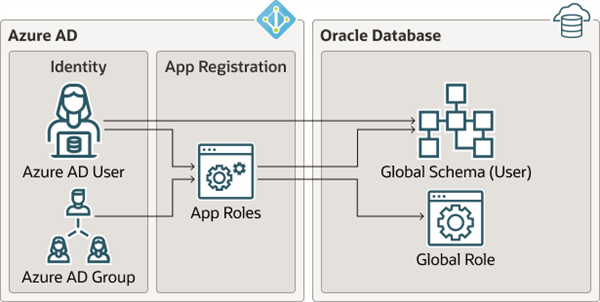
The following diagram illustrates the different types of assignments and mappings that are available.
Description of the illustration azure_mappings.png
These mappings are as follows:
-
An Azure AD user can be mapped directly to an Oracle Database global schema (user).
-
An Azure AD user, Azure AD group, or application is assigned to an app role, which is then mapped to either an Oracle Database global schema (user) or a global role.
Use Cases for Connecting to an Oracle Database Using Azure AD
Oracle Database supports several use cases for connecting to the database.
-
OAuth2 authorization code flow: This is the most common flow for human users. The client directs the Azure AD user to Azure AD to get the authorization code. This code is used to get the database access token. See the Microsoft Azure article Microsoft identity platform and OAuth 2.0 authorization code flow.
-
Resource owner password credentials (ROPC): This flow is not recommended for production servers. It is useful for test software that cannot work with a pop-up authentication window. It is used in non-graphic user interface environments when a pop-up window cannot be used to authenticate a user.
-
Client credentials: This flow is used for applications to connect with the database. The application must register with Azure AD app registration and needs a client ID and client password. These client credentials must be used to get the database access token from Azure AD when the application connects to the database. The application can pass the token through the file system or through the database client API.
-
On-behalf-of (OBO) token: An Azure application requests an OBO token for a logged in user. The OBO token will also be an access token for the database with the Azure AD user identity and assigned app roles for the database. This enables the Azure AD user to log in to the database as the user and not the application. Only an application can request an OBO token for its Azure AD user and pass it to the database client through the API.
General Process of Authenticating Microsoft Azure AD Identities with Oracle Database
The Oracle Database administrator and the Microsoft Azure AD administrator play roles to allow Azure AD users to connect to the database using Azure AD OAuth2 access tokens.
The general process is as follows:
-
The Oracle Database administrator ensures that the Oracle Database environment meets the requirements for the Microsoft Azure AD integration. See Oracle Database Requirements for the Microsoft Azure AD Integration.
-
The Azure AD administrator creates an Azure AD app registration for the database and the Oracle Database administrator enables the database to use Azure AD tokens for database access.
As part of the app registration process, the Azure AD administrator creates Azure app roles to be used for the mappings between the Azure users, groups, and applications to the Oracle Database schemas and roles.
-
The Oracle Database administrator creates and maps global schemas to either an Azure AD user (exclusive schema mapping) or to an Azure app role (shared schema mapping). The Azure AD user or application must be mapped to one schema.
-
Optionally, the Oracle administrator creates and maps global Oracle Database roles to Azure app roles.
-
The Azure AD end user who wants to connect with the Oracle Database instance registers the client application as an Azure AD client (similar to how the Oracle database is registered).
The Azure AD client will have a client identification and a client secret, unless the application client is public. If the application client is public, then only the application client identification is necessary.
-
The Azure AD end user (who can be a database administrator) connects using an utility such as PowerShell or the Azure command-line interface to retrieve the
OAuth2database access token and store it in a local file directory. An application can also request an Azure ADOAuth2access token directly from Azure AD and pass it through a database client API. Refer to the following Oracle Database client documentation for information about passing Azure ADOAuth2tokens:-
JDBC-thin clients: Oracle Database JDBC Developer’s Guide
-
Oracle Call Interface (OCI): Oracle Call Interface Programmer’s Guide
-
Oracle Data Provider for .NET (ODP): Oracle Data Provider for .NET Developer’s Guide for Microsoft WindowsConnecting to Oracle Database
-
-
Once connected to the Oracle Database instance, the Azure AD end user performs database operations as needed.