ALTER DATABASE LINK
Purpose
Use the ALTER DATABASE LINK statement to modify a fixed-user database link when the password of the connection or authentication user changes.
Note:
-
You cannot use this statement to change the connection or authentication user associated with the database link. To change user, you must re-create the database link.
-
You cannot use this statement to change the password of a connection or authentication user. You must use the ALTER USER statement for this purpose, and then alter the database link with the
ALTERDATABASELINKstatement. -
This statement is valid only for fixed-user database links, not for connected-user or current user database links. See CREATE DATABASE LINK for more information on these two types of database links.
Prerequisites
To alter a private database link, you must have the ALTER DATABASE LINK system privilege. To alter a public database link, you must have the ALTER PUBLIC DATABASE LINK system privilege.
Syntax
alter_database_link::= 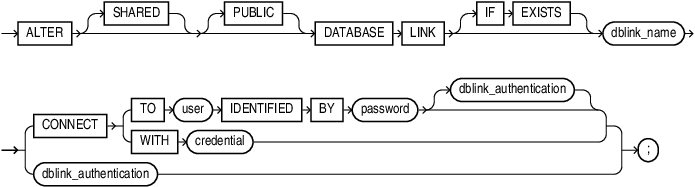
Description of the illustration alter_database_link.eps
dblink_authentication 
Description of the illustration dblink_authentication.eps
Semantics
The ALTER DATABASE LINK statement is intended only to update fixed-user database links with the current passwords of connection and authentication users. Therefore, any clauses valid in a CREATE DATABASE LINK statement that do not appear in the syntax diagram above are not valid in an ALTER DATABASE LINK statement. The semantics of all of the clauses permitted in this statement are the same as the semantics for those clauses in CREATE DATABASE LINK. Refer to CREATE DATABASE LINK for this information.
IF EXISTS
Specify IF EXISTS to alter an existing database link.
Note: You can only use IF EXISTS from Release 19.28 and up.
Examples
The following statements show the valid variations of the ALTER DATABASE LINK statement:
ALTER DATABASE LINK private_link
  CONNECT TO hr IDENTIFIED BY hr_new_password;

ALTER PUBLIC DATABASE LINK public_link
  CONNECT TO scott IDENTIFIED BY scott_new_password;

ALTER SHARED PUBLIC DATABASE LINK shared_pub_link
  CONNECT TO scott IDENTIFIED BY scott_new_password
  AUTHENTICATED BY hr IDENTIFIED BY hr_new_password;

ALTER SHARED DATABASE LINK shared_pub_link
  CONNECT TO scott IDENTIFIED BY scott_new_password;