TRUNCATE TABLE
Purpose
Note: You cannot roll back a TRUNCATE TABLE statement, nor can you use a FLASHBACK TABLE statement to retrieve the contents of a table that has been truncated.
Use the TRUNCATE TABLE statement to remove all rows from a table. By default, Oracle Database also performs the following tasks:
-
Deallocates all space used by the removed rows except that specified by the
MINEXTENTSstorage parameter -
Sets the
NEXTstorage parameter to the size of the last extent removed from the segment by the truncation process
Removing rows with the TRUNCATE TABLE statement can be more efficient than dropping and re-creating a table. Dropping and re-creating a table invalidates dependent objects of the table, and requires you to repeat the following actions:
-
Grant object privileges on the table
-
Create the indexes, integrity constraints, and triggers on the table
-
Specify the storage parameters of the table Truncating has none of these effects.
Removing rows with the TRUNCATE TABLE statement can be faster than removing all rows with the DELETE statement, especially if the table has numerous triggers, indexes, and other dependencies.
See Also:
-
DELETE and DROP TABLE for information on other ways of removing data from a table
-
TRUNCATE CLUSTER for information on truncating a cluster
Prerequisites
To truncate a table, the table must be in your schema or you must have the DROP ANY TABLE system privilege.
To specify the CASCADE clause, all affected child tables must be in your schema or you must have the DROP ANY TABLE system privilege.
You can truncate a private temporary table with the existing TRUNCATE TABLE command. Truncating a private temporary table will not commit and existing transaction. This applies to both transaction-specific and session-specific private temporary tables. Note that a truncated private temporary table will not go into the RECYCLEBIN.
See Also: “Restrictions on Truncating Tables”
Syntax
truncate_table::= 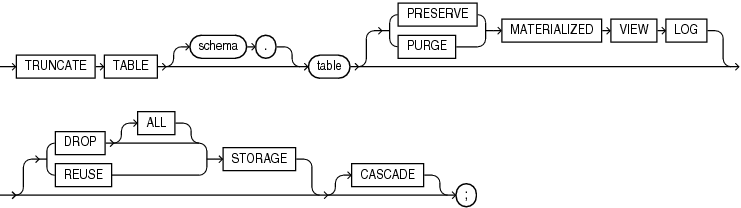
Description of the illustration truncate_table.eps
Semantics
TABLE Clause
Specify the schema and name of the table to be truncated. This table cannot be part of a cluster. If you omit schema, then Oracle Database assumes the table is in your own schema.
-
You can truncate index-organized tables and temporary tables. When you truncate a temporary table, only the rows created during the current session are removed.
-
Oracle Database changes the
NEXTstorage parameter of table to be the size of the last extent deleted from the segment in the process of truncation. -
Oracle Database also automatically truncates and resets any existing
UNUSABLEindicators for the following indexes on table: range and hash partitions of local indexes and subpartitions of local indexes. -
If table is not empty, then the database marks
UNUSABLEall nonpartitioned indexes and all partitions of global partitioned indexes on the table. However, when the table is truncated, the index is also truncated, and a new high water mark is calculated for the index segment. This operation is equivalent to creating a new segment for the index. Therefore, at the end of the truncate operation, the indexes are once againUSABLE. -
For a domain index, this statement invokes the appropriate truncate routine to truncate the domain index data.
See Also: Oracle Database Data Cartridge Developer’s Guide for more information on domain indexes
-
If a regular or index-organized table contains LOB columns, then all LOB data and LOB index segments are truncated.
-
If table is partitioned, then all partitions or subpartitions, as well as the LOB data and LOB index segments for each partition or subpartition, are truncated.
Note: When you truncate a table, Oracle Database automatically removes all data in the table’s indexes and any materialized view direct-path
INSERTinformation held in association with the table. This information is independent of any materialized view log. If this direct-pathINSERTinformation is removed, then an incremental refresh of the materialized view may lose data. -
All cursors are invalidated.
Restrictions on Truncating Tables
This statement is subject to the following restrictions:
-
You cannot roll back a
TRUNCATETABLEstatement. -
You cannot flash back to the state of the table before the truncate operation.
-
You cannot individually truncate a table that is part of a cluster. You must either truncate the cluster, delete all rows from the table, or drop and re-create the table.
-
You cannot truncate the parent table of an enabled foreign key constraint. You must disable the constraint before truncating the table. An exception is that you can truncate the table if the integrity constraint is self-referential.
-
If a domain index is defined on table, then neither the index nor any index partitions can be marked
IN_PROGRESS. -
You cannot truncate the parent table of a reference-partitioned table. You must first drop the reference-partitioned child table.
-
You cannot truncate a duplicated table.
MATERIALIZED VIEW LOG Clause
The MATERIALIZED VIEW LOG clause lets you specify whether a materialized view log defined on the table is to be preserved or purged when the table is truncated. This clause permits materialized view master tables to be reorganized through export or import without affecting the ability of primary key materialized views defined on the master to be fast refreshed. To support continued fast refresh of primary key materialized views, the materialized view log must record primary key information.
Note: The keyword SNAPSHOT is supported in place of MATERIALIZED VIEW for backward compatibility.
PRESERVE
Specify PRESERVE if any materialized view log should be preserved when the master table is truncated. This is the default.
PURGE
Specify PURGE if any materialized view log should be purged when the master table is truncated.
See Also: Oracle Database Administrator’s Guide for more information about materialized view logs and the TRUNCATE statement
STORAGE Clauses
The STORAGE clauses let you determine what happens to the space freed by the truncated rows. The DROP STORAGE clause, DROP ALL STORAGE clause, and REUSE STORAGE clause also apply to the space freed by the data deleted from associated indexes.
DROP STORAGE
Specify DROP STORAGE to deallocate all space from the deleted rows from the table except the space allocated by the MINEXTENTS parameter of the table. This space can subsequently be used by other objects in the tablespace. Oracle Database also sets the NEXT storage parameter to the size of the last extent removed from the segment in the truncation process. This setting, which is the default, is useful for small and medium-sized objects. The extent management in locally managed tablespace is very fast in these cases, so there is no need to reserve space.
DROP ALL STORAGE
Specify DROP ALL STORAGE to deallocate all space from the deleted rows from the table, including the space allocated by the MINEXTENTS parameter. All segments for the table, as well as all segments for its dependent objects, will be deallocated.
Restrictions on DROP ALL STORAGE
This clause is subject to the same restrictions as described in “Restrictions on Deferred Segment Creation”.
REUSE STORAGE
Specify REUSE STORAGE to retain the space from the deleted rows allocated to the table. Storage values are not reset to the values when the table was created. This space can subsequently be used only by new data in the table resulting from insert or update operations. This clause leaves storage parameters at their current settings.
This setting is useful as an alternative to deleting all rows of a very large table-when the number of rows is very large, the table entails many thousands of extents, and when data is to be reinserted in the future.
This clause is not valid for temporary tables. A session becomes unbound from the temporary table when the table is truncated, so the storage is automatically dropped.
If you have specified more than one free list for the object you are truncating, then the REUSE STORAGE clause also removes any mapping of free lists to instances and resets the high-water mark to the beginning of the first extent.
CASCADE
If you specify CASCADE, then Oracle Database truncates all child tables that reference table with an enabled ON DELETE CASCADE referential constraint. This is a recursive operation that will truncate all child tables, granchild tables, and so on, using the specified options.
Examples
Truncating a Table: Example
The following statement removes all rows from a hypothetical copy of the sample table hr.employees and returns the freed space to the tablespace containing employees:
TRUNCATE TABLE employees_demo;The preceding statement also removes all data from all indexes on employees and returns the freed space to the tablespaces containing them.
Preserving Materialized View Logs After Truncate: Example
The following statements are examples of TRUNCATE statements that preserve materialized view logs:
TRUNCATE TABLE sales_demo PRESERVE MATERIALIZED VIEW LOG;

TRUNCATE TABLE orders_demo;