Catalog Application Quick Tour
The examples in this section provide the basic SQL statements to create a catalog index for an auction site that sells electronic equipment, such as cameras and CD players.
New inventory is added every day, and item descriptions, bid dates, and prices must be stored together.
The application requires good response time for mixed queries. The key is to determine what columns users frequently search to create a suitable CTXCAT index. Queries on this type of index use the CATSEARCH operator.
-
Using SQL*Loader to Load the Table
Typically, query applications require a user interface. An example of how to build such a query application using the
CATSEARCHindex type is given in CATSEARCH Query Application.
Note:
Both CTXCAT and the use of CTXCAT grammar as an alternative grammar for CONTEXT queries is deprecated. Instead, Oracle recommends that you use the CONTEXT indextype, which can provide all the same functionality, except that it is not transactional. Near-transactional behavior in CONTEXT can be achieved by using SYNC(ON COMMIT) or, preferably, SYNC(EVERY [time-period]) with a short time period.
CTXCAT was introduced when indexes were typically a few megabytes in size. Modern, large indexes, can be difficult to manage with CTXCAT. The addition of index sets to CTXCAT can be achieved more effectively by the use of FILTER BY and ORDER BY columns, or SDATA, or both, in the CONTEXT indextype. CTXCAT is therefore rarely an appropriate choice. Oracle recommends that you choose the more efficient CONTEXT indextype.
Creating the Table
Perform the following steps to create and load the table:
-
Connect as the appropriate user.
Connect as the
myuserwithCTXAPProle:CONNECT myuser; -
Create your table.
Set up an auction table to store your inventory:
CREATE TABLE auction( item_id NUMBER, title VARCHAR2(100), category_id NUMBER, price NUMBER, bid_close DATE); -
Populate your table.
Populate the table with various items, each with an
id, title, priceandbid_date:INSERT INTO AUCTION VALUES(1, 'NIKON CAMERA', 1, 400, '24-OCT-2002'); INSERT INTO AUCTION VALUES(2, 'OLYMPUS CAMERA', 1, 300, '25-OCT-2002'); INSERT INTO AUCTION VALUES(3, 'PENTAX CAMERA', 1, 200, '26-OCT-2002'); INSERT INTO AUCTION VALUES(4, 'CANON CAMERA', 1, 250, '27-OCT-2002');
Using SQL*Loader to Load the Table
You can use SQL*Loader to load a table in batches.
Perform the following steps to load your table in batches with SQL*Loader:
-
Determine your queries.
Determine what criteria are likely to be retrieved. In this example, you determine that all queries search the title column for item descriptions, and most queries order by price. Later on, when you use the
CATSEARCHoperator, specify the terms for the text column and the criteria for the structured clause. -
Create the subindex to order by price.
For Oracle Text to serve these queries efficiently, you need a subindex for the price column, because your queries are ordered by price.
Therefore, create an index set called
auction_setand add a subindex for the price column:EXEC CTX_DDL.CREATE_INDEX_SET('auction_iset'); EXEC CTX_DDL.ADD_INDEX('auction_iset','price'); /* subindex A*/ -
Create the
CTXCATindex.Create the combined catalog index on the
AUCTIONtable with theCREATEINDEXstatement:CREATE INDEX auction_titlex ON AUCTION(title) INDEXTYPE IS CTXSYS.CTXCAT PARAMETERS ('index set auction_iset');The following figure shows how the
CTXCATindex and its subindex relate to the columns.
Figure 1: Auction table schema and CTXCAT index
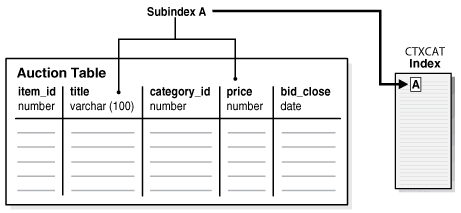
Description of the illustration ccapp_pb_019a.png
-
Query your table with
CATSEARCH.After you create the
CTXCATindex on theAUCTIONtable, query this index with theCATSEARCHoperator.First, set the output format to make the output readable:
COLUMN title FORMAT a40;Next, run the query:
SELECT title, price FROM auction WHERE CATSEARCH(title, 'CAMERA', 'order by price')> 0; TITLE PRICE --------------- ---------- PENTAX CAMERA 200 CANON CAMERA 250 OLYMPUS CAMERA 300 NIKON CAMERA 400 SELECT title, price FROM auction WHERE CATSEARCH(title, 'CAMERA', 'price <= 300')>0; TITLE PRICE --------------- ---------- PENTAX CAMERA 200 CANON CAMERA 250 OLYMPUS CAMERA 300 -
Update your table.
Update your catalog table by adding new rows. When you do so, the
CTXCATindex is automatically synchronized to reflect the change.For example, add the following new rows to the table and then rerun the query:
INSERT INTO AUCTION VALUES(5, 'FUJI CAMERA', 1, 350, '28-OCT-2002');
INSERT INTO AUCTION VALUES(6, 'SONY CAMERA', 1, 310, '28-OCT-2002');

SELECT title, price FROM auction WHERE CATSEARCH(title, 'CAMERA', 'order by price')> 0;

TITLE                                    PRICE

----------------------------------- ----------
PENTAX CAMERA                              200
CANON CAMERA                               250
OLYMPUS CAMERA                             300
SONY CAMERA                                310
FUJI CAMERA                                350
NIKON CAMERA                               400

6 rows selected.
Note how the added rows show up immediately in the query.
See Also: “Building the PSP Web Application” for an example of how to use SQL*Loader to load a text table from a data file