Classification Application Quick Tour
The function of a classification application is to perform some action based on document content. These actions can include assigning a category ID to a document or sending the document to a user. The result is classification of a document.
This section contains the following sections:
About Classification of a Document
Documents are classified according to predefined rules. These rules select documents for a category. For instance, a query rule of ‘presidential elections’ selects documents for a category about politics.
Oracle Text provides several types of classification. One type is simple, or rule-based classification, discussed here, where you create document categories and the rules for categorizing documents. With supervised classification, Oracle Text derives the rules from a set of training documents that you provide. With clustering, Oracle Text does all the work for you, deriving both rules and categories.
To create a simple classification application for document content using Oracle Text, you create rules. Rules are essentially a table of queries that categorize document content. You index these rules in a CTXRULE index. To classify an incoming stream of text, use the MATCHES operator in the WHERE clause of a SELECT statement. See the following image for the general flow of a classification application.
Figure 2: Overview of a Document Classification Application
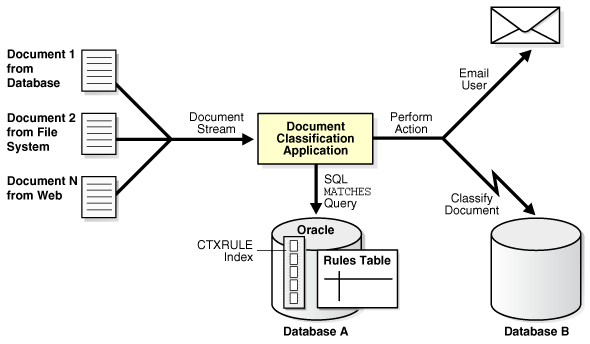
Description of the illustration ccapp_pb_018a.png
See Also: “Overview of Document Classification”
Creating a Classification Application
The following example shows how to classify documents by using myuser with the CTXAPP role. You define simple categories, create a CTXRULE index, and use MATCHES.
-
Connect as the appropriate user.
Connect as the
myuserwithCTXAPProle:CONNECT myuser; -
Create the rule table.
In this example, you create a table called
queries. Each row defines a category with an ID and a rule that is a query string.CREATE TABLE queries ( query_id NUMBER, query_string VARCHAR2(80) ); INSERT INTO queries VALUES (1, 'oracle'); INSERT INTO queries VALUES (2, 'larry or ellison'); INSERT INTO queries VALUES (3, 'oracle and text'); INSERT INTO queries VALUES (4, 'market share'); -
Create your
CTXRULEindex.
CREATE INDEX queryx ON queries(query_string) INDEXTYPE IS CTXSYS.CTXRULE;-
Classify with
MATCHES.Use the
MATCHESoperator in theWHEREclause of aSELECTstatement to match documents to queries and then classify the documents.COLUMN query_string FORMAT a35; SELECT query_id,query_string FROM queries WHERE MATCHES(query_string, 'Oracle announced that its market share in databases increased over the last year.')>0; QUERY_ID QUERY_STRING ---------- ----------------------------------- 1 oracle 4 market shareAs shown, the document string matches categories 1 and 4. With this classification, you can perform an action, such as writing the document to a specific table or emailing a user.
See Also: Classifying Documents in Oracle Text for more extended classification examples