The JSP Web Application
This application is based on JavaServer pages (JSP) and has the following requirements:
-
Your Oracle AI Database must be up and running.
-
A web server such as Apache Tomcat, which is can run JSP scripts that connect to the Oracle AI Database by using Java Database Connectivity (JDBC).
See Also: Oracle Database 2 Day + PHP Developer’s Guide for information about installing Apache HTTP Server
This section contains the following topics:
Building the JSP Web Application
This application models an online bookstore, where you can look up book titles and prices.
To create the JavaServer Pages (JSP) web application:
-
Create your table.
You must create the table to store such book information as title, publisher, and price. From SQL*Plus:
sqlplus>create table book_catalog ( id numeric, title varchar2(80), publisher varchar2(25), price numeric ) -
Load data by using SQL*Loader.
Load the book data from the operating system command line with SQL*Loader:
% sqlldr userid=ctxdemo/ctxdemo control=loader.ctl -
Create the index set.
You can create the index set from SQL*Plus:
sqlplus>begin ctx_ddl.create_index_set('bookset'); ctx_ddl.add_index('bookset','price'); ctx_ddl.add_index('bookset','publisher'); end; / -
Create the
CTXCATindex.You can create the
CTXCATindex from SQL*Plus as follows:sqlplus>create index book_idx on book_catalog (title) indextype is ctxsys.ctxcat parameters('index set bookset'); -
Try a simple search by using
CATSEARCH.You can test the newly created index in SQL*Plus as follows:
sqlplus>select id, title from book_catalog where catsearch(title,'Java','price > 10 order by price') > 0 -
Copy the
catalogSearch.jspfile to your JSP directory.When you do so, you can access the application from a browser. The URL is
http://localhost:port/path/catalogSearch.jsp.The application displays a query field in your browser and returns the query results as a list of HTML links. See Figure B-1.
Figure ?: Figure B-1 Screenshot of the Web Query Application
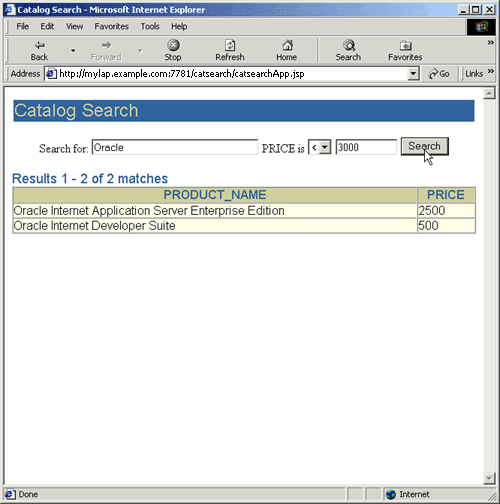
Description of the illustration qcatwiz1_newb.gif
JSP Web Application Sample Code
This section lists the code used to build the example web application. It includes the following files:
loader.ctl
LOAD DATA
  INFILE 'loader.dat'
  INTO TABLE book_catalog
  REPLACE
  FIELDS TERMINATED BY ';'
  (id, title, publisher, price)
loader.dat
1; A History of Goats; SPINDRIFT BOOKS; 50
2; Robust Recipes Inspired by Eating Too Much; SPINDRIFT BOOKS; 28
3; Atlas of Greenland History; SPINDRIFT BOOKS; 35
4; Bed and Breakfast Guide to Greenland; SPINDRIFT BOOKS; 37
5; Quitting Your Job and Running Away; SPINDRIFT BOOKS; 25
6; Best Noodle Shops of Omaha; SPINDRIFT BOOKS; 28
7; Complete Book of Toes; SPINDRIFT BOOKS; 16
8; Complete Idiot's Guide to Nuclear Technology; SPINDRIFT BOOKS; 28
9; Java Programming for Woodland Animals; BIG LITTLE BOOKS; 10
10; Emergency Surgery Tips and Tricks; SPOT-ON PUBLISHING; 10
11; Programming with Your Eyes Shut; KLONDIKE BOOKS; 10
12; English in Twelve Minutes; WRENCH BOOKS 11
13; Spanish in Twelve Minutes; WRENCH BOOKS 11
14; C++ Programming for Woodland Animals; CALAMITY BOOKS; 12
15; Oracle Internet Application Server, Enterprise Edition; KANT BOOKS; 12
16; Oracle Internet Developer Suite; SPAMMUS BOOK CO;13
17; Telling the Truth to Your Pets; IBEX BOOKS INC; 13
18; Go Ask Alice's Restaurant; HUMMING BOOKS;    13
19; Life Begins at 93;  CALAMITY BOOKS;   17
20; Python Programming for Snakes;  BALLAST BOOKS;  14
21; The Second-to-Last Mohican; KLONDIKE BOOKS;  14
22; Eye of Horus; An Oracle of Ancient Egypt; BIG LITTLE BOOKS;     15
23; Introduction to Sitting Down; IBEX BOOKS INC;  15
catalogSearch.jsp
<%@ page import="java.sql.* , oracle.jsp.dbutil.*" %>
<jsp:useBean id="name" class="oracle.jsp.jml.JmlString" scope="request" >
<jsp:setProperty name="name" property="value" param="v_query" />
</jsp:useBean>

<%
  String connStr="jdbc:oracle:thin:@machine-domain-name:1521:dev";

  java.util.Properties info = new java.util.Properties();

  Connection conn = null;
  ResultSet  rset = null;
  Statement  stmt = null;


       if (name.isEmpty() ) {

%>
           <html>
             <title>Catalog Search</title>
             <body>
             <center>
               <form method=post>
               Search for book title:
               <input type=text name="v_query" size=10>
               where publisher is
               <select name="v_publisher">
                  <option value="ADDISON WESLEY">ADDISON WESLEY
                  <option value="HUMMING BOOKS">HUMMING BOOKS
                  <option value="WRENCH BOOKS">WRENCH BOOKS
                  <option value="SPOT-ON PUBLISHING">SPOT-ON PUBLISHING
                  <option value="SPINDRIFT BOOKS">SPINDRIFT BOOKS
                  <option value="KLONDIKE BOOKS">KLONDIKE BOOKS
                  <option value="CALAMITY BOOKS">CALAMITY BOOKS
                  <option value="IBEX BOOKS INC">IBEX BOOKS INC
                  <option value="BIG LITTLE BOOKS">BIG LITTLE BOOKS
               </select>
               and price is
               <select name="v_op">
                 <option value="=">=
                 <option value="<"><
                 <option value=">">>
               </select>
               <input type=text name="v_price" size=2>
               <input type=submit value="Search">
               </form>
             </center>
             <hr>
             </body>
           </html>

<%
      }
      else {

         String v_query = request.getParameter("v_query");
	 String v_publisher = request.getParameter("v_publisher");
         String v_price = request.getParameter("v_price");
         String v_op    = request.getParameter("v_op");
%>

         <html>
           <title>Catalog Search</title>
           <body>
           <center>
            <form method=post action="catalogSearch.jsp">
            Search for book title:
            <input type=text name="v_query" value=
            <%= v_query %>
            size=10>
            where publisher is
            <select name="v_publisher">
                  <option value="ADDISON WESLEY">ADDISON WESLEY
                  <option value="HUMMING BOOKS">HUMMING BOOKS
                  <option value="WRENCH BOOKS">WRENCH BOOKS
                  <option value="SPOT-ON PUBLISHING">SPOT-ON PUBLISHING
                  <option value="SPINDRIFT BOOKS">SPINDRIFT BOOKS
                  <option value="KLONDIKE BOOKS">KLONDIKE BOOKS
                  <option value="CALAMITY BOOKS">CALAMITY BOOKS
                  <option value="IBEX BOOKS INC">IBEX BOOKS INC
                  <option value="BIG LITTLE BOOKS">BIG LITTLE BOOKS
            </select>
            and price is
            <select name="v_op">
               <option value="=">=
               <option value="<"><
               <option value=">">>
            </select>
            <input type=text name="v_price" value=
            <%= v_price %> size=2>
            <input type=submit value="Search">
            </form>
            </center>

<%
     try {

       DriverManager.registerDriver(new oracle.jdbc.driver.OracleDriver() );
       info.put ("user", "ctxdemo");
       info.put ("password","ctxdemo");
       conn = DriverManager.getConnection(connStr,info);

         stmt = conn.createStatement();
         String theQuery = request.getParameter("v_query");
         String thePrice = request.getParameter("v_price");

 // select id,title
 // from book_catalog
 // where catsearch (title,'Java','price >10 order by price') > 0

 // select title
 // from book_catalog
 // where catsearch(title,'Java','publisher = ''CALAMITY BOOKS''
          and price < 40 order by price' )>0

         String myQuery = "select title, publisher, price from book_catalog
             where catsearch(title, '"+theQuery+"',
             'publisher = ''"+v_publisher+"'' and price "+v_op+thePrice+"
             order by price' ) > 0";
         rset = stmt.executeQuery(myQuery);

         String color = "ffffff";

         String myTitle = null;
         String myPublisher = null;
         int myPrice = 0;
         int items = 0;

         while (rset.next()) {
            myTitle     = (String)rset.getString(1);
	    myPublisher = (String)rset.getString(2);
            myPrice     = (int)rset.getInt(3);
            items++;

            if (items == 1) {
%>
               <center>
                  <table border="0">
                     <tr bgcolor="#6699CC">
                       <th>Title</th>
		       <th>Publisher</th>
		       <th>Price</th>
                     </tr>
<%
            }
%>
            <tr bgcolor="#<%= color %>">
             <td> <%= myTitle %></td>
             <td> <%= myPublisher %></td>
	     <td> $<%= myPrice %></td>
            </tr>
<%
            if (color.compareTo("ffffff") == 0)
               color = "eeeeee";
             else
               color = "ffffff";

      }

   } catch (SQLException e) {

%>

      <b>Error: </b> <%= e %><p>

<%

  } finally {
       if (conn != null) conn.close();
       if (stmt != null) stmt.close();
       if (rset != null) rset.close();
   }

%>
    </table>
    </center>
   </body>
   </html>
<%
 }
%>