CDBs and PDBs
The multitenant architecture enables an Oracle database to function as a multitenant container database (CDB).
Starting in Oracle Database 21c, a multitenant container database is the only supported architecture. In previous releases, Oracle supported non-container databases (non-CDBs).
-
About Containers in a CDB A container is a collection of schemas, objects, and related structures in a multitenant container database (CDB). Within a CDB, each container has a unique ID and name.
-
The CDB Root and System Container The CDB root, also called simply the root, is a collection of schemas, schema objects, and nonschema objects to which all PDBs belong.
-
PDBs A PDB is a user-created set of schemas, objects, and related structures that appears logically to a client application as a separate database.
About Containers in a CDB
A container is a collection of schemas, objects, and related structures in a multitenant container database (CDB). Within a CDB, each container has a unique ID and name.
A CDB includes zero, one, or many customer-created pluggable databases (PDBs) and application containers. A PDB is a portable collection of schemas, schema objects, and nonschema objects that appears to an Oracle Net client as a separate database. An application container is an optional, user-created CDB component that stores data and metadata for one or more application back ends. A CDB includes zero or more application containers.
Note: “Application Containers” explains application containers in detail.
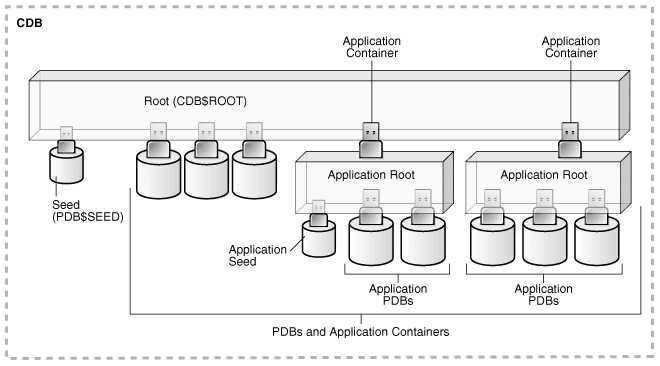
The following figure represents possible containers in a CDB.
Figure 1: Containers in a CDB
Description of the illustration admin112.png
Every CDB has the following containers:
-
Exactly one CDB root container (also called simply the root)
The CDB root is a collection of schemas, schema objects, and nonschema objects to which all PDBs belong (see “CDBs and PDBs”). The root stores Oracle-supplied metadata and common users. An example of metadata is the source code for Oracle-supplied PL/SQL packages. A common user is a database user known in every container (see “Common User Accounts”). The root container is named
CDB$ROOT. -
Exactly one system container
The system container includes the root CDB and all PDBs in the CDB. Thus, the system container is the logical container for the CDB itself.
-
Zero or more application containers
An application container consists of exactly one application root, and the PDBs plugged in to this root. Whereas the system container contains the CDB root and all the PDBs within the CDB, an application container includes only the PDBs plugged into the application root. An application root belongs to the CDB root and no other container.
-
Zero or more user-created PDBs
A PDB contains the data and code required for a specific set of features (see “PDBs”). For example, a PDB can support a specific application, such as a human resources or sales application. No PDBs exist at creation of the CDB. You add PDBs based on your business requirements.
A PDB belongs to exactly zero or one application container. If a PDB belongs to an application container, then it is an application PDB. For example, the
cust1_pdbandcust2_pdbapplication PDBs might belong to thesaas_sales_acapplication container, in which case they belong to no other application containers. An application seed is an optional application PDB that acts as a user-created PDB template, enabling you to create new application PDBs rapidly. -
Exactly one seed PDB
The seed PDB is a system-supplied template that the CDB can use to create new PDBs. The seed PDB is named
PDB$SEED. You cannot add or modify objects inPDB$SEED.
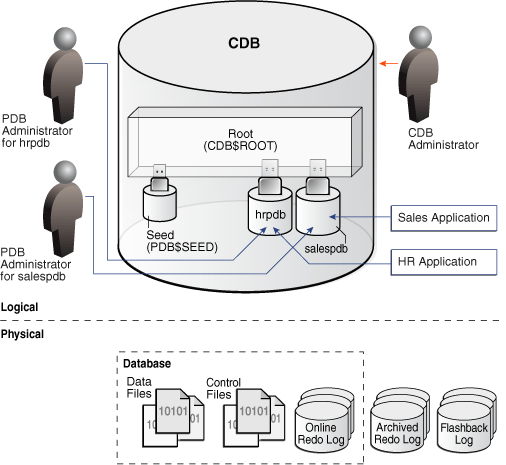
Example 2-1 CDB with No Application Containers
This example shows a simple CDB with five containers: the system container (the entire CDB), the CDB root, the PDB seed (PDB$SEED), and two PDBs. Each PDB has its own dedicated application. A different PDB administrator manages each PDB. A common user exists across a CDB with a single identity. In this example, common user SYS can manage the root and every PDB. At the physical level, this CDB is managed by one or more database instances, and contains a set of data files for each PDB and for the CDB itself.
Figure 2: CDB with No Application Containers
Description of the illustration cncpt345.png
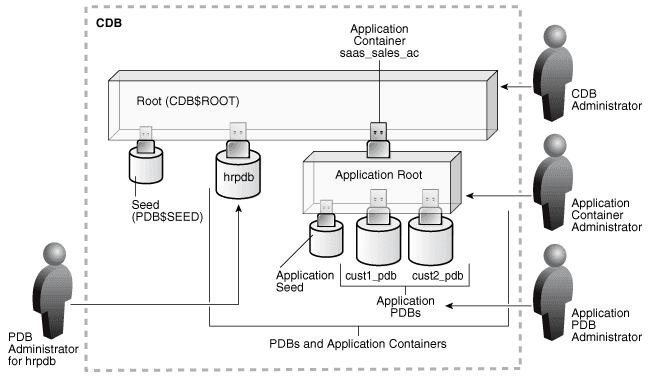
Example 2-2 CDB with an Application Container
In this variation, the CDB contains an application container named saas_sales_ac. Within the application container, the application PDB cust1_pdb supports an application for one customer, and the application PDB cust2_pdb supports an application for a different customer. The CDB also contains a PDB named hrpdb, which supports an HR application, but does not belong to an application container.
Figure 3: CDB with an Application Container
Description of the illustration cncpt383.png
In this example, multiple DBAs manage the CDB environment:
-
A CDB administrator manages the CDB itself.
-
An application container administrator manages the
saas_sales_accontainer, including application installation and upgrades. -
An application PDB administrator manages the two PDBs in the
saas_sales_accontainer:cust1_pdbandcust2_pdb. -
A PDB administrator manages
hrpdb.
The CDB Root and System Container
The CDB root , also called simply the root, is a collection of schemas, schema objects, and nonschema objects to which all PDBs belong.
Every CDB has one and only one root container named CDB$ROOT. The root stores the system metadata required to manage PDBs. All PDBs belong to the root. The system container is the CDB root and all PDBs that belong to this root.
The CDB root does not store user data. Oracle recommends that you do not add common objects to the root or modify Oracle-supplied schemas in the root. However, you can create common users and roles for database administration. A common user with the necessary privileges can switch between containers.
Oracle recommends AL32UTF8 for the root character set. PDBs with different character sets can reside in the same CDB without requiring character set conversion.
Example 2-3 All Containers in a CDB
The following query, issued by an administrative user connected to the CDB root, lists all containers in the CDB (including the seed and CDB root), ordered by CON_ID.
COL NAME FORMAT A15
SELECT NAME, CON_ID, DBID, CON_UID, GUID
FROM   V$CONTAINERS ORDER BY CON_ID;

NAME          CON_ID       DBID    CON_UID GUID
------------- ------ ---------- ---------- --------------------------------
CDB$ROOT           1 1895287725          1 2003321EDD4F60D6E0534E40E40A41C5
PDB$SEED           2 2795386505 2795386505 200AC90679F07B55E05396C0E40A23FE
SAAS_SALES_AC      3 1239646423 1239646423 200B4CE0A8DC1D24E05396C0E40AF8EE
SALESPDB           4 3692549634 3692549634 200B4928319C1BCCE05396C0E40A2432
HRPDB              5 3784483090 3784483090 200B4928319D1BCCE05396C0E40A2432
See Also: “Common User Accounts”
PDBs
A PDB is a user-created set of schemas, objects, and related structures that appears logically to a client application as a separate database.
Every PDB is owned by SYS, regardless of which user created the PDB. SYS is a common user in the CDB, which means that this user that has the same identity in the root and in every existing and future PDB within the CDB.
-
Types of PDBs All PDBs are user-created with the
CREATE PLUGGABLE DATABASEstatement except forPDB$SEED, which is Oracle-supplied. -
Purpose of PDBs For an application, a PDB is a self-contained, fully functional Oracle database. You can consolidate PDBs into a single CDB to achieve economies of scale, while maintaining isolation between PDBs.
-
Proxy PDBs A proxy PDB refers to a remote PDB, called the referenced PDB.
-
Names for PDBs Containers in a CDB share the same namespace, which means that they must have unique names within this namespace.
-
Database Links Between PDBs By default, a user connected to one PDB must use database links to access objects in a different PDB.
Types of PDBs
All PDBs are user-created with the CREATE PLUGGABLE DATABASE statement except for PDB$SEED, which is Oracle-supplied.
You can create the following types of PDBs.
Standard PDB
This type of PDB results from running CREATE PLUGGABLE DATABASE without specifying the PDB as a seed, proxy PDB, or application root. Its capabilities depend on the container in which you create it:
-
PDB plugged in to the CDB root
This PDB belongs to the CDB root container and not an application container. This type of PDB cannot use application common objects. See “Application Common Objects”.
-
Application PDB
An application PDB belongs to exactly one application container. Unlike PDBs plugged in to the CDB root, application PDBs can share a master application definition within an application container. For example, a
usa_zipcodestable in an application root might be a data-linked common object, which means it contains data accessible by all application PDBs plugged in to this root. PDBs that do not reside within the application container cannot access its application common objects.
Application Root
Consider an application root as an application-specific root container. It serves as a repository for a master definition of an application back end, including common data and metadata. To create an application root, connect to the CDB root and specify the AS APPLICATION CONTAINER clause in a CREATE PLUGGABLE DATABASE statement. See “Application Root”.
Seed PDBs
Unlike a standard PDB, a seed PDB is not intended to support an application. Rather, the seed is a template for the creation of PDBs that support applications. A seed can be either of the following:
-
Seed PDB plugged in the CDB root (
PDB$SEED)You can use this system-supplied template to create new PDBs either in an application container or the system container. The system container contains exactly one PDB seed. You cannot drop
PDB$SEED, or add objects to or modify objects within it. -
Application seed PDB
To accelerate creation of application PDBs within an application container, you can create an optional application seed. An application container contains either zero or one application seed.
You create an application seed by connecting to the application container and executing the
CREATE PLUGGABLE DATABASE ... AS SEEDstatement. See “Application Seed”.
Proxy PDBs
A proxy PDB is a PDB that uses a database link to reference a PDB in a remote CDB. When you issue a statement in a proxy PDB while the PDB is open, the statement executes in the referenced PDB.
You must create a proxy PDB while connected to the CDB root or application root. You can alter or drop a proxy PDB just as you can a standard PDB.
Purpose of PDBs
For an application, a PDB is a self-contained, fully functional Oracle database. You can consolidate PDBs into a single CDB to achieve economies of scale, while maintaining isolation between PDBs.
You can use PDBs to achieve the following specific goals:
-
Store data specific to an application
For example, a sales application can have its own dedicated PDB, and a human resources application can have its own dedicated PDB. Alternatively, you can create an application container, which is a named collection of PDBs, to store an application back end containing common data and metadata.
-
Move data into a different CDB
A database is “pluggable” because you can package it as a self-contained unit, called an unplugged PDB, and then move it into another CDB.
-
Perform rapid upgrades
You can unplug a PDB from CDB at a lower Oracle database release, and then plug it in to a CDB at a higher release.
-
Copy data quickly without loss of availability
For testing and development, you can clone a PDB while it remains open, storing the clone in the same or a different CDB. Optionally, you can specify the PDB as a refreshable clone PDB. Alternatively, you use the Oracle-supplied seed PDB or a user-created application seed to copy new PDBs.
-
Reference data in a different CDB
You can create a proxy PDB that refers to a different PDB, either in the same CDB or in a separate CDB. When you issue statements in the proxy PDB, they execute in the referenced PDB.
-
Isolate grants within PDBs
A local or common user with appropriate privileges can grant
EXECUTEprivileges on a schema object toPUBLICwithin an individual PDB.
See Also:
-
Oracle AI Database Security Guide to learn how to grant roles and privileges in a CDB
Proxy PDBs
A proxy PDB refers to a remote PDB, called the referenced PDB.
Although you issue SQL statements in the proxy (referring) PDB, the statements execute in the referenced PDB. In this respect, a proxy PDB is loosely analogous to a symbolic link file in Linux.
Proxy PDBs provide the following benefits:
-
Aggregate data from multiple application models
Proxy PDBs enable you to build location-transparent applications that can aggregate data from multiple sources. These sources can be in the same data center or distributed across data centers.
-
Enable an application root in one CDB to propagate application changes to a different application root
Assume that CDBs
cdb_prodandcdb_testhave the same application model. You create a proxy PDB in an application container incdb_prodthat refers to an application root incdb_test. When you run installation and upgrade scripts in the application root incdb_prod, Oracle AI Database propagates these statements to the proxy PDB, which in turn sends them remotely to the application root incdb_test. In this way, the application root incdb_testbecomes a replica of the application root incdb_prod.
To create a proxy PDB, execute CREATE PLUGGABLE DATABASE with the AS PROXY FROM clause, where FROM specifies the referenced PDB name and a database link. The creation statement copies only the data files belonging to the SYSTEM and SYSAUX tablespaces.
Example 2-4 Creating a Proxy PDB
This example connects to the container saas_sales_ac in a local production CDB. The sales_admin common user creates a proxy PDB named sales_sync_pdb. This application PDB references an application root named saas_sales_test_ac in a remote development CDB, which it accesses using the cdb_dev_rem database link. When an application upgrade occurs in saas_sales_ac in the production CDB, the upgrade automatically propagates to the application root saas_sales_test_ac in the remote development CDB.
CONNECT sales_admin@saas_sales_ac
Password: ***********

CREATE PLUGGABLE DATABASE sales_sync_pdb AS PROXY FROM saas_sales_test_ac@cdb_dev_rem;
Names for PDBs
Containers in a CDB share the same namespace, which means that they must have unique names within this namespace.
Names for the following containers must not conflict within the same CDB:
-
The CDB root
-
PDBs plugged in to the CDB root
-
Application roots
-
Application PDBs
For example, if the same CDB contains the application containers saas_sales_ac and saas_sales_test_ac, then two application PDBs that are both named cust1 cannot simultaneously reside in both containers. The namespace rules also prevent creation of a PDB named cust1pdb in the CDB root and a PDB named cust1pdb in an application root.
Names for PDBs and application root containers must follow the same rules as net service names. Moreover, because a PDB or application root has a service with its own name, the container name must be unique across all CDBs whose services are exposed through a specific listener. The first character of a user-created container name must be alphabetic, with remaining characters either alphanumeric or an underscore (_). Because service names are case-insensitive, container names are case-insensitive, and are in upper case even if specified using delimited identifiers.
See Also: Oracle AI Database Net Services Reference for the rules for service names
Database Links Between PDBs
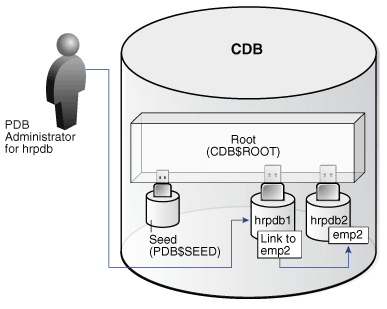
By default, a user connected to one PDB must use database links to access objects in a different PDB.
Figure 4: Database Link Between PDBs
Description of the illustration cncpt384.png
Exceptions to the rule include:
-
A data-linked common object, which is accessible by all application PDBs that contain a data link that points to this object. For example, the application container
saas_sales_acmight contain the data-linked tableusa_zipcodeswithin its application. In this case, common CDB userc##dbacan connect to an application PDB in this container, and then queryusa_zipcodeseven though the actual table resides in the application root. In this case, no database link is required. -
The
CONTAINERS()clause in SQL issued from the CDB root or application root. Using this clause, you can query data across all PDBs plugged in to the container root.
When creating a proxy PDB, you must specify a database link name in the FROM clause of the CREATE PLUGGABLE DATABASE ... AS PROXY statement. If the proxy PDB and referenced PDB reside in separate CDBs, then the database link must be defined in the root of the CDB that will contain the proxy PDB. The database link must connect either to the remote referenced PDB or to the CDB root of the remote CDB.
See Also: “Common and Local Objects”