Data Security Concepts Used in Real Application Security
This section describes access control terms and concepts that you need to understand before you can begin to configure Real Application Security. Using the PL/SQL administrative interfaces, you can create and manage the entities described here: application user, application role, principal, application privilege, security class, access control list (ACL), access control entry (ACE), and data realm.
Note: When a term such as application user or application role is used here, it applies to Real Application Security; when it is important to distinguish the database type, either no qualifier is used or the qualifier database is used.
See Also:
This section contains:
-
About Data Security with Oracle Database Real Application Security
-
Security Classes in Oracle Database Real Application Security
About Data Security with Oracle Database Real Application Security
Effective security requires defining which application users, applications, or functions can have access to which data, to perform which kinds of operations. Thus, effective security has these three dimensions:
-
which application users
-
can perform which operations
-
on which data
You define (1) principals, (2) application privileges, and (3) objects in relation to these three dimensions, respectively. Principals are users and roles. A role can represent attributes of an application user, system state, or a piece of code.
Principals and application privileges are related in a declarative way by defining ACLs. These ACLs are then related to the data by defining Data Security policy that protects rows and columns of table data. For example, you can protect table data by using PL/SQL procedures to set controlling ACLs.
Three Dimensions of Data Security illustrates an example where the user, ProjectManager has the ModifyProject privilege on a data realm comprised of Team A’s projects.
Three Dimensions of Data Security
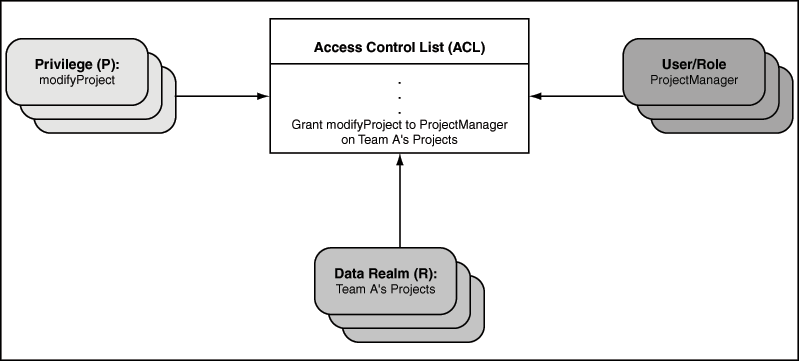
Description of the illustration access_control.gif
Principals: Users and Roles
When discussing fine-grained database access control, a principal is an application user or an application role or a database user or a database role. An application user can be a person or an autonomous application process that accesses information in the database. An application role is a logical grouping of application privileges required to accomplish a real life task. An application role can contain other application roles, but this recursion cannot be circular. You use application roles to associate application users, both database users and application users with privileges.
Oracle Database supports the following as principals:
-
Database users and database roles
A database user is also sometimes referred to as a database schema or a user account. When a person or application logs onto the database, it uses a database user (schema) and password.
A database role corresponds to a set of database privileges that can be granted to database users, applications, or other database roles — see “Understanding the Difference Between Database Roles and Application Roles”.
-
Application users and Application roles
The term application, as used by Real Application Security, refers to the creation of an application user, application role, or session that contains only information pertinent to the application that the application user is logging onto. Application users and application roles are defined by an application, and they do not need to be tied to any database schema.
Application users can also create heavyweight database sessions by connecting to the database directly. These are called direct login application users. See “About Creating a Direct Login Application User Account”. When an application user creates a heavyweight database session, the user’s default schema is set to a preconfigured value meant solely for name resolution purposes, such as
HR.An application role can only be granted to an application user or to another application role. You cannot directly grant database privileges to application users and application roles. See “Granting Database Privileges to Application Users and Application Roles” for further details.
This section includes the following sections:
-
Understanding the Difference Between Database Users and Application Users
-
Understanding the Difference Between Database Roles and Application Roles
-
Granting Database Privileges to Application Users and Application Roles
Understanding the Difference Between Database Users and Application Users
Database users are also referred to as traditional users, and have these characteristics:
-
They are associated with schemas and passwords.
-
They can create heavyweight sessions to schemas with which they are associated.
Application users are defined by an application, and have these characteristics:
-
They do not own database schemas.
-
They can create application sessions to the database through the middle tier.
-
They can create heavyweight database sessions by connecting to the database directly. (See “About Creating a Direct Login Application User Account”.)
Note: In a heavyweight session, the user is associated with a default schema.
Understanding the Difference Between Database Roles and Application Roles
A database role is traditionally thought of as a named set of database privileges.
Database roles have these characteristics:
-
They are granted privileges, just as database users can be granted privileges.
-
They serve as intermediaries for mapping database privileges to database users (and applications) as follows: a role is granted privileges, and the role is then granted to users (giving them the privileges).
-
Grant privileges to database role
-
Grant database role to database user
The database user now has the privileges of the database role.
-
Note: In traditional database terminology, a role is considered to be the same thing as the set of privileges that are granted to it.
An application role can be regarded as the set of application-defined privileges that are associated with it using the mechanism of a declarative access control list (ACL), discussed in “Access Control List (ACL)”.
Application roles have these characteristics:
-
They use an access control list (ACL), rather than a database grant, as the intermediary that maps application privileges to users or roles.
-
They can be only granted to application users or application roles.
-
They cannot be granted to a database role. On the other hand, a database role can be granted to an application role.
Note: In access control terminology, application roles are classified with application users as principals.
Granting Database Privileges to Application Users and Application Roles
You cannot grant database privileges directly to application users and application roles. Instead, you grant the database privileges to a database role, and then grant the database role to the application role in these steps.
-
Grant database privileges to database role.
-
Grant database role to the application role.
The statements in the following code do exactly this, effectively granting the database SELECT privilege to the application role, HRREP.
CREATE ROLE db_hrrep;
GRANT SELECT ON hr.employees TO db_hrrep;
GRANT db_hrrep TO HRREP;
Application users already created or subsequently created, with that application role, acquire this application privilege.
Application Privileges
An application privilege is a particular right or permission that can be granted or denied to a principal. Application developers define application privileges in a security class.
The set of application privileges granted to a principal controls whether or not this principal can perform a given operation on the data that it protects. For example, if the principal (database user) HR wants to perform the SELECT operation on a given resource, then SELECT privileges must be granted to principal HR before the SELECT operation.
Application privileges can also be aggregated. An aggregate privilege is an application privilege that implies other application privileges. These implied privileges can be any application privileges defined by the current security class or an inherited privilege. When an aggregate privilege is granted or denied, its implied application privileges are implicitly granted or denied.
Aggregate privileges simplify usability when the number of application privileges grows. For example, instead of granting each application privilege separately, you can group related application privileges into an aggregate privilege. Then, you can use a single grant to enable a principal to access all the application privileges contained in the aggregate privilege.
Security Classes in Oracle Database Real Application Security
A security class is a scope for a set of application privileges.
A security class includes application privileges that it inherits from other security classes, and it can include application privileges that it defines.
A security class is typically associated with an access control list (ACL), and the ACL can grant application privileges in the security class to specific principals. See “Access Control List (ACL)”.
Example: Showing Security Class Inheritance shows how to create a security class.
Access Control Entry (ACE)
An access control entry (ACE) either grants or denies application privileges to a particular principal (application user or application role).
An ACE is an element in an array named ace_list. The whole array is called by and becomes part of the access control list (ACL).
The ACE does not, itself, specify which data to protect; that is done by associating the ACL with target data, such as a set of rows in an order entry table. You can make this association by creating a data realm to restrict the user to modifying only those rows, or by using the PL/SQL procedure XS_DATA_SECURITY.SET_ACLS.
Access Control List (ACL)
An access control list (ACL) is a list of access control entries (ACEs), which permit or deny application privileges to one or more principals.
If the ACL you create relies on a set of custom application privileges that you define in your own security class, then you must explicitly associate that security class with the ACL. See Example: Creating an Access Control List for an example.
If the only application privileges used in the ACL are defined in the DML security class, then no security class association is needed as that is the default. See a description in “DML Security Class”.
Data Security Policy
To protect data within a database table, you must create a data security policy. Database records, both at row and column level, can be protected using the fine-grained access control described in this section.
The data security policy performs the following functions:
-
Specifies the data that you want to protect. The data can be indicated by a
WHEREclause in a data realm of one or more rows that you design. It can also be defined using named notation by using an association operator to associate the parameter to the left of the arrow (=>) with the actual parameter to the right of the arrow. For example, in Example: Creating the EMPLOYEES_DS Data Security Policy, eachrealmis defined using association operators.The data security policy can contain one or more data realms.
-
Associates each data realm with one or more access control lists (ACLs) that specify the application privileges required to access rows and columns of the data realm to form what is called a data realm constraint. A given ACL protects a given data realm and controls access to particular application users or application roles (called principals). (See “Access Control List (ACL)” for more information about ACLs.)
-
Optionally applies additional application privileges to protect a particular column to form what is known as column constraints. This is useful in cases where you need to add an extra layer of security for sensitive data.
-
Associates additional custom application privileges. For example, an administrator could create an
APPROVE_TRANSACTIONprivilege, which controls whether a user can take a particular action on the row. AssumingSELECTprivilege is granted to all users, all users could see the row, but only some users can perform the transaction approval action.
In summary, the application user who logs in will only be allowed to perform operations including DML on records within the data realm, including individual rows of data, based on the application privileges in its associated ACLs. Thus, the data security policy is composed of data realm constraints and column constraints that protect the data realm by only allowing access to application users who have application privileges in the associated ACLs.
For example, suppose you have a sales table that lists all sales representatives, their regions, the products they are responsible for, product categories, and product prices. When individual sales representatives log on, each representative would see selected data for all other sales representatives, such as sales representatives for particular product categories based on data realm constraints. If you wanted to restrict the display of product prices to sales representatives by region, you could apply additional application privileges to the column listing product prices, in this case using column constraints.
Configuring Data Security describes in detail how to protect database objects.