10.2 Configure Java Applications
The Oracle JDBC driver supports two approaches for propagating the end-user security context payload from your Java application to the database: API extension methods and a configuration-driven Service Provider Interface (SPI). API calls take precedence over provider-based configurations.
10.2.1 Use the API Extension Methods
If you want to supply the end-user security context payload directly in your application code, use the API extension methods.
oracle.jdbc.OracleConnection interface within your Java code to
manually set and clear the security context payload.
10.2.2 Use the Service Provider Interface
The Service Provider Interface (SPI) approach enables your Java application to supply the end-user security context payload without requiring modifications to your core application code.
Oracle JDBC defines a Java interface named
oracle.jdbc.spi.EndUserSecurityContextProvider. This interface
is designed to work as a standard service provider interface that is dynamically
loaded by Java's java.util.ServiceLoader class. This design allows
you to implement the interface by integrating with different Java security
technologies to provide a security context payload to Oracle JDBC.
By simply installing and configuring a provider implementation, you can enable your application to automatically propagate the security context payload to the database before each SQL operation. The SPI approach also allows you to integrate with different IAM-specific providers without changing how your application interacts with the JDBC driver.
To supply the security context payload using the SPI approach, perform the following tasks.
10.2.3 Use the JDBC Spring Boot Provider (The SPI Approach)
The JDBC Spring Boot provider is an out-of-the-box (OOTB) security context payload provider for the Oracle JDBC driver. It automates the propagation of the end-user security context payload from Spring Security (OAuth 2.0) to the database through the JDBC connection. In most cases, no application code changes are necessary.
Spring Boot runtime components
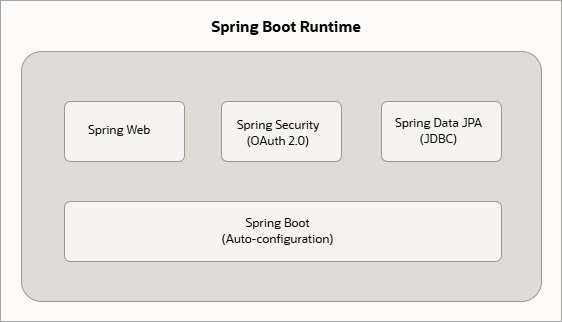
Spring Boot is built on the Spring Framework and uses declarative configuration to assemble applications from modular components. For Spring Boot applications that access Oracle AI Database and use Oracle Deep Data Security (Deep Sec), the following Spring components are most relevant:
- Spring Web: Simplifies REST API development by handling request mapping, input validation, and HTTP-to-Java object conversion.
- Spring Security: Handles authentication and authorization. It supports OAuth 2.0 token acquisition and validation, populates the Spring security context with the authenticated end-user identity and token claims, and propagates the security context information using the Spring filter chain.
- Spring Data: Manages database persistence and transactions transparently using repository interfaces. Spring Data JPA (Java Persistence API) maps Java entities to database tables, while Spring Boot auto-configures a connection pool with the Oracle JDBC driver to support Spring Data.
How the JDBC Spring Boot provider works
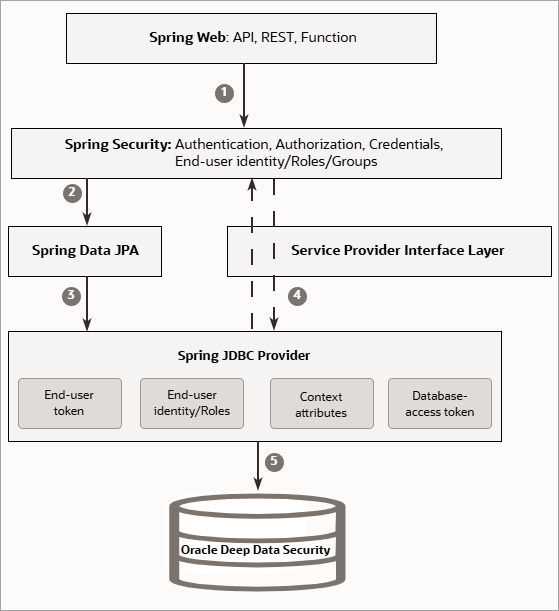
In a typical Spring Boot application, Spring Security establishes the Spring security context from OAuth 2.0 tokens issued by the IAM system. Spring’s persistence layer, together with the configured data source and connection pool, manages JDBC connections. Application code usually interacts with the database through repositories, transactions, or persistence APIs rather than holding the JDBC connection directly. Requiring application code to access the JDBC connection to pass the security context information violates Spring Framework’s module-level contracts.
Oracle JDBC addresses this type of cross-layer integration through its Service Provider Interface (SPI). The SPI provides an extension point that allows the JDBC driver to obtain the security context information from an external provider instead of requiring application code to pass that information directly to the database connection. The JDBC Spring Boot provider is the Spring Boot-specific provider that plugs into this SPI. It retrieves the security context information from Spring Security and supplies it to the JDBC driver as an end-user security context payload. For each SQL request from the application, the driver retrieves the security context payload from the provider and attaches it to the SQL payload sent to the database. Deep Sec then uses the propagated end-user security context payload to enforce data authorization in the database.
Note:
A sample Spring Boot application that you can use with the JDBC Spring Boot provider is available in the Oracle JDBC Extensions repository, underojdbc-extensions/ojdbc-provider-spring/samples.
For an end-to-end walkthrough that uses this application,
see Configure Oracle Deep Data Security for a Sample Application.
To configure the provider in a Spring Boot application, perform the following tasks.
For Spring Boot applications, both the IAM
client-registration settings and the data-source driver
configuration are supplied in the
application.properties file. You must link
the data source to the OAuth registration using the
registrationId.
Note:
The OOTB JDBC Spring Boot provider may not support custom or non-standard authentication and authorization workflows. If the provider doesn’t meet your requirements, you can build a custom provider. See Advanced: Implement a Security Context Provider.