5 Using Global Data Services (Architectures, Use Cases, Application Development)
Global Data Services (GDS) can be used with many features of the Oracle AI Database product family.
- Distributed Databases
In environments where databases are distributed for data residency, global scalability, performance, and availability, GDS acts as an intelligent traffic director and workload coordinator. - Using Global Data Services with Oracle Sharding
Oracle Sharding and Oracle Globally Distributed Database enables you to easily scale and manage globally distributed Oracle databases while meeting data locality and compliance requirements. - Using True Cache with Global Data Services
Learn how to Improve application performance and scalability by integrating True Cache with GDS for dynamic workload management. - Supported Replication Technologies and Implementation Architectures
Learn how to ensure high availability, efficient workload routing, and centralized management across replicated Oracle database architectures with Oracle GDS. - Summary: Replicated Databases Compared to Distributed Databases
To choose the right architecture for specific needs, understand the differences between replicated and distributed databases. - GDS Use Case Summary
Review different use case scenarios to better understand how you can ptimize database availability, performance, and scalability by intelligently managing workloads across replicated and distributed environments. - Application Development Considerations
When you are developing applications for Oracle GDS environments, you will want to use the features available with GDS to optimize application connectivity, failover, and workload management.
Distributed Databases
In environments where databases are distributed for data residency, global scalability, performance, and availability, GDS acts as an intelligent traffic director and workload coordinator.
Oracle Global Data Services (GDS) provides the following management capabilities:
- Shard Director and Shard Catalog: GDS acts as a "shard-aware" proxy, intercepting client requests and routing them to the appropriate shard containing the relevant data.
- Data Locality: GDS ensures that requests are directed to the shard where the data resides, minimizing data movement and optimizing performance.
- Scalability and Parallelism: GDS facilitates scaling out the database by adding more shards, and it can leverage parallel query capabilities to improve query performance.
- Simplified Application Development: GDS hides the complexity of the sharding scheme from applications, allowing them to interact with the database as a single logical unit.
Distributed Databases Example Use Cases
- Global E-commerce Platforms: Stores product data across multiple regions to provide low-latency access to users worldwide.
- Social Media Networks: Distributes user profiles, posts, and media across geographically dispersed nodes, improving scalability and response time.
- Financial Services: Manages transactions and customer data across multiple regions while ensuring consistency and high availability.
- Content Delivery Networks (CDNs): Distributes large datasets, like videos and images, across various data centers to optimize content delivery to end-users.
- IoT Applications: Processes real-time data from sensors distributed globally, requiring local processing and centralized analytics.
Using Global Data Services with Oracle Sharding
Oracle Sharding and Oracle Globally Distributed Database enables you to easily scale and manage globally distributed Oracle databases while meeting data locality and compliance requirements.
Oracle sharding enables distribution and replication of data across a pool of Oracle databases that share no hardware or software. The pool of databases is presented to the application as a single logical database. Applications elastically scale (data, transactions, and users) to any level, on any platform, simply by adding additional databases (shards) to the pool. Scaling up to 1000 shards is supported.
Oracle Sharding provides superior run-time performance and simpler life-cycle management compared to home-grown deployments that use a similar approach to scalability. It also provides the advantages of an enterprise DBMS, including relational schema, SQL, and other programmatic interfaces, support for complex data types, online schema changes, multi-core scalability, advanced security, compression, high-availability, ACID properties, consistent reads, developer agility with JSON, and much more.
Oracle Globally Distributed Database is built on the Oracle Database Global Data Services feature, so to plan your topology you must understand the Global Data Services architecture and management.
Oracle Globally Distributed Database enables you to deploy a global database, where a single logical database could be distributed over multiple geographies. This makes it possible to satisfy data privacy regulatory requirements (Data Sovereignty) as well as allows to store particular data close to its consumers (Data Proximity).
Data sovereignty generally refers to how data is governed by regulations specific to the region in which it originated. These types of regulations can specify where data is stored, how it is accessed, how it is processed, and the life-cycle of the data. With the exponential growth of data crossing borders and public cloud regions, more than 100 countries now have passed regulations concerning where data is stored and how it is transferred. Personally identifiable information (PII) in particular increasingly is subject to the laws and governance structures of the nation in which it is collected. Data transfers to other countries often are restricted or allowed based on whether that country offers similar levels of data protection, and whether that nation collaborates in forensic investigations.
Using True Cache with Global Data Services
Learn how to Improve application performance and scalability by integrating True Cache with GDS for dynamic workload management.
Oracle True Cache is an in-memory, consistent, and automatically managed SQL cache for the database. True Cache improves application response time while reducing the load on the database. Automatic cache management and consistency simplify application development, reducing development effort and cost.
You can deploy Oracle True Cache with Oracle database Global Data Services (GDS) to manage workload routing, dynamic load balancing, and service failover across multiple True Caches and other database replicas.
Global services are functionally similar to the local database application services that are provided by single instance or Oracle Real Application Clusters (Oracle RAC) databases. The main difference between global services and local services is that global services span the instances of multiple databases, whereas local services span the instances of a single database.
This diagram illustrates a basic True Cache configuration with GDS in a single region:
Figure 5-1 True Cache Integration with GDS
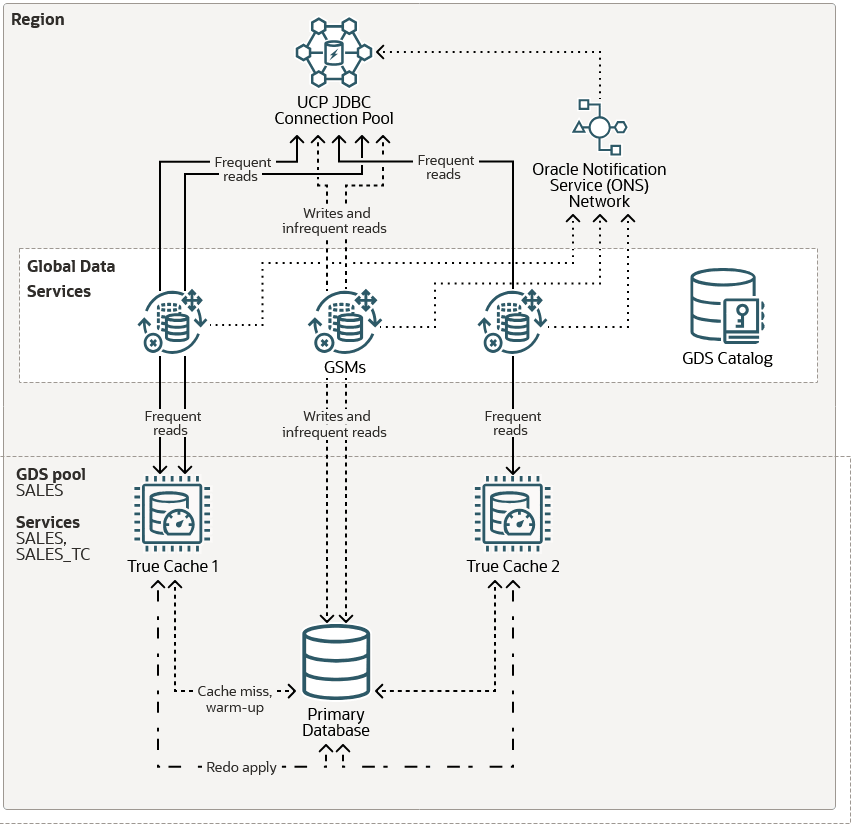
In this example, there is one region with two True Caches and one primary database. True Cache reads from the primary database to warm up the cache or when there's a cache miss. After a block is cached, it's updated automatically through redo apply from the primary database. Applications are configured so that frequent reads go to the True Caches and writes and infrequent reads go to the primary database.
The GDS configuration includes the following components:
- The GDS catalog stores configuration data for the GDS configuration. In this example, the GDS catalog is hosted outside the primary database.
-
Global service managers (GSMs) provide service-level load balancing, failover, and centralized management of services in the GDS configuration. For high availability, the best practice is to include two GSMs in each region.
- The GDS pool provides a common set of global services to the primary database and
True Caches. A region can contain multiple GDS pools, and these pools can span
multiple regions.In this example, the
SALESpool provides theSALESglobal service for the primary database and theSALES_TCglobal service for the True Caches. - An Oracle Notification Service (ONS) server is located with each GSM. All ONS servers in a region are interconnected in an ONS server network. The GSMs create runtime load balancing advisories and publish them to the Oracle universal connection pool (UCP) JDBC connection pool through the ONS server network. Applications request a connection from the pool and the requests are sent to True Caches or the primary database depending on the application configuration and the GDS configuration.
True Cache provides the following integrations with Oracle Global Data Services (GDS).
- GDS provides the
-role TRUE_CACHEoption for global services. - The True Cache application programming model using
JDBC
                    SetReadOnly()
supports global services. - GDS provides load balancing and service failover between multiple True Caches.
Deploying True Cache with Oracle GDS has the following restrictions.
- When adding True Cache services in GDSCTL, the
-failover_primaryoption requires the patch for bug 36740927. - If the application uses the JDBC programming model, both the primary database
service and True Cache service names must be fully qualified with the domain name
(for example,
sales.example.comandsales_tc.example.com). This is because GDS has a default domain name and is different from the database'sdomain_nameparameter. This also limits the fully qualified service name to a maximum of 64 characters.
For more detailed instructions regarding the deployment of Oracle True Cache with Oracle GDS, please see Deploying Oracle True Cache with Oracle Global Data Services
Supported Replication Technologies and Implementation Architectures
Learn how to ensure high availability, efficient workload routing, and centralized management across replicated Oracle database architectures with Oracle GDS.
In environments where databases are replicated for high availability, disaster recovery, or read scaling, Oracle Global Data Services (GDS) provides:
- Global Service Management: GDS creates a global service abstraction, masking the complexity of the underlying replicated databases from applications.
- Workload Routing: GDS intelligently routes client requests to the appropriate database instances based on factors like database role (read-write, read-only), region, replication-lag, and resource capacity.
- Load-balancing: GDS dynamically balances workloads taking into account load conditions and network latency.
- Failover and Switchover: GDS automates data service failover to standby databases in case of failures, ensuring continuous application availability.
- Centralized Management: The GDS catalog provides a central point for managing and monitoring the configuration and health of global services and their associated databases.
Replicated Databases Use Cases
- Disaster Recovery Systems: Replicates a primary database to a standby database for failover in case of a primary system failure.
- Content Management Systems (CMS): Read-heavy websites (such as content delivery, ecommerce, airline reservation systems) that replicate data for faster access across multiple regions.
- Business Intelligence (BI) and Analytics: Replicated databases handle complex, read-heavy queries on a replica while offloading the primary database.
- Customer Relationship Management (CRM) Systems: Replicates customer data for distributed teams, ensuring high availability and quick access to client information.
- Mobile Applications: Ensures low-latency read access to globally distributed user bases by replicating databases in multiple regions.
- Using Oracle Active Data Guard with Global Data Services
Configure sessions to move in a rolling manner for Oracle Active Data Guard reader farm. - Using Oracle GoldenGate with Global Data Services
Use this procedure to gracefully transition Oracle GoldenGate replication roles and GDS services, ensuring minimal downtime, data consistency, and availability. - Using RAFT Replication with Global Data Services
Achieve automated, resilient, and consistent replication management with rapid failover for highly available distributed databases using RAFT replication. - One GDS Infrastructure for Many Replicated Configurations
Single GDS infrastructure can support multiple replicated database configurations for high availability, disaster recovery, and read scaling.
Using Oracle Active Data Guard with Global Data Services
Configure sessions to move in a rolling manner for Oracle Active Data Guard reader farm.
Prerequisites
You must have the following in place for this procedure to work correctly.
- Oracle Active Data Guard configuration using Oracle Database 19c or Oracle AI Database.
- Global Data Services (GDS) configuration using global service manager (release 19c or later recommended).
- A GDS service created to run on all Active Data Guard databases in
the configuration.
For example:
GDSCTL> add service -service sales_sb -preferred_all -gdspool sales
 –role physical_standby -notification TRUE
GDSCTL> modify service -gdspool sales -service sales_sb -database mts -add_instances
 -preferred mts1,mts2
GDSCTL> modify service -gdspool sales -service sales_sb -database stm -add_instances
 -preferred stm1,stm2
GDSCTL> start service -service sales_sb -gdspool sales
Using Oracle GoldenGate with Global Data Services
Use this procedure to gracefully transition Oracle GoldenGate replication roles and GDS services, ensuring minimal downtime, data consistency, and availability.
The following Oracle GoldenGate role transition example topology consists of two databases: GG replica1 and GG replica2. Oracle GoldenGate is set up with uni-directional replication, with Extract running initially on GG replica1 and Replicat running initially on GG replica2. The generic steps still apply for bi-directional GoldenGate replicas or downstream mining GoldenGate replicas.
Prerequisites
You must have the following in place for this procedure to work correctly.
-
Oracle GoldenGate configuration that uses Oracle Database (19c or higher recommended)
-
GoldenGate processes should not connect to the source or target database using the GDS service name, but a dedicated TNS alias. Using the GDS service will cause the database connections to terminate prematurely, causing possible data loss.
- A heartbeat table has been implemented in the GoldenGate source and target databases to track replication latency and ensure the Replicat applied SCN synchronization. The GoldenGate automatic heartbeat table feature should be enabled. Refer to the Oracle GoldenGate Administration Guide for details on the automatic heartbeat table: https://docs.oracle.com/en/middleware/goldengate/core/19.1/gclir/add-heartbeattable.html.
-
Global Data Services (GDS) configuration using global service manager (19c or higher recommended)
-
GDS service has been created so that it can be run on all databases in the GoldenGate configuration.
For example:
GDSCTL> add service -service sales_sb -preferred_all -gdspool sales
GDSCTL> modify service -gdspool sales -service sales_sb -database mts
 -add_instances -preferred mts1,mts2
GDSCTL> modify service -gdspool sales -service sales_sb -database stm
 -add_instances -preferred stm1,stm2
GDSCTL> start service -service sales_sb -gdspool sales
Note:
If you are using the lag tolerance option, specify the lag limit for the global service in seconds. Options foradd service or modify
service are -lag {lag_value | ANY}.
The above steps allow for a graceful switchover. However, if this is a failover event where the source database is unavailable, you can estimate the data loss using the steps below.
-
When using the automatic heartbeat table, use the following query to determine the replication latency.
SQL> col Lag(secs) format 999.9
SQL> col "Seconds since heartbeat" format 999.9
SQL> col "GG Path" format a32
SQL> col TARGET format a12
SQL> col SOURCE format a12
SQL> set lines 140
SQL> select remote_database "SOURCE", local_database "TARGET", incoming_path "GG Path",
 incoming_lag "Lag(secs)", incoming_heartbeat_age "Seconds since heartbeat" from gg_lag;

SOURCE        TARGET              GG Path                          Lag(secs) Seconds since heartbeat
------------  ------------        -------------------------------- --------- -----------------------
         MTS          GDST          EXT_1A ==> DPUMP_1A ==> REP_1A       7.3                     9.0
The above example shows a possible 7.3 seconds of data loss between the source and target databases.
-
Start the GDS service on the target database and allow sessions to connect.
Note that if the application workload can accept a certain level of data lag, it is possible to perform this step much earlier than step two listed above.
GDSCTL> start service -service sales_sb -database stm -gdspool sales -
Log on to the target database and check
V$SESSIONto see sessions connected to the service.SQL> SELECT service_name, count(1) FROM v$session GROUP BY service_name ORDER BY 2;
Using RAFT Replication with Global Data Services
Achieve automated, resilient, and consistent replication management with rapid failover for highly available distributed databases using RAFT replication.
RAFT replication is a consensus-based, distributed replication protocol designed to manage a group of database nodes (shards or replicas) and facilitate automatic configuration of replication across all shards in a distributed datbase. RAFT replication seamlessly integrates with applications, providing transparency in its operation. In case of shard host failures or dynamic changes in the distributed database's composition, RAFT replication automatically reconfigures replication settings. The system takes a declarative approach to configure the replication factor, ensuring a specified number of replicas are consistently available.
When RAFT replication is enabled, a distributed database contains multiple replication units. A replication unit (RU) is a set of chunks that have the same replication topology. Each RU has multiple replicas placed on different shards. The RAFT consensus protocol is used to maintain consistency between the replicas in case of failures, network partitioning, message loss, or delay.
Swift failover is a key attribute of RAFT replication. Swift failover enables all nodes to remain active even in the event of a node failure. Notably, this feature incorporates an automatic sub-second failover mechanism, reinforcing both data integrity and operational continuity. Such capabilities make this feature well-suited for organizations seeking a highly available and scalable database system.
Oracle GDS provides GDSCTL commands and options to enable and manage RAFT replication in a system-managed sharded database.
Enabling RAFT Replication
You enable RAFT replication when you configure the shard catalog. To
enable RAFT replication, specify the native replication option in the create
shardcatalog command when you create the shard catalog. For example,
gdsctl> create shardcatalog ... -repl native
Note:
For more information regarding configuring and deploying RAFT Replication see: RAFT Replication Configuration and ManagementOne GDS Infrastructure for Many Replicated Configurations
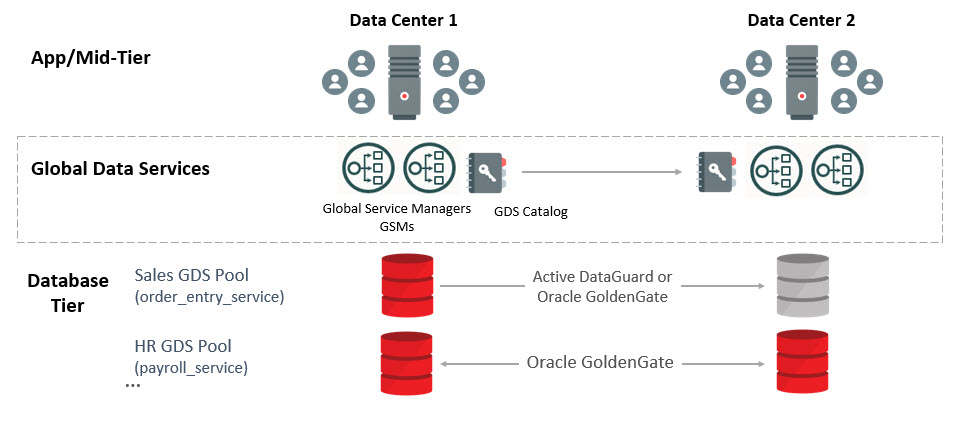
Single GDS infrastructure can support multiple replicated database configurations for high availability, disaster recovery, and read scaling.
This Architecture example is an illustration of how you can use Global Data Service (GDS) to replicate multiple databases:
Figure 5-2 GDS Replicated Configurations Architecture
Summary: Replicated Databases Compared to Distributed Databases
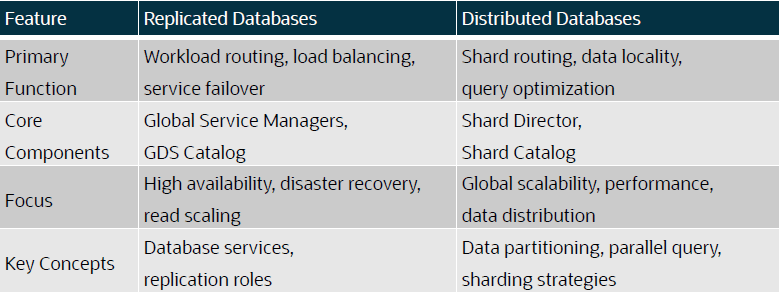
To choose the right architecture for specific needs, understand the differences between replicated and distributed databases.
Choose the type of database that meets your requirements.
GDS Use Case Summary
Review different use case scenarios to better understand how you can ptimize database availability, performance, and scalability by intelligently managing workloads across replicated and distributed environments.
Table 5-1 Ensuring Business Continuity with Automated Database Failover
| Database Architecture | Replication Technology | Workload | Workload Dynamics |
|---|---|---|---|
|
Active-Active |
Oracle GoldenGate |
read-write |
In an active-active configuration, read-write (and read-only) workloads can run both on replicas, or be assigned to separate replicas. If a database fails,then its workloads automatically transition to the surviving replica. Some customers configure Oracle GoldenGate replicas solely for failover, without running workloads on them. |
|
Active-Active |
Oracle GoldenGate |
read-only |
Read-only workloads can run on both primary and replicas, or be assigned separately. If a database fails, then read-only workloads seamlessly transition to the surviving replica while maintaining service availability. |
|
Active-Passive |
Oracle GoldenGate |
read-write |
Read-write workloads are always processed on the primary database. If the primary fails, then the standby takes over as the new primary, and read-write workloads automatically transition to it. |
|
Active-Passive |
Oracle Active Data Guard |
read-only |
The standby database can optionally handle read-only workloads under normal conditions. On primary failure, the standby assumes the primary role and serves both read-write and read-only workloads. |
Table 5-2 Minimizing Resource Requirement with Intelligent Load Balancing
| Database Architecture | Replication Technology | Workload | Workload Dynamics |
|---|---|---|---|
|
Active-Active |
Oracle GoldenGate |
read-write |
In an active-active setup, read-write workloads can be processed on both replicas or distributed based on workload type. Read-write services can be configured to balance traffic dynamically across available replicas. |
|
Active-Active |
Oracle GoldenGate |
read-only |
Read-only workloads can run on both replicas or be distributed independently of read-write workloads. Read-only services can be configured to distribute queries optimally across multiple replicas for better performance. |
|
Active-Passive |
Oracle Active Data Guard |
read-write |
In an active-passive setup, read-write workloads are processed only on the primary database. If the primary is an Oracle Real Application Clusters (Oracle RAC) database, then workloads can be distributed across the Oracle RAC nodes, but they are not balanced across multiple databases. |
|
Active-Passive |
Oracle Active Data Guard |
read-only |
One or more standby databases can be used to offload read-only workloads from the primary. If multiple standby databases exist, then read-only workloads can be load-balanced among them (for example using a reader farm configuration). |
Table 5-3 Geo-Aware Workload Routing for Faster Response Times
| Database Architecture | Replication Technology | Workload | Workload Dynamics |
|---|---|---|---|
|
Active-Active |
Oracle GoldenGate |
read-write |
In an active-active setup, regional read-write workloads can be serviced by local (regional) database replicas. Alternatively, both read-write and read-only regional workloads can be processed locally or uniformly across replicas. |
|
Active-Active |
Oracle GoldenGate |
read-only |
In an active-active setup, regional read-only workloads can be serviced by local (regional) database replicas. Alternatively, both read-write and read-only regional workloads can be processed locally or uniformly across replicas. |
|
Active-Passive |
Oracle Active Data Guard |
read-write |
Regional affinity does not apply to read-write workloads in an active-passive setup. Read-write workloads are always processed on the primary database, regardless of its region. |
|
Active-Passive |
Oracle Active Data Guard |
read-only |
In a multi-standby environment (for example, a reader farm), read-only workloads can be processed on a regional standby database to optimize performance and reduce latency. |
Table 5-4 Improving Read Performance with Smart Replication Lag Aware Routing
| Database Architecture | Replication Technology | Workload | Workload Dynamics |
|---|---|---|---|
|
Active-Active |
Oracle GoldenGate |
read-write |
Does not apply. |
|
Active-Active |
Oracle GoldenGate |
read-only |
In a single-replica setup, read-only workloads are served at the replica as long as the replication lag remains within the configured threshold. If the lag exceeds the threshold, then the workload is failed over to the primary. In a multi-replica configuration, read-only workloads are redirected to another replica within the acceptable replication lag limit. If no replicas meet the threshold, then the workload is routed to the primary database. |
|
Active-Passive |
Oracle Active Data Guard |
read-write |
Does not apply |
|
Active-Passive |
Oracle Active Data Guard |
read-only |
In a single-standby configuration, read-only workloads are served at the standby as long as the replication lag remains within the allowed threshold. If the threshold is exceeded, then the workload is redirected to the primary. In a multi-standby setup, the workload is transitioned to another standby within the acceptable replication lag limit. If no standbys meet the threshold, then the workload is routed to the primary database. |
Table 5-5 Boosting Query Speed with Ultra-Fast Cache
| Database Architecture | Replication Technology | Workload | Workload Dynamics |
|---|---|---|---|
|
Active-Passive |
Oracle True Cache |
read-write |
The primary database processes both read-write and read-only workloads. However, all or specific read-only workloads can be offloaded to Oracle True Cache to improve performance. |
|
Active-Passive |
Oracle True Cache |
read-only |
Oracle True Cache processes read-only workloads, either fully or selectively, based on configured services. This reduces load on the primary database and enhances query response times. |
Application Development Considerations
When you are developing applications for Oracle GDS environments, you will want to use the features available with GDS to optimize application connectivity, failover, and workload management.
- Application Workload Suitability for Global Data Services
Learn how to assess if your application architecture and workload are compatible with Oracle Global Data Services (GDS). - Using FAN ONS with Global Data Services
Learn how you can leverage Fast Application Failover (FAN) to configure automatic, high availability notification for robust application failover and seamless connectivity. - Client Side Configuration
To ensure your client connections are reliable, highly available, and configured for optimal failover, follow best practices for configuration. - Configuring FAN for Java Clients Using Universal Connection Pool
Oracle recommends that you use the Universal Connection Pool (UCP) or WebLogic Server Active GridLink to take full advantage of Fast Connection Failover (FCF) with the database JDBC Thin Driver. - Configuring FAN for OCI Clients
Oracle Call Interface (OCI) clients embed Fast Application Notification (FAN) at the driver level, so all clients can use it, regardless of the pooling solution. - Controlling Logon Storms
Oracle strongly recommends that you use connection pools. If you must handle many direct connections, then you can tune the maximum number of allowed connections to control logon storms.
Application Workload Suitability for Global Data Services
Learn how to assess if your application architecture and workload are compatible with Oracle Global Data Services (GDS).
Global Data Services (GDS) is best for replication-aware application workloads; it is designed to work in replicated environments. Applications that are suitable for GDS adoption possess any of the following characteristics:
-
The application can separate its work into read-only, read-mostly, and read-write services to use Oracle Active Data Guard or Oracle GoldenGate replicas. GDS does not distinguish between read-only, read-write, and read-mostly transactions. The application connectivity has to be updated to separate read-only or read-mostly services from read-write services, and the GDS administrator can configure the global services on appropriate databases. For example, a reporting application can function directly with a read-only service at an Oracle Active Data Guard standby database.
-
Administrators should be aware of and avoid or resolve multi-master update conflicts to take advantage of Oracle GoldenGate replicas. For example, an internet directory application with built-in conflict resolution enables the read-write workload to be distributed across multiple databases, each open read-write and synchronized using Oracle GoldenGate multi-master replication.
-
Ideally, the application is tolerant of replication lag. For example, a web-based package tracking application that allows customers to track the status of their shipments using a read-only replica, where the replica does not lag the source transactional system by more than 10 seconds.
Parent topic: Application Development Considerations
Using FAN ONS with Global Data Services
Learn how you can leverage Fast Application Failover (FAN) to configure automatic, high availability notification for robust application failover and seamless connectivity.
Fast Application Notification (FAN) uses the Oracle Notification Service (ONS) for
event propagation to all database clients, including JDBC, Tuxedo, and listener clients.
ONS is installed as part of Oracle Global Data Services, Oracle Grid Infrastructure on a
cluster, in an Oracle Data Guard installation, and when Oracle WebLogic is installed.
ONS propagates FAN events to all other ONS daemons it is registered with. No steps are
needed to configure or enable FAN on the database server side, with one exception: OCI
FAN and ODP FAN require that notification be set to TRUE for the
service by GDSCTL. With FAN auto-configuration at the client, ONS JAR files must be on
the CLASSPATH or in the ORACLE_HOME, depending on your
client.
General Best Practices for Configuring FCF Clients
Follow these best practices before progressing to driver-specific instructions.
-
Use a dynamic database service. Using FAN requires that the application connects to the database using a dynamic global database service. This is a service created using GDSCTL.
-
Do not connect using the database service or PDB service. These services are for administration only and are not supported for FAN. The TNSnames entry or URL must use the service name syntax and follow best practices by specifying a dynamic database service name. Refer to the examples later in this document.
-
Use the Oracle Notification Service when you use FAN with JDBC thin, database OCI, or ODP.Net clients. FAN is received over ONS. Accordingly, in the database, ONS FAN auto-configuration is introduced so that FCF clients can discover the server-side ONS networks and self-configure. FAN is automatically enabled when ONS libraries or jars are present.
-
Enabling FAN on most FCF clients is still necessary in the database. FAN auto-configuration removes the need to list the global service managers an FCF client needs.
-
Listing server hosts is incompatible with location transparency and causes issues with updating clients when the server configuration changes. Clients already use a TNS address string or URL to locate the global service manager listeners.
-
FAN auto-configuration uses the TNS addresses to locate the global service manager listeners and then asks each server database for the ONS server-side addresses. When there is more than one global service manager FAN auto-configuration contacts each and obtains an ONS configuration for each one.
-
The ONS network is discovered from the URL when using the database. An ONS node group is automatically obtained for each address list when
LOAD_BALANCEis off across the address lists. -
By default, the FCF client maintains three hosts for redundancy in each node group in the ONS configuration.
-
Each node group corresponds to each GDS data center. For example, if there is a primary database and several Oracle Data Guard standbys, there are by default three ONS connections maintained at each node group. The node groups are discovered when using FAN auto-configuration.
With
node_groupsdefined by FAN auto-configuration, andnode_groups(the default), more ONS endpoints are not required. If you want to increase the number of endpoints, you can do this by increasing max connections. This applies to each node group. Increasing to 4 in this example maintains four ONS connections at each node. Increasing this value consumes more sockets.oracle.ons.maxconnections=4 ONS - If the client is to connect to multiple clusters and receive FAN events from them, for example in Oracle RAC with a Data Guard event, then multiple ONS node groups are needed. FAN auto-configuration creates these node groups using the URL or TNS name. If automatic configuration of ONS (Auto-ONS) is not used, specify the node groups in the Oracle Grid Infrastructure or oraaccess.xml configuration files.
Parent topic: Application Development Considerations
Client Side Configuration
To ensure your client connections are reliable, highly available, and configured for optimal failover, follow best practices for configuration.
As a best practice, multiple global service managers should be highly available. Clients should be configured for multiple connection endpoints where these endpoints are global service managers rather than local, remote, or single client access name (SCAN) listeners. For OCI / ODP .Net clients use the following TNS name structure.
(DESCRIPTION=(CONNECT_TIMEOUT=90)(RETRY_COUNT=30)(RETRY_DELAY=3) (TRANSPORT_CONNECT_TIMEOUT=3)
  (ADDRESS_LIST =
   (LOAD_BALANCE=on)
   (ADDRESS=(PROTOCOL=TCP)(HOST=GSM1)(PORT=1522))
   (ADDRESS=(PROTOCOL=TCP)(HOST=GSM2)(PORT=1522))
   (ADDRESS=(PROTOCOL=TCP)(HOST=GSM3)(PORT=1522)))
  (ADDRESS_LIST=
   (LOAD_BALANCE=on)
   (ADDRESS=(PROTOCOL=TCP)(HOST=GSM2)(PORT=1522)))
 (CONNECT_DATA=(SERVICE_NAME=sales)))
Always use dynamic global database services created by GDSCTL to connect to the database. Do not use the database service or PDB service, which are for administration only not for application usage and they do not provide FAN and many other features because they are only available at mount. Use the latest client driver aligned with the latest or older RDBMS for JDBC.
Use one DESCRIPTION in the TNS names entry or URL Using
more causes long delays connecting when RETRY_COUNT and
RETRY_DELAY are used. Set CONNECT_TIMEOUT=90 or
higher to prevent logon storms for OCI and ODP clients.
Parent topic: Application Development Considerations
Configuring FAN for Java Clients Using Universal Connection Pool
Oracle recommends that you use the Universal Connection Pool (UCP) or WebLogic Server Active GridLink to take full advantage of Fast Connection Failover (FCF) with the database JDBC Thin Driver.
To enable Fast Connection Failover (FCF), set the UCP pool property
FastConnectionFailoverEnabled on the Universal Connection Pool. You
do not need to configure this property for Active GridLink, because it enables FCF by
default. Third-party application servers, including IBM WebSphere and Apache Tomcat,
support UCP as a connection pool replacement.
To learn how to embed UCP with other web servers, refer to the following technical briefs:
-
Design and deploy WebSphere applications for planned or unplanned database downtimes and runtime load balancing with UCP (https://www.oracle.com/docs/tech/database/planned-unplanned-rlb-ucp-websphere.pdf)
-
Design and deploy Tomcat applications for planned or unplanned database downtimes and Runtime Load Balancing with UCP (https://www.oracle.com/docs/tech/database/planned-unplanned-rlb-ucp-tomcat.pdf)
Follow these configuration steps to enable Fast Connection Failover.
- Use the service name syntax for the connection URL. Oracle recommends
that you specify a dynamic database service name, using the appropriate JDBC URL
structure.
Ensure your URL format supports high availability. You can use either a Java Thin driver (JDBC Thin), or use an Oracle JDBC OCI driver.
- If wallet authentication has not been established, then you must set up
remote ONS configuration.
Set the pool property
setONSConfigurationin a property file. The property file must contain anons.nodesproperty. You also have the option to set properties fororacle.ons.walletfileandoracle.ons.walletpassword.The following is an example of an
ons.propertiesfile:PoolDataSource pds = PoolDataSourceFactory.getPoolDataSource(); pds.setConnectionPoolName("FCFSamplePool"); pds.setFastConnectionFailoverEnabled(true); pds.setONSConfiguration("propertiesfile=/usr/ons/ons.properties"); pds.setConnectionFactoryClassName("oracle.jdbc.pool.OracleDataSource"); pds.setURL("jdbc:oracle:thin@((CONNECT_TIMEOUT=4)(RETRY_COUNT=30)(RETRY_DELAY=3) "+ " (ADDRESS_LIST = "+ " (LOAD_BALANCE=on) "+ " ( ADDRESS = (PROTOCOL = TCP)(HOST=GSM1)(PORT=1522))) "+ " (ADDRESS_LIST = "+ " (LOAD_BALANCE=on) "+ "( ADDRESS = (PROTOCOL = TCP)(HOST=GSM2)(PORT=1522)))"+ "(CONNECT_DATA=(SERVICE_NAME=service_name)))"); - Ensure that the pool property
setFastConnectionFailoverEnabled=trueis set. - Ensure that the
CLASSPATHincludesons.jar,ucp.jar, and the JDBC driver JAR file, such asojdbc8.jar. - If you use JDBC Thin with your database, then you can configure Application Continuity to fail over the connections after the FAN event.
- If your database requires custom ONS endpoints instead of the default
autoconfiguration, then enable the appropriate ONS endpoints manually.
If multiple clusters exist with
auto-onsenabled, thenauto-onsgenerates node lists using the following rule:By default,
oracle.ons.maxconnectionsis set to 3 for every active node list. Typically, you do not need to set this value explicitly, or change this value. In this example, the ONS client tries to maintain six connections in total.
Parent topic: Application Development Considerations
Configuring FAN for OCI Clients
Oracle Call Interface (OCI) clients embed Fast Application Notification (FAN) at the driver level, so all clients can use it, regardless of the pooling solution.
Oracle recommends that both the server and the client are Oracle Database 19c or a later database release.
Configuration for SQL*Plus and PHP
- Set notification for the service.
- For PHP clients only, add the OCI8 extension setting
oci8.events=Onto thephp.inifile.Note:
If XML is present withevents=-false, or if events are not specified, then FAN is disabled. To maintain FAN with SQL*Plus and PHP whenoraccess.xmlis in use, setevents=-true. - On the client side, enable FAN in XML with the database.
Configuration for Oracle Call Interface (OCI) Clients
- Tell Oracle Call Interface (OCI) where to find ONS listeners.
The client installation includes ONS linked into the client library. With auto-configuration, ONS endpoints are automatically discovered from the TNS address. Oracle recommends this method. As with ODP.Net, you can also manually configure ONS using
oraaccess.xml. - Enable FAN high availability events for the Oracle Call Interface
connections.
To enable FAN you edit the OCI file XML to specify the global parameter events. This file is located in the path
$ORACLE_HOME/network/admin.For more information, see Oracle AI Database High Availability Overview and Best Practices
- Enable FAN on the server for all Oracle Call Interface
clients.
Note:
It is still necessary to enable FAN on the database server for all OCI clients (including SQL*Plus).
Controlling Logon Storms
Oracle strongly recommends that you use connection pools. If you must handle many direct connections, then you can tune the maximum number of allowed connections to control logon storms.
sqlnet.ora file.
Oracle Maximum Availability Architecture (MAA) best practices recommend the following manual tuning on servers that host Global Service Managers:
-
Increase the
listen()syscall backlog at the OS level to increase the maximum number of connections a server application can set. You do this by changing thesomaxconnsetting to enable syscall to increase the number of connections that can be queued for acceptance on a listening socket (that is, the backlog queue foraccept()). For example, you can change thesomaxconnvalue from an existing value (such as 4096) to 8000.To apply the new value without restarting the server, run the following command as
root:echo 8000 > /proc/sys/net/core/somaxconnThis command redirects the standard output of the
echocommand to the/proc/sys/net/core/somaxconn, overwriting its current value. Changes made to/proc/sys/net/core/somaxconnare not persistent and will be lost after a restart unless you specifically configure them in system startup scripts or/etc/sysctl.conf. -
To keep this value after a system restart, add this line to
/etc/sysctl.conf:net.core.somaxconn=8000 -
Increase
queuesizefor the Global Service Manager listener.To increase the
queuesizesetting, update thesqlnet.orafile in the Oracle home from which the listeners are running. For example, to update the quuesize setting to 8000, edit the file to change the sqlnet.ora entry forTCP.QUEUESIZE:TCP.QUEUESIZE=8000
Parent topic: Application Development Considerations