legend Element
The legend element has the following definition:
<!ELEMENT legend (column,themes)? >
<!ATTLIST legend
  bgstyle CDATA #implied
  font CDATA #implied
  location_x CDATA #implied
  location_y CDATA #implied
  offset_x CDATA #implied
  offset_y CDATA #implied
  profile (MEDIUM|SMALL|LARGE) "MEDIUM"
  position (SOUTH_WEST|SOUTH_EAST|SOUTH|NORTH|
  NORTH_WEST|NORTH_EAST|EAST|WEST|CENTER) "SOUTH_WEST"
>
<!ELEMENT column entry+ >
<!ATTLIST entry
  is_title (true|false) "false"
  is_separator (true|false) "false"
  tab CDATA "0"
  style CDATA #implied
  text CDATA #implied
  text_size CDATA #implied
  width CDATA #implied
  height CDATA #implied
>
<!ELEMENT themes theme+ >
<!ATTLIST theme
  name CDATA #REQUIRED
>
<legend> elements are used to draw a legend (map inset illustration) on top of a generated map, to make the visual aspects of the map more meaningful to users. The main part of a <legend> element is one or more <column> elements, each of which defines a column in the legend. (If no <column> elements are present, an automatic legend is created, as explained in Map Legend.) A one-column legend will have all entries arranged from top to bottom. A two-column legend will have the two columns side by side, with the first column on the left, and each column having its own legend entries. Figure: Map with Legend shows a one-column legend. Figure: Two-Column Map Legend shows a two-column legend.
Figure: Two-Column Map Legend
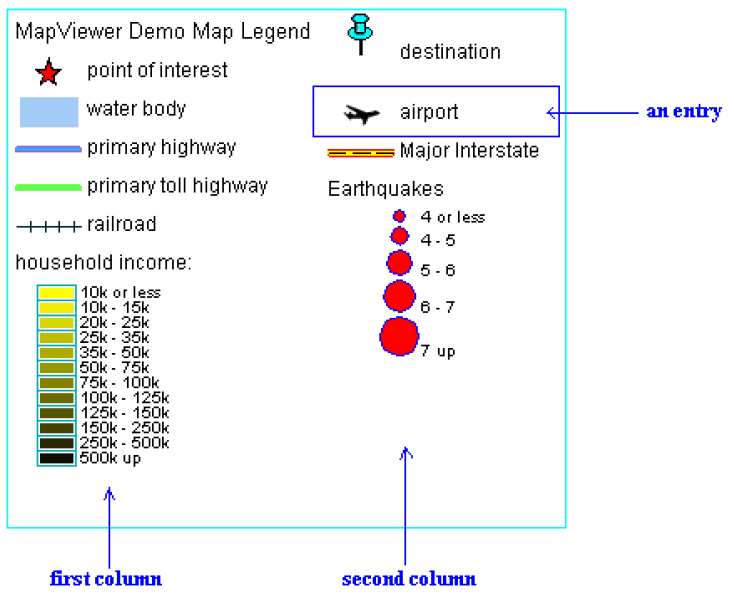
Description of the illustration mapviewer_map_legend.png
bgstyle is an optional attribute that specifies the overall background style of the legend. It uses a string with syntax similar to scalable vector graphics (SVG) to specify the fill and stroke colors for the bounding box of the legend. If you specify an opacity (fill-opacity or stroke-opacity) value, the fill and stroke colors can be transparent or partially transparent. The following example specifies a background that is white and half transparent, and a stroke (for the legend box boundary) that is red:
bgstyle="fill:#ffffff;fill-opacity:128;stroke:#ff0000"
font is an optional attribute that specifies the name of the font to be used for text that appears in the legend image. You can specify a logical font name that is supported by Java (serif, sansserif, monospaced, dialog, or dialoginput). You can also specify the name of a physical font that is available on the system where the MapViewer server is running.
location_x and location_y are optional attributes that specify the X and Y coordinates (in screen units) of the start of the legend. If you specify these attributes, they override any specification for the position attribute.
offset_x and offset_y are optional attributes to be used with the position attribute. The default distance from the borders for the position hint corresponds to 10 pixels. You can use these offset parameters to override the default value.
profile is an optional attribute that specifies a relative size of the legend on the map, using one of the following keywords: SMALL, MEDIUM (the default), or LARGE.
position is an optional attribute that specifies where the legend should be drawn on the map. The default is SOUTH_WEST, which draws the legend in the lower-left corner of the resulting map.
is_title is an optional attribute of the <entry> element. When its value is TRUE, the entry is used as the title for the column, which means that the description text appears in a more prominent font than regular legend text, and any other style attribute defined for the entry is ignored. The default is FALSE.
is_separator is an optional attribute of the <entry> element. When its value is TRUE, the entry is used to insert a blank line for vertical spacing in the column. The default is FALSE.
tab is an optional attribute of the <entry> element. It specifies the number of tab positions to indent the entry from the left margin of the column. The default is 0 (zero), which means no indentation.
style is an optional attribute of the <entry> element. It specifies the name of the MapViewer style (such as a color or an image) to be depicted as part of the entry.
text is an optional attribute of the <entry> element. It specifies the description text (for example, a short explanation of the associated color or image) to be included in the entry.
text_size is an optional attribute of the <entry> element. It specifies the size (in display units) of the description text to be included in the entry. The specified value overrides the MapViewer predefined profile size.
width and height are optional attributes that together specify the size (in device units) of the legend entry Any specified values override the defaults, which depend on the MapViewer profile values for small, medium, and large text. The following example shows the <legend> element specification for the legend in Figure: Map with Legend.
<legend bgstyle="fill:#ffffff;fill-opacity:128;stroke:#ff0000"
        position="NORTH_WEST">
    <column>
        <entry text="Map Legend"
               is_title="true" />
        <entry style="M.STAR"
               text="center point" />
        <entry style="M.CITY HALL 3"
               text="cities" />
        <entry is_separator="true" />
        <entry style="C.ROSY BROWN STROKE"
               text="state boundary" />
        <entry style="L.PH"
               text="interstate highway" />
        <entry text="County population:" />
        <entry style="V.COUNTY_POP_DENSITY"
               tab="1" />
    </column>
</legend>
In the preceding example:
-
The background color has an opacity value of 128 (
fill-opacity:128), which means that the white background will be half transparent. -
The legend boundary box will be red (
stroke:#ff0000). -
The legend boundary box will be positioned in the upper-left part of the display (
position="NORTH_WEST"). -
The legend will be the default size, because the
profileattribute (which has a default value ofMEDIUM) is not specified. -
The legend will have a single column, with entries arranged from top to bottom.
-
The first entry is the legend title, with the text
Map Legend. -
The fourth entry is a separator for adding a blank line.
-
The seventh entry is description text (
County population:) that users of the generated map will associate with the next (and last) entry, which specifies an advanced style. TheCounty population:text entry is helpful because advanced styles usually have their own descriptive text, and you do not want users to become confused about which text applies to which parts of the legend. -
The last entry specifies an advanced style (
style="V.COUNTY_POP_DENSITY"), and it is indented one tab position (tab="1") so that the colors and text identifying various population density ranges will be easy for users to distinguish from the precedingCounty population:description text.