Create and Manage Iceberg Tables with Oracle SQL
Use Oracle-Managed Create and Write Operations
An Oracle-managed Iceberg create/write operation creates or populates an Iceberg table in an external catalog from Oracle SQL. The table’s metadata and data remain in external lake storage; CREATE ICEBERG TABLE does not create a locally stored Oracle table.
Use a Native Iceberg table when Oracle must publish an append-oriented analytic result into a supported external Iceberg catalog for access by Oracle and other compatible engines. Use an ordinary Oracle table when the workload requires indexes, enforced relational constraints, frequent row-level DML, database-local backup and recovery, or low-latency transactional serving.
Understanding Ownership and Persistence
The following diagram shows how Oracle AI Database creates and publishes a Native Iceberg table commit. Oracle SQL writes the data file and Iceberg metadata files to object storage. After the files are available, Oracle AI Database updates the operational catalog with a commit pointer to the new metadata file, making the table state visible. This division separates Oracle-managed SQL transactions from object storage persistence and catalog-managed table state.
Image 4-2. Oracle managed Iceberg Create and Write Operations
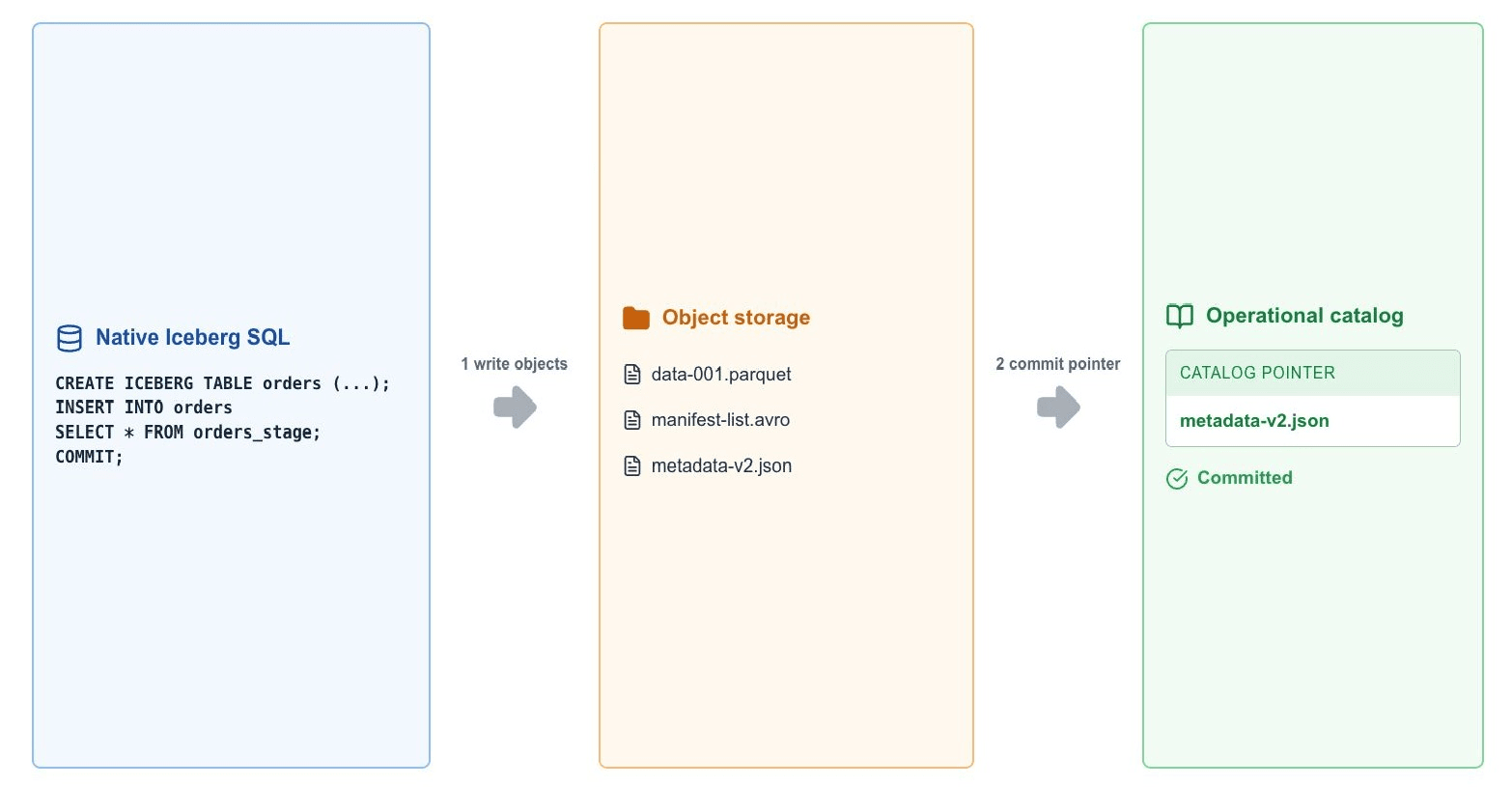
The catalog owns the logical table and commit pointer. The object store owns the physical files. Oracle AI Database owns the SQL transaction and local credential mapping used to publish the commit.
Prepare the Catalog and Storage
Complete the setup as explained in Chapter 2, then verify the Native Iceberg-specific requirements in the SQL Language Reference:
- The database release supports
CREATE ICEBERG TABLE. - The catalog implementation is certified for Native Iceberg create and write operations, not only for read access.
- The catalog is mounted through
DBMS_CATALOG.MOUNT_ICEBERGand the catalog identity can create and commit the target namespace and table. - The data-storage identity can create, list, read, and update the required objects under an object storage location.
- The database character set is
AL32UTF8. - The storage prefix is empty or dedicated to the new table and is not shared with another table lifecycle.
Mount the Certified Catalog Implementation
Use the catalog implementation’s documented MOUNT_ICEBERG catalog type, endpoint, credentials, and configuration. The following Oracle-managed pattern is illustrative:
BEGIN
  DBMS_CATALOG.MOUNT_ICEBERG(
    catalog_name => 'LAKEHOUSE_CATALOG',
    endpoint => '<oracle-catalog-endpoint>',
    catalog_credential => 'LAKEHOUSE_CATALOG_CREDENTIAL',
    data_storage_credential => 'LAKEHOUSE_STORAGE_CREDENTIAL',
    catalog_type => 'ICEBERG_ORACLE'
  );
END;
/
A credential that can list a catalog is not necessarily allowed to create a table or commit a snapshot. Validate catalog mutation and storage write permissions before publication.
For details about catalog registration, credential mapping, and mount parameters, see DBMS_CATALOG.
Create an Iceberg Table from Oracle SQL
The complete Oracle Database 26ai syntax is:
CREATE ICEBERG TABLE [schema.]table_name
  [ ( column_def)[, column_def ]... ]
WITHIN CATALOG catalog_name
STORAGE LOCATION "bucket_uri_or_prefix";
Create the table in the mounted catalog and assign a dedicated object-storage location:
CREATE ICEBERG TABLE sales.orders (
  order_id DECIMAL(18, 0),
  order_total DECIMAL(18, 2),
  order_date DATE,
  source_name STRING
)
WITHIN CATALOG lakehouse_catalog
STORAGE LOCATION "s3://lakehouse-warehouse/sales/orders/";
The statement creates an empty Iceberg v2 table in the external catalog. It does not create a local Oracle representation and does not initially populate the table.
Note - The current implementation handles storage location to be enclosed in double quotes. If single quotes are used, the quote is passed as part of the URI and results in an error.
For the complete syntax, clauses, and restrictions, see CREATE ICEBERG TABLE.
Insert Data with INSERT … SELECT
The INSERT INTO ... SELECT (ITAS) operation supports any valid SELECT statement whose
source objects reside within the local Oracle AI Database. This enables users to perform bulk data loads into Iceberg tables from Oracle.
ITAS performs the following operations as part of a single transaction:
- Reads the source rows from the
SELECTstatement. - Retrieves the latest Iceberg table metadata.
- Generates Parquet data files, Iceberg Manifest files, and a manifest list.
- Generates the table metadata JSON file.
- Uploads the generated files to the object store.
- Commits a new Iceberg snapshot to the Iceberg catalog.
Note - Oracle uses optimistic concurrency control during commit to ensure consistency when multiple engines write to the same Iceberg table.
Prerequisites
Based on the the Native Iceberg model, the principal prerequisites for Insert, Update and Delete operations are as follows:
- The table/catalog combination must support Native Iceberg writes.
- The catalog must be accessible through the supported Oracle catalog integration.
- The catalog identity must have permission to commit the changed table state.
- The data-storage identity must have the permissions required by the write operation.
- The database user must have the required privileges.
- Native Iceberg transaction requirements must be satisfied.
Syntax
INSERT INTO [schema.]table_name@catalog_name
  <select_statement>;
Here, <select_statement> represents a valid SELECT query whose source objects reside in the local Oracle AI Database. It can include joins, subqueries, filters, aggregations, and other supported SQL clauses.
–Parallel ITAS–
INSERT INTO
/*+ APPEND PARALLEL(target_table@catalog 4) */
target_table@catalog
SELECT
/*+ PARALLEL(source_table 4) */
*
FROM source_table;
–Parallel ITAS with multiple source tables–
SELECT /*+ PARALLEL(source_table_1 <select_dop>)
          PARALLEL(source_table_2 <select_dop>) */
...
FROM source_table_1
JOIN source_table_2 ON ...;
For a query with multiple source tables, specify a hint for each table you want to parallelize. The INSERT and the source query can use different DOP.
Semantics
- The source query may reference one or more Oracle AI Database table, views, inline views and sub-queries, Join operations, aggregate queries, or SQL expressions. The
SELECTstatement may include standard SQL clauses and operators, such as:WHEREGROUP BYHAVINGORDER BY(when applicable)- Aggregate functions
- Scalar expressions
- Joins
- The target table must be an existing Iceberg table referenced using a local Catalog (
@catalog) syntax. - Iceberg table metadata is retrieved at the beginning of the transaction. The metadata defines table schema, partition specification, and current snapshot for the duration of the transaction.
- Oracle converts the selected rows into Parquet data files using the native Parquet writer. Each PDML worker independently creates and uploads its own Parquet files.
- When processing Commit, Oracle creates manifest files, manifest list, new metadata JSON file, updates the Iceberg catalog and and commits a new Iceberg snapshot.
- If another transaction commits data before the current transaction commits (concurrent DML operation), Oracle rebases the transaction on the newest snapshot. The commit is retried up to four times. If all retries fail, the transaction is aborted.
- If the Iceberg schema changes during the transaction, Oracle aborts the transaction and the
INSERTmust be restarted. - Oracle currently supports Copy-on-Write mode, which means new files are produced without the deleted rows. Oracle currently supports Copy-on-Write mode, which means new files are produced with the updated rows.
Example
INSERT INTOfoo.bar@glue_cat
SELECT*
FROM an_oracle_table;
COMMIT;
–Example with multiple source tables–
INSERT INTO sales_summary@lake_catalog
SELECT c.region, SUM(s.amount)
FROM sales s
JOIN customers c ON c.customer_id = s.customer_id
WHERE s.sale_date >= DATE '2026-01-01'
GROUP BY c.region;

COMMIT;
–Parallel ITAS–
INSERT INTO
/*+ APPEND PARALLEL(foo.bar@glue_cat 4) */
foo.bar@glue_cat
SELECT
/*+ PARALLEL(an_oracle_table 4) */
*
FROM an_oracle_table;
COMMIT;
–Parallel ITAS with multiple source tables–
INSERT /*+ APPEND PARALLEL(iceberg_target@lake_catalog 4) */
INTO iceberg_target@lake_catalog
SELECT /*+ PARALLEL(s 8) PARALLEL(c 8) */
       s.product_id, c.category_name
FROM sales s
JOIN categories c ON c.category_id = s.category_id;

COMMIT;
In the above example, INSERT uses a DOP 4 while the source query uses a DOP 8. The INSERT hint controls target-table parallelism, and the SELECT hints control source-query parallelism. The example uses a join to show multiple source tables.
Usage Notes
- Oracle complies with the Apache Iceberg Version 2 specification.
- ITAS supports Parallel DML (PDML).
- Parquet files are compressed using ZSTD Level 1.
- By default, the Parquet Writer maintains column min/max values in the Iceberg manifest files. To improve writer performance, users can set
write.metadata.metrics.default=noneto disable min/max computation. - The source objects referenced by the
SELECTstatement must reside in the local Oracle AI Database. - The inserted data becomes available to Oracle AI Database and other Iceberg-compatible engines after the transaction commits successfully.
- Oracle automatically retries commits when concurrent DML operations occur without schema changes.
The documented Oracle write path publishes the result of a query. Make the source-to-target mapping explicit and cast incompatible source types before the insert.
INSERT INTO sales.orders@lakehouse_catalog
SELECT CAST(order_id AS NUMBER(18)),
       CAST(order_total AS NUMBER(18, 2)),
       order_date,
       source_name
FROM orders_publish_stage;

COMMIT;
Insert into an Existing Iceberg Table
Oracle AI Database can append query results to a compatible Iceberg table created by Oracle or another Iceberg engine. The table must be available through a supported mounted catalog, and its schema and Iceberg features must be compatible with the installed Oracle AI Database release.
INSERT INTO sales.shared_orders@lakehouse_catalog
SELECT order_id,
       order_total,
       order_date,
       source_name
FROM orders_publish_stage;

COMMIT;
This operation publishes a new Iceberg snapshot in the existing table. It does not transfer catalog ownership or table-lifecycle responsibility to Oracle AI Database. Treat this as an append-oriented write path; do not infer support for UPDATE, DELETE, MERGE, or other row-level DML.
Before writing, verify catalog commit permissions, object-storage write permissions, and compatibility of the table format, schema, data types, partitioning, and other table features with the installed release. For the authoritative syntax and supported target origin, see INSERT.
Complete the Transaction and Refresh Visibility
The session must not have an open transaction when the Iceberg insert begins. Until the Iceberg transaction ends, additional DML is restricted and the target table cannot be queried. Treat each publication as a separate transaction boundary.
If the newly created or committed table is not visible through the mounted catalog cache, use the documented cache operation and then verify the committed state:
EXEC DBMS_CATALOG.FLUSH_CATALOG_CACHE('LAKEHOUSE_CATALOG');

SELECT order_id, order_total, order_date
FROM sales.orders@lakehouse_catalog;
Write to Iceberg Tables with Overridden Column Data Types
By default, Oracle Database maps each Iceberg column type to a predefined Oracle data type. For example:
- Iceberg
STRINGmaps toVARCHAR2(4000 BYTE). - Iceberg
INTmaps toNUMBER(10). - Iceberg
ARRAY<FLOAT>maps toVARCHAR2(4000).
These default mappings can restrict write operations. For example, an Iceberg STRING column can logically store values longer than 4000 characters, but inserting a CLOB value larger than 4000 characters can fail when the column uses the default VARCHAR2(4000) mapping.
Data type override support allows you to specify the Oracle data type that Oracle uses to represent an individual Iceberg column. You can define the override when you create the table or modify it. For example:
customer_name    STRING AS VARCHAR2(200),
customer_profile STRING AS CLOB
The underlying Iceberg column types remain STRING. The AS clause changes the Oracle-side representation used for SQL processing, reads, and writes.
Prerequisites
Before using data type overrides:
- The Iceberg catalog must be mounted in Oracle Database.
- The user must have the privileges required to create or alter the Iceberg table.
- The specified Iceberg type and Oracle override type must be supported.
- The source data must be convertible to the overridden Oracle type.
- The overridden Oracle type must be convertible to the target Iceberg type during the write operation.
- Text-based source columns must use a supported character set.
- For extended
VARCHAR2sizes,MAX_STRING_SIZE=EXTENDEDmust be enabled. - Vector columns must use supported dense vector representations.
You can check the relevant database character sets by running:
SELECT parameter, value
FROM nls_database_parameters
WHERE parameter IN
(
    'NLS_CHARACTERSET',
    'NLS_NCHAR_CHARACTERSET'
);
For VARCHAR2, CHAR, and CLOB sources, NLS_CHARACTERSET must be UTF8 or AL32UTF8.
For NVARCHAR2, NCHAR, and NCLOB sources, NLS_NCHAR_CHARACTERSET must be UTF8 or AL32UTF8.
Default Oracle Mappings
If you do not specify an override, Oracle uses the default mapping for the Iceberg type.
| Iceberg Types | Default Oracle Types |
|---|---|
INT |
NUMBER(10) |
LONG |
NUMBER(20) |
FLOAT |
BINARY_FLOAT |
DOUBLE |
BINARY_DOUBLE |
DECIMAL |
NUMBER |
DATE |
DATE |
TIMESTAMP |
TIMESTAMP(9) |
TIMESTAMPTZ |
TIMESTAMP(9) WITH TIME ZONE |
STRING |
VARCHAR2(4000 BYTE) |
UUID |
VARCHAR2(4000 BYTE) |
BINARY |
RAW(2000) |
ARRAY<FLOAT> |
VARCHAR2(4000) |
ARRAY<DOUBLE> |
VARCHAR2(4000) |
Supported Oracle Override Types
The following Oracle data types can be specified as column overrides:
`DATE`
`TIMESTAMP`
`TIMESTAMP WITH TIME ZONE`
`TIMESTAMP WITH LOCAL TIME ZONE`
`CLOB`
`BLOB`
`BINARY_FLOAT`
`BINARY_DOUBLE`
`FLOAT`
`FLOAT(n)`
`NUMBER`
`NUMBER(p)`
`NUMBER(p,s)`
`RAW(n)`
`VARCHAR2(n)`
`VARCHAR2(n BYTE)`
`VARCHAR2(n CHAR)`
`NVARCHAR2(n)`
`CHAR(n)`
`CHAR(n BYTE)`
`CHAR(n CHAR)`
`NCHAR(n)`
`VECTOR(n)`
`VECTOR(*)`
`VECTOR(n, element_type)`
`VECTOR(*, element_type)`
`VECTOR(n, element_type, DENSE)`
`VECTOR(*, element_type, DENSE)`
Supported vector element types include the Oracle vector element formats defined for the release. The write-path examples and positive test cases validate FLOAT32 and FLOAT64 vectors.
Syntax
Create an Iceberg Table with Type Overrides
CREATE ICEBERG TABLE [schema.]table_name
(
    column_name iceberg_type [AS oracle_type]
    [, column_name iceberg_type [AS oracle_type] ]...
)
[WITHIN CATALOG catalog_name]
[STORAGE LOCATION 'bucket_uri_or_prefix']
[PARTITION BY
(
    transform(column_name)
    [, transform(column_name) ]...
)];
The AS oracle_type clause is optional. If it is omitted, Oracle uses the default mapping for the Iceberg column type.
Alter an Existing Column Override
ALTER ICEBERG TABLE [schema.]table_name
WITHIN CATALOG catalog_name
MODIFY column_name AS oracle_type;
The MODIFY clause changes the Oracle-side type representation for an existing column.
Insert into an Iceberg Table
The INSERT syntax does not change when type overrides are used:
INSERT INTO iceberg_table
SELECT ...
FROM source_table;
Catalog-qualified references can also be used:
INSERT INTO schema.table_name@catalog_name
SELECT ...
FROM source_table;
Existing Iceberg write features, including partitioned-table inserts, parallel DML, and append operations, continue to use their existing syntax.
Examples
Create a Table with String and Vector Overrides
CREATE ICEBERG TABLE lakehouse.customers
(
    customer_id              INT,
    customer_name            STRING AS VARCHAR2(200),
    customer_profile         STRING AS CLOB,
    customer_city            STRING,
    customer_profile_vector  ARRAY<FLOAT> AS VECTOR(*, FLOAT32)
)
WITHIN CATALOG "GLUE_ORA40"
STORAGE LOCATION 's3://iceberg-db/customers';
In this example:
customer_nameis represented asVARCHAR2(200)instead of the defaultVARCHAR2(4000).customer_profileis represented asCLOB.customer_profile_vectoris represented as a denseVECTORwithFLOAT32elements.- The underlying Iceberg types remain unchanged.
Create a Table Using Default Mappings
CREATE ICEBERG TABLE lakehouse.default_customers
(
    customer_id             INT,
    customer_name           STRING,
    customer_profile_vector ARRAY<FLOAT>
)
WITHIN CATALOG "GLUE_ORA40"
STORAGE LOCATION 's3://iceberg-db/default_customers';
Because no overrides are specified, Oracle uses the default mappings:
INTtoNUMBER(10)STRINGtoVARCHAR2(4000 BYTE)ARRAY<FLOAT>toVARCHAR2(4000)
Alter an Existing Override
ALTER ICEBERG TABLE lakehouse.customers
WITHIN CATALOG "GLUE_ORA40"
MODIFY customer_city AS CLOB;
Subsequent operations use CLOB as the Oracle-side representation of customer_city.
Insert a Large String into a CLOB-Overridden Column
INSERT INTO lakehouse.customers
(
    customer_id,
    customer_profile
)
SELECT
    customer_id,
    profile_text
FROM customer_profiles;
If profile_text is a CLOB containing more than 4000 characters, the insert can succeed because customer_profile is represented as CLOB rather than the default VARCHAR2(4000).
The value must still satisfy the supported CLOB-to-Iceberg STRING conversion limits.
Insert into a Column Overridden to VARCHAR2
CREATE ICEBERG TABLE lakehouse.short_names
(
    id   INT,
    name STRING AS VARCHAR2(200)
)
WITHIN CATALOG "GLUE_ORA40"
STORAGE LOCATION 's3://iceberg-db/short_names';
Values up to the declared length can be inserted:
INSERT INTO lakehouse.short_names
SELECT id, name
FROM source_names;
A value exceeding 200 characters is rejected. Oracle does not silently truncate the value.
Insert Vector Data
CREATE ICEBERG TABLE lakehouse.vector_data
(
    id        INT,
    embedding ARRAY<FLOAT> AS VECTOR(*, FLOAT32)
)
WITHIN CATALOG "GLUE_ORA40"
STORAGE LOCATION 's3://iceberg-db/vector_data';
A source table containing a compatible dense FLOAT32 vector can be inserted as follows:
INSERT INTO lakehouse.vector_data
SELECT id, embedding
FROM source_vectors;
Insert into a Partitioned Table Using Parallel DML
CREATE ICEBERG TABLE lakehouse.events
(
    event_id    INT,
    event_date  DATE,
    description STRING AS CLOB
)
WITHIN CATALOG "GLUE_ORA40"
STORAGE LOCATION 's3://iceberg-db/events'
PARTITION BY (DAY(event_date));
The overridden column can be used with partitioned and parallel inserts:
INSERT /*+ APPEND PARALLEL(lakehouse.events@GLUE_ORA40 4) */
INTO lakehouse.events@GLUE_ORA40
SELECT /*+ PARALLEL(source_events 4) */
       event_id,
       event_date,
       description
FROM source_events;
Semantics
Column Representation
The override determines the Oracle data type used to represent the Iceberg column during SQL processing.
For example:
profile STRING AS CLOBmeans that Oracle exposes the Iceberg STRING column as a CLOB.
The override does not change the logical Iceberg type defined for the column.
Runtime Conversion
Oracle validates a write in two stages:
-
Source Oracle type to overridden Oracle type - Oracle uses its existing cast and conversion rules to determine whether the source value can be converted to the overridden Oracle type.
-
Overridden Oracle type to Iceberg type - Oracle verifies that the overridden value can be written to the physical Iceberg type.
For example, when inserting a CLOB into an Iceberg STRING column overridden as CLOB:
CLOB source
  -> overridden Oracle CLOB representation
  -> Iceberg STRING
  -> Parquet data file
A failure in either conversion stage causes the statement to fail.
String-to-Iceberg Conversion
The write path supports string-based Oracle types, subject to size and character-set restrictions:
VARCHAR2,NVARCHAR2,CHAR, andNCHARvalues can be written to IcebergSTRING.- Standard-length values can use lengths up to
4000. - Extended character types can use lengths from
4001through32767when extended string size is enabled. CLOBandNCLOBvalues can be written to IcebergSTRINGwhen the character-set and size requirements are satisfied.
Vector-to-Iceberg Conversion
Dense Oracle vectors can be written to Iceberg representations such as:
LIST<FLOAT>LIST<DOUBLE>- String representations of vectors
The vector dimension can be fixed or flexible:
VECTOR(128, FLOAT32)
VECTOR(*, FLOAT32)
A fixed dimension must be within the supported Oracle vector range. A wildcard dimension allows the dimension to be determined from the value.
Metadata Scope - Override information is stored in the Oracle-mounted Iceberg catalog entity. If the same remote Iceberg catalog is mounted in two different Oracle schemas, each schema has a separate mounted catalog entity.
Type override information created in one schema is not automatically shared with the other schema.
Alter and Concurrent DML
When an ALTER ICEBERG TABLE ... MODIFY operation and an insert occur concurrently:
- The concurrent insert continues using the column type that was active when the insert began.
- The type override change affects DML statements started after the alter operation.
- DML statements started after the override change can fail with
ORA-43320while earlier Iceberg DML transactions using the old type remain open. - The earlier transactions must commit or roll back before the newer DML can proceed.
Supported Write Conversions
The following conversions are within the scope of the enhancement:
| Oracle Source or Overridden Type | Iceberg output type | Notes |
|---|---|---|
VARCHAR2(n) |
STRING |
Supports standard and extended lengths subject to limits. |
NVARCHAR2(n) |
STRING |
Requires a supported national character set. |
CHAR(n) |
STRING |
Supports standard and extended lengths subject to limits. |
NCHAR(n) |
STRING |
Requires a supported national character set. |
CLOB |
STRING |
Uses LOB-backed UTF-8 conversion and size validation. |
NCLOB |
STRING |
Uses national character-set validation. |
VECTOR(..., FLOAT32) |
LIST<FLOAT> or STRING |
Validated by the vector write path. |
VECTOR(..., FLOAT64) |
LIST<DOUBLE> or STRING |
Validated by the vector write path. |
For vector conversion,
FLOAT64can be narrowed to aLIST<FLOAT>representation, andFLOAT32can be widened to aLIST<DOUBLE>representation where supported.
Validations and Restrictions
- The
ASclause must contain a valid Oracle data type. - Invalid or malformed
CREATE ICEBERG TABLEandALTER ICEBERG TABLEstatements are rejected before override metadata is committed. - The DDL does not determine whether every Iceberg-to-Oracle or Oracle-to-Iceberg conversion is semantically valid.
- Read and write compatibility is checked at runtime.
- Values that exceed the declared
VARCHAR2,CHAR, orNCHARlength are rejected. - Values are not silently truncated.
- Text sources must meet the required character-set restrictions.
- Vector values must use supported dense vector formats and dimensions (up to 4K dimensions are supported).
- The override only changes the Oracle-side type representation; it does not add or remove Iceberg columns.
- An unsupported conversion must fail explicitly without committing a partial write.
- Existing
INSERT, partitioned-table, append, and parallel-DML syntax remains unchanged.
For CLOB-to-STRING conversion, the specification identifies a default source-size limit of approximately 1 MB. The write.parquet.page-size-bytes table property can increase the permitted scalar CLOB or STRING size. For this purpose, the page size must remain within the supported range and must not exceed the row-group size.
Update Iceberg Tables
Oracle AI Database supports UPDATE operations on Iceberg tables to modify column values for all rows or rows satisfying a specified predicate. Changes become part of the Iceberg table when the transaction is committed. Oracle currently supports Copy-on-Write mode, which means new files are produced with the updated rows.
Overview
Use the UPDATE statement to modify column values for all rows in an Iceberg table. Updates can be made to specific columns of each row, or to rows satisfying a predicate.
Prerequisites
The principal prerequisites are as follows:
- The table/catalog combination must support Native Iceberg writes.
- The catalog must be accessible through the supported Oracle catalog integration.
- The catalog identity must have permission to commit the changed table state.
- The storage identity must have the permissions required by the write operation.
- The database user must have the required privileges.
- Native Iceberg transaction requirements must be satisfied.
Syntax
Update all rows:
UPDATE [schema.]table_name[@catalog_name]
SET column = value;
Update selected rows:
UPDATE [schema.]table_name[@catalog_name]
SET column = value
WHERE predicate;
Examples
–Update every row (This example updates all rows having SOURCE_NAME changed to ORACLE)–
UPDATE sales.orders@lakehouse_catalog
SET source_name = 'ORACLE';

COMMIT;
–Update selected rows (This example changes the matching historical orders)–
UPDATE sales.orders@lakehouse_catalog
SET order_status = 'ARCHIVED'
WHERE order_date < DATE '2019-01-01';

COMMIT;
Delete Iceberg Tables
Oracle AI Database supports DELETE operations on Iceberg tables to remove all rows or rows satisfying a WHERE predicate. Changes become part of the Iceberg table when the transaction is committed. Oracle currently supports Copy-on-Write mode, which means new files are produced with the deleted rows.
Overview
Use DELETE to remove all rows, or selected rows satisfying a predicate, from an Iceberg table.
Prerequisites
Based on the Native Iceberg model, the principal prerequisites are as follows:
- The target must be a Native Iceberg table supported for Oracle write operations.
- The Iceberg table must be non-partitioned.
- The catalog containing the table must be mounted and support the applicable Iceberg write operation.
- The catalog identity must have sufficient privileges to commit changes to the table.
- The data-storage identity must have the permissions required by the write path.
- The Oracle user must have the required database privileges to perform the operation.
- Normal Native Iceberg transaction requirements apply.
Syntax
Delete all rows:
DELETE FROM [schema.]table_name[@catalog_name];Delete selected rows:
DELETE FROM [schema.]table_name[@catalog_name]
WHERE predicate;
Semantics
DELETE FROM tdeletes all rows from the current table state.DELETE FROM t WHEREpredicate deletes only rows for which the specified predicate evaluates to true. Rows that do not satisfy the predicate remain part of the table. Oracle currently supports Copy-on-Write mode, which means new files are produced without the deleted rows.
Examples
–Delete all rows–
DELETE FROM sales.orders@lakehouse_catalog;

COMMIT;
Use this when the table definition must remain but its current contents should be removed.
–Delete selected rows–
DELETE FROM sales.orders@lakehouse_catalog
WHERE order_status = 'CANCELLED';

COMMIT;
Drop an Iceberg Table Created through Oracle
The complete Oracle Database 26ai syntax is:
DROP ICEBERG TABLE [schema.]table_name
WITHIN CATALOG catalog_name [PURGE];
Drop the catalog table without deleting its physical objects:
DROP ICEBERG TABLE sales.orders
WITHIN CATALOG lakehouse_catalog;
Use PURGE only when the catalog entry and its physical table objects must be deleted:
DROP ICEBERG TABLE sales.orders
WITHIN CATALOG lakehouse_catalog
PURGE;
PURGEis destructive. It deletes the current metadata file, manifest list, manifests, and data files associated with the table. Confirm ownership, storage scope, retention, and downstream consumers before running it.
For the complete syntax and drop behavior, see DROP ICEBERG TABLE.