RMAN Archiving Configuration Scenarios
Learn about the various RMAN archiving scenarios.
This section describes the archiving scenarios for an Oracle RAC database. The two configuration scenarios in this chapter describe a three-node UNIX cluster for an Oracle RAC database. For both scenarios, the LOG_ARCHIVE_FORMAT that you specify for the instance performing recovery must be the same as the format that you specified for the instances that archived the redo log files.
Oracle Advanced Cluster File System Archiving Scheme
The preferred configuration for Oracle RAC is to use Oracle Automatic Storage Management (Oracle ASM) for a recovery area using a disk group for your recovery set that is different from the disk group used for your data files.
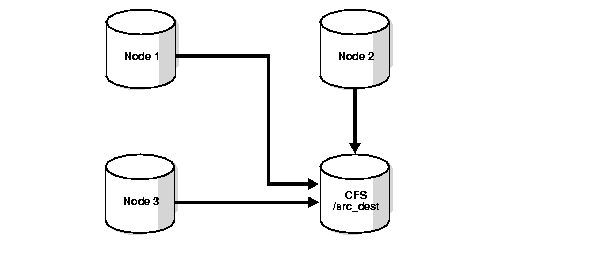
When you use Oracle ASM, it uses an Oracle Managed Files naming format. Alternatively, you can use a cluster file system archiving scheme. If you use a cluster file system, then each node writes to a single location on the cluster file system when archiving the redo log files. Each node can read the archived redo log files of the other nodes. For example, as shown in the following image, if Node 1 archives a redo log file to /arc_dest/log_1_100_23452345.arc on the cluster file system, then any other node in the cluster can also read this file.
Figure: Cluster File System Archiving Scheme
Note:
The archive log naming format in this example is only for a cluster file system example.
If you do not use a cluster file system, then the archived redo log files cannot be on raw devices. This is because raw devices do not enable sequential writing of consecutive archive log files.
Related Topics
Advantages of the Cluster File System Archiving Scheme
The main advantage of the cluster file system arcvhiving scheme is that any node can read the achive logs.
The advantage of this scheme is that none of the nodes uses the network to archive logs. Because the file name written by a node can be read by any node in the cluster, RMAN can back up all logs from any node in the cluster. Backup and restore scripts are simplified because each node has access to all archived redo logs.
Initialization Parameter Settings for the Cluster File System Archiving Scheme
Learn about parameter settings for cluster file system archiving.
In the cluster file system scheme, each node archives to a directory that is identified with the same name on all instances within the cluster database (/arc_dest, in the following example). To configure this directory, set values for the LOG_ARCH_DEST_1 parameter, as shown in the following example:
*.LOG_ARCHIVE_DEST_1="LOCATION=/arc_dest"The following list shows archived redo log entry examples that would appear in the RMAN catalog or in the control file based on the previous example. Note that any node can archive logs using any of the threads:
/arc_dest/log_1_999_23452345.arc
/arc_dest/log_1_1000_23435343.arc
/arc_dest/log_1_1001_23452345.arc <- thread 1 archived in node3
/arc_dest/log_3_1563_23452345.arc <- thread 3 archived in node2
/arc_dest/log_2_753_23452345.arc <- thread 2 archived in node1
/arc_dest/log_2_754_23452345.arc
/arc_dest/log_3_1564_23452345.arc
Location of Archived Logs for the Cluster File System Archiving Scheme
Any node can read the archive logs, regarless of which node created the logs.
Because the file system is shared and because each node is writing its archived redo logs to the /arc_dest directory in the cluster file system, each node can read the logs written by itself and any other node.
Noncluster File System Local Archiving Scheme
Learn about the noncluster file system local archiving scheme.
When archiving locally to a noncluster file system, each node archives to a uniquely named local directory. If recovery is required, then you can configure the recovery node so that it can access directories on the other nodes remotely. For example, use NFS on Linux and UNIX computers, or mapped drives on Windows systems. Therefore, each node writes only to a local destination, but each node can also read archived redo log files in remote directories on the other nodes.
Considerations for Using Noncluster File System Local Archiving
If you use noncluster file system local archiving for media recovery, then you must configure the node that is performing recovery for remote access to the other nodes so that the node can read the archived redo log files in the archive directories on the other nodes.
In addition, if you are performing recovery and you do not have all of the available archive logs, then you must perform an incomplete recovery up to the first missing archived redo log sequence number. You do not have to use a specific configuration for this scheme. However, to distribute the backup processing onto multiple nodes, the easiest method is to configure channels as described in the backup scenarios in "Managing Backup and Recovery".
Note:
Because different file systems are used in a noncluster case, the archive log directories must be unique on each node. For example, /arc_dest_1 is only available on node1, /arc_dest_2 is only directly mounted on node2, and so on.
Then node1 mounts /arc_dest_2 from node2 and /arc_dest_3 from node3 through NFS.
Related Topics
Initialization Parameter Settings for Non-Cluster File System Local Archiving
You can set the archiving destination values as follows in the initialization parameter file.
Note:
The policy-managed database deployment option is desupported in Oracle AI Database 26ai.
Set the SID.LOG_ARCH_DEST parameter for each instance using the SID designator, as shown in the following example:
sid1.LOG_ARCHIVE_DEST_1="LOCATION=/arc_dest_1"
sid2.LOG_ARCHIVE_DEST_1="LOCATION=/arc_dest_2"
sid3.LOG_ARCHIVE_DEST_1="LOCATION=/arc_dest_3"
The following list shows the possible archived redo log entries in the database control file. Note that any node can read archived redo logs from any of the threads, which must happen in order for the database to recover after a failure.
/arc_dest_1/log_1_1000_23435343.arc
/arc_dest_2/log_1_1001_23452345.arc <- thread 1 archived in node2
/arc_dest_2/log_3_1563_23452345.arc <- thread 3 archived in node2
/arc_dest_1/log_2_753_23452345.arc <- thread 2 archived in node1
/arc_dest_2/log_2_754_23452345.arc
/arc_dest_3/log_3_1564_23452345.arc
Location of Archived Logs for Noncluster File System Local Archiving
Learn about the location of archived logs for noncluster file system local archiving.
As illustrated in the following table, each of three nodes has a directory containing the locally archived redo logs. Additionally, if you mount directories on the other nodes remotely through NFS or mapped drives, then each node has two remote directories through which RMAN can read the archived redo log files that are archived by the remaining nodes.
Note:
The archive log destinations, similar to those shown in the following table, must be different on each node so that if you mount the NFS directory on a different node, then it does not conflict with an existing archive log directory
Table: UNIX/NFS Location Log Examples, Noncluster File System Local Archiving
| Node | Reads the archived redo log files in the directory | For logs archived by node |
|---|---|---|
| 1 | /arc_dest_1 | 1 |
| 1 | /arc_dest_2 | 2 (through NFS) |
| 1 | /arc_dest_3 | 3 (through NFS) |
| 2 | /arc_dest_1 | 1 (through NFS) |
| 2 | /arc_dest_2 | 2 |
| 2 | /arc_dest_3 | 3 (through NFS) |
| 3 | /arc_dest_1 | 1 (through NFS) |
| 3 | /arc_dest_2 | 2 (through NFS) |
| 3 | /arc_dest_3 | 3 |
File System Configuration for Noncluster File System Local Archiving
Use NFS to perform recovery using a remaining instance to read logs that are not yet backed up.
If you are performing recovery and a remaining instance must read all of the logs that are on disk but not yet backed up, then you should configure NFS as shown in the following table.
Table: UNIX/NFS Configuration for Shared Read Local Archiving Examples
| Node | Directory... | Is configured... | And mounted on... | On node... |
|---|---|---|---|---|
| 1 | /arc_dest_1 | Local read/write | n/a | n/a |
| 1 | /arc_dest_2 | NFS read | /arc_dest_2 | 2 |
| 1 | /arc_dest_3 | NFS read | /arc_dest_3 | 3 |
| 2 | /arc_dest_1 | NFS read | /arc_dest_1 | 1 |
| 2 | /arc_dest_2 | Local read/write | n/a | n/a |
| 2 | /arc_dest_3 | NFS read | /arc_dest_3 | 3 |
| 3 | /arc_dest_1 | NFS read | /arc_dest_1 | 1 |
| 3 | /arc_dest_2 | NFS read | /arc_dest_2 | 2 |
| 3 | /arc_dest_3 | Local read/write | n/a | n/a |
Note:
Microsoft Windows users can achieve the same results depicted in the examples in this section by using mapped drives.