10.1 Introduction to RDF Graph Server and Query UI
The RDF Graph Server and Query UI consists of RDF RESTful services and a Java EE client application called RDF Graph Query UI. This client serves as an administrative console for Oracle RDF and can be deployed to a Java EE container.
The RDF Graph Server and RDF RESTful services can be used to create a SPARQL endpoint for RDF graphs in Oracle AI Database.
The following figure shows the RDF Graph Server and Query UI architecture:
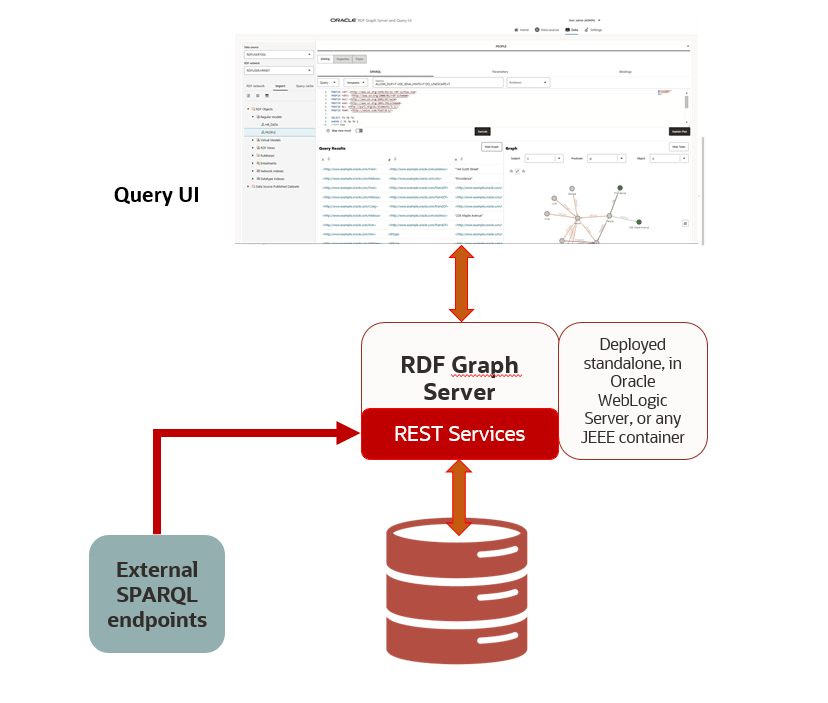
The Oracle RDF Graph Query UI is an Oracle JET based client that can be used to manage RDF objects from different data sources, and to perform SPARQL queries and updates. This Java EE application helps to build application web pages that query and display RDF graphs. It supports queries across multiple data sources. The salient features of the RDF Graph Query UI are as follows:
- Uses RDF RESTful services to communicate with RDF data stores, which can be an Oracle RDF data source or an external RDF data source.
- Allows you to perform CRUD operations on various RDF objects such as private networks, models, rule bases, entailments, network indexes and data types for Oracle data sources.
- Allows you to execute SPARQL queries and update RDF data.
- Provides a graph view of SPARQL query results.
- Uses Oracle JET for user application web pages.
The following topics describe the key concepts when working with RDF Graph Server and Query UI.
- Data Sources
Data sources are repositories of RDF objects. - RDF Datasets
Each RDF data source contains metadata information that describe the avaliable RDF objects. - REST Services
An RDF REST API allows communication between client and backend RDF data stores.
Parent topic: RDF Graph Server and Query UI
10.1.1 Data Sources
Data sources are repositories of RDF objects.
A data source can refer to an Oracle AI Database, or to an external RDF service that can be accessed by an endpoint URL such as Dbpedia. The data source can be defined by generic and as well as specific parameters. Some of the generic parameters are name, type, and description. Specific parameters are JDBC properties (for database data sources) and endpoint base URL (for external data sources).
Parent topic: Introduction to RDF Graph Server and Query UI
10.1.1.1 Oracle Data Sources
Oracle data sources are defined using JDBC connections. Three types of Oracle JDBC data sources can be defined:
- A JDBC URL data source with standard Oracle JDCB parameters, which include SID or service name, host, port, and user credentials.
- A container JDBC data source that can be defined inside the application Server (WebLogic, Tomcat, or others).
- An Oracle wallet data source that contains the files needed to make the database connection.
The parameters that define an Oracle AI Database data source include:
- name: A generic name of the data source.
- type: The data source type. For databases, it must be ‘DATABASE’.
- description (optional): A generic description of the data source.
- properties: Specific mapping parameters with values for data source
properties:
- For a JDBC URL:
- Database SID or service name
- Host machine
- Database listening port
- User name and password credentials
- For a container data source:
- JNDI name - Java naming and directory interface (JNDI) name
- For a wallet data source:
- A string describing the wallet service
- User name and password credentials (required if the user credentials are not stored in the wallet)
- Optional proxy details
For a cloud wallet it is usually an alias name stored in the tnsnames.ora file, but for a simple wallet it contains the host, port, and service name information.
- For a JDBC URL:
The following example shows the JSON representation of a JDBC URL data source.
{
    "name" : "rdfuser_jdbc_sid",
    "type" : "DATABASE",
    "description" : "",
    "properties" : {
	"host" : "127.0.0.1"
	"sid" : "orcl193"
	"port" : "1524",
	"user" : "rdfuser",
        "password" : "<password>"
    }
}
The following example shows the JSON representation of a container data source:
{
   "name": "rdfuser_ds_ct",
   "type": "DATABASE",
   "description": "Database Container connection",
   "properties": {
       "jndiName": "jdbc/RDFUSER193c"
   }
}
The following example shows the JSON representation of a wallet data source where the credentials are stored in the wallet:
{
   "name": "rdfuser_ds_wallet",
   "type": "DATABASE",
   "description": "Database wallet connection",
   "properties": {
       "walletService": "db202002041627_medium"
   }
}
Parent topic: Data Sources
10.1.1.2 Endpoint URL Data Sources
External RDF data sources are defined using an endpoint URL. In general, each RDF store has a generic URL that accepts SPARQL queries and SPARQL updates. Depending on the RDF store service, it may also provide some capabilities request to retrieve available datasets.
Table 10-1 External Data source Parameters
| Parameters | Description |
|---|---|
|
name |
A generic name of the data source. |
|
type |
The type of the data source. For external data sources, the type must be ‘ENDPOINT’. |
|
description |
A generic description of the data source. |
| properties |
Specific mapping parameters with values for data source properties:
|
The following example shows the JSON representation of a Dbpedia external data source :
{
  "name": "dbpedia",
  "type": "ENDPOINT",
  "description": "Dbpedia RDF data - Dbpedia.org",
  "properties": {
      "baseUrl": "http://dbpedia.org/sparql",
      "provider": "Dbpedia"
   }
}
Parent topic: Data Sources
10.1.2 RDF Datasets
Each RDF data source contains metadata information that describe the avaliable RDF objects.
The following describes the metadata information defined by each provider.
-
Oracle RDF data sources: The RDF metadata includes information about the following RDF objects: private networks, models (real, virtual, view), rulebases, entailments, network indexes and datatypes.
-
External RDF providers: The metadata may include dataset names. Some external providers may not have a metadata concept, in which case the base URL points to generic (default) metadata.
RDF datasets point to one or more RDF objects available in the RDF data source. A dataset definition is used in SPARQL query requests. Each provider has its own set of properties to describe the RDF dataset.
The following example shows the JSON representation of a dataset.
[
   {
     "networkOwner": "RDFUSER",
     "networkName": "MYNET",
     "models": ["M1"]
   }
]
For RDF stores that do not have a specific dataset, a simple JSON {} or a default name can be used.
Parent topic: Introduction to RDF Graph Server and Query UI
10.1.3 REST Services
An RDF REST API allows communication between client and backend RDF data stores.
The REST services can be divided into the following groups:
-
Server generic services: allows access to available data sources, and configuration settings for general, proxy, and logging parameters.
-
Oracle RDF services: allows CRUD operations on Oracle RDF objects.
-
SPARQL services: allows execution of SPARQL queries and updates on the data sources.
Assuming the deployment of RDF web application with context-root set
to orardf, on localhost machine and port
number 7101, the base URL for REST requests is
http://localhost:7101/orardf/api/v1.
Note:
The examples in this section and throughout this chapter reference host machine aslocalhost and port number as
7101. These values can vary depending on
your application deployment.
The following are some RDF REST examples:
- Get the server information:
The following is a public endpoint URL. It can be used to test if the server is up and running.
http://localhost:7101/orardf/api/v1/utils/version - Get a list of data sources:
http://localhost:7101/orardf/api/v1/datasources - Get general configuration parameters:
http://localhost:7101/orardf/api/v1/configurations/general - Get a list of RDF semantic networks for Oracle RDF:
http://localhost:7101/orardf/api/v1/networks?datasource=rdfuser_ds_193c - Get a list of all Oracle RDF real models for a private
semantic network (applies from 19c databases):
http://localhost:7101/orardf/api/v1/models?datasource=rdfuser_ds_193c&networkOwner=RDFUSER&networkName=LOCALNET&type=real - Post request for SPARQL query:
http://localhost:7101/orardf/api/v1/datasets/query?datasource=rdfuser_ds_193c&datasetDef={"metadata":[
                                                {"networkOwner":"RDFUSER",
                                                "networkName":"LOCALNET","models":["UNIV_BENCH"]} ]
                                                }
Query Payload:
select ?s ?p ?o where { ?s ?p ?o} limit 10 - Get request for SPARQL query:
http://localhost:7101/orardf/api/v1/datasets/query?datasource=rdfuser_ds_193c&query=select ?s ?p ?o where { ?s ?p ?o} limit 10&datasetDef={"metadata":[ {"networkOwner":"RDFUSER", "networkName":"LOCALNET","models":["UNIV_BENCH"]} ] } - Put request to publish an RDF model:
http://localhost:7101/orardf/api/v1/datasets/publish/DSETNAME?datasetDef={"metadata":[
                                                {"networkOwner":"RDFUSER", "networkName":"LOCALNET"
                                                "models":["UNIV_BENCH"]} ]}
Default SPARQL Query Payload:
select ?s
                                                ?p ?o where { ?s ?p ?o} limit 10
This default SPARQL can be overwritten when requesting the contents of a published dataset. The
datasourceparameter in the preceding request is optional. However, if you define this parameter on the URL, it must match the current publishing data source name because this API version supports just one publishing data source. Otherwise, the published data source name is automatically used. - Get request for a published dataset:
The following is a public endpoint URL. It is using the default parameters (SPARQL query, output format, and others) that are stored in dataset definition. However, these default parameters can be overwritten in REST request by passing new parameter values.
http://localhost:7101/orardf/api/v1/datasets/query/published/DSETNAME
A detailed list of available REST services can be found in the
Swagger json file, orardf_swagger.json, which is packaged
in the application documentation directory.
Parent topic: Introduction to RDF Graph Server and Query UI