RDF Data in the Database
RDF data in Oracle AI Database is stored in one or more RDF networks.
All triples are parsed and stored in the system as entries in tables is an RDF network, and each RDF network is under a regular database user schema. A triple {subject, property, object} is treated as one database object. As a result, a single document containing multiple triples results in multiple database objects.
All the subjects and objects of triples are mapped to nodes in a RDF data network, and properties are mapped to network links that have their start node and end node as subject and object, respectively. The possible node types are blank nodes, URIs, plain literals, and typed literals.
The following requirements apply to the specifications of URIs and the storage of RDF data in the database:
-
A subject must be a URI or a blank node.
-
A property must be a URI.
-
An object can be any type, such as a URI, a blank node, or a literal. (However, null values and null strings are not supported.)
RDF Networks
An RDF network is a set of tables and views that holds RDF data. An RDF network is not created during installation. A database user must explicitly call SEM_APIS.CREATE_RDF_NETWORK to create an RDF network before any RDF data can be stored in the database.
Note: RDF Networks were called as Semantic Networks in the previous book versions (prior to Oracle AI Database Release 26ai). See Changes in Terminology and Subprograms for more information.
An RDF network contains, among other things, an RDF_LINK$ table for storing RDF triples or quads. By default, the RDF_LINK$ table is list-partitioned into a set of RDF Graphs, which are user-created containers for storing RDF triples or quads.
The RDF_LINK$ table can optionally use list-hash composite partitioning, where each RDF graph partition is subpartitioned by a hash of the predicate. Composite partitioning can improve SPARQL query performance on larger data sets through better parallelization and improved query optimizer statistics.
The RDF_LINK$ table can also optionally use list-list composite partitioning, where each RDF graph partition is subpartitioned by the graph ID. The subpartition is automatically maintained on the graph ID. This configuration is highly recommended for quad data as it will drastically improve the performance of SPARQL update (CLEAR, MOVE, DROP, or COPY) graph operations.
For more information about how to enable composite partitioning, see:
-
The
optionsparameter descriptions for SEM_APIS.CREATE_RDF_GRAPH and SEM_APIS.CREATE_RDF_NETWORK. -
The usage notes for the
optionsparameter for SEM_APIS.CREATE_INFERRED_GRAPH, specifically for theMODEL_PARTITIONS=noption.
An RDF_VALUE$ table is used to store a mapping of RDF values to internal numeric identifiers. Starting with version 21c, values stored in the RDF_VALUE$ table can be stored using an unescaped storage form; that is, Unicode characters and special characters are stored as a single character instead of being stored as an ASCII escape sequence (such as the single character ‘ñ’ instead of the ASCII escape sequence ‘\u00F1’). This unescaped storage form reduces storage costs and increases query performance.
The network storage form can be specified in the options parameter of the SEM_APIS.CREATE_RDF_NETWORK procedure at network creation time. Unescaped storage form is the default in version 21c and later. Existing RDF networks can be migrated using the SEM_APIS.MIGRATE_DATA_TO_STORAGE_V2 procedure.. Existing applications should not be affected by any changes in network storage form.
Starting with Oracle AI Database 26ai, the following are the two options for the maximum size of VARCHAR values stored in RDF_VALUE$ table:
-
4000 bytes: This is the default maximum size.
-
32767 bytes: If the database has extended VARCHAR enabled (see Extended Data Types ), then the default maximum size can optionally be extended to 32767 bytes.
RDF values smaller than or equal to this maximum size of 4K or 32K will be stored as VARCHARs, and larger values will be stored as CLOBs. Using a 32K maximum VARCHAR size results in fewer values being stored as CLOBs, which increases performance of query, DML, and bulk load of large RDF values.
The maximum VARCHAR size for a network can be specified in the options parameter of the SEM_APIS.CREATE_RDF_NETWORK procedure at network creation time.
-
NETWORK_MAX_STRING_SIZE=STANDARD: Indicates a maximum size of 4000 bytes and is the default.
-
NETWORK_MAX_STRING_SIZE=EXTENDED: Indicates a maximum size of 32767 bytes.
The NETWORK_MAX_STRING_SIZE setting for an RDF network is recorded in the network’s RDF_PARAMETER table.
One or more RDF networks can be created and owned by a regular database user schema. Each such network is called a schema-private RDF network. You can have such a network in a single database or pluggable database.
Note: Starting from Oracle AI Database Release 26ai, MDSYS-owned RDF networks are deprecated. It is recommended that you create schema-private RDF networks. An existing MDSYS-owned RDF network can be migrated to a shared schema-private RDF network by using the SEM_APIS.MOVE_RDF_NETWORK_DATA and SEM_APIS.APPEND_RDF_NETWORK_DATA procedures. Also, see Moving, Restoring, and Appending an RDF Network for more information.
Schema-Private RDF Networks
In a schema-private RDF network, the associated database objects are created in the network owner’s schema, and the network owner has exclusive privileges to those objects. (DBA users also have such privileges, and the network owner or a DBA can grant and revoke the privileges for other users.)
Schema-private RDF networks have several benefits:
-
They provide better security and isolation because multiple users do not share tables and indexes.
The network owner’s schema contains all RDF network database objects, and the network owner has exclusive privileges to those objects by default.
Schema-private RDF networks provide better isolation because database objects are not shared among multiple database users by default. However, after granting appropriate privileges, a network owner may share their schema-private RDF network with other users.
-
Regular users can perform administration operations on their own networks, for example, index creation or network-wide statistics gathering.
The network owner can perform administration operations on the network without needing DBA privileges.
Several schema-private RDF networks can coexist in a single database, PDB, or even schema, which allows custom data type indexing schemes for different sets of RDF data. For example, NETWORK1 can have only a spatial data type index while NETWORK2 has only a text data type index.
Most SEM_APIS package subprograms now have network_owner and network_name parameters to support schema-private RDF networks. Schema-private RDF networks are identified by the two-element combination of network owner and network name, which is specified in the last two parameters of the SEM_APIS.CREATE_SEM_NETWORK call that created the network.
The following table describes the usage of the network_owner and network_name parameters in subprograms that include them.
Table: network_owner and network_name Parameters
| Parameter Name | Description |
|---|---|
network_owner |
Name of the schema that owns the network. The network owner must be a non-NULL value that specifies a regular database user. |
network_name |
Name of the network.
|
Types of RDF Network Users
The following three key types of RDF network users are supported:
-
Network Creator: A user that invokes SEM_APIS.CREATE_RDF_NETWORK. The network creator is either a database user with DBA privileges or it is the same as the network owner.
-
Network Owner: A user whose schema will hold the tables, triggers and views that make up the RDF network.
-
Network User: A database user that performs operations on the RDF network.
In many examples in this book, the name
RDFUSERis given as a sample network user name. There is nothing special about that name string; it could be the name of any database user such asSCOTT,ANNA, orMARKETING.The network owner is initially the only network user. (However, other database users can be granted privileges on the network, thus making them additional potential network users.)
Naming Conventions for RDF Network Objects
RDF network database objects follow specific naming conventions.
All RDF network database objects in a schema-private network are prefixed with NETWORK_NAME#, for example, USER3.MYNET#SEM_MODEL$ . This book uses the portion of the database object name after the prefix to refer to the object. That is, SEM_MODEL$ refers to NETWORK_OWNER.NETWORK_NAME#SEM_MODEL$ for a schema-private RDF network.
RDF_PARAMETER Table in RDF Networks
The MDSYS.RDF_PARAMETER table holds database-wide RDF Graph installation information. This table is created during installation and always exists.
In schema-private RDF networks, a NETWORK_NAME#RDF_PARAMETER table holds network-specific information such as network compression settings and any RDFCTX or RDFOLS policies used in the schema-private network.
A schema-private NETWORK_NAME#RDF_PARAMETER table is dependent on the existence of the NETWORK_NAME RDF network. This table is created during schema-private RDF network creation and is dropped when the schema-private network is dropped.
Migrating from MDSYS to Schema-Private RDF Networks
An existing MDSYS-owned RDF network can be migrated to a shared schema-private RDF network by using the SEM_APIS.MOVE_RDF_NETWORK_DATA and SEM_APIS.APPEND_RDF_NETWORK_DATA procedures. See Migrating an MDSYS-Owned Network to a Schema-Private Network for details.
Sharing Schema-Private RDF Networks
After a schema-private network is created, it can optionally be shared, that is, made available for use by other database users besides the network owner. Other users can be allowed to have either of the following access capabilities:
-
Read-only access to RDF data, which provides the ability to query the RDF data in the network.
Granting read-only or query-only access to an RDF network can be done by:
-
The network owner by using the single command SEM_APIS.GRANT_NETWORK_ACCESS_PRIVS with
QUERY_ONLY=Tincluded in theOPTIONSparameter. -
The network owner or the RDF graph owner by using SEM_APIS.GRANT_RDF_GRAPH_ACCESS_PRIVS with appropriate privileges such as
QUERYorSELECTfor the individual RDF graphs in the network.
See Example: Sharing a Network and Granting Query Only Privilege to Another User for more details.
-
-
Read/write access to RDF objects and data in the network, such as the ability to create, alter, or drop RDF graphs and inferred graphs, and to read, insert, modify, or delete RDF data.
The logical sequence of steps for granting both read and write access is as follows:
-
A DBA must grant network sharing privileges to the network owner. This needs to be done only once for a given network owner. However, you can skip this step if you are using Oracle AI Database 26ai.
-
The network owner must enable the specific network for sharing. This needs to be done only once for a given network.
-
The network owner must grant network access privileges to the user(s) that will be allowed to access the network.
Each of these grants can subsequently be revoked, if necessary.
See Example: Sharing a Network and Granting Read and Write Privileges to Another User for more details.
-
Note: Having the above access capabilities for a network allows a user to access only the dictionary and metadata tables for the network. RDF graphs and inferred graphs not owned by the user are not accessible unless the network owner or the owner of the individual RDf graphs use the SEM_APIS.REVOKE_RDF_GRAPH_ACCESS_PRIV or SEM_APIS.GRANT_RDF_GRAPH_ACCESS_PRIVS subprogram to grant appropriate privilege(s) for individual RDF graphs or inferred graphs in the network to the user.
Example: Sharing a Network and Granting Query Only Privilege to Another User
The following example shares a network named NET1, owned by user RDFUSER. RDFUSER grants query-only access on NET1 with user RDFQ.
-- As RDFUSER, create a schema-private network owned by RDFUSER named NET1
CONNECT rdfuser/<password>;
EXECUTE SEM_APIS.CREATE_RDF_NETWORK('RDFTBS',network_owner=>'RDFUSER',network_name=>'NET1');

-- As RDFUSER, grant query only network access privilege for NET1 to RDFQ
EXECUTE SEM_APIS.GRANT_NETWORK_ACCESS_PRIVS(network_owner=>'RDFUSER',network_name=>'NET1',network_user=>'RDFQ', options=>' QUERY_ONLY=T ');

-- As RDFUSER, create an RDF graph M1 in network NET1
EXECUTE SEM_APIS.CREATE_RDF_GRAPH('M1',null,null,network_owner=>'RDFUSER',network_name=>'NET1');

-- Check metadata
SELECT *
FROM rdfuser.net1#sem_model$;

-- Insert some data
INSERT INTO rdfuser.net1#rdft_m1(triple)
VALUES (SDO_RDF_TRIPLE_S('M1','<urn:person1>','<urn:name>','"Peter"','RDFUSER','NET1'));
COMMIT;

-- Allow RDFQ to select and query an RDF graph that RDFUSER owns
EXECUTE SEM_APIS.GRANT_RDF_GRAPH_ACCESS_PRIVS('M1','RDFQ',sys.odcivarchar2list('SELECT','QUERY'),network_owner=>'RDFUSER',network_name=>'NET1');

-- As RDFQ, verify that RDF graph M1 is visible for querying
CONNECT rdfq/<password>;
SELECT *
FROM rdfuser.net1#rdf_model$
WHERE model_name='M1';

-- Query with SEM_MATCH
SELECT s$rdfterm, p$rdfterm, o$rdfterm
FROM TABLE(SEM_MATCH(
'SELECT ?s ?p ?o
 WHERE { ?s ?p ?o }'
,SEM_MODELS('M1')
,null,null,null,null
,' PLUS_RDFT=VC '
,null,null
,'RDFUSER','NET1'));
Example: Sharing a Network and Granting Read and Write Privileges to Another User
The following example shares a network named NET1, owned by user RDFUSER, with user RDFUSER2. Also RDFUSER grants query-only access on NET1 with user RDFUSER3.
-- As RDFUSER, create a schema-private network owned by RDFUSER named NET1
CONNECT rdfuser/<password>;
EXECUTE SEM_APIS.CREATE_RDF_NETWORK('RDFTBS',network_owner=>'RDFUSER',network_name=>'NET1');

-- As RDFUSER, enable sharing for NET1
CONNECT rdfuser/<password>;
EXECUTE SEM_APIS.ENABLE_NETWORK_SHARING(network_owner=>'RDFUSER',network_name=>'NET1');

-- As RDFUSER, grant network access privileges for NET1 to RDFUSER2
EXECUTE SEM_APIS.GRANT_NETWORK_ACCESS_PRIVS(network_owner=>'RDFUSER',network_name=>'NET1',network_user=>'RDFUSER2');

-- As RDFUSER2, create a RDF graph M2 in network NET1
CONNECT rdfuser2/<password>;
EXECUTE SEM_APIS.CREATE_RDF_GRAPH('M2',null,null,network_owner=>'RDFUSER',network_name=>'NET1');

-- Check metadata
SELECT *
FROM rdfuser.net1#sem_model$;

-- Insert some data
INSERT INTO rdfuser.net1#rdft_m2(triple)
VALUES (SDO_RDF_TRIPLE_S('M2','<urn:person1>','<urn:name>','"John"','RDFUSER','NET1'));
COMMIT;

-- Query with SEM_MATCH
SELECT s$rdfterm, p$rdfterm, o$rdfterm
FROM TABLE(SEM_MATCH(
'SELECT ?s ?p ?o
 WHERE { ?s ?p ?o }'
,SEM_MODELS('M2')
,null,null,null,null
,' PLUS_RDFT=VC '
,null,null
,'RDFUSER','NET1'));

-- As RDFUSER, grant query only network access privileges for NET1 to RDFUSER3
CONNECT rdfuser/<password>
EXECUTE SEM_APIS.GRANT_NETWORK_ACCESS_PRIVS(network_owner=>'RDFUSER',network_name=>'NET1',network_user=>'RDFUSER3', options=>' QUERY_ONLY=T ');

-- As RDFUSER2, allow RDFUSER3 to select and query an RDF graph that RDFUSER2 owns
CONNECT rdfuser2/<password>
EXECUTE SEM_APIS.GRANT_RDF_GRAPH_ACCESS_PRIVS('M2','RDFUSER3',sys.odcivarchar2list('SELECT','QUERY'),network_owner=>'RDFUSER',network_name=>'NET1');

-- As RDFUSER3, verify that RDF graph M2 is visible for querying
CONNECT rdfuser3/<password>
SELECT *
FROM rdfuser.net1#rdf_model$
WHERE model_name='M2';

-- Query with SEM_MATCH
SELECT s$rdfterm, p$rdfterm, o$rdfterm
FROM TABLE(SEM_MATCH(
'SELECT ?s ?p ?o
 WHERE { ?s ?p ?o }'
,SEM_MODELS('M2')
,null,null,null,null
,' PLUS_RDFT=VC '
,null,null
,'RDFUSER','NET1'));
Migrating from Escaped to Unescaped Storage Form
You can migrate an existing RDF network from escaped storage form to unescaped storage form by using the SEM_APIS.MIGRATE_DATA_TO_STORAGE_V2 procedure. This procedure must be called by a DBA or the network owner.
Note that migration in the reverse direction is not possible. That is, you cannot migrate an RDF network from unescaped storage form to escaped storage form.
RDF Graphs
An RDF graph is a user-created container for storing RDF triples or quads. An RDF network contains zero or more RDF graphs. You can use the SEM_APIS.CREATE_RDF_GRAPH procedure to create an RDF graph. Each graph is physically stored as a partition in the network’s RDF_LINK$ table. Besides the corresponding RDF_LINK$ partition, each graph is associated with two other database objects.
Note: RDF graphs were called as Semantic Models in the previous book versions (prior to Oracle AI Database Release 26ai). See Changes in Terminology and Subprograms for more information.
In a schema-private RDF network, each graph is associated with (1) a SEMM_<rdf_graph_name> view of the graph’s RDF_LINK$ partition, and (2) an RDFT_<rdf_graph_name> application view for the graph.
The application view is created automatically in the network owner’s schema and has one column named TRIPLE with type SDO_RDF_TRIPLE_S. It is an updatable view that can be used to perform SQL DMLs on the associated RDF graph. The graph owner is given SELECT, INSERT, UPDATE, and DELETE privileges WITH GRANT OPTION on RDFT_<rdf_graph_name>.
You can truncate a graph using SEM_APIS.TRUNCATE_RDF_GRAPH.
The SEM_MODEL$ view contains information about all RDF graphs defined in an RDF network. When you create a graph using the SEM_APIS.CREATE_RDF_GRAPH procedure, you specify a name for the graph, as well as a table and column to hold references to the RDF data, and the system automatically generates a graph ID.
Oracle maintains the SEM_MODEL$ view automatically when you create and drop graphs. Users should never modify this view directly. For example, do not use SQL INSERT, UPDATE, or DELETE statements with this view.
The SEM_MODEL$ view contains the columns shown in Table: SEM_MODEL$ View Columns.
Table: SEM_MODEL$ View Columns
| Column Name | Data Type | Description |
|---|---|---|
| OWNER | VARCHAR2(30) | Schema of the owner of the RDF graph. |
| MODEL_ID | NUMBER | Unique model ID number, automatically generated. |
| MODEL_NAME | VARCHAR2(25) | Name of the RDF graph. |
| TABLE_NAME | VARCHAR2(30) | This value will be NULL for a schema-private network. |
| COLUMN_NAME | VARCHAR2(30) | This value will be NULL for a schema-private network. |
| MODEL_TABLESPACE_NAME | VARCHAR2(30) | Name of the tablespace to be used for storing the triples for this RDF graph. |
| MODEL_TYPE | VARCHAR2(40) | A value indicating the type of graph: M for regular RDF graph; V for RDF graph collection; X for RDF graph created to store the contents of the semantic index; or D for RDF graph created on relational data. |
| INMEMORY | VARCHAR2(1) | String value indicating if the i is an Oracle AI Database In-Memory RDF graph collection: T for in-memory, or F for not in-memory. |
When you create an RDF graph, a view for the triples associated with the graph is also created under the network owner’s schema. This view has a name in the format SEMM_<rdf_graph_name>, and it is visible only to the owner of the graph and to users with suitable privileges. Each SEMM_<rdf_graph_name> view contains a row for each triple (stored as a link in a network), and it has the columns shown in Table: SEMM_<rdf_graph_name> View Columns.
Table: SEMM_<rdf_graph_name> View Columns
| Column Name | Data Type | Description |
|---|---|---|
| P_VALUE_ID | NUMBER | The VALUE_ID for the text value of the predicate of the triple. Part of the primary key. |
| START_NODE_ID | NUMBER | The VALUE_ID for the text value of the subject of the triple. Also part of the primary key. |
| CANON_END_NODE_ID | NUMBER | The VALUE_ID for the text value of the canonical form of the object of the triple. Also part of the primary key. |
| END_NODE_ID | NUMBER | The VALUE_ID for the text value of the object of the triple |
| MODEL_ID | NUMBER | The ID for the RDF graph to which the triple belongs. |
| COST | NUMBER | (Reserved for future use) |
| CTXT1 | NUMBER | (Reserved column; can be used for fine-grained access control) |
| CTXT2 | VARCHAR2(4000) | (Reserved for future use) |
| DISTANCE | NUMBER | (Reserved for future use) |
| EXPLAIN | VARCHAR2(4000) | (Reserved for future use) |
| PATH | VARCHAR2(4000) | (Reserved for future use) |
| G_ID | NUMBER | The VALUE_ID for the text value of the graph name for the triple. Null indicates the default graph (see Named Graphs). |
| LINK_ID | VARCHAR2(71) | Unique triple identifier value. (It is currently a computed column, and its definition may change in a future release.) |
Note: In Table: SEMM_<rdf_graph_name> View Columns, for columns P_VALUE_ID, START_NODE_ID, END_NODE_ID, CANON_END_NODE_ID, and G_ID, the actual ID values are computed from the corresponding lexical values. However, a lexical value may not always map to the same ID value.
Statements
The RDF_VALUE$ table contains information about the subjects, properties, and objects used to represent RDF statements. It uniquely stores the text values (URIs or literals) for these three pieces of information, using a separate row for each part of each triple.
Oracle maintains the RDF_VALUE$ table automatically. Users should never modify this view directly. For example, do not use SQL INSERT, UPDATE, or DELETE statements with this view.
The RDF_VALUE$ table contains the columns shown in Table: RDF_VALUE$ Table Columns.
Table: RDF_VALUE$ Table Columns
| Column Name | Data Type | Description |
|---|---|---|
| VALUE_ID | NUMBER | Unique value ID number, automatically generated. |
| VALUE_TYPE | VARCHAR2(10) | The type of text information stored in the VALUE_NAME column. Possible values: UR for URI, BN for blank node, PL for plain literal, PL@ for plain literal with a language tag, PLL for plain long literal, PLL@ for plain long literal with a language tag, TL for typed literal, or TLL for typed long literal. A long literal is a literal with more than 4000 bytes. |
| VNAME_PREFIX | VARCHAR2(NETWORK_MAX_STRING_SIZE) |
If the length of the lexical value is NETWORK_MAX_STRING_SIZE bytes or less, this column stores a prefix of a portion of the lexical value. The SEM_APIS.VALUE_NAME_PREFIX function can be used for prefix computation. For example, the prefix for the portion of the lexical value <http://www.w3.org/1999/02/22-rdf-syntax-ns#type> without the angle brackets is http://www.w3.org/1999/02/22-rdf-syntax-ns#. |
| VNAME_SUFFIX | VARCHAR2(512) | If the length of the lexical value is NETWORK_MAX_STRING_SIZE bytes or less, this column stores a suffix of a portion of the lexical value. The SEM_APIS.VALUE_NAME_SUFFIX function can be used for suffix computation. For the lexical value mentioned in the description of the VNAME_PREFIX column, the suffix is type. |
| LITERAL_TYPE | VARCHAR2(4000) | For typed literals, the type information; otherwise, null. For example, for a row representing a creation date of 1999-08-16, the VALUE_TYPE column can contain TL, and the LITERAL_TYPE column can contain http://www.w3.org/2001/XMLSchema#date. |
| LANGUAGE_TYPE | VARCHAR2(80) | Language tag (for example, fr for French) for a literal with a language tag (that is, if VALUE_TYPE is PL@ or PLL@). Otherwise, this column has a null value. |
| CANON_ID | NUMBER | The ID for the canonical lexical value for the current lexical value. (The use of this column may change in a future release.) |
| COLLISION_EXT | VARCHAR2(64) | Used for collision handling for the lexical value. (The use of this column may change in a future release.) |
| CANON_COLLISION_EXT | VARCHAR2(64) | Used for collision handling for the canonical lexical value. (The use of this column may change in a future release.) |
| ORDER_TYPE | NUMBER | Represents order based on data type. Used to improve performance on ORDER BY queries. |
| ORDER_NUM | NUMBER | Represents order for number type. Used to improve performance on ORDER BY queries. |
| ORDER_DATE | TIMESTAMP WITH TIME ZONE | Represents order based on date type Used to improve performance on ORDER BY queries. |
| LONG_VALUE | CLOB | The character string if the length of the lexical value is greater than NETWORK_MAX_STRING_SIZE bytes. Otherwise, this column has a null value. |
| GEOM | SDO_GEOMETRY | A geometry value when a spatial index is defined. |
| VALUE_NAME | VARCHAR2(NETWORK_MAX_STRING_SIZE) |
This is a computed column. If length of the lexical value is NETWORK_MAX_STRING_SIZE bytes or less, the value of this column is the concatenation of the values of VNAME_PREFIX column and the VNAME_SUFFIX column. |
Triple Uniqueness and Data Types for Literals
Duplicate triples are not stored in an RDF network. To check if a triple is a duplicate of an existing triple, the subject, property, and object of the incoming triple are checked against triple values in the specified RDF graph. If the incoming subject, property, and object are all URIs, an exact match of their values determines a duplicate. However, if the object of incoming triple is a literal, an exact match of the subject and property, and a value (canonical) match of the object, determine a duplicate. For example, the following two triples are duplicates:
<eg:a> <eg:b> <"123"^^http://www.w3.org/2001/XMLSchema#int>
<eg:a> <eg:b> <"123"^^http://www.w3.org/2001/XMLSchema#unsignedByte>
The second triple is treated as a duplicate of the first, because "123"^^<http://www.w3.org/2001/XMLSchema#int> has an equivalent value (is canonically equivalent) to "123"^^<http://www.w3.org/2001/XMLSchema#unsignedByte>. Two entities are canonically equivalent if they can be reduced to the same value.
To use a non-RDF example, A*(B-C), A*B-C*A, (B-C)*A, and -A*C+A*B all convert into the same canonical form.
Note: Although duplicate triples and quads are not stored in the underlying table partition for the RDFM_<rdf_graph_name> view, it is possible to have duplicate rows in an application table. For example, if a triple is inserted multiple times into an application table, it will appear once in the RDFM_<rdf_graph_name> view, but will occupy multiple rows in the application table.
Value-based matching of lexical forms is supported for the following data types:
-
STRING: plain literal, xsd:string and some of its XML Schema subtypes
-
NUMERIC: xsd:decimal and its XML Schema subtypes, xsd:float, and xsd:double. (Support is not provided for float/double INF, -INF, and NaN values.)
-
DATETIME: xsd:datetime, with support for time zone. (Without time zone there are still multiple representations for a single value, for example,
"2004-02-18T15:12:54"and"2004-02-18T15:12: 54.0000".) -
DATE: xsd:date, with or without time zone
-
OTHER: Everything else. (No attempt is made to match different representations).
Canonicalization is performed when the time zone is present for literals of type xsd:time and xsd:dateTime.
The following namespace definition is used: xmlns:xsd="http://www.w3.org/2001/XMLSchema"
The first occurrence of a long literal in the RDF_VALUE$ table is taken as the canonical form and given the VALUE_TYPE value of CPLL, CPLL@, or CTLL as appropriate; that is, a C for canonical is prefixed to the actual value type. If a long literal with the same canonical form (but a different lexical representation) as a previously inserted long literal is inserted into the RDF_VALUE$ table, the VALUE_TYPE value assigned to the new insertion is PLL, PLL@, or TLL as appropriate.
Canonically equivalent text values having different lexical representations are thus stored in the RDF_VALUE$ table; however, canonically equivalent triples are not stored in the database.
Subjects and Objects
RDF subjects and objects are mapped to nodes in an RDF network. Subject nodes are the start nodes of links, and object nodes are the end nodes of links. Non-literal nodes (that is, URIs and blank nodes) can be used as both subject and object nodes. Literals can be used only as object nodes.
Blank Nodes
Blank nodes can be used as subject and object nodes in the RDF network. Blank node identifiers are different from URIs in that they are scoped within an RDF graph. Thus, although multiple occurrences of the same blank node identifier within a single RDF graph necessarily refer to the same resource, occurrences of the same blank node identifier in two different RDF graphs do not refer to the same resource.
In an Oracle RDF network, this behavior is modeled by requiring that blank nodes are always reused (that is, are used to represent the same resource if the same blank node identifier is used) within an RDF graph, and never reused between two different RDF graphs. Thus, when inserting triples involving blank nodes into an RDF graph, you must use the SDO_RDF_TRIPLE_S constructor that supports reuse of blank nodes.
Properties
Properties are mapped to links that have their start node and end node as subjects and objects, respectively. Therefore, a link represents a complete triple.
When a triple is inserted into an RDF graph, the subject, property, and object text values are checked to see if they already exist in the database. If they already exist (due to previous statements in other RDF graphs), no new entries are made; if they do not exist, three new rows are inserted into the RDF_VALUE$ table (described in Statements).
Inferencing: Rules and Rulebases
Inferencing is the ability to make logical deductions based on rules. Inferencing enables you to construct queries that perform semantic matching based on meaningful relationships among pieces of data, as opposed to just syntactic matching based on string or other values. Inferencing involves the use of rules, either supplied by Oracle or user-defined, placed in rulebases. Figure: Inferencing shows triple sets being inferred from RDF graph data and the application of rules in one or more rulebases. In this illustration, the database can have any number of RDF graphs, rulebases, and inferred triple sets, and an inferred triple set can be derived using rules in one or more rulebases.
Figure: Inferencing
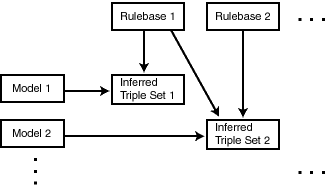
Description of the illustration inferencing.gif
A rule is an object that can be applied to draw inferences from RDF data. A rule is identified by a name and consists of:
-
An IF side pattern for the antecedents
-
A THEN side pattern for the consequents
For example, the rule that a chairperson of a conference is also a reviewer of the conference could be represented as follows:
('chairpersonRule', -- rule name
 '(?r :ChairPersonOf ?c)', -- IF side pattern
 NULL,  -- filter condition
 '(?r :ReviewerOf ?c)', -- THEN side pattern
 SEM_ALIASES (SEM_ALIAS('', 'http://some.org/test/'))
)
For best performance, use a single-triple pattern on the THEN side of the rule. If a rule has multiple triple patterns on the THEN side, you can easily break it into multiple rules, each with a single-triple pattern, on the THEN side.
A rulebase is an object that contains rules. The following Oracle-supplied rulebases are provided:
-
RDFS
-
RDF (a subset of RDFS)
-
OWLSIF (empty)
-
RDFS++ (empty)
-
OWL2EL (empty)
-
OWL2RL (empty)
-
OWLPrime (empty)
-
SKOSCORE (empty)
The RDFS and RDF rulebases are created when you call the SEM_APIS.CREATE_RDF_NETWORK procedure to add RDF support to the database. The RDFS rulebase implements the RDFS inference rules, as described in the World Wide Web Consortium (W3C) RDF Semantics document at http://www.w3.org/TR/rdf-mt/. The RDF rulebase represents the RDF inference rules, which are a subset of the RDFS entailment rules. You can see the contents of these rulebases by examining the SEMR_RDFS and SEMR_RDF views.
You can also create user-defined rulebases using the SEM_APIS.CREATE_RULEBASE procedure. User-defined rulebases enable you to provide additional specialized inferencing capabilities.
For each rulebase, a table is created to hold rules in the rulebase, along with a view with a name in the format SEMR_rulebase-name (for example, SEMR_FAMILY_RB for a rulebase named FAMILY_RB). You must use this view to insert, delete, and modify rules in the rulebase. Each SEMR_rulebase-name view has the columns shown in Table: SEMR_rulebase-name View Columns.
Table: SEMR_rulebase-name View Columns
| Column Name | Data Type | Description |
|---|---|---|
| RULE_NAME | VARCHAR2(30) | Name of the rule |
| ANTECEDENTS | VARCHAR2(4000) | IF side pattern for the antecedents |
| FILTER | VARCHAR2(4000) | (Not supported.) |
| CONSEQUENTS | VARCHAR2(4000) | THEN side pattern for the consequents |
| ALIASES | SEM_ALIASES | One or more namespaces to be used. (The SEM_ALIASES data type is described in Using the SEM_MATCH Table Function to Query RDF data.) |
Information about all rulebases is maintained in the SEM_RULEBASE_INFO view, which has the columns shown in Table: SEM_RULEBASE_INFO View Columns and one row for each rulebase.
Table: SEM_RULEBASE_INFO View Columns
| Column Name | Data Type | Description |
|---|---|---|
| OWNER | VARCHAR2(30) | Owner of the rulebase |
| RULEBASE_NAME | VARCHAR2(25) | Name of the rulebase |
| RULEBASE_VIEW_NAME | VARCHAR2(30) | Name of the view that you must use for any SQL statements that insert, delete, or modify rules in the rulebase |
| STATUS | VARCHAR2(30) | Contains VALID if the rulebase is valid, INPROGRESS if the rulebase is being created, or FAILED if a system failure occurred during the creation of the rulebase. |
Example: Inserting a Rule into a Rulebase
Example: Inserting a Rule into a Rulebase creates a rulebase named family_rb, and then inserts a rule named grandparent_rule into the family_rb rulebase. This rule says that if a person is the parent of a child who is the parent of a child, that person is a grandparent to (that is, has the grandParentOf relationship with respect to) the child’s child. It also specifies a namespace to be used. (This example is an excerpt from Example: Using an RDF graph for Family Information in Example: Family Information.)
EXECUTE SEM_APIS.CREATE_RULEBASE('family_rb', network_owner=>'RDFUSER', network_name=>'NET1');

INSERT INTO rdfuser.net1#semr_family_rb VALUES(
  'grandparent_rule',
  '(?x :parentOf ?y) (?y :parentOf ?z)',
  NULL,
  '(?x :grandParentOf ?z)',
  SEM_ALIASES(SEM_ALIAS('','http://www.example.org/family/')));
Note that the kind of grandparent rule shown in Example: Inserting a Rule into a Rulebase can be implemented using the OWL 2 property chain construct. For information about property chain handling, see Property Chain Handling.
Example: Using Rulebases for Inferencing
You can specify one or more rulebases when calling the SEM_MATCH table function (described in Using the SEM_MATCH Table Function to Query RDF data), to control the behavior of queries against RDF data. Example: Using Rulebases for Inferencing refers to the family_rb rulebase and to the grandParentOf relationship created in Example: Inserting a Rule into a Rulebase, to find all grandfathers (grandparents who are male) and their grandchildren. (This example is an excerpt from Example: Using an RDF graph for Family Information in Example: Family Information.)
-- Select all grandfathers and their grandchildren from the family RDF graph.
-- Use inferencing from both the RDFS and family_rb rulebases.
SELECT x$rdfterm grandfather, y$rdfterm grandchild
  FROM TABLE(SEM_MATCH(
    'PREFIX  rdf: <http://www.w3.org/1999/02/22-rdf-syntax-ns#>
     PREFIX rdfs: <http://www.w3.org/2000/01/rdf-schema#>
     PREFIX     : <http://www.example.org/family/>
     SELECT ?x ?y
     WHERE {?x :grandParentOf ?y . ?x rdf:type :Male}',
    SEM_Models('family'),
    SEM_Rulebases('RDFS','family_rb'),
    null,  null, null,
    ' PLUS_RDFT=VC ',
    null, null,
    'RDFUSER', 'NET1'));
For information about support for native OWL inferencing, see Using OWL Inferencing.
Inferred Graphs
An inferred graph is an object containing precomputed triples that can be inferred from applying a specified set of rulebases to a specified set of RDF graphs. If a SEM_MATCH query refers to any rulebases, an inferred graph must exist for each rulebase-RDF graph combination in the query.
Note: Inferred graphs were called as Entailments in the previous book versions (prior to Oracle AI Database Release 26ai). See Changes in Terminology and Subprograms for more information.
To create an inferred graph, use the SEM_APIS.CREATE_INFERRED_GRAPH procedure. To drop (delete) an inferred graph, use the SEM_APIS.DROP_INFERRED_GRAPH procedure.
When you create an inferred graph, a view for the triples associated with the inferred graph is also created under the network owner’s schema. This view has a name in the format SEMI_inferred-graph-name, and it is visible only to the owner of the inferred graph and to users with suitable privileges. Each SEMI_inferred-graph-name view contains a row for each triple (stored as a link in a network), and it has the same columns as the SEMM_rdf-graph-name view, which is described in Table: SEMM_<rdf_graph_name> View Columns in Metadata for Models.
Information about all inferred graphs is maintained in the SEM_RULES_INDEX_INFO view, which has the columns shown in Table: SEM_RULES_INDEX_INFO View Columns and one row for each inferred graph.
Table: SEM_RULES_INDEX_INFO View Columns
| Column Name | Data Type | Description |
|---|---|---|
| OWNER | VARCHAR2(30) | Owner of the inferred graph. |
| INDEX_NAME | VARCHAR2(25) | Name of the inferred graph. |
| INDEX_VIEW_NAME | VARCHAR2(30) | Name of the view that you must use for any SQL statements that insert, delete, or modify rules in the inferred graph. |
| STATUS | VARCHAR2(30) | Contains VALID if the inferred graph is valid, INVALID if the inferred graph is not valid, INCOMPLETE if the inferred graph is incomplete (similar to INVALID but requiring less time to re-create), INPROGRESS if the inferred graph is being created, or FAILED if a system failure occurred during the creation of the inferred graph. |
| MODEL_COUNT | NUMBER | Number of RDF graphs included in the inferred graph. |
| RULEBASE_COUNT | NUMBER | Number of rulebases included in the inferred graph. |
| HAS_TOPOIDX | VARCHAR2(3) | YES if a topological index exists for the inferred graph. NO otherwise. |
Information about all database objects, such as RDF graphs and rulebases, related to inferred graphs is maintained in the SEM_RULES_INDEX_DATASETS view. This view has the columns shown in Table: SEM_RULES_INDEX_DATASETS View Columns and one row for each unique combination of values of all the columns.
Table: SEM_RULES_INDEX_DATASETS View Columns
| Column Name | Data Type | Description |
|---|---|---|
| INDEX_NAME | VARCHAR2(25) | Name of the inferred graph |
| DATA_TYPE | VARCHAR2(8) | Type of data included in the inferred graph. Examples: MODEL for an RDF graph and RULEBASE for a rulebase |
| DATA_NAME | VARCHAR2(25) | Name of the object of the type in the DATA_TYPE column |
Example: Creating an inferred graph creates an inferred graph named family_rb_rix_family, using the family graph and the RDFS and family_rb rulebases. (This example is an excerpt from Example: Using an RDF graph for Family Information in Example: Family Information.)
Example: Creating an inferred graph
BEGIN
  SEM_APIS.CREATE_INFERRED_GRAPH(
    'rdfs_rix_family',
    sem_models('family'),
    sem_Rulebases('RDFS','family_rb'),
    network_owner=>'RDFUSER', network_name=>'NET1');
END;
/
RDF Graph Collections
An RDF graph collection is a logical graph that can be used in a SEM_MATCH query. An RDF graph collection is the result of a UNION or UNION ALL operation on one or more RDF graphs and/or inferred graphs. Using RDF graph collections can help simplify the development process. However, for operational workloads in production, it is recommended you use single RDF graphs where possible.
Note: RDF Graph Collections were called as Virtual Models in the previous book versions (prior to Oracle AI Database Release 26ai). See Changes in Terminology and Subprograms for more information.
Queries against a single RDF graph can more effectively use partition pruning and are able to use local optimizer statistics for the single-graph’s partition, compared to queries against an RDF graph collection. Queries against an RDF graph collection use global optimizer statistics for the entire RDF network, which can be less accurate than local, graph-level statistics. Hence, where possible you must combine the datasets that are queried together into a single RDF graph.
Besides using RDF graph collections for development, you can also use them if you need to access data across multiple RDF graphs in a single query, and also need to keep the individual RDF graphs separate for other queries. However, if possible, you must combine the datasets that are queried together into a single RDF graph.
Using an RDF graph collection, during the development phase of a project, provides the following benefits:
-
It can simplify management of access privileges for RDF data. For example, assume that you have created three RDF graphs and one inferred graph based on the three graphs and the OWLPrime rulebase. Without an RDF graph collection, you must individually grant and revoke access privileges for each RDf graph and the inferred graph. However, if you create an RDF graph collection that contains the three RDF graphs and the inferred graph, you will only need to grant and revoke access privileges for the single RDF graph collection.
-
It can facilitate rapid updates to RDF graphs. For example, assume that RDF graph collection VM1 contains RDF graph M1 and inferred graph R1 (that is, VM1 = M1 UNION ALL R1), and assume that RDF graph M1_UPD is a copy of M1 that has been updated with additional triples and that R1_UPD is an inferred graph created for M1_UPD. Now, to have user queries over VM1 go to the updated RDF graph and inferred graph, you can redefine RDF graph collection VM1 (that is, VM1 = M1_UPD UNION ALL R1_UPD).
-
It can simplify query specification because querying an RDF graph collection is equivalent to querying multiple RDF graphs in a SEM_MATCH query. For example, assume that RDF graphs m1, m2, and m3 already exist, and that an inferred graph has been created for m1, m2 ,and m3 using the OWLPrime rulebase. You could create an RDF graph collection vm1 as follows:
EXECUTE sem_apis.create_rdf_graph_collection('vm1', sem_models('m1', 'm2', 'm3'),
                                      sem_rulebases('OWLPRIME'),
                                      network_owner=>'RDFUSER',
                                      network_name=>'NET1');
To query the RDF graph collection, use the RDF graph collection name as if it were a RDF graph in a SEM_MATCH query. For example, the following query on the RDF graph collection:
SELECT * FROM TABLE (sem_match('{…}', sem_models('vm1'), null, …));is equivalent to the following query on all the individual RDF graphs:
SELECT * FROM TABLE (sem_match('{…}', sem_models('m1', 'm2', 'm3'),
                                      sem_rulebases('OWLPRIME'), …));
A SEM_MATCH query over an RDF graph collection will query either the SEMV or SEMU view (SEMU by default and SEMV if the ‘ALLOW_DUP=T’ option is specified) rather than querying the UNION or UNION ALL of each RDF graph and inferred graph. For information about these views and options, see the reference section for the SEM_APIS.CREATE_RDF_GRAPH_COLLECTION procedure.
RDF graph collections use views (described later in this section) and add some metadata entries, but do not significantly increase system storage requirements.
To create an RDF graph collection, use the SEM_APIS.CREATE_RDF_GRAPH_COLLECTION procedure. To drop (delete) an RDF graph collection, use the SEM_APIS.DROP_RDF_GRAPH_COLLECTION procedure. an RDF graph collection is dropped automatically if any of its component RDF graphs, rulebases, or inferred graph are dropped. To replace an RDF graph collection without dropping it, use the SEM_APIS.CREATE_RDF_GRAPH_COLLECTION procedure with the REPLACE=T option. Replacing an RDF graph collection allows you to redefine it while maintaining any access privileges.
To query an RDF graph collection, specify the RDF graph collection name in the models parameter of the SEM_MATCH table function, as shown in Example: Querying an RDF Graph Collection.
For information about the SEM_MATCH table function, see Using the SEM_MATCH Table Function to Query RDF data, which includes information using certain attributes when querying an RDF graph collection.
When you create an RDF graph collection, an entry is created for it in the SEM_MODEL$ view, which is described in Table: SEM_MODEL$ View Columns in RDF Graphs. However, the values in several of the columns are different for RDF graph collections as opposed to RDF graphs, as explained in Table: SEM_MODEL$ View Column Explanations for RDF graph collections.
Table: SEM_MODEL$ View Column Explanations for RDF graph collections
| Column Name | Data Type | Description |
|---|---|---|
| OWNER | VARCHAR2(30) | Schema of the owner of the RDF graph collection |
| MODEL_ID | NUMBER | Unique model ID number, automatically generated. Will be a negative number, to indicate that this is an RDF graph collection. |
| MODEL_NAME | VARCHAR2(25) | Name of the RDF graph collection |
| TABLE_NAME | VARCHAR2(30) | Null for an RDF graph collection |
| COLUMN_NAME | VARCHAR2(30) | Null for an RDF graph collection |
| MODEL_TABLESPACE_NAME | VARCHAR2(30) | Null for an RDF graph collection |
Information about all RDF graph collections is maintained in the SEM_VMODEL_INFO view, which has the columns shown in Table: SEM_VMODEL_INFO View Columns and one row for each RDF graph collection.
Table: SEM_VMODEL_INFO View Columns
| Column Name | Data Type | Description |
|---|---|---|
| OWNER | VARCHAR2(30) | Owner of the RDF graph collection |
| VIRTUAL_MODEL_NAME | VARCHAR2(25) | Name of the RDF graph collection |
| UNIQUE_VIEW_NAME | VARCHAR2(30) | Name of the view that contains unique triples in the RDF graph collection, or null if the view was not created |
| DUPLICATE_VIEW_NAME | VARCHAR2(30) | Name of the view that contains duplicate triples (if any) in the RDF graph collection |
| STATUS | VARCHAR2(30) | Contains In the case of multiple inferred graphs, the lowest status among all of the component inferred graphs is used as the RDF graph collection's status ( |
| MODEL_COUNT | NUMBER | Number of RDF graphs in the RDF graph collection |
| RULEBASE_COUNT | NUMBER | Number of rulebases used for the RDF graph collection |
| RULES_INDEX_COUNT | NUMBER | Number of inferred graphs in the RDF graph collection |
Information about all objects (RDF graphs, rulebases, and inferred graphs) related to RDF graph collections is maintained in the SEM_VMODEL_DATASETS view. This view has the columns shown in Table: SEM_VMODEL_DATASETS View Columns and one row for each unique combination of values of all the columns.
Table: SEM_VMODEL_DATASETS View Columns
| Column Name | Data Type | Description |
|---|---|---|
| VIRTUAL_MODEL_NAME | VARCHAR2(25) | Name of the RDF graph collection |
| DATA_TYPE | VARCHAR2(8) | Type of object included in the RDF graph collection. Examples: MODEL for an RDF graph, RULEBASE for a rulebase, or RULEIDX for an inferred graph |
| DATA_NAME | VARCHAR2(25) | Name of the object of the type in the DATA_TYPE column |
Example: Querying an RDF Graph Collection
SELECT COUNT(protein)
  FROM TABLE (SEM_MATCH (
    'SELECT ?protein
     WHERE {
      ?protein rdf:type :Protein .
      ?protein :citation ?citation .
      ?citation :author "Bairoch A."}',
    RDF_MODELS('UNIPROT_VM'),
    NULL,
    SEM_ALIASES(SEM_ALIAS('', 'http://purl.uniprot.org/core/')),
    NULL,
    NULL,
    'ALLOW_DUP=T',
    NULL,
    NULL,
    'RDFUSER','NET1'));
Named Graphs
RDF Graph supports the use of named graphs, which are described in the “RDF Dataset” section of the W3C SPARQL Query Language for RDF recommendation (http://www.w3.org/TR/rdf-sparql-query/#rdfDataset).
This support is provided by extending an RDF triple consisting of the traditional subject, predicate, and object, to include an additional component to represent a graph name. The extended RDF triple, despite having four components, will continue to be referred to as an RDF triple in this document. In addition, the following terms are sometimes used:
-
N-Triple is a format that does not allow extended triples. Thus, n-triples can include only triples with three components.
-
N-Quad is a format that allows both “regular” triples (three components) and extended triples (four components, including the graph name). For more information, see
http://www.w3.org/TR/2013/NOTE-n-quads-20130409/.To load a file containing extended triples (possibly mixed with regular triples) into an Oracle AI Database, the input file must be in N-Quad format.
The graph name component of an RDF triple must either be null or a URI. If it is null, the RDF triple is said to belong to a default graph; otherwise it is said to belong to a named graph whose name is designated by the URI.
Additionally, to support named graphs in SDO_RDF_TRIPLE_S object type (described in Semantic Data Types_ Constructors_ and Methods), a new syntax is provided for specifying a model-graph, that is, a combination of model (RDF graph) and named graph (if any) together, and the RDF_M_ID attribute holds the identifier for a model-graph: a combination of model (RDF graph) ID and value ID for the named graph (if any). The name of a model-graph is specified as rdf_graph_name, and if a named graph is present, followed by the colon (:) separator character and the name of the named graph (which must be a URI and enclosed within angle brackets < >).
For example, in a medical data set the named graph component for each RDF triple might be a URI based on patient identifier, so there could be as many named graphs as there are unique patients, with each named graph consisting of data for a specific patient.
For information about performing specific operations with named graphs, see the following:
-
Using constructors and methods:Semantic Data Types_ Constructors_ and Methods
-
Loading: Loading N-Quad Format Data into a Staging Table Using an External Table and Loading Data into Named Graphs Using INSERT Statements
-
Querying: GRAPH Keyword Support and Expressions in the SELECT Clause
-
Inferencing: Using Named Graph Based Inferencing (Global and Local)
Data Formats Related to Named Graph Support
TriG and N-QUADS are two popular data formats that provide graph names (or context) to triple data. The graph names (context) can be used in a variety of different ways. Typical usage includes, but is not limited to, the grouping of triples for ease of management, localized query, localized inference, and provenance.
Example: RDF Data Encoded in TriG Format Example: RDF Data Encoded in TriG Format shows an RDF data set encoded in TriG format. It contains a default graph and a named graph.
@prefix foaf: <http://xmlns.com/foaf/0.1/> .
@prefix dc: <http://purl.org/dc/elements/1.1/> .

# Default graph
{
  <http://my.com/John> dc:publisher <http://publisher/Xyz> .
}

# A named graph
<http://my.com/John> {
  <http://my.com/John> foaf:name "John Doe" .
}
When loading the TriG file from Example: RDF Data Encoded in TriG Format into a DatasetGraphOracleSem object (for example, using Example: Loading Quads into a DatasetGraph in Bulk Loading Using RDF Semantic Graph Support for Apache Jena, but replacing the constant "N-QUADS" with "TRIG"), the triples in the default graph will be loaded into Oracle AI Database as triples with null graph names, and the triples in the named graphs will be loaded into the database with the designated graph names.
Example: N-QUADS Format Representation
N-QUADS format is a simple extension of the existing N-TRIPLES format by adding an optional fourth column (graph name or context). Example: N-QUADS Format Representation shows the N-QUADS format representation of the TriG file from Example: RDF Data Encoded in TriG Format.
<http://my.com/John> <http://purl.org/dc/elements/1.1/publisher> <http://publisher/Xyz> .
<http://my.com/John> <http://xmlns.com/foaf/0.1/name> "John Doe" <http://my.com/John>
When loading an N-QUADS file into a DatasetGraphOracleSem object (see Example: Loading Quads into a DatasetGraph), lines without the fourth column will be loaded into Oracle AI Database as triples with null graph names, and lines with a fourth column will be loaded into the database with the designated graph names.
RDF Data Security Considerations
The following database security considerations apply to the use of RDF data:
-
When an RDF graph or inferred graph is created, the owner gets the SELECT privilege with the GRANT option on the associated view. Users that have the SELECT privilege on these views can perform SEM_MATCH queries against the associated RDF graph or inferred graph.
-
When a rulebase is created, the owner gets the SELECT, INSERT, UPDATE, and DELETE privileges on the rulebase, with the GRANT option. Users that have the SELECT privilege on a rulebase can create an inferred graph that includes the rulebase. The INSERT, UPDATE, and DELETE privileges control which users can modify the rulebase and how they can modify it.
-
To perform data manipulation language (DML) operations on an RDF graph, a user must have DML privileges for the corresponding base table.
-
The creator of the base table corresponding to an RDF graph can grant privileges to other users.
-
To perform data manipulation language (DML) operations on a rulebase, a user must have the appropriate privileges on the corresponding database view.
-
The creator of an RDF graph can grant SELECT privileges on the corresponding database view to other users.
-
A user can query only those RDF graphs for which that user has SELECT privileges to the corresponding database views.
-
Only the creator of an RDF graph or a rulebase can drop it.
RDF Privilege Considerations
The following database privilege-related considerations apply to the use of RDF networks:
-
The network owner user whose schema will hold the tables and views for the RDF network must have the following roles and priviliges:
GRANT CONNECT, RESOURCE, CREATE VIEW TO <network_owner_user>; -
The network owner requires quota on the tablespace that will contain the network.