Settings Page
You can set your configuration parameters in the Settings page.
The Graph Query UI application settings are determined by the JSON files that are included in the RDF Server and Client installation.
-
datasource.json: File with RDF data source definitions. -
general.json: General configuration parameters. -
proxy.json: Proxy server parameters. -
logging.json: Logging settings. -
seed.json: Master seed key value generated at first deployment of the application. This is a unique value to be used for encrypting and decrypting passwords for Oracle data sources defined with credentials. This is an important file, and losing it will not allow you to encrypt or to decrypt passwords values.
On the server side, the directory WEB-INF/workspace is the default directory to store configuration information, logs, and temporary files. The configuration files are stored by default in WEB-INF/workspace/config.
Note:
If the RDF Graph Query application is deployed from an unexploded .war file, and if no JVM parameter is defined for the workspace folder location, then the default workspace location for the application is WEB-INF/workspace. However, any updates to the configuration, log, and temp files done by the application may be lost if the application is redeployed. Also, wallet data source files and published dataset files can be lost.
To overcome this, you must start the application server, such as Weblogic or Tomcat, with the JVM parameter oracle.rdf.workspace.dir set. For example: =Doracle.rdf.workspace.dir=/rdf/server/workspace. The workspace folder must exist on the file system. Otherwise, the workspace folder defaults to WEB-INF/workspace.
It is recommended to have a backup of the workspace folder, in case of redeploying the application on a different location. Copying the workspace folder contents to the location of the JVM parameter, allows to restore all configurations in new deployment.
Data Sources JSON Configuration File
The JSON file for data sources stores the general attributes of a data source, including specific properties associated with data source.
The following example shows a data source JSON file with two data sources: one an Oracle container data source defined on the application server, and the other an external data source.
{
  "datasources" : [
   {
    "name" : "rdfuser193c",
    "type" : "DATABASE",
    "description" : "19.3 Oracle database",
    "properties" : {
      "jndiName" : "jdbc/RDFUSER193c"
    }
   },
   {
     "name" : "dbpedia",
     "type" : "ENDPOINT",
     "description" : "Dbpedia RDF data - Dbpedia.org",
      "properties" : {
         "baseUrl" : "http://dbpedia.org/sparql",
         "provider" : "Dbpedia"
       }
    }
  ]
}
General JSON configuration file
The general JSON configuration file stores information related to SPARQL queries, JBDC parameters and upload parameters.
The JSON file includes the following parameters:
-
Maximum SPARQL rows: Defines the limit of rows to be fetched for a SPARQL query. If a query returns more than this limit, the fetching process is stopped.
-
SPARQL Query Timeout: Defines the time in seconds to wait for a query to complete.
-
Allow publishing: Flag to enable public data source selection for using with SPARQL query endpoints.
-
Publishing data source: The RDF data source to publish datasets.
-
JDBC Fetch size: The fetch size parameter for JDBC queries.
-
JDBC CLOB Prefetch size: Number of characters to be prefetched when retrieving large object values.
-
JDBC Batch size: The batch parameter for JDBC updates.
-
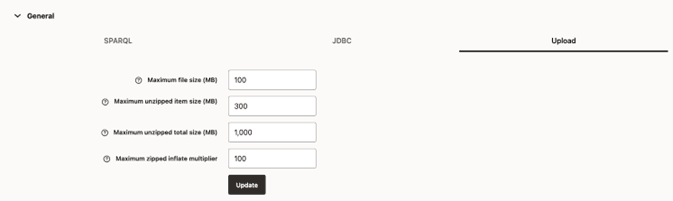
Maximum file size to upload: The maximum file size to be uploaded into server.
-
Maximum unzipped item size: The maximum size for an item in a zip file.
-
Maximum unzipped total size: The size limit for all entries in a zip file.
-
Maximum zip inflate multiplier: Maximum allowed multiplier when inflating files.
These parameters can be updated as shown in the following figures
Figure: General SPARQL Parameters
{: #GUID-9996FA31-DA78-4185-B088-5E9AEF1E6C91__FIG_KNQ_SBQ_GQB .titleinfigure} 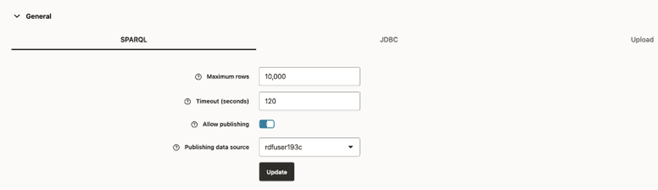 Figure: General JDBC Parameters {: #GUID-9996FA31-DA78-4185-B088-5E9AEF1E6C91__FIG_HPZ_5BQ_GQB .titleinfigure}
 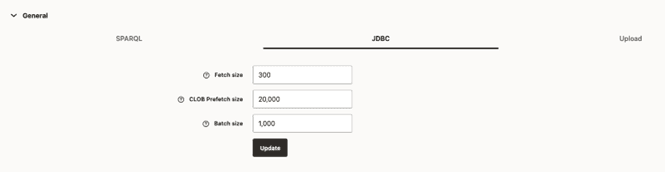 Figure: General File Upload Parameters {: #GUID-9996FA31-DA78-4185-B088-5E9AEF1E6C91__FIG_HNV_R4D_PNB .titleinfigure}
Description of the illustration general_json_config_file.png
Proxy JSON Configuration File
The Proxy JSON configuration file contains proxy information for your enterprise network.
Figure: Proxy JSON Configuration File
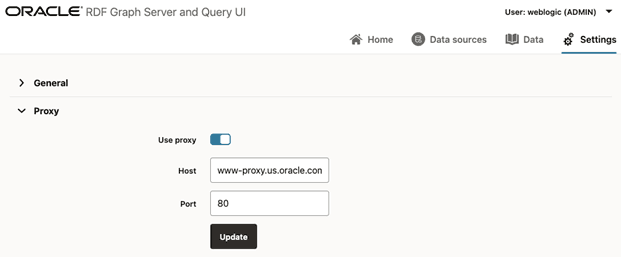
Description of the illustration proxy_json_config_file.png
The file includes the following parameters:
-
Use proxy: flag to define if proxy parameters should be used.
-
Host: proxy host value.
-
Port: proxy port value.
Logging JSON Configuration File
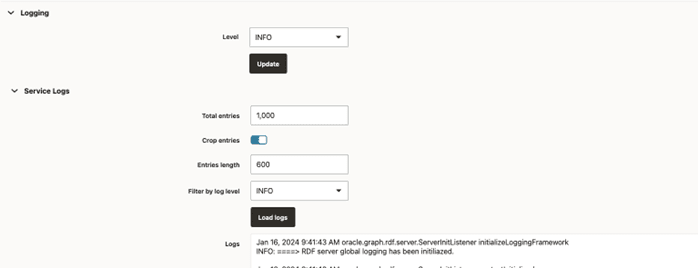
The Logging JSON configuration file contains the logging settings. You can specify the logging level.
For Administrators and RDF users, it is also possible to load the logs for further analysis.
Figure: Logging JSON Configuration File