Use Select AI in SQL Queries
Use DBMS_CLOUD_AI.GENERATE in SQL queries to generate content, analyze sentiment, filter results, and summarize feedback stored in database tables.
About Using Select AI in SQL Queries
You can invoke Select AI directly from SQL queries using DBMS_CLOUD_AI.GENERATE. This enables you to combine Oracle SQL processing with a configured AI provider or model through a Select AI profile, avoiding a separate application-tier pipeline while preserving database-side SQL orchestration.
Using Select AI in SQL allows you to:
- Generate content from table data.
- Classify or analyze text.
- Filter rows using AI-generated results.
- Summarize large collections of text.
- Build scalable AI pipelines using standard SQL operations.
Note: For row-by-row examples, DBMS_CLOUD_AI.GENERATE may invoke the configured model once per row. For large tables, filter rows with ordinary SQL first, consider batching or persisting generated results, and review provider rate limits, latency, and cost.
The DBMS_CLOUD_AI.GENERATE function can be used in SQL statements, PL/SQL programs, and applications that access Autonomous AI Database.
Prerequisites
Before you run these examples:
- Make sure you have the privileges required to use
DBMS_CLOUD_AI. - Create an AI profile for your selected LLM provider, or use an existing profile.
- The examples use
OCI_PROFILEas the AI profile name. ReplaceOCI_PROFILEwith the name of your own configured profile. For setup instructions, see Create an AI Profile. DBMS_CLOUD_AI.GENERATEreturns aCLOB.
Note: Treat all prompts as governed data. Prompts can send table data to the LLM provider configured in your AI profile. Send only the fields you need, mask or exclude sensitive data when appropriate, and follow your organization’s data-governance policies.
You can use the DBMS_CLOUD_AI.GENERATE function in SQL queries to apply generative AI to data stored in database tables. Common use cases include content generation, sentiment analysis, AI-based filtering, and text summarization.
The examples demonstrate different patterns:
| Use Case | What You Achieve | SQL Pattern |
|---|---|---|
| Generate personalized emails | Content generation | AI in SELECT clause |
| Identify sentiment | Text classification | AI in SELECT clause |
| Filter positive reviews | AI-powered filtering | AI in WHERE clause |
| Summarize product feedback | Text summarization | AI with GROUP BY and aggregation |
Generate Personalized Content
This example demonstrates how to generate personalized emails using DBMS_CLOUD_AI.GENERATE. Customer demographics and travel preferences stored in the travel_recommendations table are used as input to a large language model (LLM), which generates customized travel recommendation emails for each customer. This approach can be used to create personalized communications, recommendations, and other AI-generated content directly from database records.
Create the Sample Table
Create the travel_recommendations table:
CREATE TABLE travel_recommendations (
    id           NUMBER,
    task         VARCHAR(4000),
    task_rules   VARCHAR(4000),
    last_name    VARCHAR(50),
    first_name   VARCHAR(50),
    location     VARCHAR(100),
    age          NUMBER,
    gender       VARCHAR(10),
    has_kids     VARCHAR(5),
    num_cars     NUMBER,
    income_level VARCHAR(50),
    dog_owner    VARCHAR(5)
);
Populate the Table
Note: Send only the fields necessary for the required AI task. Mask, anonymize, or exclude sensitive data where appropriate, and ensure all use of database data with AI services follows your organization’s security, privacy, and data-handling policies.
Run the following SQL statements to insert the records into the travel_recommendations table:
INSERT INTO travel_recommendations VALUES
    (1, 'Pick 5 great things to do at the location', '1. Encourage the customer to do these things. Really sell them as to why it would be right for them 2. Take into account all the information about the customer that''s provided, including family and dog situation, whether they have a car and income 3. Format the result with emojis and make it fun', 'Mouly', 'Jennine', 'Paris, France', 37, 'Female', 'NO', 2, 'F: Above 110,000', 'NO'),
    (2, 'Pick 5 great things to do at the location', '1. Encourage the customer to do these things. Really sell them as to why it would be right for them 2. Take into account all the information about the customer that''s provided, including family and dog situation, whether they have a car and income 3. Format the result with emojis and make it fun', 'Kwon', 'Min-Jae', 'Seoul, South Korea', 45, 'Male', 'YES', 1, 'E: 80,000–110,000', 'YES'),
    (3, 'Pick 5 great things to do at the location', '1. Encourage the customer to do these things. Really sell them as to why it would be right for them 2. Take into account all the information about the customer that''s provided, including family and dog situation, whether they have a car and income 3. Format the result with emojis and make it fun', 'Nguyen', 'Linh', 'Hoi An, Vietnam', 29, 'Female', 'NO', 0, 'C: 30,000–50,000', 'NO'),
    (4, 'Pick 5 great things to do at the location', '1. Encourage the customer to do these things. Really sell them as to why it would be right for them 2. Take into account all the information about the customer that''s provided, including family and dog situation, whether they have a car and income 3. Format the result with emojis and make it fun', 'Gonzalez', 'Carlos', 'Barcelona, Spain', 34, 'Male', 'YES', 2, 'D: 50,000–80,000', 'YES'),
    (5, 'Pick 5 great things to do at the location', '1. Encourage the customer to do these things. Really sell them as to why it would be right for them 2. Take into account all the information about the customer that''s provided, including family and dog situation, whether they have a car and income 3. Format the result with emojis and make it fun', 'Smith', 'Angela', 'New York City, USA', 41, 'Female', 'NO', 1, 'F: Above 110,000', 'NO');
Generate Personalized Emails
Run the following query to generate a personalized email for each customer record:
SELECT id,
       DBMS_CLOUD_AI.GENERATE(
           prompt       => prompt,
           profile_name => 'OCI_PROFILE',
           action       => 'chat') AS email_text
FROM (
    SELECT id,
           JSON_OBJECT(*) AS prompt
    FROM (
        SELECT id,
               task,
               task_rules,
               last_name,
               first_name,
               location,
               age,
               gender,
               has_kids,
               num_cars,
               income_level,
               dog_owner
        FROM travel_recommendations
    )
);
How the Query Works
The query performs the following steps:
- Retrieves customer information from the
travel_recommendationstable. - Converts each row to a JSON object using the
JSON_OBJECTfunction. The JSON object is passed to the LLM as the prompt. - Calls the
DBMS_CLOUD_AI.GENERATEfunction to generate content for each row. - Uses the AI profile specified by the
profile_nameparameter to determine the AI provider and model. - Uses the
chataction to send the prompt directly to the LLM and return the generated response.
Results
The query returns one AI-generated email for each customer in the table.
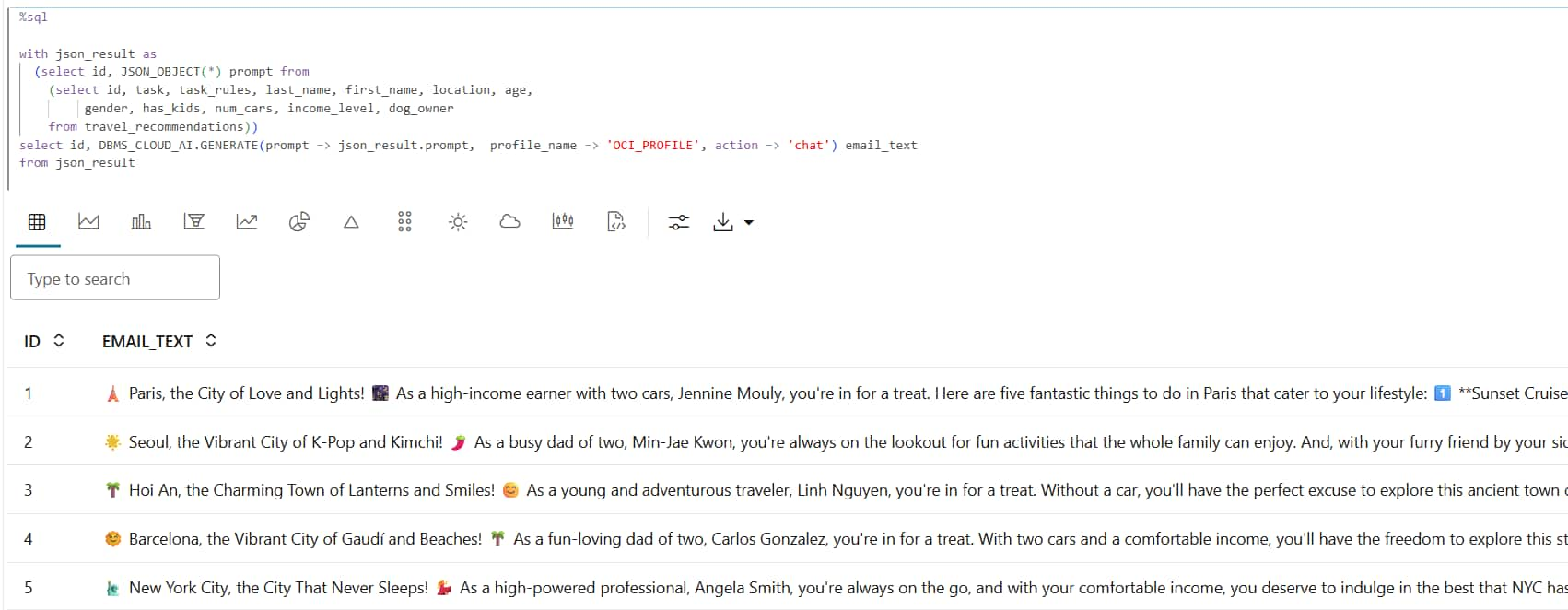
Description of the illustration personalized-travel-email-results.png
Example: Perform Sentiment Analysis
This example demonstrates how to perform sentiment analysis using DBMS_CLOUD_AI.GENERATE. Customer feedback stored in the customer_feedback table is provided as input to a large language model (LLM), which classifies each response as positive, neutral, or negative. This approach can be used to analyze customer reviews, survey responses, support tickets, and other text-based feedback stored in database tables.
Create the Sample Table
Create the customer_feedback table:
CREATE TABLE customer_feedback (
    id               NUMBER,
    first_name       VARCHAR2(50),
    last_name        VARCHAR2(50),
    product          VARCHAR2(100),
    product_feedback VARCHAR2(4000)
);
Populate the Table
Run the following SQL statements to insert the records into the customer_feedback table:
INSERT INTO customer_feedback VALUES
    (1,  'Morgan',   'Smith',     'Pixel 8',         'Absolutely love this phone! The battery lasts forever and the camera is top-notch.'),
    (2,  'Morgan',   'Smith',     'OnePlus 12',      'Incredible value for the price. Exceeded my expectations!'),
    (3,  'Reese',    'Martinez',  'Xperia 1 V',      'Best smartphone I have ever used. Highly recommend!'),
    (4,  'Jordan',   'Anderson',  'Galaxy S24',      'Absolutely love this phone! The battery lasts forever and the camera is top-notch.'),
    (5,  'Taylor',   'Nguyen',    'Pixel 8',         'Absolutely love this phone! The battery lasts forever and the camera is top-notch.'),
    (6,  'Morgan',   'Anderson',  'OnePlus 12',      'Best smartphone I have ever used. Highly recommend!'),
    (7,  'Quinn',    'Anderson',  'Xperia 1 V',      'Super smooth performance, and the design is stunning!'),
    (8,  'Jordan',   'Wilson',    'OnePlus 12',      'Best smartphone I have ever used. Highly recommend!'),
    (9,  'Casey',    'Lee',       'Galaxy S24',      'Incredible value for the price. Exceeded my expectations!'),
    (10, 'Alex',     'Patel',     'OnePlus 12',      'Incredible value for the price. Exceeded my expectations!'),
    (11, 'Morgan',   'Kim',       'OnePlus 12',      'The display is gorgeous and it handles multitasking like a champ.'),
    (12, 'Casey',    'Smith',     'Xperia 1 V',      'Incredible value for the price. Exceeded my expectations!'),
    (13, 'Taylor',   'Garcia',    'iPhone 15 Pro',   'The display is gorgeous and it handles multitasking like a champ.'),
    (14, 'Jordan',   'Wilson',    'OnePlus 12',      'The display is gorgeous and it handles multitasking like a champ.'),
    (15, 'Casey',   'Patel',     'Xperia 1 V',      'Absolutely love this phone! The battery lasts forever and the camera is top-notch.'),
    (16, 'Reese',    'Nguyen',    'iPhone 15 Pro',   'Super smooth performance, and the design is stunning!'),
    (17, 'Morgan',   'Garcia',    'iPhone 15 Pro',   'Super smooth performance, and the design is stunning!'),
    (18, 'Alex',     'Brown',     'OnePlus 12',      'It works fine for everyday use, but nothing extraordinary.'),
    (19, 'Alex',     'Anderson',  'Xperia 1 V',      'Okay phone. Does not stand out but no major issues either.'),
    (20, 'Cameron',  'Anderson',  'iPhone 15 Pro',   'Okay phone. Does not stand out but no major issues either.'),
    (21, 'Jordan',   'Kim',       'iPhone 15 Pro',   'Okay phone. Does not stand out but no major issues either.'),
    (22, 'Drew',     'Wilson',   'OnePlus 12',      'Good overall, but I had to get used to the interface.'),
    (23, 'Casey',    'Garcia',    'Pixel 8',         'It works fine for everyday use, but nothing extraordinary.'),
    (24, 'Casey',    'Brown',     'iPhone 15 Pro',   'Okay phone. Does not stand out but no major issues either.'),
    (25, 'Taylor',   'Patel',    'Pixel 8',         'Okay phone. Does not stand out but no major issues either.'),
    (26, 'Jamie',    'Kim',       'iPhone 15 Pro',   'It works fine for everyday use, but nothing extraordinary.'),
    (27, 'Casey',    'Lee',       'iPhone 15 Pro',   'Not bad, not great. Gets the job done.'),
    (28, 'Taylor',   'Wilson',    'Xperia 1 V',      'It works fine for everyday use, but nothing extraordinary.'),
    (29, 'Taylor',   'Patel',     'Xperia 1 V',      'Not bad, not great. Gets the job done.'),
    (30, 'Casey',    'Wilson',    'OnePlus 12',      'It works fine for everyday use, but nothing extraordinary.'),
    (31, 'Cameron',  'Patel',     'iPhone 15 Pro',   'Decent phone, but I expected a bit more for the price.'),
    (32, 'Taylor',   'Wilson',    'Galaxy S24',      'Not bad, not great. Gets the job done.'),
    (33, 'Taylor',   'Brown',     'Pixel 8',         'Good overall, but I had to get used to the interface.'),
    (34, 'Cameron',  'Anderson',  'OnePlus 12',      'Not bad, not great. Gets the job done.'),
    (35, 'Alex',     'Martinez',  'Pixel 8',         'The build quality feels cheap and it lags often.'),
    (36, 'Quinn',    'Garcia',    'Pixel 8',         'The build quality feels cheap and it lags often.'),
    (37, 'Cameron',  'Martinez',  'Xperia 1 V',      'The build quality feels cheap and it lags often.'),
    (38, 'Cameron',  'Lee',       'Xperia 1 V',      'The build quality feels cheap and it lags often.'),
    (39, 'Quinn',    'Martinez',  'iPhone 15 Pro',   'I have had multiple glitches and crashes since I bought it.'),
    (40, 'Taylor',   'Smith',     'OnePlus 12',      'Battery drains too fast and it overheats.'),
    (41, 'Jordan',   'Smith',     'Xperia 1 V',      'Not worth the money. Very dissatisfied with the performance.'),
    (42, 'Reese',    'Nguyen',    'Xperia 1 V',      'Battery drains too fast and it overheats.'),
    (43, 'Morgan',   'Garcia',    'Galaxy S24',      'I have had multiple glitches and crashes since I bought it.'),
    (44, 'Cameron',  'Brown',     'Pixel 8',         'Not worth the money. Very dissatisfied with the performance.'),
    (45, 'Quinn',    'Brown',     'Galaxy S24',      'Camera quality is disappointing, especially in low light.'),
    (46, 'Casey',    'Garcia',    'Xperia 1 V',      'The build quality feels cheap and it lags often.'),
    (47, 'Jordan',   'Martinez',  'OnePlus 12',      'Battery drains too fast and it overheats.'),
    (48, 'Cameron',  'Smith',     'Xperia 1 V',      'Battery drains too fast and it overheats.'),
    (49, 'Drew',     'Wilson',    'Galaxy S24',      'Battery drains too fast and it overheats.'),
    (50, 'Jordan',   'Smith',     'Galaxy S24',      'Not worth the money. Very dissatisfied with the performance.');
Analyze Customer Feedback Sentiment
Run the following query to classify the sentiment of each customer feedback record:
SELECT id,
       product,
       DBMS_CLOUD_AI.GENERATE(
           prompt =>
               'Return the sentiment of the following text using only the values positive, neutral, or negative, nothing else: '
               || product_feedback,
           profile_name => 'OCI_PROFILE',
           action => 'chat') AS sentiment
FROM customer_feedback;
The sentiment for each product as the result of the query:
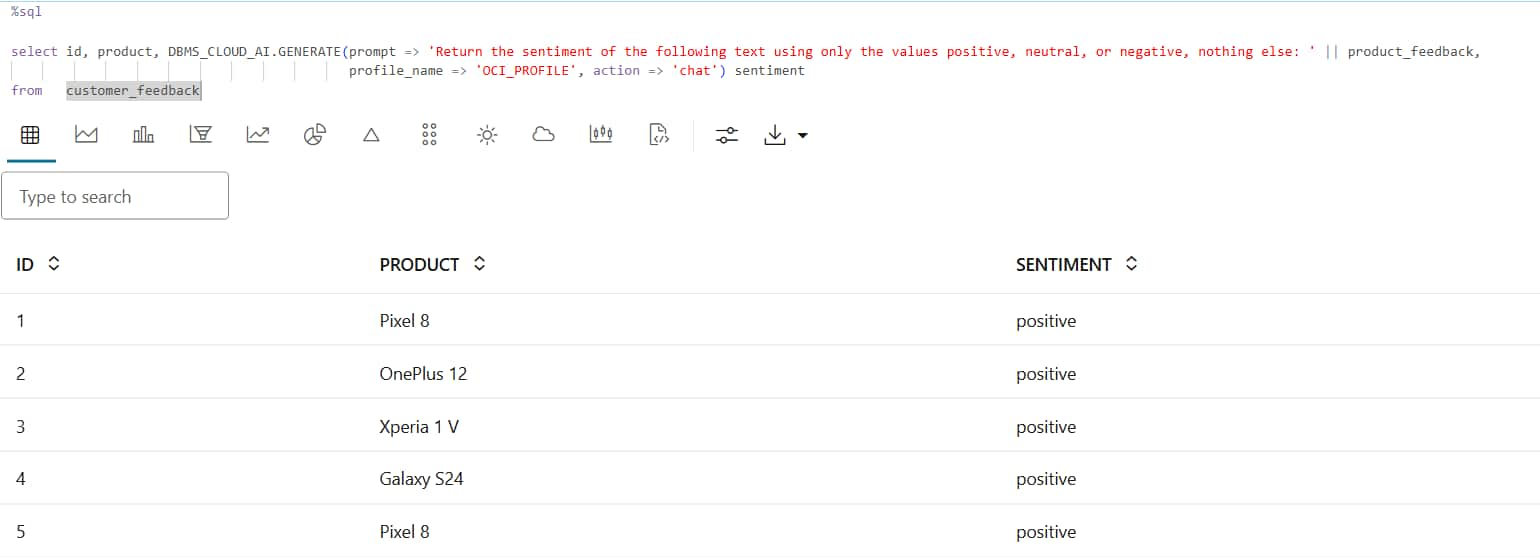
Description of the illustration customer-feedback-sentiment-results.png
The query can also count the occurrences of each sentiment for every product:
SELECT
    product,
    DBMS_LOB.SUBSTR(
        DBMS_CLOUD_AI.GENERATE(
            prompt       => 'Return the sentiment of the following text using only the values positive, neutral, or negative, nothing else: '
                            || product_feedback,
            profile_name => 'OCI_PROFILE',
            action       => 'chat'
        ),
        4000,
        1
    ) sentiment,
    count(*) count
FROM customer_feedback
GROUP BY product, sentiment
ORDER BY sentiment desc, product
How the Query Works
The query performs the following steps:
- Retrieves customer feedback from the
customer_feedbacktable. - Combines an instruction prompt with the contents of the
product_feedbackcolumn. - Calls the
DBMS_CLOUD_AI.GENERATEfunction to send the prompt to a large language model (LLM). - Uses the AI profile specified by the
profile_nameparameter to determine the AI provider and model used to generate the response. - Uses the
chataction to instruct the LLM to classify the feedback as positive, neutral, or negative. - Returns the sentiment classification for each feedback record.
Results
The query returns a sentiment classification for each customer feedback record. The generated output can be used for customer experience analysis, product feedback monitoring, trend analysis, and reporting.
Sentiment analysis results for customer feedback
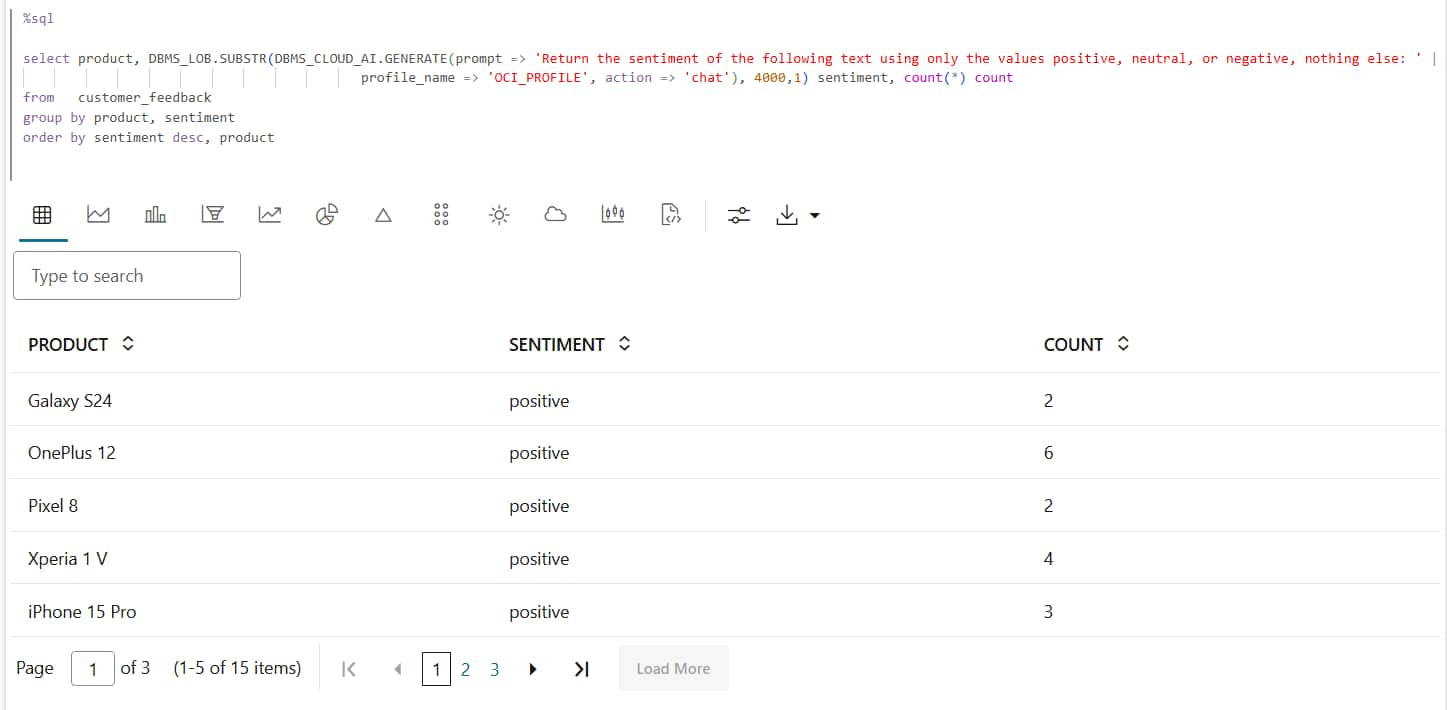
Description of the illustration sentiment-counts-by-product.png
Example: Filter Rows Using AI Results
This example demonstrates how to use DBMS_CLOUD_AI.GENERATE to filter rows based on AI-generated sentiment classifications. Customer feedback stored in the customer_feedback table is analyzed by a large language model (LLM), and only records with positive sentiment are returned. This approach can be used to identify favorable product reviews, customer comments, survey responses, and other positive feedback stored in database tables.
Filter Product Reviews with Positive Feedback
Run the following query to return only product reviews that have positive sentiment:
SELECT id, product
FROM customer_feedback
WHERE LOWER(TRIM(DBMS_LOB.SUBSTR(
                  DBMS_CLOUD_AI.GENERATE(
                      prompt => 'Return the sentiment of the following text using only the values positive, neutral, or negative, nothing else: '
                          || product_feedback,
                      profile_name => 'OCI_PROFILE',
                      action       => 'chat'),
                  4000,
                  1))) = 'positive';
How the Query Works
The query performs the following steps:
- Retrieves customer feedback records from the
customer_feedbacktable. - Combines an instruction prompt with the contents of the
product_feedbackcolumn. - Calls the
DBMS_CLOUD_AI.GENERATEfunction to classify the sentiment of each feedback record. - Uses the AI profile specified by the
profile_nameparameter to determine the AI provider and model used to generate the response. - Uses the
chataction to instruct the LLM to return a sentiment classification. - Applies a
WHEREclause to return only records classified aspositive.
Results
The query returns the IDs and product names for customer feedback records classified as positive. AI-generated classifications can be used in WHERE clauses to filter query results based on the meaning and sentiment of text rather than structured column values.
Product reviews with positive sentiment
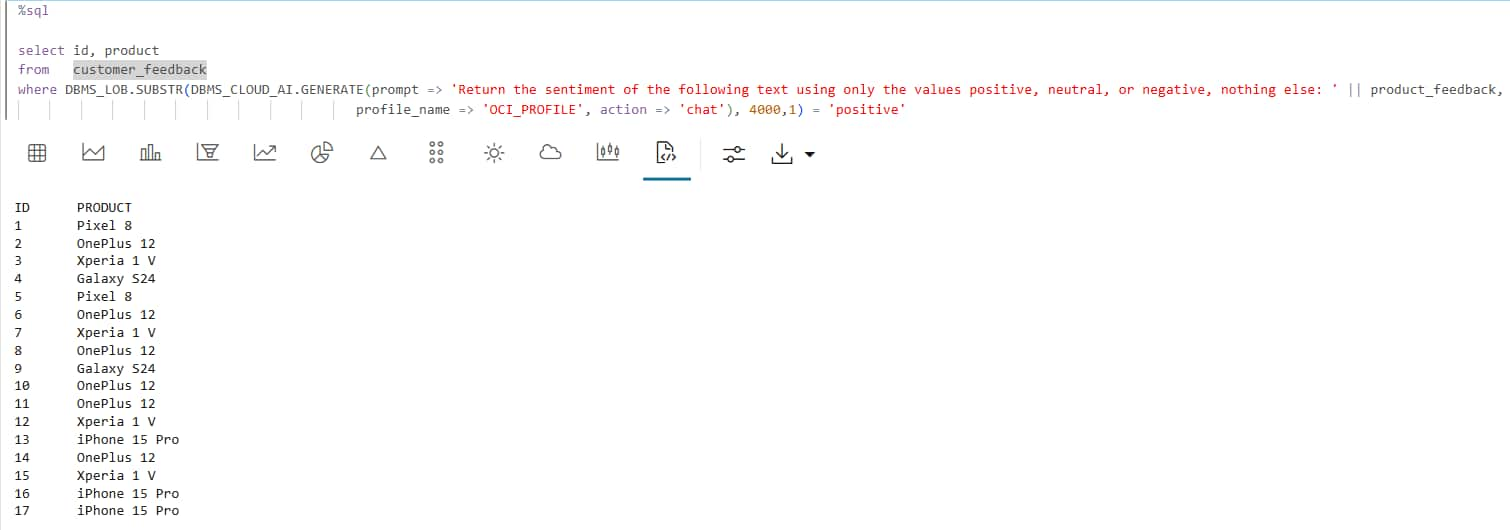
Description of the illustration positive-product-review-results.png
Example: Summarize Grouped Content
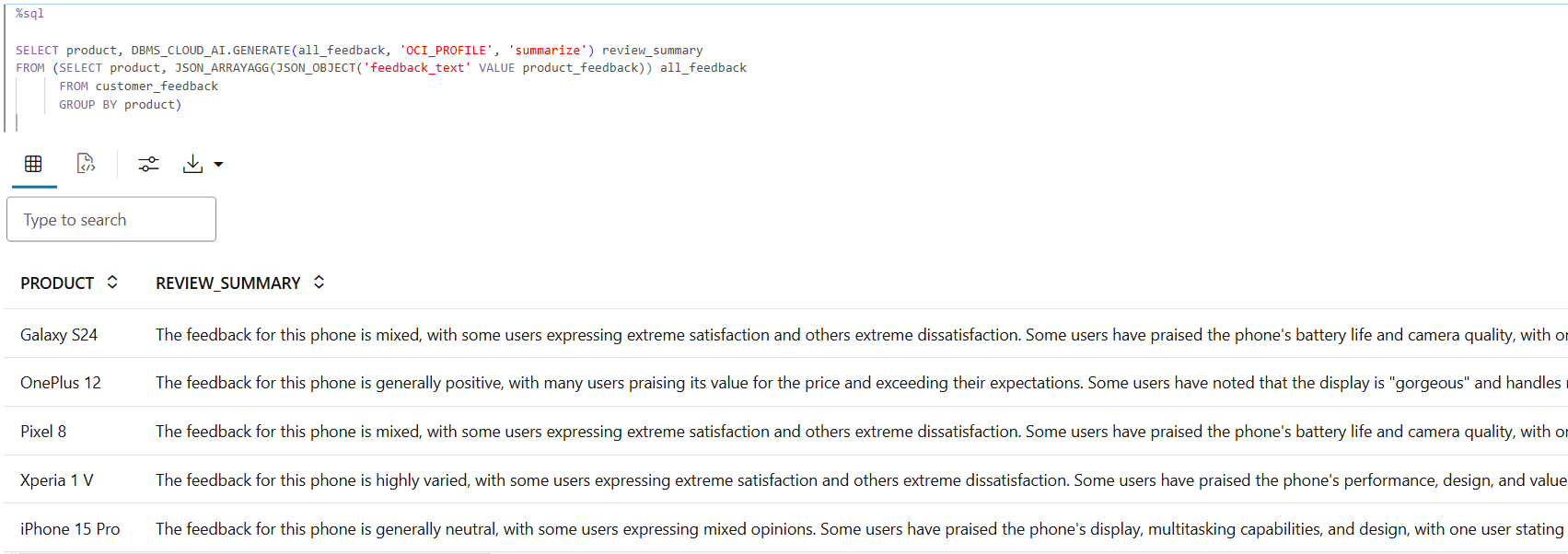
This example demonstrates how to use DBMS_CLOUD_AI.GENERATE to summarize customer feedback grouped by product. Feedback comments stored in the customer_feedback table are aggregated by product and provided as input to a large language model (LLM), which generates a concise summary for each product. This approach can be used to summarize product reviews, customer comments, survey responses, and other text-based feedback stored in database tables.
Summarize Feedback Grouped by Product
Run the following query to generate a summary of customer feedback for each product:
SELECT product,
       DBMS_CLOUD_AI.GENERATE(
           prompt       => all_feedback,
           profile_name => 'OCI_PROFILE',
           action       => 'summarize') AS review_summary
FROM (
    SELECT product,
           JSON_ARRAYAGG(
               JSON_OBJECT('feedback_text' VALUE product_feedback)
           ) AS all_feedback
    FROM customer_feedback
    GROUP BY product
);
How the Query Works
The query performs the following steps:
- Retrieves customer feedback from the
customer_feedbacktable. - Groups the feedback by product.
- Aggregates the feedback for each product into a JSON array using
JSON_ARRAYAGG. - Passes the aggregated feedback to
DBMS_CLOUD_AI.GENERATE. - Uses the
profile_nameparameter to specify the AI provider and model. - Uses the
summarizeaction to generate a concise summary for each product.
Results
The query returns one AI-generated summary for each product in the table. The generated summaries can be used to review customer sentiment, identify recurring themes, and create product feedback reports.
Product feedback summaries
Description of the illustration product-feedback-summaries.png