CREATE MACRO
Purpose
Use the CREATE MACRO statement to create a macro in a schema.
Prerequisites
-
To create or replace a macro in your own schema, you must have the
CREATE PROCEDUREsystem privilege. To create or replace a macro in another user’s schema, you must have theCREATE ANY PROCEDUREsystem or schema privilege. In an Oracle Real Application Clusters environment, all instances in the cluster must support macros before you create a macro. -
To invoke a macro owned by another user, you must have the
EXECUTEobject privilege on the macro or theEXECUTE ANY PROCEDUREsystem or schema privilege. The invoker must have the necessary privileges to access the objects referenced by the expanded SQL.
Syntax
create_macro::=

Description of the illustration create_macro.gif
macro_def_list::=

Description of the illustration macro_def_list.gif
param_list::=
Description of the illustration param_list.gif
param_type::=
Description of the illustration param_type.gif
column_list::=
Description of the illustration macro_column_list.gif
sql_expr::=
Description of the illustration sql_expr.gif
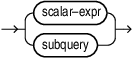
scalar_exp
For information on scalar_expr, see SELECT.
See Also:
-
SELECT for the syntax of subquery
Semantics
OR REPLACE
Specify OR REPLACE to redefine an existing macro without first dropping it.
IF NOT EXISTS
Specify IF NOT EXISTS to create the macro only if an object with the specified name does not already exist. If such an object exists, Oracle AI Database retains the existing object and does not return an error.
schema
Specify the schema in which to create the macro. If you omit schema, Oracle AI Database creates the macro in your schema.
macro_name
Specify the name of the macro. The name must comply with the rules for database object names.
See Also: Database Object Names and Qualifiers
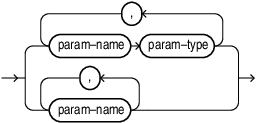
param_list
Specify the parameters that the macro accepts. Specify a SQL data type for scalar parameters. You can specify data type constraints, such as length, precision, and scale. However, Oracle AI Database does not use these constraints when resolving or invoking the macro.
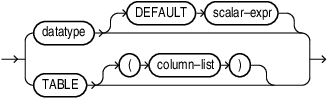
DEFAULT
Specify DEFAULT to define a default value for a scalar parameter.
TABLE
Specify TABLE to declare a table parameter. Omit the column list to create a generic table parameter. A generic table parameter accepts any compatible table expression. Specify a column list to constrain the table parameter to a required set of columns.
A table parameter declared in a native macro differs from a table parameter declared in a function-based macro. Function-based macros declare table parameters by using DBMS_TF.TABLE_T.
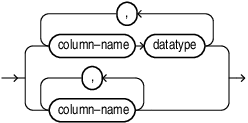
column_list
Specify the columns required by a constrained table parameter. If you omit the data type of every column, Oracle AI Database treats each column as having the VARCHAR2 data type.
AS | IS
Specify either AS or IS. These keywords are semantically equivalent. Follow AS or IS with the SQL expression or query that defines the macro. Specify the defining SQL directly. Do not enclose it in a character literal. Oracle AI Database parses the defining SQL and performs semantic and data type validation when it creates the macro.
Scalar Expressions, Subqueries, and Predicates
-
A scalar expression defines a scalar macro.
-
An unparenthesized query defines a table macro.
-
A query enclosed in parentheses defines a scalar macro whose result is a scalar subquery.
Parameter Name Resolution
-
If an unqualified name matches both a macro parameter and a column in the query scope, Oracle AI Database resolves the name to the macro parameter.
-
Qualify a macro parameter with the macro name when qualification is required.
-
Qualify a column with its table name or table alias when qualification is required.
-
Adding a column whose name matches a macro parameter does not change the meaning of an existing macro definition. The unqualified name continues to resolve to the macro parameter.
-
If a table in the query scope has the same name as the macro, assign an alias to the table and use that alias to qualify its columns.
on_clause
Specify the ON clause to bind the parameters of a scalar macro to columns of a table or view. The general macro parameter name resolution rules also apply to parameters bound by the ON clause.
If the same macro definition is visible through multiple scopes, Oracle AI Database uses the definition associated with the table or view in the innermost applicable scope.
See Also: DBMS_DATA_ACCESS
Invoking a Macro
-
You can pass arguments by using positional notation, for example,
macro_name(argument1, argument2). -
You can pass arguments by using named notation, for example,
macro_name(parameter1 => argument1, parameter2 => argument2).
Viewing Macro Metadata
-
The
DBA_MACROS,ALL_MACROS, andUSER_MACROSdata dictionary views describe macro definitions. -
The
DBA_MACRO_PARAMETERS,ALL_MACRO_PARAMETERS, andUSER_MACRO_PARAMETERSdata dictionary views describe macro parameters. -
The
DBA_OBJECTS,ALL_OBJECTS, andUSER_OBJECTSviews identify a native macro by using the object typeMACRO.
Restrictions on CREATE MACRO
The following restrictions apply to the statement and its definition:
-
You cannot specify
OR REPLACEandIF NOT EXISTSin the same statement. -
You cannot specify
IF EXISTSwithCREATE MACRO. -
The macro owner must have the necessary privileges to access any objects in other schemas referenced in the macro.
-
A macro name must be unique in the shared schema namespace.
-
You cannot mix typed and untyped columns in one table column list.
-
A scalar parameter default must be a constant scalar expression. A table parameter cannot have a default value.
-
A table argument must contain every required column with a compatible data type. Additional columns and a different column order are permitted.
-
Enclose a Boolean expression in parentheses.
-
An
ONclause can specify only one existing local table or view. -
You cannot specify an
ONclause for a table macro. -
The object specified in the
ONclause must occur in the current or an enclosing query scope when the macro is expanded.
Restrictions on Invoking the Created Macro
-
Invoke a scalar macro only where a scalar expression is permitted.
-
Invoke a table macro only in the
FROMclause. -
For a data grant predicate that uses an
ON-bound macro, the bound object must match the data grant’sONobject.
Examples
Creating a Scalar Macro: Example
The following statement defines a scalar macro that assigns a price tier:
CREATE MACRO price_tier(base_price NUMBER) AS
  CASE
    WHEN base_price >= 1000 THEN 'Premium'
    WHEN base_price >= 500 THEN 'Standard'
    WHEN base_price >= 100 THEN 'Basic'
    ELSE 'Entry'
  END;

SELECT price_tier(750) AS tier FROM DUAL;
The query returns Standard.
Specifying a Default Argument: Example
The following macro supplies a default value when the argument is omitted:
CREATE MACRO greet(person_name VARCHAR2 DEFAULT 'World') AS
  'Hello, ' || person_name || '!';

SELECT greet() AS greeting FROM DUAL;
SELECT greet(person_name => 'Bob') AS greeting FROM DUAL;
The first query returns Hello, World!. The second returns Hello, Bob!.
Creating a Table Macro: Example
The following macro returns employees in the specified department:
CREATE MACRO staff_in_dept(deptno NUMBER) AS
  SELECT *
  FROM scott.emp NATURAL JOIN scott.dept
  WHERE deptno = staff_in_dept.deptno;

SELECT *
FROM staff_in_dept(deptno => 10)
WHERE job = 'CLERK';
The qualified reference staff_in_dept.deptno identifies the macro parameter.
Specifying a Generic Table Parameter: Example
The following macro counts the rows in its table argument:
CREATE MACRO row_count(t TABLE) AS
  SELECT COUNT(*) AS row_cnt FROM t;

SELECT * FROM row_count(scott.emp);
Specifying Table Columns and Data Types: Example
The following macro requires its table argument to have the three named columns with matching data types:
CREATE MACRO employee_pay_summary(
  t TABLE(department_id NUMBER, salary NUMBER, job_id VARCHAR2),
  job_title VARCHAR2
) AS
  SELECT department_id, AVG(salary) AS average_salary
  FROM t
  WHERE job_id = UPPER(employee_pay_summary.job_title)
  GROUP BY department_id;

SELECT *
FROM employee_pay_summary(hr.employees, 'SA_REP');

WITH employee_data AS (
  SELECT job_id, salary, department_id
  FROM hr.employees
)
SELECT *
FROM employee_pay_summary(employee_data, 'SA_REP');
Both arguments contain the required columns. The first contains additional columns. The second lists the required columns in a different order.
Omitting Table Column Data Types: Example
The following definition treats a, b, and c as VARCHAR2 columns:
CREATE MACRO selected_columns(t TABLE(a, b, c), c_value VARCHAR2) AS
  SELECT a, b FROM t WHERE c = selected_columns.c_value;
It is equivalent to this definition:
CREATE MACRO selected_columns(
  t TABLE(a VARCHAR2, b VARCHAR2, c VARCHAR2),
  c_value VARCHAR2
) AS
  SELECT a, b FROM t WHERE c = selected_columns.c_value;
These statements show alternative definitions; execute one definition, or use OR REPLACE when replacing the first.
Distinguishing Parameters from Columns: Example
The following definition uses the macro name to qualify the parameter and a table alias to qualify the column:
CREATE MACRO department_row_count(deptno NUMBER) AS
  SELECT COUNT(*) AS row_cnt
  FROM scott.emp e
  WHERE e.deptno = department_row_count.deptno;

SELECT * FROM department_row_count(10);
An unqualified deptno in this definition would resolve to the parameter. The reference e.deptno resolves to the table column.
Creating a Scalar Subquery Macro: Example
The parentheses make the following definition scalar-valued:
CREATE MACRO scalar_query(n NUMBER) IS
  (SELECT n FROM DUAL);

SELECT scalar_query(10) AS value FROM DUAL;
Removing the parentheses changes the definition to a table-valued macro:
CREATE MACRO table_query(n NUMBER) IS
  SELECT n FROM DUAL;

SELECT * FROM table_query(10);
Creating a Predicate Macro: Example
The following Boolean expression is enclosed in parentheses:
CREATE MACRO positive_number(n NUMBER) AS (n > 0);

SELECT *
FROM scott.dept
WHERE positive_number(deptno);
Binding a Macro to a Table: Example
The following macro binds job to the scott.emp table:
CREATE MACRO check_title(title VARCHAR2) ON scott.emp AS
  (job = UPPER(title));

SELECT *
FROM scott.emp e
WHERE check_title('clerk');
The expanded predicate compares e.job with UPPER('clerk'). Invoking the macro in a scope that contains only scott.dept does not match the bound object and results in an error.
Using a Macro in a Data Grant: Example
The following macro defines a reusable employee access predicate:
CREATE MACRO employee_access(
  department_number NUMBER,
  minimum_salary NUMBER
) ON hr.employees AS
  (department_id = employee_access.department_number
   AND salary >= employee_access.minimum_salary);
The following data grant references the macro. This example assumes that analyst_data_role is an existing data role and that the issuing user has the privileges required to create the data grant and use the macro.
CREATE DATA GRANT employee_read_access AS SELECT
  ON hr.employees
  WHERE employee_access(80, 10000)
  TO analyst_data_role;
The macro and data grant bind to the same table, hr.employees.
See Also: CREATE DATA GRANT and Create Data Grants for prerequisites and restrictions.
Granting and Revoking EXECUTE: Example
The following statements illustrate access to a macro from another schema. Execute the first two statements as SCOTT:
CREATE MACRO successor(n NUMBER) AS n + 1;
GRANT EXECUTE ON successor TO hr;
Execute the following query as HR:
SELECT scott.successor(10) AS next_number FROM DUAL;The query returns 11.
Execute the following statement as SCOTT to revoke the grant:
REVOKE EXECUTE ON successor FROM hr;The invocation requires another applicable privilege after this grant is revoked.
See Also: