CREATE DATA GRANT
Purpose
Use CREATE DATA GRANT to create data grants for rows and columns on tables and views.
Prerequisites
You must have the CREATE DATA GRANT system privilege to create data grants in your own schema.
You must have the CREATE ANY DATA GRANT system privilege to create data grants in schemas other than your own.
You must have the ADMINISTER ANY DATA GRANT system privilege to create data grants on objects in any schema (can also be granted at the schema level for non-SYS schema).
You can use the data dictionary view DBA_DATA_GRANTS to get a list of data grants granted on each table and view. See DBA_DATA_GRANTS of the Database Reference.
Syntax
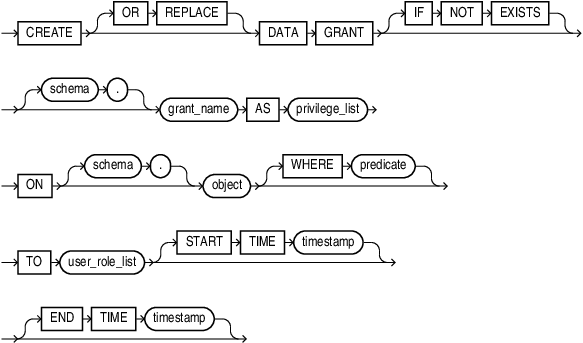
Description of the illustration create_data_grant.gif
privilege_list
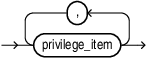
Description of the illustration privilege_list.gif
privilege_item

Description of the illustration privilege_item.gif
privilege
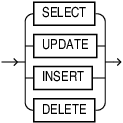
Description of the illustration privilege.gif
column_list
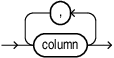
Description of the illustration column_list.gif
user_role_list
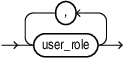
Description of the illustration user_role_list.gif
user_role
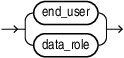
Description of the illustration user_role.gif
Semantics
-
OR REPLACE: changes the definition of an existing data grant without dropping and re-creating it. WhenOR REPLACEis specified, and the data grant does not exist, it will be created.When
OR REPLACEis not specified, and the data grant does not exist, it will be created. If the data grant already exists, then an error is thrown.You can update the following clauses using
OR REPLACEfor existing data grants: privilege_list, user_role_list,START TIME,END TIME, and predicate. -
IF NOT EXISTS: If you specifyIF NOT EXISTSand the data grant already exists, no error is raised. If the data grant does not exist, then it is created.If you do not specify
IF NOT EXISTSand the data grant already exists, an error is raised. If the data grant does not exist, then it is created. -
Note that only one of
OR REPLACEorIF NOT EXISTSis allowed in the sameCREATE DATA GRANTstatement. Using bothOR REPLACEandIF NOT EXISTSin the same statement results in an error. -
schema: specifies the schema in which to create the data grant. The schema must be a valid database user. When a Deep Sec end user executes
CREATE DATA GRANT, you must explicitly provide the schema unless the end user has a schema assigned via theCREATE END USERorALTER END USERstatement. -
grant_name: is the name of a data grant object and can be schema qualified. If the schema is not specified, then the database assumes the current schema. Note that if there are many data grants, each of them can belong to a different schema.
-
privilege_list: contains the names of CRUD operations which are granted in the data grant. A privilege cannot appear more than once in the list, otherwise an error is raised.
ALL COLUMNS EXCEPT: contains the list of columns you want to exclude. The specified privilege is granted on all the columns of the target table or view except the ones listed in column_list. Any future columns added to the table are also granted to users as theALLkeyword is expanded to all-columns at runtime, not at the time of the grant.column_list: can be specified only when the
INSERT,SELECT, orUPDATEprivilege are granted. If you do not list columns, then the grantees will be granted the specified privilege on all columns in the table or view. You cannot specifyDELETEbecause it is not a valid column-level privilege.For creating data grants on
SYS.END_USER_CONTEXT, only row-levelSELECTandUPDATEprivileges are supported. Other privileges and column-level privileges are not permitted. -
object: can be a table, view, or materialized view. If the schema is not specified for the object, then the database assumes the object is in the current schema. If the object does not exist, an error is thrown.
The
ONclause must reference exactly one object, multiple objects will result in an error.If the object in the new data grant is different from the object previously specified in the
ONclause, an error is raised.Data grants are not supported for objects owned by
SYS, with the exception of theSYS.END_USER_CONTEXTview. -
predicate: can be any valid SQL predicate that indicates the rows of interest. It represents a subset of rows within a table or view. Predicates with data grants enable Deep Sec to enforce row-level security. It has the limitation of 4,000 characters. If the predicate length exceeds 4000 characters, an error is raised.
The predicate is validated twice, once during the DDL execution of
CREATE DATA GRANTand the second time during runtime of the SQL query. During DDL, the predicate is checked for syntax errors and existence of the objects in the predicate. During runtime, i.e., for DML, the predicate is checked for cyclic loops, for example, whether the predicate contains a reference to same object as the one in theONclause ofCREATE DATA GRANTcommand.The database privileges for objects referenced in the predicate of a data grant are checked at runtime (not at DDL time) against the data grant owner, as determined by the schema of grant_name.
-
user_role_list: specifies the end users or data roles to which the privilege is being granted. Data grants cannot include database users or database roles in user_role_list. If an end user or a data role appears more than once in user_role_list, an error is raised.
user_role: refers to a Deep Sec end user or data role. If neither of these exists, an error is raised indicating that the grantee is not an end user or a data role.
end_user: refers to the name of the local application user. The end user must be valid for the creation of data grant to succeed. Otherwise, an error results saying that grantee is not an end user.
data_role: refers to the name of the local or external data role. The data role must be valid for the creation of data grant to succeed. Otherwise, an error is raised indicating that the grantee is not a data role.
-
START TIME: specifies the time from when the data grant is effective. If not specified, the data grant becomes effective immediately.START TIMEmust not be later thanEND TIME. Otherwise an error is raised.Evaluation is based on the database or server setting of current time (for example,
SYSTIMESTAMPorDBtime zone behavior). -
END TIME: specifies the time from when the data grant becomes ineffective. If not specified, the data grant is effective until it is dropped. Evaluation is based on the database or server setting of current time (for example,SYSTIMESTAMPorDBtime zone behavior).