CREATE DATA ROLE
Purpose
Use CREATE DATA ROLE to create a data role or an externally mapped data role (with a mapping to an external application role).
Prerequisites
To create a data role, the CREATE DATA ROLE system privilege is required. Customers can use the DBA_DATA_ROLES data dictionary view to query the existing data roles together with their properties.
Syntax

Description of the illustration create_data_role.gif
external_role_clause::=

Description of the illustration external_role_clause.gif
local_role_clause::=
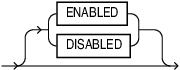
Description of the illustration local_role_clause.gif
Semantics
-
OR REPLACE: WhenOR REPLACEis specified, and the data role does not exist, it will be created. If the data role already exists, the identifier_string will be replaced.When
OR REPLACEis not specified, and the data role does not exist, it will be created. If the data role already exists, then an error will be thrown. -
IF NOT EXISTS: If you specifyIF NOT EXISTSand the data role already exists, no error is thrown. If the data role does not exist, then it will be created.If you do not specify
IF NOT EXISTSand the data role already exists, an error is thrown. If the data role does not exist, then it will be created. -
Note that only one of
OR REPLACEorIF NOT EXISTSis allowed in the sameCREATE DATA ROLEstatement. Using bothOR REPLACEandIF NOT EXISTSin the same statement results in an error. -
data_role_name: the name of the data role to be created.
-
identifier_string: Identifier string for the data role. The string must have a prefix indicating the external provider and must be less than 1024 characters.
The following are supported:
-
AZURE_CLIENT_ID=idforAZUREin format:AZURE_ROLE=<role_name> or AZURE_APP=<aud>:AZURE_ROLE=<role_name>for Microsoft Entra ID. -
IAM_OAUTH_CLIENT_ID=idforOCI IAMin format:IAM_OAUTH_GROUP=<group_name>for Oracle Cloud Infrastructure Identity and Access Management (OCI IAM).
The external provider mapping string (for externally-mapped roles only). The supported formats are:
-
AZURE_ROLE=role_nameorAZURE_APP=aud:AZURE_ROLE=role_namefor Microsoft Entra ID. -
IAM_OAUTH_GROUP=group_namefor Oracle Cloud Infrastructure Identity and Access Management (OCI IAM).
-
-
ENABLED/DISABLED: specifies whether the data role is enabled or disabled on creation. If you do not specify it,ENABLEDis used by default. This clause does not apply to externally mapped data roles. -
Note that the same external application role cannot have more than one data role mapping. When creating an externally mapped data role, an error is raised if the specified external identifier with an externally mapped data role already exists. The external ID string comparison is case-insensitive.
-
After a local data role is granted to an application identity, it can be enabled only by the application, and it cannot be granted to other end users and data roles. Also,
ENABLED/DISABLEDoption will not be applicable.
Example
The following SQL statement creates an externally mapped data role, employee_role, which is mapped from the AZURE role, employee:
CREATE DATA ROLE employee_role
  MAPPED TO 'AZURE_ROLE=employee';
The following SQL statement creates a local data role, it_support_role:
CREATE DATA ROLE it_support_role;