Graph Reference
Purpose
Each GRAPH_TABLE starts with a graph reference that references the graph to perform the pattern matching on.
Prerequisites
To query a property graph, you must have READ or SELECT object privilege on the graph. Note that you do not require READ or SELECT object privilege on the tables or views that underlie the graph.
To issue an Oracle Flashback Query using the graph_ref_as_of_clause in GRAPH_TABLE, you must additionally have FLASHBACK object privilege on the tables and materialized views that underlie the graph. This is needed only for those tables and views that are accessed by the query, based on the specified graph pattern and label expressions used therein. Alternatively, you must have FLASHBACK ANY TABLE system privilege.
To invoke a graph algorithm function (GAF), you must have EXECUTE privilege on the DBMS_OGA and DBMS_GAF packages. By default, this privilege is granted to PUBLIC for both packages.
Syntax
graph_reference::=

Description of the illustration graph_reference.gif
graph_name::=

Description of the illustration graph_name.gif
graph_ref_as_of_clause::=
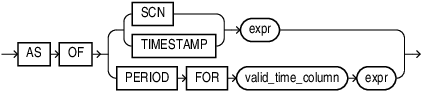
Description of the illustration graph_ref_as_of_clause.gif
Semantics
A graph name may be qualified with a schema name to allow for querying graphs created by other users. Furthermore, you can specify the graph_ref_as_of_clause clause to retrieve the result of the graph query at a particular change number (SCN) or timestamp. If you specify SCN, then expr must evaluate to a number. If you specify TIMESTAMP, then expr must evaluate to a timestamp value. In either case, expr cannot evaluate to NULL.
Example 1
The following query counts the number of persons in the students_graph :
SELECT COUNT(*)
FROM GRAPH_TABLE ( students_graph
  MATCH (a IS person)
  COLUMNS (a.name)
);
The output is:
  COUNT(*)
----------
      4
Example 2
The following example queries a graph at two different timestamps. It first inserts a new row into the university table that underlies the students_graph. It then queries versions of the graph before and after the insertion.
INSERT INTO university (name) VALUES ('u3');SELECT COUNT(*)
FROM GRAPH_TABLE (
students_graph
MATCH (u IS university)
COLUMNS (u.*)
);SELECT COUNT(*)
FROM GRAPH_TABLE (
students_graph AS OF TIMESTAMP (SYSTIMESTAMP - INTERVAL '2' MINUTE)
MATCH (u IS university)
COLUMNS (u.*)
);DELETE FROM university WHERE name = 'u3';Result of first query:
  COUNT(*)
----------
        3
Result of second query:
  COUNT(*)
----------
         2
Note: this example assumes that the second SELECT query is run at least two minutes after the graph was created and within two minutes after running the INSERT statement, otherwise the output is different.
Graph Algorithm Functions
You can combine graph algorithm computation with graph queries using Graph Algorithm Functions (GAFs) with the GRAPH_TABLE operator.
GAFs are PL/SQL functions that take a graph as input and return a new graph as output. You can use this new graph as input to GRAPH_TABLE in the first argument.
A graph algorithm function computes one or more new properties on a given graph, but does not change its topology. Computed properties may be vertex or edge properties. These properties can then be accessed like any other property of the graph in the enclosing GRAPH_TABLE operator.
Example
SELECT *
FROM GRAPH_TABLE(
  dbms_oga.pagerank(
    students_graph,
    PROPERTY(VERTEX OUTPUT rank),
    100, 1e-6, 0.85d, TRUE
  )
  MATCH (p IS person)
  COLUMNS (
    p.name,
    p.rank
  )
)
ORDER BY rank DESC;
The output is:
NAME RANK
---------- ----------
Mary 1.493E-001
Bob 1.437E-001
John 1.305E-001
Alice 1.305E-001
See Also:
-
See Oracle Graph Algorithms of the PL/SQL Packages and Types Reference
-
See Running Graph Algorithm Functions in SQL Graph Queries of the Database Graph Developer's Guide for Property Graph