IS JSON Condition
SQL/JSON conditions is json and is not json are complementary. They test whether their argument is syntactically correct, that is, well-formed, JSON data. With optional keyword VALIDATE they test whether the data is also valid with respect to a given JSON schema.
-
If the data tested is syntactically correct and keyword
VALIDATEis not present, thenIS JSONreturns true, andIS NOT JSONreturns false. -
If keyword
VALIDATEis present, then the data is tested to ensure that it is both well-formed and valid with respect to the specified JSON schema. KeywordVALIDATE(optionally followed by keywordUSING) must be followed by a SQL string literal that is the JSON schema to validate against. -
If an error occurs during parsing or validating, and the data is considered to not be well-formed or not valid, then
IS JSONreturns false andIS NOT JSONreturns true. Parsing and validation errors are handled by the condition itself returning true or false. Other errors that are neither from parsing or validation, these errors are raised. -
You can use
IS JSONandIS NOT JSONin aCASEexpression or theWHEREclause of aSELECTstatement. You can useIS JSONin a check constraint.
IS_JSON_condition::=

Description of the illustration is_json_condition.gif
(IS_JSON_modifier_list::=, IS_JSON_args::=)
IS_JSON_modifier_list::=
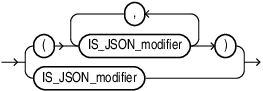
Description of the illustration is_json_modifier_list.gif
IS_JSON_modifier::=
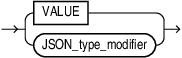
Description of the illustration is_json_modifier.gif
JSON_type_modifier::=
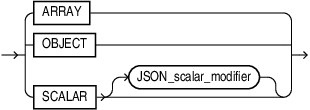
Description of the illustration json_type_modifier.gif
IS_JSON_args::=

Description of the illustration is_json_args.gif
-
Use expr to specify the JSON data to be evaluated. Specify an expression that evaluates to a text literal. If expr is a column, then the column must be of data type
VARCHAR2,CLOB, orBLOB. If expr evaluates to null or a text literal of length zero, then this condition returnsUNKNOWN.
LIMIT in json_modifier_spec applies to the entire JSON modifier specification.
Specify ALLOW NULL in json_array_spec to allow a JSON single type scalar value of NULL.
Specify DISALLOW NULL in json_array_spec to disallow a JSON single type scalar value of NULL. This is the default.
Specify SORT in json_array_spec to sort the JSON array elements in ascending order.
For more information see SQL/JSON Conditions IS JSON and IS NOT JSON of the JSON Developer’s Guide.
IS_JSON_Modifier
For JSON-type data, as an alternative to using VALIDATE with a simple JSON schema you can use the IS JSON modifers OBJECT, ARRAY, or SCALAR, respectively.
For more see SQL JSON Condtions IS JSON and IS NOT JSON of the JSON Developers’s Guide.
is_json_args
-
You must specify
FORMATJSONif expr is a column of data typeBLOB.
If you specify STRICT, then this condition considers only strict JSON syntax to be well-formed JSON data. If you specify LAX, then this condition also considers lax JSON syntax to be well-formed JSON data. The default is LAX.
For a full discussion of STRICT and LAX syntax see About Strict and Lax JSON Syntax, and TYPE Clause for SQL Functions and Conditions
-
If you specify
WITHUNIQUEKEYS, then this condition considers JSON data to be well-formed only if key names are unique within each object. If you specifyWITHOUTUNIQUEKEYS, then this condition considers JSON data to be well-formed even if duplicate key names occur within an object. AWITHOUTUNIQUEKEYStest performs faster than aWITHUNIQUEKEYStest. The default isWITHOUTUNIQUEKEYS. -
Specify the optional keyword
VALIDATEto test that the data is also valid with respect to a given JSON schema. -
To enforce that a JSON type value is a certain type, you can use JSON type modifiers. See SQL/JSON Conditions IS JSON and IS NOT JSON of the JSON Developer’s Guide.
JSON Schema Validation
A JSON schema typically specifies the allowed structure and data typing of other JSON documents. You can therefore use a JSON schema to validate JSON data. You can validate JSON data against a JSON schema in the following ways:
-
Use condition
IS JSON(orIS NOT JSON) with keywordVALIDATEand the name of a JSON schema, to test whether targeted data is valid (or invalid) against that schema. The schema can be provided as a literal string or a usage domain. (KeywordVALIDATEcan optionally be followed by keywordUSING.)You can use
VALIDATEwith condition is json anywhere you can use that condition. This includes use in aWHEREclause, or as a check constraint to ensure that only valid data is inserted in a column.When used as a check constraint for a JSON-type column, you can alternatively omit is json, and just use keyword
VALIDATEdirectly. These two table creations are equivalent, for a JSON-type column:
CREATE TABLE tab (jcol JSON VALIDATE '{"type" : "object"}');CREATE TABLE tab (jcol JSON CONSTRAINT jchk
CHECK (jcol IS JSON VALIDATE '{"type" : "object"}'));- Use a usage domain as a check constraint for JSON type data. For example:
CREATE DOMAIN jd AS JSON CONSTRAINT jchkd CHECK (jd IS JSON VALIDATE '{"type" : "object"});CREATE TABLE jtab(jcol JSON DOMAIN jd);When creating a domain from a schema, you can alternatively omit the constraint and is json, and just use keyword VALIDATE directly. This domain creation is equivalent to the previous one:
CREATE DOMAIN jd AS JSON VALIDATE '{"type" : "object"};For databases that support a binary JSON format, data can be encoded on the client. In such cases, the database does not have to convert textual JSON to its binary representation and hence validation using an extended data type can be performed.
If textual JSON is sent to the database, it is followed by an encoding process to a binary representation (server-side encoding). In such circumstances, the schema validator can operate in CAST mode. That is, the binary encoder can use the value specified for the extended data type keyword in the JSON schema and encode the scalar field to its binary representation. Only scaler types are eligible for casting.
CREATE TABLE jtab (
  id    NUMBER(9) PRIMARY KEY,

  jcol  JSON CHECK(jcol IS JSON VALIDATE CAST USING '{
                  "type": "object",
                  "properties": {
                       "firstName": {
                        "extendedType": "string",
                        "maxLength": 50
                      },
                      "birthDate" : {
                        "extendedType": "date"
                      }
                    },
                    "required": ["firstName", "birthDate"]
                  }'
  )
);
The following textual JSON is a valid document per the above schema:
{
  "firstName": "Scott",
  "birthDate": "1990-04-02"
}- Use PL/SQL functions explained fully in JSON Schema of the JSON Developer’s Guide.
Static dictionary views DBA_JSON_SCHEMA_COLUMNS, ALL_JSON_SCHEMA_COLUMNS, and USER_JSON_SCHEMA_COLUMNS describe a JSON schema that you is used as a check constraint.
Each row of these views contains the name of the table, the JSON column, and the constraint defined by the JSON schema, as well as the JSON schema itself and an indication of whether the cast mode is specified for the JSON schema. Views DBA_JSON_SCHEMA_COLUMNS and ALL_JSON_SCHEMA_COLUMNS also contain the name of the table owner.
Examples
IS JSON VALIDATE
The following exampe creates a schema jsontab1 with a JSON constraint jtlisj that has a JSON validate check:
CREATE TABLE jsontab1(
    id NUMBER(4),
    j  JSON CONSTRAINT jt1isj CHECK (j IS JSON VALIDATE USING
     '{
       "type":"object",
       "minProperties": 2
      }')
    );
The following example shows the error when you try to insert values other than a JSON object:
INSERT INTO jsontab1(j) VALUES ('["a", "b"]');
INSERT INTO jsontab1(j) VALUES ('["a", "b"]')
*
ERROR at line 1:
ORA-02290: check constraint (SYS.JT1ISJ) violated
The following two examples shows a row added with valid input :
INSERT INTO jsontab1(j) VALUES ('{"a": "a", "b": "b"}');

   1 row created.
INSERT INTO jsontab1(jschd) VALUES (json('"a json string"'));
1 row created.The following example adds another constraint jschdsv to table jsontab1:
ALTER TABLE jsontab1
ADD jschd JSON CONSTRAINT jschdsv
                   CHECK (jschd IS JSON VALIDATE USING '{"type":"string"}');

Table altered.
SQL> INSERT INTO jsontab1(jschd) VALUES (json('3.1415'));
INSERT INTO jsontab1(jschd) VALUES (json('3.1415'))
*
ERROR at line 1:
ORA-02290: check constraint (SYS.JSCHDSV) violatedIS JSON VALIDATE in WHERE Clause
SELECT COUNT(1) FROM jsontab1 WHERE j IS JSON
VALIDATE
         '{"type" : "object",
              "properties" : {
                  "id" : {
                      "type" : "number"
                   }
               }
           }';
Testing for STRICT or LAX JSON Syntax: Example
The following statement creates table t with column col1:
CREATE TABLE t (col1 VARCHAR2(100));The following statements insert values into column col1 of table t:
INSERT INTO t VALUES ( '[ "LIT192", "CS141", "HIS160" ]' );
INSERT INTO t VALUES ( '{ "Name": "John" }' );
INSERT INTO t VALUES ( '{ "Grade Values" : { A : 4.0, B : 3.0, C : 2.0 } }');
INSERT INTO t VALUES ( '{ "isEnrolled" : true }' );
INSERT INTO t VALUES ( '{ "isMatriculated" : False }' );
INSERT INTO t VALUES (NULL);
INSERT INTO t VALUES ('This is not well-formed JSON data');
The following statement queries table t and returns col1 values that are well-formed JSON data. Because neither the STRICT nor LAX keyword is specified, this example uses the default LAX setting. Therefore, this query returns values that use strict or lax JSON syntax.
SELECT col1
  FROM t
  WHERE col1 IS JSON;

COL1
-------------------------------------------------- [ "LIT192", "CS141", "HIS160" ]
{ "Name": "John" }
{ "Grade Values" : { A : 4.0, B : 3.0, C : 2.0 } }
{ "isEnrolled" : true }
{ "isMatriculated" : False }
The following statement queries table t and returns col1 values that are well-formed JSON data. This example specifies the STRICT setting. Therefore, this query returns only values that use strict JSON syntax.
SELECT col1
  FROM t
  WHERE col1 IS JSON STRICT;

COL1
-------------------------------------------------- [ "LIT192", "CS141", "HIS160" ]
{ "Name": "John" }
{ "isEnrolled" : true }
The following statement queries table t and returns col1 values that use lax JSON syntax, but omits col1 values that use strict JSON syntax. Therefore, this query returns only values that contain the exceptions allowed in lax JSON syntax.
SELECT col1
  FROM t
  WHERE col1 IS NOT JSON STRICT AND col1 IS JSON LAX;

COL1
--------------------------------------------------
{ "Grade Values" : { A : 4.0, B : 3.0, C : 2.0 } }
{ "isMatriculated" : False }
Testing for Unique Keys: Example
The following statement creates table t with column col1:
CREATE TABLE t (col1 VARCHAR2(100));The following statements insert values into column col1 of table t:
INSERT INTO t VALUES ('{a:100, b:200, c:300}');
INSERT INTO t VALUES ('{a:100, a:200, b:300}');
INSERT INTO t VALUES ('{a:100, b : {a:100, c:300}}');
The following statement queries table t and returns col1 values that are well-formed JSON data with unique key names within each object:
SELECT col1 FROM t
  WHERE col1 IS JSON WITH UNIQUE KEYS;

COL1
---------------------------
{a:100, b:200, c:300}
{a:100, b : {a:100, c:300}}
The second row is returned because, while the key name a appears twice, it is in two different objects.
The following statement queries table t and returns col1 values that are well-formed JSON data, regardless of whether there are unique key names within each object:
SELECT col1 FROM t
  WHERE col1 IS JSON WITHOUT UNIQUE KEYS;

COL1
---------------------------
{a:100, b:200, c:300}
{a:100, a:200, b:300}
{a:100, b : {a:100, c:300}}
Using IS JSON as a Check Constraint: Example
The following statement creates table j_purchaseorder, which will store JSON data in column po_document. The statement uses the IS JSON condition as a check constraint to ensure that only well-formed JSON is stored in column po_document.
CREATE TABLE j_purchaseorder
  (id RAW (16) NOT NULL,
   date_loaded TIMESTAMP(6) WITH TIME ZONE,
   po_document CLOB CONSTRAINT ensure_json CHECK (po_document IS JSON));
See Also: Conditions IS JSON and IS NOT JSON of the JSON Developer’s Guide.