Performing Operations on Edges
This topic describes the effects of adding, moving, removing, and updating edges, and explains how to perform these operations using the PL/SQL API.
Adding an Edge
Adding a non-isolated edge adds the edge to a face. It also splits the face, causing the original face to be divided into two faces. Spatial automatically adjusts the definition of the original face and creates a new face (assigning it an ID value that is unique among faces in the topology).
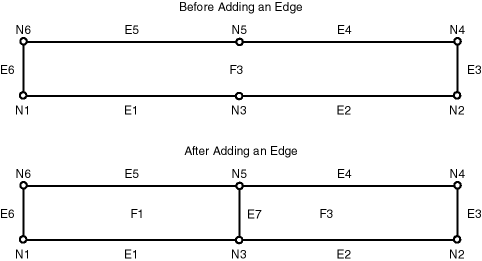
To add an edge, use the SDO_TOPO_MAP.ADD_EDGE procedure. You must specify existing nodes as the start and end nodes of the added edge. Figure: Adding a Non-Isolated Edge shows the addition of an edge (E7) between nodes N3 and N5 on face F3.
Figure: Adding a Non-Isolated Edge
Description of the illustration add_edge.gif
As a result of the operation shown in Figure: Adding a Non-Isolated Edge, face F3 is redefined to be two faces, F1 and F3. (Spatial applies complex rules, which are not documented, to determine the ID values of the resulting faces.)
Any polygon features that were defined on the original face are automatically redefined to be on both resulting faces. For example, if a park named Walden State Park had been defined on the original face F3 in Figure: Adding a Non-Isolated Edge, then after the addition of edge E7, Walden State Park would be defined on both faces F1 and F3.
Moving an Edge
Moving a non-isolated edge keeps the start or end point of the edge in the same position and moves the other of those two points to another existing node position. You must specify the source node (location before the move of the node to be moved), the target node (location after the move of the node being moved), and the vertices for the moved edge.
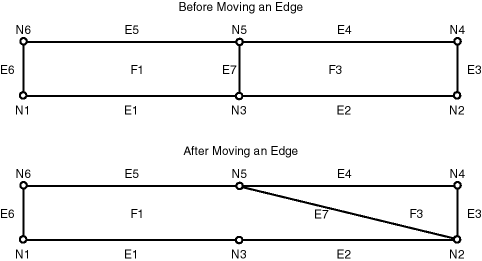
To move an edge, use the SDO_TOPO_MAP.MOVE_EDGE procedure. Figure: Moving a Non-Isolated Edge shows the movement of edge E7, which was originally between nodes N3 and N5, to be between nodes N2 and N5.
Figure: Moving a Non-Isolated Edge
Description of the illustration move_edge.gif
As a result of the operation shown in Figure: Moving a Non-Isolated Edge, faces F1 and F3 are automatically redefined to reflect the coordinates of their edges, including the new coordinates for edge E7.
Any isolated nodes and edges might remain in the same face or be moved to a different face as a result of a move operation on a non-isolated edge. The SDO_TOPO_MAP.MOVE_EDGE procedure has two output parameters, moved_iso_nodes and moved_iso_edges, that store the ID numbers of any isolated nodes and edges that were moved to a different face as a result of the operation.
An edge cannot be moved if, as a result of the move, any of the following would happen:
-
The moved edge would intersect any other edge. For example, assume that the topology before the move, as shown in Figure: Moving a Non-Isolated Edge, had included another edge (E10) that was between nodes N3 and N4. In this case, the movement of edge E7 would cause it to intersect edge E10, and therefore the move operation is not performed.
-
The node would be moved to a face that does not currently bound the edge. For example, if the movement of edge E7 would place its terminating point at a node outside the faces shown in Figure: Moving a Non-Isolated Edge (F1 and F3), the move operation is not performed.
Removing an Edge
Removing a non-isolated edge deletes the edge and merges the faces that bounded the edge. (Spatial applies complex rules, which are not documented, to determine the ID value of the resulting face.)
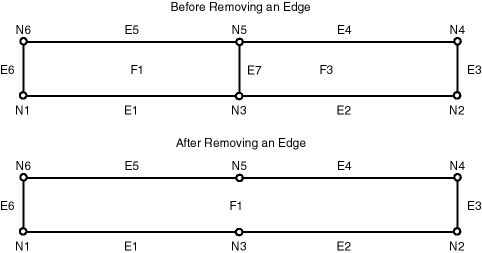
To remove an edge, use the SDO_TOPO_MAP.REMOVE_EDGE procedure. Figure: Removing a Non-Isolated Edge shows the removal of an edge (E7) that is bounded by faces F1 and F3.
Figure: Removing a Non-Isolated Edge
Description of the illustration delete_edge.gif
As a result of the operation shown in Figure: Removing a Non-Isolated Edge:
-
Face F1 is redefined to consist of the area of the original faces F1 and F3.
-
Face F3 is deleted.
-
The start and end nodes of the deleted edge (nodes N3 and N5) are not removed.
Any polygon features that were defined on both original faces are automatically redefined to be on the resulting face. For example, if a park named Adams Park had been defined on the original faces F1 and F3 in Figure: Removing a Non-Isolated Edge, then after the removal of edge E7, Adams Park would be defined on face F1.
A non-isolated edge cannot be removed if one or more of the following are true:
-
A linear feature is defined on the edge. For example, if a linear feature named Main Street had been defined on edge E7 in Figure: Removing a Non-Isolated Edge, edge E7 cannot be removed. Before you can remove the edge in this case, you must remove the definition of any linear features on the edge.
-
A polygon feature defined on either original face is not also defined on both faces. For example, if a linear feature named Adams Park had been defined on face F1 but not face F3 in Figure: Removing a Non-Isolated Edge, edge E7 cannot be removed.
Updating an Edge
Updating an isolated edge means changing one or more coordinates of the edge, but without changing the start point and end point.
To update an edge, use the SDO_TOPO_MAP.CHANGE_EDGE_COORDS procedure.
Any isolated nodes and edges might remain in the same face or be moved to a different face as a result of an update operation on a non-isolated edge. The SDO_TOPO_MAP.CHANGE_EDGE_COORDS procedure has two output parameters, moved_iso_nodes and moved_iso_edges, that store the ID numbers of any isolated nodes and edges that were moved to a different face as a result of the operation.
An edge cannot be updated if, as a result of the operation, it would intersect any other edge. See the Usage Notes for the SDO_TOPO_MAP.CHANGE_EDGE_COORDS procedure for more information about updating an edge.