3 Configuring Oracle REST Data Services for Multiple Databases
Oracle REST Data Services supports the ability to connect to more than one database. This section describes different strategies for routing requests to the appropriate database.
- Deploying ORDS with Local Configuration
- Deploying ORDS with the OCI Database API Gateway Configuration Service
This section describes how to deploy Oracle REST Data Services (ORDS) using the OCI Database API Gateway Configuration Service. - Deploying ORDS with Central Configuration Server
This section describes how to deploy ORDS using a central configuration server. - Deploying ORDS with ETCD
This section describes how to deploy ORDS using ETCD.
3.1 Deploying ORDS with Local Configuration
By default, ORDS configuration is persisted in the ORDS configuration directory
files. These files are best managed using the ords config
command line command and can be modified manually.
3.1.1 About the Request URL
Oracle REST Data Services supports a number of different strategies for routing requests to the appropriate database. All of these strategies rely on examining the request URL and choosing the database based on some kind of match against the URL. It is useful to recap the pertinent portions of a request URL. Consider the following URL:
https://www.example.com/ords/sales/f?p=1:1
This URL consists of the following sections:
-
Protocol:
https -
Host Name:
www.example.com -
Context Root:
/ordsThe context root is the location at which Oracle REST Data Services is deployed on the application server.
-
Request Path:
/sales/f?p=1.1This is the portion of the request URL relative to the context root.
For different applications, it may be important to route requests based on certain prefixes in the request path or certain prefixes in the full request URL.
There are two steps to configuring multiple databases:
-
Configuring the database connection information
-
Configuring which requests are routed to which database
Parent topic: Deploying ORDS with Local Configuration
3.1.2 Configuring Additional Databases
When you first configure Oracle REST Data Services, you configure a default
database connection named: default. You can create additional database
connections using the install command.
Tip:
To see full help for the install command type:
ords install --help
ords --config <configuration folder> install3.1.3 Advanced Routing
Note:
If custom mapping is configured, then default mapping with database pool name is not enabled.See Also:
Configuring Additional DatabasesParent topic: Deploying ORDS with Local Configuration
3.1.4 Routing Based on the Request Path
- Open or create a file
<ords_config_folder>/databases/<database_name>/paths - Enter the paths that you want to be served by this database.
Example location of the paths file
ords_conf/
+-- databases/
|   +-- db1/
|   |   +-- wallet/
|   |   +-- paths
|   |   +-- pool.xml
|   +-- db2/
|       +-- wallet/
|       +-- paths
|       +-- pool.xml
+-- globals/ords_conf/databases/db1/pathssalesords_conf/databases/db2/pathsords_conf/databases/db2/pathssupport
/finance/department1The previous rules match all the following requests:
http://example.com/ords/sales --> db1
http://example.com/ords/sales/leads --> db1
https://www.example.com/ords/sales/forecasting.report?month=jan --> db1 (If www.example.com resolves to the same system as example.com.)

http://example.com/ords/support --> db2
http://example.com/ords/finance/department1 --> db2
Parent topic: Deploying ORDS with Local Configuration
3.1.5 Routing Based on the Request Hostname
You can create request routing rules based on the hostname using the hostnames file. To do this, perform the following steps:
- Open or create a file
<ords_config_folder>/databases/<database_name>/hostnames. - Add the hostnames you want to be served by this database.
ords_conf/
+-- databases/
|   +-- db1/
|   |   +-- wallet/
|   |   +-- hostnames
|   |   +-- pool.xml
|   +-- db2/
|       +-- wallet/
|       +-- hostnames
|       +-- pool.xml
+-- globals/
Example: ords_conf/databases/db1/hostnames
www.example.com
example.orgords_conf/databases/db2/hostnamesfoo.bar.comThe preceding rules match the requests to their corresponding database connection as follows:
http://www.example.com/ords/ --> db1
http://example.org:8080/ords/f?p=1:1 --> db1
https://foo.bar.com/ords/myschema/resource --> db2
The preceding rules do not match following requests:
http://example.com/ords/ (The hostname is missing the www.)
http://foo.bar.net/ords/myschema/resource --> db2 (hostname is different
Parent topic: Deploying ORDS with Local Configuration
3.2 Deploying ORDS with the OCI Database API Gateway Configuration Service
This section describes how to deploy Oracle REST Data Services (ORDS) using the OCI Database API Gateway Configuration Service.
The OCI Database API Gateway Configuration Service (Configuration Service) is included with the Oracle Database Tools Service in Oracle Cloud Infrastructure (OCI). Oracle Database Tools enables users to create connections to any Oracle Database in OCI, and these connections can now be used to define ORDS pools. The Configuration Service is used to specify how ORDS is configured, including global settings and pool-level configuration. It also supports defining user-enabled resources (AutoREST objects) and user-defined resources such as modules, templates, and handlers enabling the users to create RESTful resources for their Oracle Database without installing ORDS in the database.
This OCI-managed service is designed to integrate seamlessly with ORDS, and provides all required configuration through a centralized, managed, and secured approach.
- ORDS RESTful Service Definition Locations
This section describes the ORDS RESTful service definition locations. - Prerequisites
This section describes the prerequisites required for using the OCI Database API Gateway Configuration Service with ORDS. - Configuration Settings
The following section outlines how configuration is structured when using the OCI Database API Gateway Configuration Service to deploy ORDS. - OCI Database API Gateway Configuration Settings
This section lists the OCI Database API Gateway Configuration settings. - OCI Database API Gateway Configuration Global Settings
This section lists the settings defined in an OCI Database API Gateway Configuration Global Settings. - Advanced ORDS Global Settings
This section describes the advanced ORDS global settings. - OCI Database API Gateway Configuration Pool Settings
This section describes the OCI Database API Gateway Configuration Pool Settings. - Advanced ORDS Pool Settings
This section describes the advanced ORDS pool settings. - Auto API Specifications
This section defines the Auto REST Objects. - API Specifications
The section specifies user-defined REST resources, that correspond to modules, templates, and handlers when ORDS is installed in the target databases. - OCI Security
This section covers the security model for the OCI Database Tools Database API Gateway Configuration Service. - Steps for Deploying ORDS with the OCI Database API Gateway Configuration service
This section provides the steps to deploy ORDS using the OCI Database API Gateway Configuration service.
3.2.1 ORDS RESTful Service Definition Locations
This section describes the ORDS RESTful service definition locations.
- DATABASE
- CLOUD
DATABASE
Configures ORDS so that all pool connections use an ORDS Runtime Database user. ORDS must be installed in these databases, and all RESTful service definitions are sourced from the database.- Database Actions is configurable
- Oracle APEX is configurable
Figure 3-1 DATABASE ORDS RESTful Service Definition Location
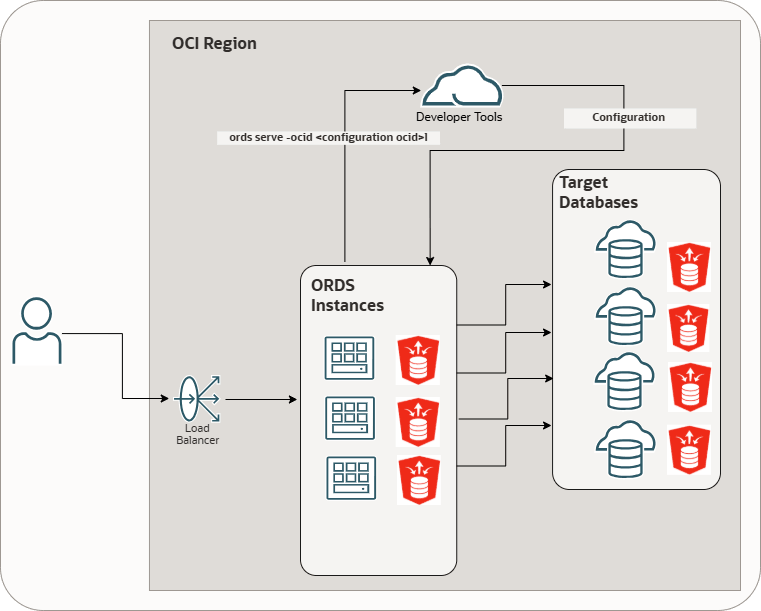
In this configuration:
- ORDS is installed in the database
- Pools are defined using OCI Database Tools Connections for enhanced security
- This deployment is intended for users who require the full ORDS feature set, including APEX integration
- RESTful Service definitions continue to be stored in the database, and ORDS operates in a more traditional configuration
CLOUD
Configures ORDS so that all pool connections use a non-ORDS Runtime Database user.ORDS installation is not required for these databases, as there are no
references to ORDS_METADATA for implementing the RESTful services.
All RESTful service definitions including user-defined resources susc as modules,
templates, handlers and user-enabled resources (AutoREST APIs) are provided
exclusively from this configuration.
Figure 3-2 CLOUD ORDS RESTful Service Definition Location
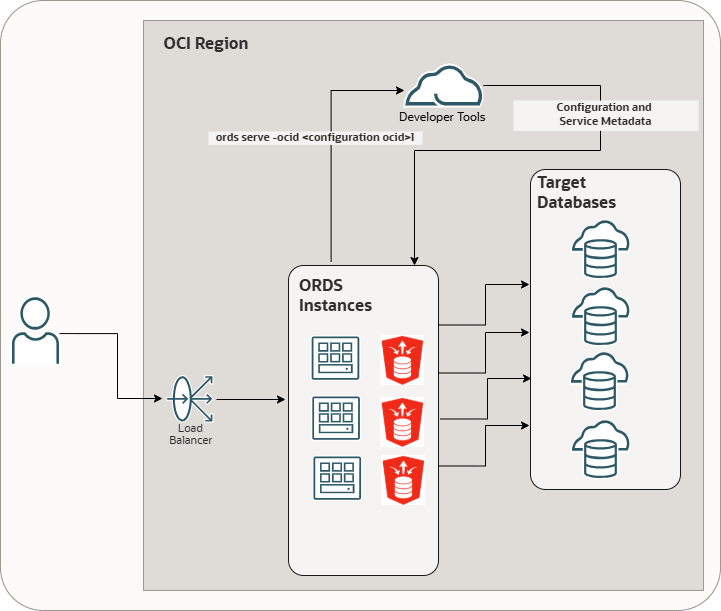
In this configuration:
- ORDS is not installed in the target database
- Pools are defined using OCI Database Tools Connections for enhanced security
- The database does not require the
ORDS_METADATAschema - User-defined resources such as modules, templates, handlers and user-enabled resources (REST-enabled SQL, REST APIs) are defined entirely in the Database API Gateway Configuration
- This model provides maximum flexibility and enables ORDS to work with databases where ORDS installation is not permitted
- Configuration changes are picked up automatically by ORDS at runtime including new pool configurations
- No ORDS restart is required when the configuration changes are applied
In standard ORDS deployments (for example, Local, Central, or ETCD
configurations), RESTful service definitions for both user-defined and user-enabled
resources are stored in the database under the ORDS_METADATA
schema. ORDS relies on this metadata as the system of record to deliver features
such as AutoREST, REST-enabled SQL, and REST APIs. With the OCI Database API Gateway
Configuration Service, RESTful service definitions can be managed outside the
database, directly within the configuration.
3.2.2 Prerequisites
This section describes the prerequisites required for using the OCI Database API Gateway Configuration Service with ORDS.
Before using the OCI Database API Gateway Configuration Service with ORDS, ensure the following OCI resources are in place and the required access is available:
- An OCI tenancy with access to the Database Tools service
- An OCI compartment where Database Tools resources are created
- An OCI IAM user or dynamic group with permission to manage and read Database Tools configurations
- Access to the OCI console or OCI CLI for managing Database Tools resources
3.2.3 Configuration Settings
The following section outlines how configuration is structured when using the OCI Database API Gateway Configuration Service to deploy ORDS.
In an OCI Database API Gateway Configuration Service deployment, global settings and pool settings are consolidated into a single document called the ORDS Instance Configuration. If the ORDS RESTful Service Definition Location is set to CLOUD, then the ORDS Instance Configuration can also include API specifications and Auto API specifications. Users do not need to manage the document format directly. Everything can be configured through the OCI console user interface.
- First-class properties: Core settings required for ORDS to function correctly
- Advanced properties: Optional ORDS settings that provide fine-grained control
Any property not classified as a first-class property must be specified as an advanced property.
3.2.4 OCI Database API Gateway Configuration Settings
This section lists the OCI Database API Gateway Configuration settings.
Table 3-1 OCI Database API Gateway Configuration Settings
| OCI Setting Name | Description |
|---|---|
| ORDS RESTful service definition location | Specifies the ORDS RESTful service definition location.
Supported values:
|
| Name | Specifies an user-friendly name to help easily identify this configuration. |
| Compartment | Specifies the comparment where the Database API Gateway Configuration will reside. |
3.2.5 OCI Database API Gateway Configuration Global Settings
This section lists the settings defined in an OCI Database API Gateway Configuration Global Settings.
Table 3-2 OCI Database API Gateway Configuration Global Settings
| OCI Setting Name | Description |
|---|---|
Pool route |
Specifies how the target pool is selected for an
HTTP request.
PATH: The
HEADER: The |
Pool routing header |
Specifies the request header name that provides the
pool route value when the poolRouteValue is set as
HEADER.
|
Enable Database API feature |
Enables the database API feature.
Supported Values:
|
Http access |
Specifies the http access. 0 means
it is intentionally disabled. By default the value is
0 .
Ports can range from 1–65535. Binding to ports below 1024 requires elevated (root) privileges and is generally discouraged. Deployment on non-privileged ports (1024–65535) is recommended. Note: These settings can be overridden through the ORDS command line. |
Https access |
Specifies the https access. A value of
0 indicates the feature is intentionally
disabled. By default, it is set to 8443.
Ports can range from 1–65535. Binding to ports below 1024 requires elevated (root) privileges and is generally discouraged. Deployment on non-privileged ports (1024–65535) is recommended. If this is set without specifyinghttpsCertificatePath and
httpsCertificateKeyPath, ORDS generates and
uses a self-signed certificate. This self signed certificate would
be persisted on the file system based on the ORDS home.
|
Document root |
Specifies the document root used to serve static
content. this setting is required if the ORDS instances serve static
content (for example: APEX images). APEX images are resolved using
the document root together with the APEX image context path.
Default value is If the value is not set, then ORDS does not serve any static resources from disk. Note: Oracle recommends the use of the Oracle CDN for APEX images. |
Certificate Bundle |
Specifies whether to use a self-signed certificate (for testing only) or to provide certificate details to enable HTTPS. |
SSL Public certificate path |
Specifies the path to the certificate. |
SSL public certificate
format |
Specifies the SSL public certificate format.
PEM is the only current valid format.
|
SSL Private key path |
Specifies SSL Private key path |
SSL private key format |
Specifies SSL private key format.
Supported values:
|
3.2.6 Advanced ORDS Global Settings
This section describes the advanced ORDS global settings.
- The settings that are already defined as first-class properties
- The database-related settings
that are restricted. For example:
db.username,db.password, anddb.*
3.2.7 OCI Database API Gateway Configuration Pool Settings
This section describes the OCI Database API Gateway Configuration Pool Settings.
Table 3-3 OCI Database API Gateway Configuration Pool Settings
| OCI Setting Name | Description |
|---|---|
Name |
Specifies a user-friendly name to easily identify this pool. |
Connection In Compartment |
Specifies the Compartment where the Database Tool Connection resides. |
Pool route value |
Specifies the string used by ORDS to identify the target pool. ORDS can be globally configured to inspect the path or a header for the value. |
Connection |
Specifies the Database Tools Connection OCID used to create the connection pool. |
Enable Database Actions |
Enables Database Actions. Database Actions, is a web-based interface that provides development, data tools, administration and monitoring features for Oracle Database. |
Enable REST-Enabled SQL Service |
Enables REST-Enabled SQL Service. REST-Enabled SQL
is a REST API that lets you run ad-hoc SQL and SQL scripts. You can
POST one or more SQL statements to the service.
Note: Database Actions requires this feature. |
Max pool size |
Specifies the maximum number of database connections a pool can create at a time. |
Min pool size |
Specifies the minimum number of database connections that a pool can have. |
Initial pool size |
Specifies the initial number of database connections required to create a pool. |
JWKS URL |
Specifies the JWKS URL used to validate JWT token
signatures.
Note: This setting is required for Bearer Authentication. |
Allowed Issuer |
Specifies the issuer for accepted JWTs. The
iss claim of the token must match this value.
Note: This setting is required for Bearer Authentication. |
Allowed Audience |
Specifies the audience for accepted JWTs. The
aud claim of the token match this
value.
Note: This setting is required for Bearer Authentication. |
Role Claim Name |
This setting is optional. If this value is not
provided, Scope-Based Access Control is used. If it is provided,
Role-Based Access Control is used.
It specifies the
JSON pointer to the claim in the JWT that contains the roles of
the user. The claim name must be a valid JSON pointer and must
start with a forward slash (for example:
|
3.2.8 Advanced ORDS Pool Settings
This section describes the advanced ORDS pool settings.
All global settings described in About the Oracle REST Data Services Configuration Files section can be used as advanced properties, except the following:
- The settings that are already defined as first-class properties
- The database-related settings that are restricted. For example:
db.username,db.password, anddb.*
3.2.9 Auto API Specifications
This section defines the Auto REST Objects.
The autoApiSpec section defines Auto REST Objects. Auto REST Objects
must be present in the schema associated with the connection pool. Auto API
specifications are supported only when the OCI Database API Gateway configuration for
ORDS RESTful Service Definition Location is set to CLOUD.
| Option | Description |
|---|---|
Name |
Specifies a user-friendly name to easily identify the resource. |
Description |
Specifies the description to help document the resource. |
Database object name |
Specifies the name of the database object. |
Auto REST Objects |
Specifies the type of the Object.
Supported values:
|
Alias |
Specifies the URI path element. Defaults to the lowercase object name. Must be unique within the pool.This option is optional. |
Operations |
Supports READ and WRITE operations.
Supported values:
|
Security Schemes |
Defines the security schemes for the
resource.
Supported values:
If none of the values are specified, then the resource is public. If value
If value
|
Scope |
Specifies the scope that protects this resource. The JWT must provide this scope to access this resource. This requires the BEARER to be listed in the Security Schemes. Used with Scope-Based JWT profiles. |
Role |
Specifies the role that protects the resource. The JWT must include the specified role to grant access to the resource. One or more (max 20) roles can be specified. This requires the BEARER to be listed in the Security Schemes. Used with Role-Based JWT profiles. |
3.2.10 API Specifications
The section specifies user-defined REST resources, that correspond to modules, templates, and handlers when ORDS is installed in the target databases.
The user-defined REST resources are supported only when the ORDS RESTful Service Definition Location in the OCI Database API Gateway configuration is set to CLOUD.
- Must be in a JSON format
- Must comply with OpenAPI 3.x standards
ORDS supports only a specific subset of OpenAPI fields, including the following:
See Also:
OpenAPI SpecificationTable 3-4 OpenAPI fields
| Field | Optional/Mandatory | Type | Description |
|---|---|---|---|
servers |
optional | Not applicable | Specifies the base path for all API specification paths.
Only relative path is supported. These form the base path of all
apiSpec paths.
|
security |
optional | Not applicable | Specifies the security required to access this API |
components.securitySchemes."<securitySchemeName>".type |
optional | Not applicable | Specifies the security scheme type used by ORDS.
|
components.securitySchemes."<securitySchemeName>".scheme |
optional | Not applicable | Specifies the scheme of security definition.
"basic", "bearer". Used to
identify if JWT Profile or Basic Authentication is required
|
paths."<path>" |
Not applicable | string | Specifies the path to the resource. |
paths."<path>"."<operation>" |
Not applicable | object | Specifies the operation for a resource. |
paths."<path>"."<operation>".security |
optional | object | Specifies the security required to access the resource. |
x-dbtools-properties |
Not applicable | Not applicable | ORDS extension of OpenAPI specification with information on how ORDS provides the resources. |
x-dbtools-properties.originsAllowed |
optional | array | Specifies the permitted origins for the apiSpec |
x-dbtools-properties.itemsPerPage |
optional | number | Specifies the default pagination for a resource handler HTTP operation GET method. That is, the number of rows to return on each page of a JSON format result set based on a database query. |
x-dbtools-properties.published |
optional | string | Specifies the publication status.
Supported values:
"PUBLISHED" |
x-dbtools-properties.description |
optional | string | Specifies the developer description of the
apiSpec definition.
|
paths."<path>".x-dbtools-etag |
optional | Not applicable | Specifies the ORDS extension of the Open API specification with the information on how ORDS provides this paths resource. |
paths."<path>".x-dbtools-etag.httpEntityTagType |
Not applicable | string |
Specifies the type of entity tag to be used by the resource path. An entity tag is an HTTP header that acts as a version identifier for a resource. Use entity tag headers to avoid retrieving previously retrieved resources and to perform optimistic locking while updating the resources. Supported values:
|
paths."<path>".x-dbtools-etag.eTagQuery |
Not applicable | string | Specifies the query used to generate the ETag
If the
|
paths."<path>".x-dbtools-etag.description |
optional | Not applicable | Specifies the developer description of the
apiSpec definition.
|
paths."<path>"."<operation>".x-dbtools-operation |
Not applicable | object | Specifiest the ORDS extension of the Open API specification with information on how ORDS provides this resource operation. |
paths."<path>"."<operation>".x-dbtools-operation.sourceType |
Not applicable | string | Specifies the HTTP request method for this handler.
Refer to ORDS.CREATE_SERVICE. Supported values:
|
paths."<path>"."<operation>".x-dbtools-operation.source |
Not applicable | string | Specifies the source implementation for the selected HTTP method. |
paths."<path>"."<operation>".x-dbtools-operation.mleEnvName |
optional | string | Specifies the multilingual Engine (MLE) environment available for this operation. |
paths."<path>"."<operation>".x-dbtools-operation.mimesAllowed |
optional | string | Applies to PUT and POST operations only. Comma separated list of MIME types that the operation accepts. |
paths."<path>"."<operation>".x-dbtools-operation.description |
optional | string | Specifies the developer comments. |
paths."<path>"."<operation>".x-dbtools-operation.parameters |
optional | Not applicable | Specifies an array of parameter definitions that ORDS can interpret. |
paths."<path>"."<operation>".x-dbtools-operation.parameters[0].name |
Not applicable | string | Specifies the name of the parameter as it is named in the URI Template or the HTTP Header. Used to map the names that are not valid SQL parameter names. |
paths."<path>"."<operation>".x-dbtools-operation.parameters[0].bindVariable |
Not applicable | string | Specifies the name of the parameter as it is referred to
in the SQL. If a NULL value is specified, then the
parameter is unbound.
|
paths."<path>"."<operation>".x-dbtools-operation.parameters[0].sourceType |
Not applicable | string | Specifies the type that is identified if the parameter
originates in the URI Template or an HTTP Header.
Supported values:
|
paths."<path>"."<operation>".x-dbtools-operation.parameters[0].accessMethod |
Not applicable | string | Specifies the access method of the parameter.
Supported values:
|
paths."<path>"."<operation>".x-dbtools-operation.parameters[0].parameterType |
Not applicable | string | Specifies the native type of the parameter.
Supported values:
|
paths."<path>"."<operation>".x-dbtools-operation.parameters[0].description |
Not applicable | string | Specifies the developer comments. |
3.2.11 OCI Security
This section covers the security model for the OCI Database Tools Database API Gateway Configuration Service.
The OCI Database Tools Database API Gateway Configuration service is secured using OCI Identity and Access Management (IAM) and integrates natively with authentication and authorization mechanisms of OCI.
-
- OCI Instance Principal authentication
- OCI configuration profile authentication
OCI Instance Principal authentication
ords serve --ocid <CONFIG_OCID>Using this method:
- The compute instance is part of a dynamic group.
- IAM policies grant the dynamic group access to:
- Database Tools Configuration resources
- Database Tools Connections
- ORDS automatically retrieves short-lived credentials from OCI
- No OCI configuration files or API keys need to be stored on disk
Advantages:
- Eliminates the need for credential management
- Supports automatic credential rotation
- Provides a strong security posture aligned with OCI best practices
- Recommended for production deployments
Instance Principal authentication is fully managed by the IAM policies assigned to the dynamic group associated with the compute instance.
See Also:
Calling Services from an InstanceOCI Configuration Profile Authentication
-Doci.profile=<PROFILE_NAME>Using this method:
- ORDS reads credentials from the OCI configuration file (typically
~/.oci/config) - Authentication is performed using the specified OCI user, tenancy, and API key
- Access to resources is managed by the IAM policies associated with the OCI user
Advantages:
- Suitable for development and testing environments
- Enables administrators to use existing OCI user credentials
- Does not require ORDS to run on OCI Compute
See Also:
SDK and CLI Configuration File3.2.12 Steps for Deploying ORDS with the OCI Database API Gateway Configuration service
This section provides the steps to deploy ORDS using the OCI Database API Gateway Configuration service.
To deploy ORDS using the OCI Database API Gateway Configuration service, perform the following steps:
- Create a compartment for Database Tools resources.
- Set up a Virtual Cloud Network (VCN) with appropriate routing and security rules.
- Provision an OCI Compute instance to run ORDS.
- Download and install ORDS on the compute instance.
- Create Database Tools Connections for the target databases.
- Create a Database API Gateway service that defines:
- Global ORDS settings
- Pool configurations
- API specifications and Auto API specifications
- Configure IAM policies for one of the following:
- A dynamic group (Instance Principal)
- An OCI user (OCI profile authentication)
- Start ORDS using the configuration
OCID:
ords serve --ocid <CONFIG_OCID>
At startup, ORDS dynamically retrieves its configuration from the OCI Database API Gateway service and applies updates at runtime without requiring a restart.
3.3 Deploying ORDS with Central Configuration Server
This section describes how to deploy ORDS using a central configuration server.
Overview
By default, Oracle REST Data Services (ORDS) configuration resides
locally in files such as the global/settings.xml and
databases/default/pool.xml within an ORDS configuration
directory. Alternatively, ORDS can acquire its configuration from a REST API called
central configuration server API .
- Centrally managed configuration provides a single place to update, manage, and secure ORDS configuration.
- ORDS pools are dynamically loaded as required, this helps in quick startup time for ORDS.
- Global Configuration Resource
- Pool Configuration Resource
Typically, a central configuration server is required only when you are managing multiple ORDS nodes or Database Pool configurations.
Prerequisites
- Secure REST API that implements the specified central configuration server API
- ORDS global and database pool information is defined in the OpenAPI specification
- OAuth2.0 authorization server (for issuing access tokens)
- Ability to create an Oracle wallet to store the credentials for accessing the secure central configuration
- OpenAPI Specification
- Database Mapping
- Global Configuration Settings
- Database Pool Configuration Settings
- Security
- Starting ORDS in a Central Configuration Deployment
See Also:
ORDS Central Configuration OpenAPI3.3.1 OpenAPI Specification
Refer to ORDS Central Configuration OpenAPI
Parent topic: Deploying ORDS with Central Configuration Server
3.3.2 Database Mapping
When ORDS is deployed using central configuration, only the global configuration
settings are initially retrieved. Appropriate pool configuration is retrieved and cached
in the subsequent requests only after a request is made to ORDS for which it requires a
Database connection. The global configuration resource provides a
search HREF template for the pool configuration resource. ORDS uses
this template to request the pool configuration. The search HREF is
templated, meaning the {host} string is replaced by a value that
identifies the specific pool.
You can use one of the following three methods to replace the
{host} string to specify the appropriate pool configuration:
- Request Host Method
- Header Method
- Direct URL Specification
Parent topic: Deploying ORDS with Central Configuration Server
3.3.2.1 Request Host Method
Request host method is the default method to replace the {host}
string in the search href. The host of the ORDS request is used.
This method is useful when the sub domain of the ORDS service can be used to identify which pool configuration to use.
Examples
href="https://central-config.example.com:8585/central/v1/config/pool/{host}"GET: https://mydatabase.servername.com/ords/hr/employees/mydatabase.servername.com is the request host.
https://central-config.example.com:8585/central/v1/config/pool/mydatabase.servername.comParent topic: Database Mapping
3.3.2.2 Header Method
If the sub domain cannot be used to denote the appropriate pool, then a request header
can be used. Using the security.externalHostMappingHeader setting, the
Global configuration specifies the header you want to use.
Examples
Global Configuration:
href="https://central-config.example.com:8585/central/v1/config/pool/{host}"GET: -Header "poolname: mydatabase" https://www.servername.com/ords/hr/employees/https://central-config.example.com:8585/central/v1/config/pool/mydatabaseParent topic: Database Mapping
3.3.2.3 Direct URL Specification
Direct URL Specification method is an alternative to the Header Method and aligns with
how pool identifiers are retained for file-based configurations. With this method, the
pool identifier is specified directly in the request URL. To enable this feature, you
must define a new setting in the global configuration
security.externalMappingPathPrefix and set its value to true.
Global Configuration
href templated
search value provided by the global
configuration:href="https://central-config.example.com:8585/central/v1/config/pool/{host}"Request to ORDS with a direct URL specification
GET: https://www.servername.com/ords/mypool/hr/employees/In
this case, mypool is the pool identifier included in the request
path.
https://central-config.example.com:8585/central/v1/config/pool/mypoolParent topic: Database Mapping
3.3.3 Global Configuration Settings
- Must be in a JSON format
- The global settings must be defined in the
settingsobject. - Include a related
Searchlink ending with the{host}template parameter to describe the Pool configuration resource.
Example response for the ORDS global settings
{
  "settings": {
    "restEnabledSql.active": true,
    "feature.sdw": true,
    "security.externalHostMappingHeader": "poolname"
  },
  "links": [
    [
      {
        "rel": "collection",
        "href": "https://central-config.example.com:8585/central/v1/config/"
      },
      {
        "rel": "self",
        "href": "https://central-config.example.com:8585/central/v1/config/"
      },
      {
        "rel": "search",
        "href": "https://central-config.example.com:8585/central/v1/config/pool/{host}",
        "templated": true
      }
    ]
  ]
}
Parent topic: Deploying ORDS with Central Configuration Server
3.3.4 Database Pool Configuration Settings
- Must be in a JSON format
- The pool settings defined in the
database.pool.settingsobject. - When you are configuring a database pool for the Oracle Autonomous
Database, pool configuration files must include the contents of its
db.wallet.zipconfiguration property encoded in Base64
Example 3-1 db.wallet.zip
Example pool configuration response with the db.wallet.zip file
providing a base64 representation of an ADB-S instance wallet.
Note:
Thedb.username
and db.password can be provided as settings. However, it is a best
practice to include the credentials in the ADB-S instance wallet before converting
it to base64.
{
  "database": {
    "pool": {
      "name": "mydatabase",
      "settings": {
        "db.wallet.zip.service":"mydb_low",
        "db.wallet.zip": "UEsDBBQACAgIAOMid1IAAAAAAAAAAAAAAAALAAAAY3dhbGxldC5zc28BdRuH4TjA...",
        "feature.sdw": true,
        "plsql.gateway.mode": "proxied",
        "restEnabledSql.active": true
      }
    }
  }
}
Example 3-2 db.customURL
Example pool configuration response with the db.customURL providing
the pool connection details.
{
  "database": {
    "pool": {
      "name": "mydatabase",
      "settings": {
        "db.username" : "ORDS_PUBLIC_USER",
        "db.password" : "ORDS PUBLIC USER PASSWORD",
        "db.connectionType" : "customurl",
        "db.customURL" : "jdbc:oracle:thin:@(description=(retry_count=3)(address_list=(load_balance=on)
         (address=(protocol=tcp)(host=adb.ap-sydney-1.oraclecloud.com)(port=1521)))
         (connect_data=(service_name=database_pool_1_high.adb.oraclecloud.com)))",
        "feature.sdw": true,
        "plsql.gateway.mode": "proxied",
        "restEnabledSql.active": true
      }
    }
  }
}- Using eTag
- Adding Credentials to an Instance Wallet
This section describes how to add credentials to an instance wallet.
Parent topic: Deploying ORDS with Central Configuration Server
3.3.4.1 Using eTag
Pool configuration responses should include an eTag. To identify any
changes to a pool configuration, ORDS uses the eTag. If an
eTag remains unchanged, then ORDS does not refresh
the configuration settings of the pool.
Parent topic: Database Pool Configuration Settings
3.3.4.2 Adding Credentials to an Instance Wallet
This section describes how to add credentials to an instance wallet.
Adding the database credentials for an ORDS runtime user can be provided using the
db.username and db.password settings. However, a
better method is to include the credentials in the the ADB-S instance wallet and then
provide that in base64 format using the db.wallet.zip setting.
The following command can be used to include the ORDS runtime user credentials. When prompted, provide the instance wallet password.
mkstore -wrl <path to the instance wallet> -createCredential <servicename> <ORDS Runtime user name>
      <ORDS Runtime user password>
Parent topic: Database Pool Configuration Settings
3.3.5 Security
The Central Configuration API can be secured using basic authentication or OAuth2. The credentials and other information required to acquire an access token or make basic authentication requests are provided using an ORDS credentials wallet.
- Resource Owner Password Credentials Grant
- Client Credentials Grant
mkstore utility can be used to create the ORDS credentials
wallet.
Note:
SQLcl provides amkstore command which can be used to
create the appropriate ORDS credentials wallet or modify an instance ADB-S instance
wallet.
Table 3-5 ORDS Credential Wallet Storage
| Secret Alias | Secret Value | Description |
|---|---|---|
oauth:client_credentials_mode:[Server Name] |
Value must be one of the following:
|
Determines how the client credentials are added to the
token request.
Default value is
|
oauth:client_id:[Server Name] |
client_id of the client application
|
Used with grant_type=client_credentials |
oauth:client_secret:[Server Name] |
Client secret of the client application | Used where
grant_type=client_credentials |
oauth:grant_type:[Server Name] |
When used, must be one of the following:
|
The value defaults to password
when oauth:username:[hostname] is included.
Otherwise, the default value is
client_credentials |
oauth:password:[Server Name] |
password of the user who needs to be
authenticated
|
Used with grant_type=password |
oauth:scope:[Server Name] |
Conforms to Access Scope specification as defined in Access Token Scope | OAuth 2.0 scopes to the request access |
oauth:token_endpoint:[Server Name] |
Absolute URL of an access token endpoint as defined in Token Endpoint | ORDS client uses the POST method when
accessing the token requests
|
oauth:username:[Server Name] |
username of the user who needs to be
authenticated
|
Used when grant_type=password |
Parent topic: Deploying ORDS with Central Configuration Server
3.3.5.1 Demonstration to Create an Entry of a Wallet for OAuth2.0 Authentication
The example in this section demonstrates how to set up a wallet with the
mkstore utility for an OAuth2.0 client credentials grant type.
Setting up a wallet with the SQLcl mkstore utility
sql /nolog
SQL> mkstore -wrl /tmp/wallet -create
Creating an entry of a wallet for OAuth2.0 Authentication
central-config.example.com.sql /nolog
SQL> mkstore -wrl /tmp/wallet -createEntry oauth:grant_type:central-config.example.com client_credentials
SQL> mkstore -wrl /tmp/wallet -createEntry oauth:token_endpoint:central-config.example.com https://myauthserver.com/oauth/token
SQL> mkstore -wrl /tmp/wallet -createEntry oauth:client_id:central-config.example.com SeqlyQGW4iKgHd@cQ4Xnkg..
SQL> mkstore -wrl /tmp/wallet -createEntry oauth:client_secret:central-config.example.com SuBNKFsft£t924Dsfgsh..Parent topic: Security
3.3.6 Starting ORDS in a Central Configuration Deployment
ORDS recognizes that a central configuration deployment is required when the
following Java options are included in the ords serve command.
bin/ords --java-options "-Dconfig.url=[ORDS Global Configuration Resource Location]
-Dconfig.wallet=[ORDS Credentials Wallet Location]" serve-Dconfig.url: Provides ORDS with the Global configuration resource and its server is used to reference secrets in the ORDS credentials wallet.Example:
-Dconfig.url=https://central-config.example.com:8585/central/v1/config/-Dconfig.wallet: Provides ORDS with the ORDS credentials wallet location. Through auto login, it uses the secrets contained in the Oracle wallet to acquire an access token so that the Global and Pool resources can be accessed.Example:
-Dconfig.wallet=/tmp/wallet
You will receive a notification in the command prompt from where the
ords serve command was issued, indicating that ORDS is running
under a central configuration deployment. ORDS then waits for the incoming HTTPS
requests for the database pools that have been configured.
3.3.6.1 Satisfying the HTTPS Requests
ORDS waits for the incoming HTTPS requests for currently configured database pools.
Once the incoming requests arrive, ORDS first determines if the database pool configuration information is cached. If the configuration settings are not available, then ORDS makes a request to the central configuration server to retrieve the pool configuration. The pool is then initialized and the request is handled.
Parent topic: Starting ORDS in a Central Configuration Deployment
3.4 Deploying ORDS with ETCD
This section describes how to deploy ORDS using ETCD.
Overview
ORDS can retrieve its configuration data from ETCD. The following are the benefits of using ETCD with ORDS:- You don't need to restart ORDS when you make changes to the configuration settings
- Centralizing data in an ETCD server simplifies the configuration management
- Leverages the robust security features of ETCD
- Distributed architecture of ETCD ensures reliability and scalability
Significance of using ETCD
ETCD is a lightweight, distributed, and highly available key-value store that is widely used in cloud-native applications. ETCD fits seamlessly into ORDS deployments and offers flexibility for the users who want to manage dynamic configurations.
Note:
ORDS currently supports ETCD version v3.5 or later.3.4.1 Prerequisites
- Install ETCD on your target server(s). Confirm installation using
the following code:
etcdctl versionExample output:
etcdctl version: 3.5.17 API version: 3.5 - Configure authentication and authorization. Refer to the ETCD documentation.
- Ensure that you can create an Oracle wallet to store the credentials for accessing ETCD (optional but recommended).
Parent topic: Deploying ORDS with ETCD
3.4.2 Database mapping
See Also:
Database MappingAdding Credentials to an Instance Wallet
Oracle highly recommends to include the database credentials in the ADB-S instance
wallet and then provide that in base64 format using the
db.wallet.zip setting.
Parent topic: Deploying ORDS with ETCD
3.4.3 Configuration Settings
- Must be in a JSON format
- The global settings must be defined in the
settingsobject. - The pool settings must be defined in the
database.pool.settingsobject.
Global Configuration Settings
The global configuration settings are updated to support ETCD integration.
Example 3-3 Response for the ORDS Global Settings
{
  "settings": {
    "restEnabledSql.active": true,
    "feature.sdw": true
  }
}
This simplifies the configuration and aligns with the design principles of ETCD.
Database Pool Configuration Settings
db.wallet.zipExample pool configuration response with the
db.wallet.zip file provides a base64 representation of an ADB-S
instance wallet:
Note:
The db.username and db.password can
be provided as settings. However, it is a best practice to include the
credentials in the ADB-S instance wallet before converting it to base64.
{
  "database": {
    "pool": {
      "name": "mydatabase",
      "settings": {
        "db.wallet.zip.service":"mydb_low",
        "db.wallet.zip": "UEsDBBQACAgIAOMid1IAAAAAAAAAAAAAAAALAAAAY3dhbGxldC5zc28BdRuH4TjA...",
        "feature.sdw": true,
        "plsql.gateway.mode": "proxied",
        "restEnabledSql.active": true
      }
    }
  }
}db.customURLExample pool configuration response with the
db.customURL providing the pool connection
details:
{
  "database": {
    "pool": {
      "name": "mydatabase",
      "settings": {
        "db.username" : "ORDS_PUBLIC_USER",
        "db.password" : "ORDS PUBLIC USER PASSWORD",
        "db.connectionType" : "customurl",
        "db.customURL" : "jdbc:oracle:thin:@(description=(retry_count=3)(address_list=(load_balance=on)
         (address=(protocol=tcp)(host=adb.ap-sydney-1.oraclecloud.com)(port=1521)))
         (connect_data=(service_name=database_pool_1_high.adb.oraclecloud.com)))",
        "feature.sdw": true,
        "plsql.gateway.mode": "proxied",
        "restEnabledSql.active": true
      }
    }
  }
}
Parent topic: Deploying ORDS with ETCD
3.4.4 Starting ORDS with ETCD
ORDS recognizes that an ETCD deployment is required when the following Java
options are included in the ords serve command:
export ETCD_ORDS_USERNAME=etcd-username
export ETCD_ORDS_PASSWORD=etcd-password
bin/ords --java-options "-Dconfig.url=[ETCD Location] -Dconfig.source=etcd" serve
Java Options
-Dconfig.url: Provides ORDS with the ETCD IP address and the port number and its server.Example:
-Dconfig.url=https://etcd.example.com:2379-Dconfig.source: Specifies the source of the configuration data. If the target of the URI is an ETCD server, then it must be set toetcd
You will receive a notification in the command prompt from where the
ords serve command is issued indicating that ORDS is running with
ETCD configuration. ORDS then waits for the incoming HTTPS requests for the database
pools that have been configured.
Using ORDS Credential Wallet Storage
Alternatively, use a wallet for secure storage of credentials.
Setting up a wallet with the SQLcl mkstore utility
sql /nolog
SQL> mkstore -wrl /tmp/wallet -create
Creating an entry of a wallet for basic Authentication
The ETCD server in this example is etcd.example.com.
Note:
<etcd-username>:<etcd-password> must be in
base64.
sql /nolog
SQL> mkstore -wrl /tmp/wallet -createEntry http:basic:etcd.example.com <etcd-username>:<etcd-password>
Start ORDS with the appropriate Java options:
bin/ords --java-options "-Dconfig.url=[ETCD Location]
-Dconfig.wallet=[ORDS-ETCD Credentials Wallet Location]" serve
Where the Java option -Dconfig.wallet, provides ORDS with
the ETCD-ORDS credentials wallet location. Through auto login, it uses the secrets
contained in the Oracle wallet to get the basic credentials so that the Global and Pool
resources can be accessed.
Example: -Dconfig.wallet=/tmp/wallet
Using Prefixing (Recommended)
Using prefixing method is recommended enhance the configuration organization:
export ETCD_ORDS_PREFIX=ords-conf-dev
bin/ords --java-options "-Dconfig.url=[ETCD Location] -Dconfig.source=etcd" serve
Parent topic: Deploying ORDS with ETCD