Implicit Parameters
This chapter describes the implicit parameters used in REST service handlers that are not explicitly declared. Oracle REST Data Services (ORDS) adds these parameters automatically to the resource handlers.
List of Implicit Parameters
The following table lists the implicit parameters:
Note: Parameter names are case sensitive. For example, :CURRENT_USER is not a valid implicit parameter.
Table 1 List of Implicit Parameters
| Name | Type | Access Mode | HTTP Header | Description | Introduced |
|---|---|---|---|---|---|
:body |
BLOB | IN | N/A | Specifies the body of the request as a temporary BLOB. | |
| 2.0 | |||||
:body_text |
CLOB | IN | N/A | Specifies the body of the request as a temporary CLOB. | 18.3 |
:body_json |
CLOB | IN | N/A | Specifies the body of the request as a temporary CLOB in JSON format. | 24.1 |
:content_type |
VARCHAR | IN | Content-Type |
Specifies the MIME type of the request body, as indicated by the Content-Type request header. | 2.0 |
:current_user |
VARCHAR | IN | N/A | Specifies the authenticated user for the request. If no user is authenticated, then the value is set to null. | 2.0 |
:forward_location |
VARCHAR | OUT | X-ORDS-FORWARD-LOCATION |
Specifies the location where Oracle REST Data Services must forward a GET request to produce the response for this request. | 18.3 |
:fetch_offset |
NUMBER | IN | N/A | Specifies the zero-based offset of the first row to be displayed on a page. | 18.3 |
:fetch_size |
NUMBER | IN | N/A | Specifies the maximum number of rows to be retrieved on a page. | 18.3 |
:page_offset |
NUMBER | IN | N/A | Specifies the zero based page offset in a paginated request. Note: |
2.0 |
:page_size |
NUMBER | IN | N/A | Specifies the maximum number of rows to be retrieved on a page. The |
2.0 |
:row_offset |
NUMBER | IN | N/A | Specifies the one-based index of the first row to be displayed in a paginated request. | 3.0 |
:row_count |
NUMBER | IN | N/A | Specifies the one-based index of the last row to be displayed in a paginated request. | 3.0 |
:status_code |
NUMBER | OUT | X-ORDS-STATUS-CODE |
Specifies the HTTP status code for the request. | 18.3 |
Support for Automatic Binding
ORDS also supports, automatic binding for the following:
-
Query parameters
-
Form data
- JSON objects When query parameters are provided, they are always automatically bound by the Resource Handlers. Whereas, the automatic binding behavior of form data and JSON objects are dependent on the following two factors:
-
Where and how the
:body,:body_text, and:body_jsonimplicit parameters are used -
The media- or the MIME type used:
-
application/x-www-form-urlencoded -
application/json -
multipart/form-datawith a single file -
multipart/form-datawith multiple files
-
Examples
Example 4-1 Automatic Binding on Query Parameters
ORDS supports automatic binding of query parameters for POST requests with all Content Types. That is:
-
application/x-www-form-urlencoded -
application/json -
multipart/form-datawith a single file -
multipart/form-datawith multiple files
Example HTTP request issued:
https://localhost:8443/ords/my_schema/demo/etc?shape=triangleThe value triangle is accessible in an ORDS handler with the automatic bind :shape as shown in the following example PL/SQL handler code:
Begin
  HTP.p('RESULT: ' || :shape);
End;

RESULT: triangle
Automatic Binding on Form Data
ORDS supports automatic binding of POST request body form data under various conditions. The following example assumes a POST request that is being issued to an ORDS Resource Handler with none of the previously mentioned :body_ implicit parameters.
HTTP request issued in the form of a curl command:
curl 'https://localhost:8443/ords/my_schema/demo/etc'
  --header 'Content-Type: application/x-www-form-urlencoded'
  --data-url-encode 'last_name=Ever'
  --data-url-encode 'first_name=Greatest'
The values for last_name and first_name are accessible in an ORDS handler with the automatic binds :last_name and :first_name. As shown in the following example PL/SQL Handler code:
BeginHTP.p('Hello: '|| :first_name || :last_name);
End;

Hello: Greatest Ever
<div class="infoboxnote" markdown="1">
**See Also:**
- [About the :body parameter](implicit-parameters.html#GUID-B0BB1694-715C-4948-84A5-307EA3868063)
- [About the :body_text Parameter](implicit-parameters.html#GUID-76A23568-EA67-4375-A4AA-880E1D160D27)
- [About the :body_json Parameter](implicit-parameters.html#GUID-EA38D36F-0648-4713-ADBF-4BABF12C0918)
</div>
Automatic binding of JSON objects
ORDS supports automatic binding of a JSON object in POST requests when the following conditions are met:
-
The
Content-Typeis ofapplication/jsontype -
None of the following implicit bind parameters are used in the Resource Handler:
-
:body -
:body_text -
:body_json
-
HTTP request issued in the form of a curl command:
curl 'https://localhost:8443/ords/my_schema/demo/etc'
  --header 'Content-Type: application/json'
  --data '{username: "clark", "password: "superman1234"}'
The values of username and password are accessible from this ORDS handler with the automatic binds :username and :password. As shown in the example PL/SQL handler code:
BeginHTP.p('Hello: '|| :username);
  Htp.p('Your password: '|| :password);
End;

Hello: clark
Your password: superman1234
About the :body_text Parameter
The :body_text implicit parameter is used in the resource handlers to receive the contents of the request body as a temporary CLOB. Typically, the content of the request body is textual (for example JSON or HTML content) and so, receiving the request body as a CLOB saves the resource handler author from the effort of converting the :body BLOB parameter to a CLOB instance.
Note: :body_text implicit parameter must only be dereferenced once inside the entire PL/SQL block. If you need this value more than once, assign it to a local variable, and dereference the local variable instead.
You can use either one of the implicit parameters :body or :body_text. Otherwise, the PL/SQL block displays an error message “Duplicate steam parameter’’.
It is recommended to use :body_text ( a character representation ) rather than :body ( a binary representation ) particularly where the PL/SQL block uses JSON functions to process the request body efficiently.
About the :body parameter
The :body implicit parameter is used in the resource handlers to receive the contents of the request body as a temporary BLOB.
Note: Only POST or PUT requests can have a request body. The HTTP specification does not permit request bodies on GET or DELETE requests.
Example 4-2 Example
The following example illustrates a PL/SQL block that stores the request body in a database table:
begin
 insert into tab (content) values (:body);
end;
Note:
The :body implicit parameter must be dereferenced exactly once in a PL/SQL block. If it is dereferenced more than once, then the second and subsequent dereferences will appear to be empty. This is because the client sends the request body only once. If you need this value more than once, then assign it to a local variable, and dereference the local variable instead.
You can use either one of the implicit parameters :body or :body_text. Otherwise, the PL/SQL block displays an error message “Duplicate steam parameter’’.
If you use either :body or :body_text, then you cannot use :bind notation to read attributes of the JSON payload of the request.
The following example will not work as intended because it dereferences the :body parameter twice:
begin
 insert into tab1(content) values (:body); -- request body will be inserted
 insert into tab2(content) values (:body); -- an empty blob will be inserted
end;
To avoid this limitation, the :body parameter value must be assigned to a local PL/SQL variable before it is used. This enables the local variable to be dereferenced more than once:
declare
 l_content blob := :body;
begin
 insert into tabl(content) values(l_content);
 insert into tab2(content) values(l_content);
end;
About the :body_json Parameter
The :body_json implicit parameter can be used with the POST resource handlers to receive the contents of the request body as a JSON object. This enables the resource handlers to directly reference the JSON properties (that is {"key": "value"} pairs)
Additionally, the :body_json implicit parameter can be used when form data and one or more files are included in multipart or form data POST requests. Form data that is bound to the :body_json implicit parameter, continues to be received as a JSON object while one or more files can be processed with the ORDS.BODY_FILE_COUNT LOOP function and the ORDS.GET_BODY_FILE procedure.
Similar to the :body and :body_text implicit parameters, when the :body_json implicit parameter is included in a resource handler, it must be invoked so that it can be used. The :body_json parameter can be invoked in one of the following ways:
-
The
DBMS_OUTPUTpackage such asdbms_output.put_line(:body_json); -
The hypertext procedures (
htp) and functions (htf) packages, such as inhtp.print(:body_json); -
Assigning the
:body_jsonimplicit parameter as variable. For example,l_body_json := :body_json;
Example
Creating BODY_JSON_DEMO_TABLE Table
A table BODY_JSON_DEMO_TABLE is created with the following attributes:
CREATETABLEBODY_JSON_DEMO_TABLE (
    ID              NUMBER(*, 0)
        GENERATED BY DEFAULT AS IDENTITY ( START WITH 1 CACHE 20 )
    NOT NULL,
    FILE_NAME       VARCHAR2(200),
    FILE_BODY       BLOB,
    CONTENT_TYPE    VARCHAR2(200),
    FILE_VISIBILITY VARCHAR2(10),
    SUBMITTED_BY    VARCHAR2(200),
    SUBMITTED_ON    TIMESTAMP DEFAULT SYSTIMESTAMP,
    SHAPE           VARCHAR2(20)
);
Figure 1: Creating a Table BODY_JSON_DEMO_TABLE
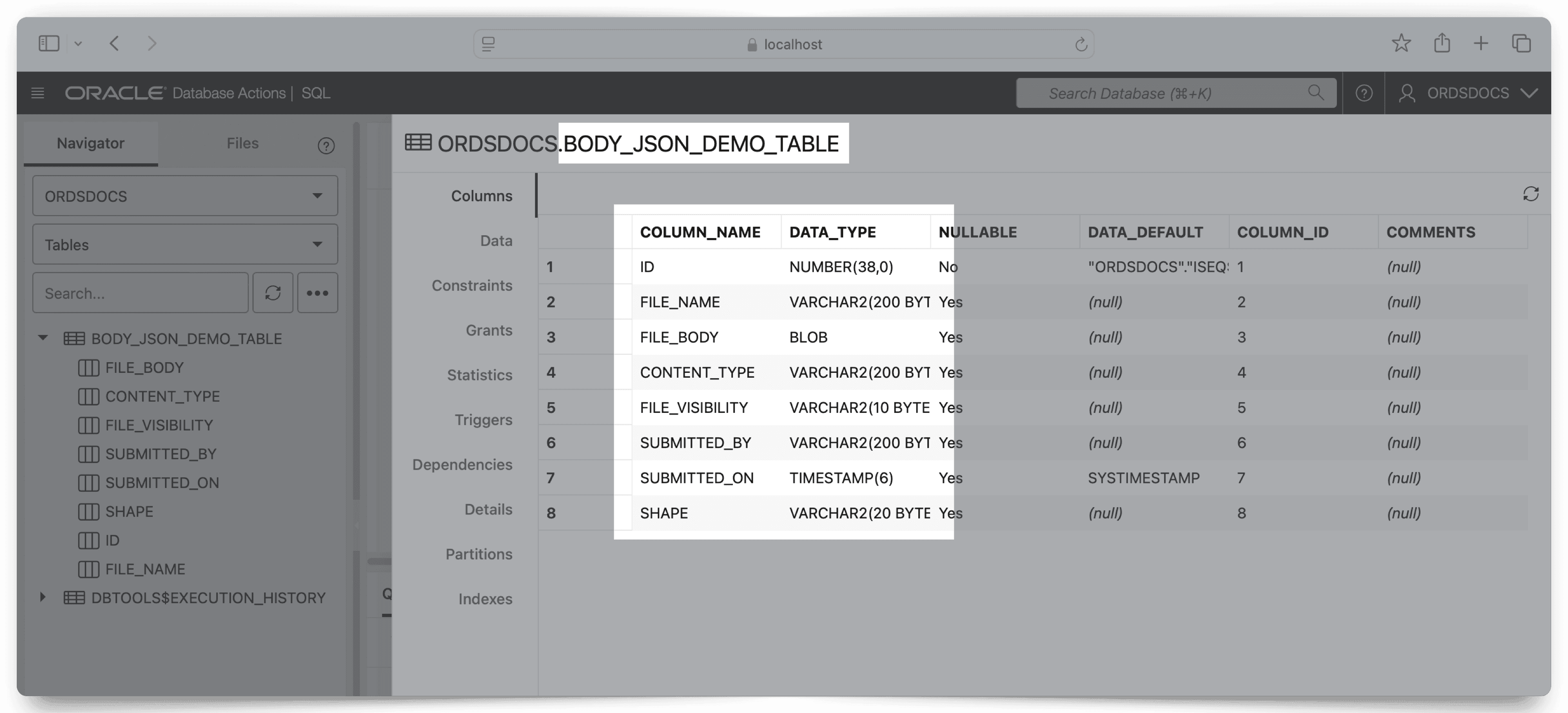
Description of the illustration demo-table-sql-worksheet.png
Note: Columns such as FILE_VISIBILITY, SUBMITTED_BY, and SUBMITTED_ON are only for demonstration purposes.
Creating an ORDS Endpoint (Resource Handler)
An ORDS endpoint is created using the following Resource Handler code that meets the following requirements:
-
The endpoint expects multiple files and form data in a JSON format. That is, the use of the
:body_jsonimplicit parameter. -
The
ORDS.BODY_FILE_COUNTfunction is used to count the total number of files in thePOSTrequest. -
The
ORDS.GET_BODY_FILEprocedure is used to temporarily store in the current memory of the database session file names, details, and contents. This enables the ORDS resource handler to handle multiple files in a singlePOSTrequest. Figure 2: Creating an ORDS Endpoint
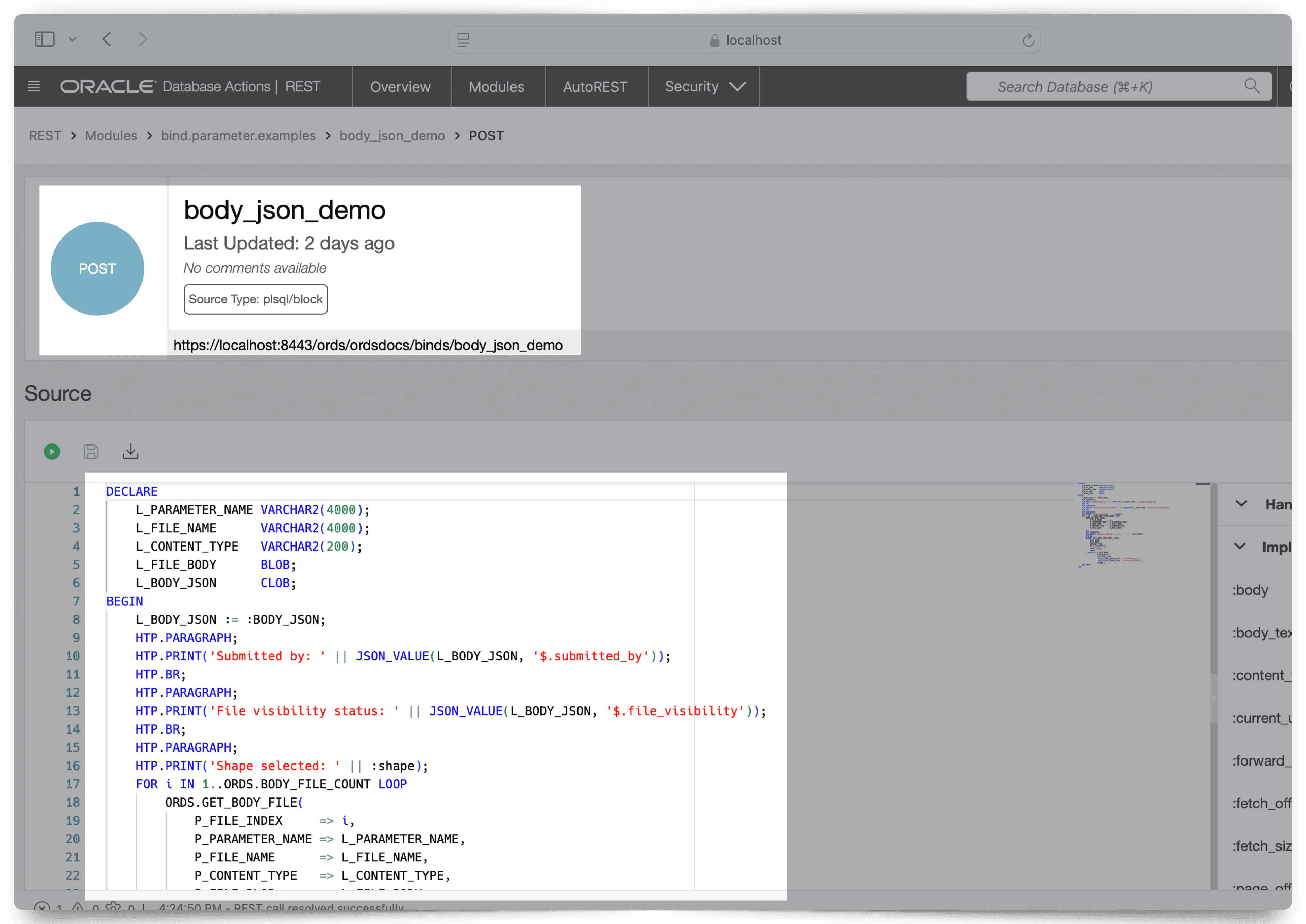
Description of the illustration body-json-demo-plsql-handler-image.png
INSERT Resource Handler Code
The following resource handler code example then performs an INSERT on the BODY_JSON_DEMO_TABLE table and relies upon various HTP procedures to print the results to a user, client, or application:
DECLARE
    L_PARAMETER_NAME VARCHAR2(4000);
    L_FILE_NAME      VARCHAR2(4000);
    L_CONTENT_TYPE   VARCHAR2(200);
    L_FILE_BODY      BLOB;
    L_BODY_JSON      CLOB;
BEGIN
    L_BODY_JSON := :BODY_JSON;
    HTP.PARAGRAPH;
    HTP.PRINT('Submitted by: ' || JSON_VALUE(L_BODY_JSON, '$.submitted_by'));
    HTP.BR;
    HTP.PARAGRAPH;
    HTP.PRINT('File visibility status: ' || JSON_VALUE(L_BODY_JSON, '$.file_visibility'));
    HTP.BR;
    HTP.PARAGRAPH;
    HTP.PRINT('Shape selected: ' || :shape);
    FOR i IN
1..ORDS.BODY_FILE_COUNT LOOP
        ORDS.GET_BODY_FILE(
            P_FILE_INDEX     => i,
            P_PARAMETER_NAME => L_PARAMETER_NAME,
            P_FILE_NAME      => L_FILE_NAME,
            P_CONTENT_TYPE   => L_CONTENT_TYPE,
            P_FILE_BLOB      => L_FILE_BODY
        );
        HTP.PARAGRAPH;
        HTP.PRINT('Inserted file #' || i || ': ' || L_FILE_NAME);
        HTP.BR;
        INSERT INTO BODY_JSON_DEMO_TABLE (
            FILE_NAME,
            FILE_BODY,
            CONTENT_TYPE,
            FILE_VISIBILITY,
            SUBMITTED_BY,
            SHAPE
        ) VALUES ( L_FILE_NAME,
                   L_FILE_BODY,
                   L_CONTENT_TYPE,
                   JSON_VALUE(L_BODY_JSON, '$.submitted_by'),
                   JSON_VALUE(L_BODY_JSON, '$.file_visibility'),
                   :shape );
    END LOOP;
END;
Testing the :body_json Implicit Parameter
- To test the
:body_jsonimplicit parameter, following curl command can be used: Note: This example demonstrates how automatic binding of query parameters (for example:shape=triangle) can optionally be used in ORDSPOSTresource handlers.
<pre class="copy"><code> curl --location 'https://localhost:8443/ords/ordsdocs/binds/body_json_demo?shape=triangle' \ --form 'files=@"demo- 3.sql"' \ --form 'files=@"demo-2.sql"' \ --form 'submitted_by="chris"' \ --form 'file_visibility="public"'</code></pre>
The following is a response from a client:
<pre class="copy"><code><p> Submitted By: chris <br /> <p> File visibility status: public <br /> <p> Shape: triangle <p> Inserted File: demo-3.sql <br /> <p> Inserted File: demo-2.sql <br /></code></pre>
- You can also test using an API testing tool, such as Postman: Figure 3: Testing :body_json implicit parameter using Postman testing tool.
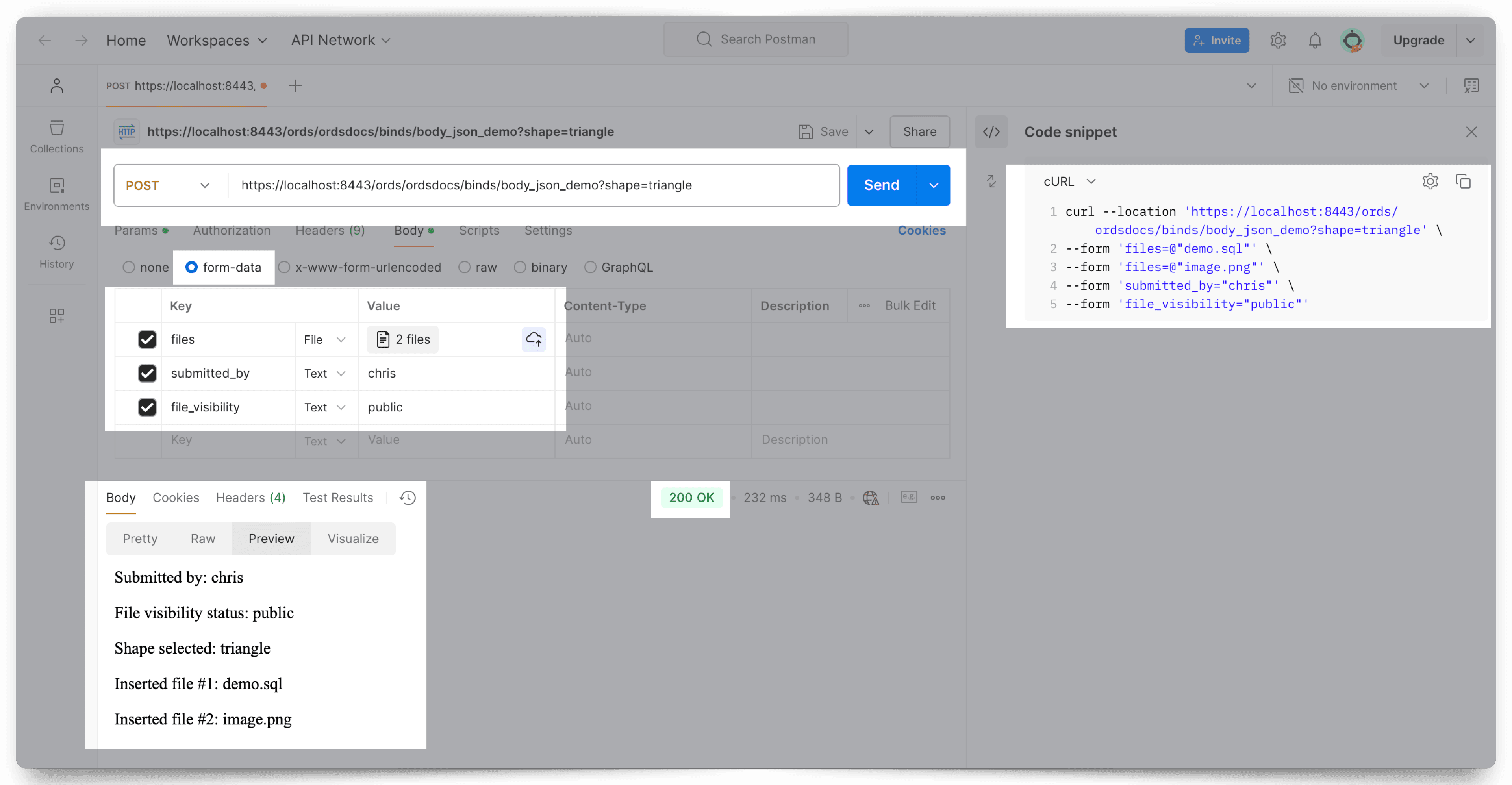
Description of the illustration body-json-postman-example-image.png
Test Results
After performing the preceding test, and querying the target database shows the following updates :
Figure 4: Results after Querying the Target Database
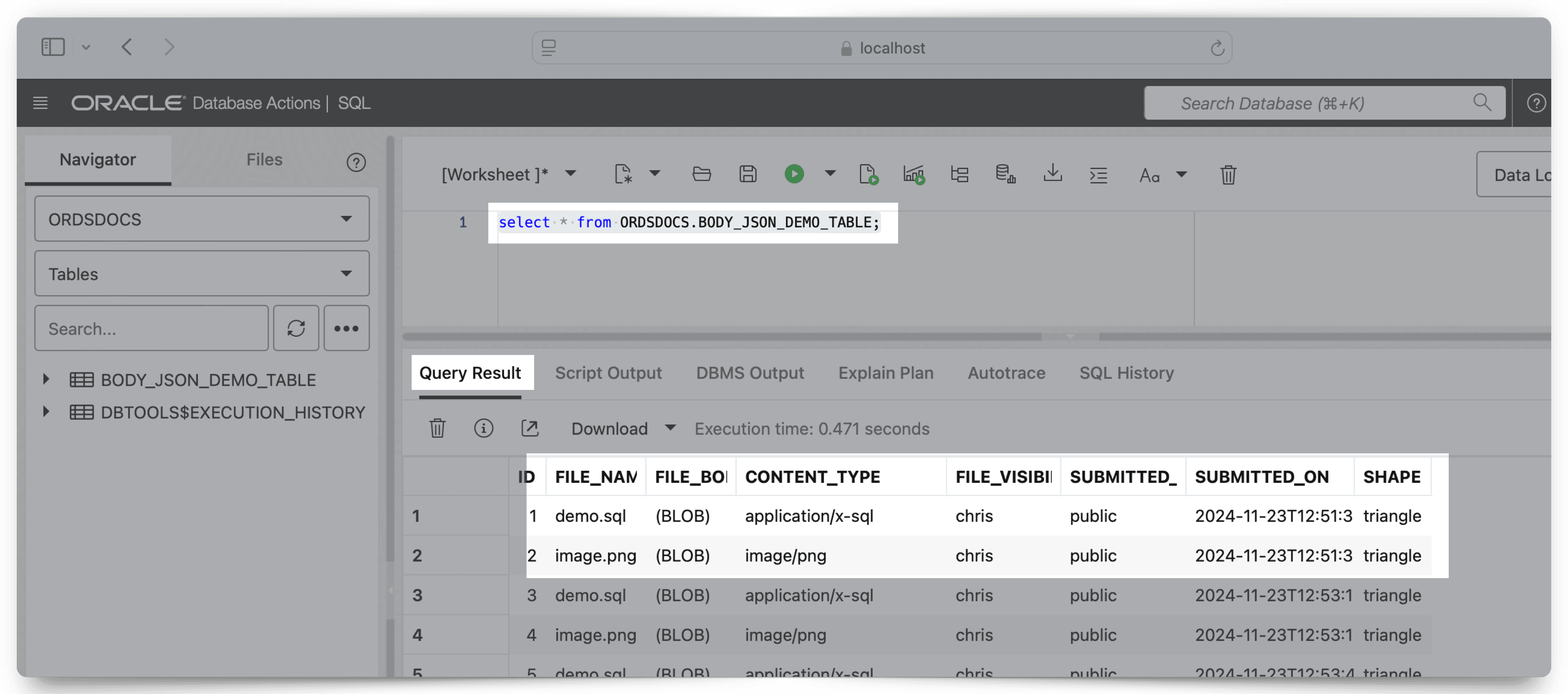
Description of the illustration table-results-body-json-tests-image.png
About the :content_type Parameter
The :content_type implicit parameter provides the value of the Content-Type request header supplied with the request. If no Content-Type header is present in the request, then a null value is returned.
About the :current_user Parameter
The :current_user implicit parameter provides the identity of the user authenticated for the request.
Note: In a scenario, where the user is not authenticated, the value is set to null. For example, if the request is for a public resource, then the value will be set to null.
About the :status_code Parameter
The :status_code implicit parameter enables a resource handler to indicate the HTTP status code value to include in a response. The value must be one of the numeric values defined in the HTTP Specification document.
About the :forward_location Parameter
The :forward_location implicit parameter provides a mechanism for PL/SQL based resource handlers to produce a response for a request.
Consider a POST request that results in the creation of a new resource. Typically, the response of a POST request for REST APIs contains the location of the newly created resource (in the Location response header) along with the representation of the new resource. The presence of the Location header in the response indicates that there must be a GET resource handler that can produce a response for the specified location.
Instead of applying logic to the POST resource handler to render the representation of the new resource in the response, the resource handler can delegate that task to the existing GET Resource Handler.
The following resource handler defines a POST handler that delegates the generation of the response to a GET resource handler:
ords.define_handler(
  p_module_name => 'tickets.collection',
  p_pattern => '.',
  p_method  => 'POST',
  p_mimes_allowed => 'application/json',
  p_source_type => ords.source_type_plsql,
  p_source => '
   declare
    l_owner varchar2(255);
    l_payload clob;
    l_id number;
   begin
    l_payload := :body_text;
    l_owner := :current_user;
    l_id := ticket_api.create_ticket(
      p_json_entity => l_payload,
      p_author => l_owner
    );
    :forward_location := ''./'' || l_id;
    :status_code := 201;
   end;
  '
);
Where:
-
The
ords.define_handlerAPI is used to add a POST handler to an existing resource module namedtickets.collection. -
The
p_patternwith value ‘.’ indicates that the POST handler should be bound to the root resource of the resource module. If the base path of thetickets.collection’ is/tickets/, then the POST handler is bound to the/tickets/URL path. -
The
p_mimes_allowedvalue indicates that the POST request must have a Content-Type header value ofapplication/json’. -
The
p_source_typevalue indicates that the source of the POST handler is a PL/SQL block. -
The
p_sourcevalue contains the source of the PL/SQL block:Where:
Note: The
:body_textimplicit parameter is assigned to a local variable, so that it can be dereferenced more than once.-
The identity of the user, making the POST request, is determined from the
:current_userimplicit parameter. -
The PL/SQL block, delegates the task of storing the request payload to a PL/SQL package level function. The PL/SQL block should only contain logic to bridge from the HTTP request to the PL/SQL package invocation.
Note: When all the data modification operations are wrapped in a PL/SQL API, the PL/SQL block can be independently unit tested. Long and complicated PL/SQL blocks are an anti-pattern indicative of code that is difficult to test and maintain.
-
The PL/SQL package level function returns the ID of the newly created resource.
-
The
:forward_locationimplicit parameter is assigned the value of'./' || l_id. For example, if the value ofl_idis 4256, then the value of:forward_locationis/tickets/4256.When ORDS evaluates the preceding PL/SQL block and checks the value assigned to the
:forward_locationimplicit parameter, it initiates a GET request against the specified location (for example,/tickets/4256) and return the response generated by the GET request as the response of the POST request. In addition, ORDS includes a location response header with the fully resolved URL of the:forward_locationvalue. -
The
:status_codeimplicit parameter is assigned the HTTP response status code value. The 201 (Created) status code indicates that a new resource is created. This value will override the status code generated by the GET request.
-
About the Pagination Implicit Parameters
The following table lists the pagination implicit parameters:
Note: Oracle REST Data Services reserves the use of the query parameters, page, offset, and limit. It is not permitted to define REST services that use named bind parameters with any of the preceding query parameter names. Alternatively, REST services must use the appropriate pagination implicit parameters defined in the following table:
Table 2 Pagination Implicit Parameters
| Name | Description | Status |
|---|---|---|
:page_offset |
Specifies the zero based page offset in a pagination request. | Deprecated |
:page_size |
Specifies the maximum number of rows to be retrieved on a page. | Deprecated |
:row_offset |
Specifies the index of the first row to be displayed in a pagination request. | Not Recommended |
:row_count |
Specifies the index of the last row to displayed in a pagination request. | Not Recommended |
:fetch_offset |
Specifies the zero based index of the first row to be displayed on a page. | Recommended |
:fetch_size |
Specifies the maximum number of rows to be retrieved on a page. | Recommended |
-
About Automatic Pagination This section describes the automatic pagination process.
-
About Manual Pagination This section describes the manual pagination process.
About the :page_offset Parameter
The :page_offset implicit parameter is provided for backward compatibility, so it is used only with source_type_query source type resource handlers.
  <div class="infoboxnote" markdown="1">

  **Note:**
  - The `source_type_query` source type is deprecated, instead use the `source_type_collection` feed parameter.

  - The `:page_offset` implicit parameter is deprecated, instead use the `:row_offset` implicit parameter.
  </div>
About the :page_size Parameter
The :page_size implicit parameter is used to indicate the maximum number of rows to be retrieved on a page. :page_size parameter is provided for backward compatibility. This parameter is deprecated, instead use :fetch_size implicit parameter.
About the :row_offset Parameter
The :row_offset implicit parameter indicates the number of the first row to be displayed on a page. The :row_offset implicit parameter is used when you are using both a wrapper pagination query and row_number() (used in Oracle 11g and earlier releases). Starting Oracle 12c or later releases, Oracle recommends using the :fetch_offset implicit parameter and a row limiting clause instead of the :row_offset parameter.
About the :row_count Parameter
The :row_count implicit parameter is used to indicate the number of rows to be displayed on a page. The :row_count value is the value of the sum of :row_offset and the pagination size. The :row_count implicit parameter is useful when implementing pagination using a wrapper pagination query and row_number()method that was used in Oracle database 11g and earlier releases. Starting Oracle Database release 12c or later, Oracle recommends that you use :fetch_size parameter and a row limiting clause instead.
About the :fetch_offset Parameter
The :fetch_offset implicit parameter is used to indicate the zero based offset of the first row to display in a given page. The :fetch_offset implicit parameter is used when you implement pagination using a row limiting clause, which is recommended for use with Oracle 12c and later releases.
About the :fetch_size Parameter
The :fetch_size implicit parameter is used to indicate the maximum number of rows to retrieve on a page. ORDS always sets the value of :fetch_size to the pagination size plus one. The presence or absence of the extra row helps ORDS in determining if there is a subsequent page in the results or not.
Note: The extra row that is queried is never displayed on the page.
About Automatic Pagination
This section describes the automatic pagination process.
If a GET resource handler source type, source_type_collection_feed or source_type_query has a non zero pagination size (p_items_per_page) and the source of the GET resource handler does not dereference any of the implicit pagination parameters discussed in the preceding sections, then ORDS automatically wraps the query in a pagination clause to constrain the query results to include only the values from the requested page. With automatic pagination, the resource handler author needs to specify only the pagination size, and ORDS automatically handles the remaining effort in paginating the resource.
Note: All resource modules have a default pagination size (p_items_per_page) of
- So, by default automatic pagination is enabled.
About Manual Pagination
This section describes the manual pagination process.
In some scenarios, a GET resource handler needs to perform pagination on its own rather than delegating the pagination process to ORDS. In such cases, the source of the GET resource handler will dereference one or more implicit pagination parameters discussed in the preceding sections. Note: The GET resource handler must specify the desired pagination size so that ORDS can correctly calculate the required values for the implicit pagination parameters.
Examples
Manual pagination example using row limiting clause
The following example defines a REST service that uses a row limiting clause to paginate the query result set. This is the recommended way to implement manual pagination:
begin
 ords.define_service(
   p_module_name => 'example.paging',
   p_base_path => '/example/',
   p_pattern => '/paged',
   p_items_per_page => 7,
   p_source => 'select * from emp e order by empno desc offset :fetch_offset rows fetch next :fetch_size rows only'
 );
 commit;
end;
Manual pagination example using row_number() method
The following example defines a REST service that uses a wrapper query and row_number() method. This approach is not recommended.
begin
ords.define_service(
   p_module_name => 'example.paging',
   p_base_path => '/example/',
   p_pattern => '/paged',
   p_items_per_page => 7,
   p_source => 'select * from (select q_.* , row_number() over (order by 1) rn__ from (select * from emp e order by empno desc) q_ )where rn__ between :row_offset and :row_count'
 );
 commit;
end;