Oracle REST Data Services Installation Checklist
This chapter provides information about supported platforms, system requirements, and Database privileges required for using ORDS .
WARNING: If you are planning to upgrade from version 21.4.x or earlier releases, then refer to Migration of Legacy Configuration section before proceeding. Starting with ORDS version 22.1, changes to both URL mapping and the configuration directory structure were implemented. Ensure you review these changes and then prepare your migration strategy accordingly.
-
Deploying ORDS to a Kubernetes Cluster with Oracle Container Engine (OKE) This section describes the procedure for deploying ORDS to an Oracle Kubernetes Cluster.
-
ORDS Installer Privileges Script This section describes about the script file that provides privileges to the user to install, upgrade, repair, and uninstall ORDS.
System Requirements
Oracle REST Data Services system requirements are as follows:
-
A currently supported version of Oracle Database as specified in the Oracle Lifetime Support Policy
-
Use one of the following:
-
Oracle Java version 17, 21, or 25
-
Oracle GraalVM Enterprise Edition for Java version 17, 21, or 25
Note:
On Linux system, if the Oracle Java version is lower than 17, then the installation fails with an error message. For example:
Error: ORDS requires Java 17 and above to run.

Found Java version 11.

Please set JAVA_HOME to appropriate version and update PATH if necessary.
So, you must set
JAVA_HOMEto the appropriate version and update the PATH if required.On Windows system, the user is re-directed to the Java download page.
-
-
Web browser requirements: Refer to Oracle Software Web Browser Support Policy for more information.
Note:
Oracle APEX is not a prerequisite for using Oracle REST Data Services.
If Oracle APEX is installed and if RESTful services have been configured during the installation (see the step Configuring Oracle REST Data Services in Oracle APEX Installation Guide), then Oracle REST Data Services supports it.
Platforms Available
ORDS is distributed and available in the following platforms:
-
You can download at Downloads
-
From Oracle YUM Repository as an RPM package
-
In Oracle Container Registry as a ready to run image
GraalVM Configuration
To operate, Oracle REST Data Services requires a Java Runtime Environment. Customers can choose to use a supported Oracle GraalVM for improved performance in their runtime environment. It is not mandatory.
However, certain features in ORDS require the Java Runtime Environment to be a GraalVM with specific Graal components installed. The dependent Graal component for such features is mentioned in the documentation section. The most common dependency is on the Graal.js component for JavaScript support.
Use gu list command to determine the components available:
gu list
ComponentId              Version             Component name                Stability
----------------------------------------------------------------------------------------
graalvm                  23.0.1              GraalVM Core                  Supported
icu4j                    23.0.1              ICU4J                         Supported
js                       23.0.1              Graal.js                      Supported
regex                    23.0.1              TRegex                        Supported
If the JavaScript component is not listed as an available component, then install it using the gu install js command. Refer to GraalVM documentation for more information on the Graal Updater command utility and the capabilities of the various Graal components.
Note: The ORDS image located at ORDS Docker Image Repository is based on GraalVM with the Graal.js component.
Note:
The GraalVM Updater was removed in GraalVM for JDK version
- It is not planned to embed the JavaScript component in ORDS. However, it is possible to use the plugin framework to embed Graal JS component. See Also: Embedding Graal JavaScript Component Plugin Demostration Example
Supported Java EE Application Servers
Oracle REST Data Services supports the following Java EE application servers:
| Application Server | Supported Release |
|---|---|
| Oracle WebLogic Server | 14.1.2 Release |
| Apache Tomcat | 9.0.x Release |
Deploying ORDS to a Kubernetes Cluster with Oracle Container Engine (OKE)
This section describes the procedure for deploying ORDS to an Oracle Kubernetes Cluster.
The steps below detail the process of deploying Oracle REST Data Services (ORDS) within an Oracle Kubernetes Cluster. Leveraging Oracle Kubernetes Engine (OKE) enables efficient management of deployments across multiple nodes, ensuring both scalability and reliability: 1. Accessing the Cluster through kubectl: Ensure that you have access to your OKE cluster through the kubectl command-line interface before moving forward. This enables you to directly interact with the cluster and its components.
-
Setting Up Configuration Source: You need to configure a configuration source for ORDS to persist configurations. You can choose from options such as OCI file storage, etcd, or a central configuration server to provide and manage configuration for the ORDS instances.
-
Configuring ORDS: Deploy ORDS within the cluster through the creation of an appropriate deployment file. Customize settings such as database connectivity, security protocols, and other configurations to meet your requirements. For example, using a central configuration server.
-
Managing APEX Images: For applications developed with APEX, ensure proper management by uploading images to the designated location and configuring permissions as needed. Oracle also recommends using the Oracle APEX Static Resources Content Delivery Network (CDN).
-
Creating New Pool Configurations: You can use multiple databases, you can create the pool configuration using ORDS install command.
-
Migrating or Managing Existing Configurations: If you are upgrading ORDS versions or modifying the existing configurations, adhere to best practices to prevent disruptions and maintain compatibility.
-
Deploying ORDS with HTTPS Support: Establish secure communication by enabling end-to-end HTTPS. This involves acquiring SSL/TLS certificates and configuring them appropriately.
-
Enabling Autoscaling Features: Utilize Horizontal Pod Autoscalers (HPA) and Cluster Autoscaler (CA) to dynamically adjust the number of replicas based on demand. HPA monitors CPU usage, while CA manages node scaling automatically.
-
Managing Logging and Monitoring Services: Implement robust logging mechanisms to monitor system activities and troubleshoot issues efficiently. Utilize OCI monitoring tools to obtain insights into resource usage and overall system health.
Figure 1: Architecture diagram for deploying ORDS on Oracle Kubernetes Cluster
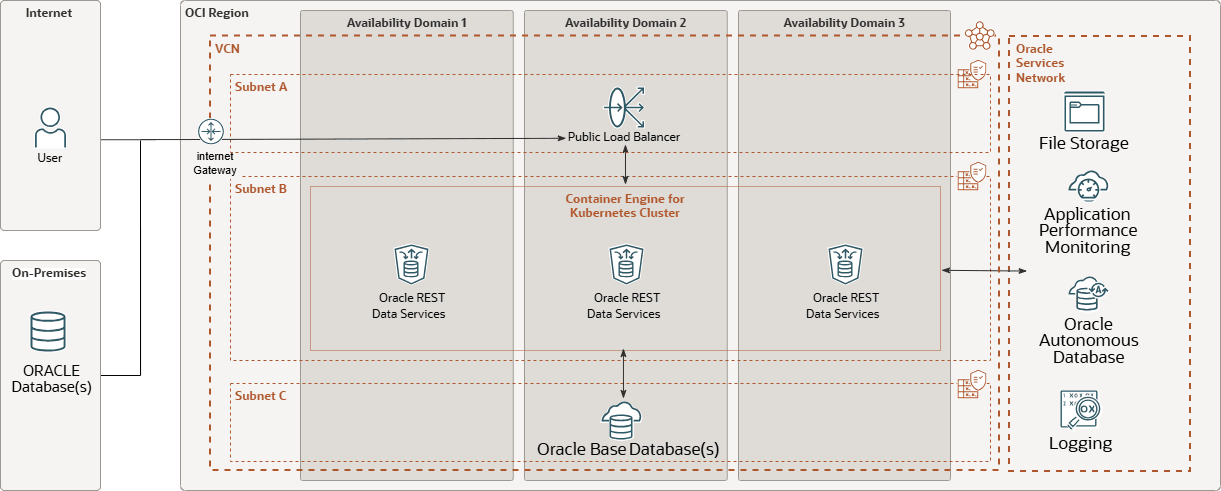
Description of the illustration ords_oke_deployment.png
Supported Oracle APEX Versions
Oracle REST Data Services supports the currently supported versions of APEX.
See Also: SUPPORTED VERSIONS OF APEX
ORDS Installer Privileges Script
This section describes about the script file that provides privileges to the user to install, upgrade, repair, and uninstall ORDS. Note: This script is used when you do not want to use SYS AS SYSDBA to install, upgrade, repair, and uninstall ORDS for Oracle PDB or Oracle 11g.
The Oracle REST Data Services contains a script, ords_installer_privileges.sql which is located in the scripts/installer folder. The script provides the assigned database user the privileges to install, upgrade, repair, and uninstall ORDS in Oracle Database.
Perform the following steps: 1. Using SQLcl or SQL*Plus, connect to the Oracle Database instance. You must have a Database account with appropriate privileges for installing ORDS.
-
Execute the following script providing the database user:
SQL> @/path/to/scripts/installer/ords_installer_privileges.sql exampleuser
SQL> exit
You must use the specified database user to install, upgrade, repair, and uninstall ORDS.
Privileges Granted to the Oracle REST Data Services Users
As part of the Oracle REST Data Services installation, privileges are granted to several users and roles:
-
ORDS_RUNTIME_ROLErole-
ORDS_RUNTIME_ROLEis grantedEXECUTEon the following packages if these packages are not grantedEXECUTEtoPUBLIC:-
SYS.DBMS_LOB -
SYS.DBMS_SESSION -
SYS.DBMS_UTILITY -
SYS.WPIUTL
-
-
ORDS_RUNTIME_ROLEis granted the necessaryORDS_METADATAobject privileges to determine the repository version and to access the connection pool configurations.
-
-
ORDS_PUBLIC_USERuser-
ORDS_PUBLIC_USERis granted connect to allow connection to the database. -
ORDS_PUBLIC_USERis granted role,ORDS_RUNTIME_ROLEto allow the user to act as an ORDS runtime user
-
-
ORDS_ADMINISTRATOR_ROLEroleORDS_ADMINISTRATOR_ROLEis granted EXECUTE onORDS_METADATA.ORDS_ADMINPL/SQL package.
-
PUBLIC-
PUBLICis grantedEXECUTEonORDS_METADATA.ORDS_REPVERSIONview to allow the repository version to be queried by anyone. -
PUBLICis grantedSELECTon manyORDS_METADATAviews. -
PUBLICis grantedEXECUTEonORDS_METADATAPL/SQL packages that are available for developer users.
-
-
ORDS_METADATAschema-
ORDS_METADATAschema is granted on the following packages if these packages are not grantedEXECUTEonPUBLIC:-
SYS.DBMS_ASSERT -
SYS.DBMS_LOB -
SYS.DBMS_OUTPUT -
SYS.DBMS_SCHEDULER -
SYS.DBMS_SESSION -
SYS.DBMS_UTILITY -
SYS.DEFAULT_JOB_CLASS -
SYS.HTP -
SYS.OWA -
SYS.WPG_DOCLOAD
-
-
ORDS_METADATAis grantedSELECT(11g) orREAD(12c or later) on the following view if it is not grantedSELECTorREADtoPUBLIC:SYS.SESSION_PRIVS
-
ORDS_METADATAschema is grantedEXECUTEon the following packages:-
SYS.DBMS_CRYPTO -
SYS.DBMS_METADATA
-
-
ORDS_METADATAschema is grantedSELECT(11g) orREAD(12c or later) on the following views:-
SYS.DBA_OBJECTS -
SYS.DBA_ROLE_PRIVS -
SYS.DBA_TAB_COLUMNS
-
-
ORDS_METADATAschema is grantedSELECTincludingWITH GRANT OPTIONon the following views:-
SYS.USER_CONS_COLUMNS -
SYS.USER_CONSTRAINTS -
SYS.USER_OBJECTS -
SYS.USER_PROCEDURES -
SYS.USER_TAB_COLUMNS -
SYS.USER_TABLES -
SYS.USER_VIEWS
-
-
ORDS_METADATAschema is granted the following system privileges:-
ALTER USER -
CREATE ANY TRIGGER -
CREATE JOB -
CREATE VIEW -
CREATE PUBLIC SYNONYM -
DROP PUBLIC SYNONYM
-
-
ORDS_METADATAschema is granted the necessary object privileges to migrate APEX REST data toORDS_METADATAtables. -
ORDS_METADATAschema is grantedORDS_ADMINISTRATOR_ROLE,ORDS_RUNTIME_ROLEroles with administrator option.
-
-
PUBLICis grantedSELECTon manyORDS_METADATAtables and views. -
PUBLICis grantedEXECUTEon PL/SQL packages that are available for users to invoke. -
ORDS_METADATAis grantedEXECUTEon the following packages if these packages are not grantedEXECUTEtoPUBLIC:-
SYS.DBMS_ASSERT -
SYS.DBMS_LOB -
SYS.DBMS_OUTPUT -
SYS.DBMS_SCHEDULER -
SYS.DBMS_SESSION -
SYS.DBMS_UTILITY -
SYS.DEFAULT_JOB_CLASS -
SYS.HTP -
SYS.OWA -
SYS.WPG_DOCLOAD
-
-
ORDS_METADATAis granted the necessary object privileges to migrate APEX REST data toORDS_METADATAtables.
About the Database Users Used by Oracle REST Data Services
Oracle REST Data Services uses the following database users:
| User Name | Required | Description |
|---|---|---|
ORDS_METADATA |
Yes | Owner of the PL/SQL packages used for implementing many Oracle REST Data Services capabilities. It is not accessed directly by Oracle REST Data Services; the Oracle REST Data Services application never creates a connection to the |
ORDS_PUBLIC_USER |
Yes | User for Oracle REST Data Services to make an initial database connection for handling requests. Depending on the request, the user will proxy to the relevant Oracle REST Data Services-enabled schema or PL/SQL Gateway user to complete the requested action in the database. |
About Command-Line Interface
ORDS release 22.1.0 introduces the ORDS Command-Line Interface that provides the following benefits:
-
Create, update, and list your ORDS configuration
-
Add additional database pools to your configuration Install/upgrade
-
Repair, or uninstall ORDS in the database
-
Run ORDS in standalone mode The preceding functions can be accomplished interactively through prompts, or run silently (non-interactively) using the ORDS commands.
About Online Help
The online help provides information about the commands along with the available options and arguments. To show the list of ORDS commands, execute the following command:
ords --helpTo show the details of an ORDS command, specify the ORDS command followed by --help. If you want additional details for a sub-command, then specify the --help after the sub-command.
Syntax:
ords <command> --helpords <command> <sub-command> --helpExamples:
ords install --help-
ords config --helpords config set --help