Default Legend Styles
When the vertices or edges include labels, then the corresponding legend entries are automatically generated based on those labels. However, if the vertex has a property named caption or title, that property’s value is used as the text shown for that vertex in the default legend style.
The following example describes the graph data for vertices and edges as shown:
const vertices = [
  {
    id: 1,
    properties: {
      label: 'blue',
      name: 'Hello'
    },
    labels:['color']
  },
  {
    id: 2,
    properties: {
      label: 'blue',
      name: 'World'
    },
    labels:['color']
  },
  {
    id: 3,
    properties: {
      name: 'Some Name'
    },
    labels:['text']
  }
];

const edges = [
  {
    id: 1,
    source: 1,
    target: 2,
    labels: ['edge']
  },
  {
    id: 2,
    source: 2,
    target: 3,
    labels: ['edge']
  }
];

const settings = {baseStyles: {}};

const graphViz = new GraphVisualization({
  target: document.body,
  props: { data: { vertices, edges }, settings }
});
The legends are then generated from the vertex and edge labels (used in the preceding code) as shown:
Figure: Default Legends
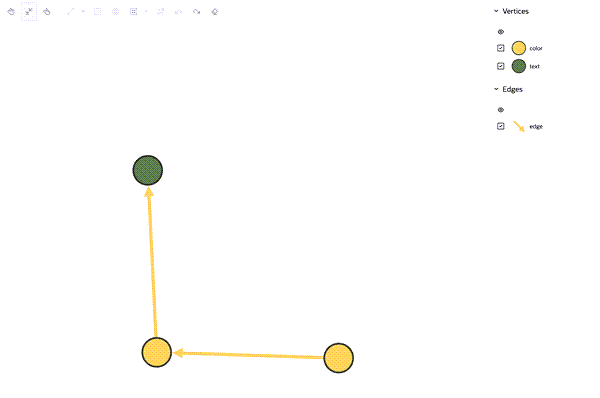
Description of the illustration default_legends_usage.png
The getCurrentRuleBasedStyles function returns the currently defined rule-based styles, including both default and custom styles. You can use this function to change the default rule-based styles as shown in the following example:
const graphViz = new GraphVisualization({
  target: document.body,
  props: { data: { vertices, edges }, settings }
});

const receivedRules = grpahViz.getCurrentRuleBasedStyles();

/*
Here is example of receivedRules. If the rule is default, rule.isDefault is true.
[
  {
    "_id": "2",
    "stylingEnabled": true,
    "target": "vertex",
    "conditions": {
      "operator": "and",
      "conditions": [
        {
          "property": "labels",
          "operator": "~",
          "value": "color"
        }
      ]
    },
    "component": "vertex",
    "style": {
      "color": "#F0CC71"
    },
    "legendTitle": "color",
    "isDefaultRule": true
  },
  ...
]
*/

//Modify receivedRules. Note: Do not edit _id, isDefaultRule, and conditions.
//Modify _id = 2 default rule, color to aqua
receivedRules = [
  {
    "_id": "2",
    "stylingEnabled": true,
    "target": "vertex",
    "conditions": {
      "operator": "and",
      "conditions": [
        {
          "property": "labels",
          "operator": "~",
          "value": "color"
        }
      ]
    },
    "component": "vertex",
    "style": {
      "color": "aqua"
    },
    "legendTitle": "color",
    "isDefaultRule": true
  },
  ...
]

//Assgin the modified received rules to settings.ruleBasedStyles
settings.ruleBasedStyles = recivedRules;
graphViz.$set({setting});
The updated styles are then reflected in the legend panel as shown:
Figure: Custom Legends
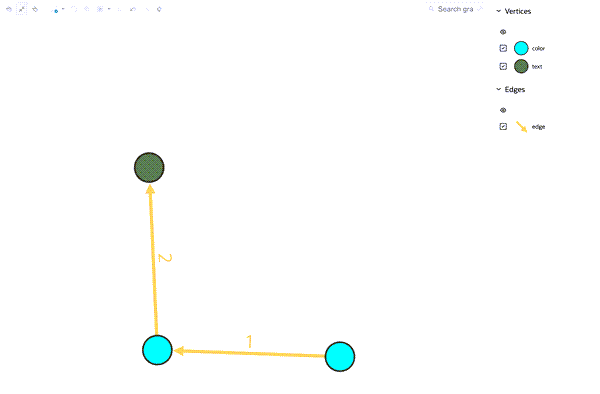
Description of the illustration custom_style_legends_usage.png