Executing PGQL Queries Against PGQL Property Graphs
This topic explains how you can execute PGQL queries directly against PGQL property graphs in your database.
The PGQL query execution flow is shown in the following figure.
Figure: PGQL on PGQL Property Graphs in Database
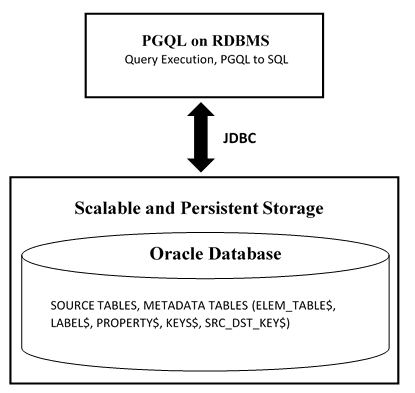
Description of the illustration pg_views_diagram.png
The basic execution flow is:
-
The PGQL query is submitted to PGQL on RDBMS through a Java API.
-
The PGQL query is translated into SQL statements using the internal metadata tables for PGQL property graphs.
-
The translated SQL is submitted to the database by JDBC.
-
The SQL result set is wrapped as a PGQL result set and returned to the caller.
-
Supported PGQL Features and Limitations for PGQL Property Graphs
Learn about the supported PGQL features and limitations for PGQL property graphs. -
SQL Translation for a PGQL Query
You can obtain the SQL translation for a PGQL query through thetranslateQuery()andgetSqlTranslation()methods inPgqlStatementandPgqlPreparedStatement.
Supported PGQL Features and Limitations for PGQL Property Graphs
Learn about the supported PGQL features and limitations for PGQL property graphs.
The following table describes the complete list of supported and unsupported PGQL features for PGQL property graphs:
Table: Supported PGQL Functionalities and Limitations for PGQL Property Graphs
| Feature | PGQL on PGQL Property Graphs |
|---|---|
CREATE PROPERTY GRAPH |
Supported |
DROP PROPERTY GRAPH |
Supported |
| Fixed-length pattern matching | Supported |
| Variable-length pattern matching goals | Supported:
Limitations:
|
| Variable-length pattern matching quantifiers | Supported:
|
| Variable-length path unnesting | Supported:
Not supported:
|
OPTIONAL MATCH |
Not supported |
GROUP BY |
Supported |
HAVING |
Supported |
| Aggregations | Supported:
Limitations:
|
DISTINCT
|
Supported |
SELECT v.* |
Supported |
ORDER BY (+ASC/DESC), LIMIT, OFFSET |
Supported |
| Data Types | All available Oracle RDBMS data types supported |
| JSON | Supported:
|
| Operators | Supported:
|
| Functions and predicates | Supported are all available functions in the Oracle RDBMS that take the form Supported PGQL functions/predicates:
Limitations:
|
| User-defined functions | Supported:
|
Subqueries:
|
Supported:
|
GRAPH_TABLE operator |
Supported Extension:
|
INSERT/UPDATE/DELETE |
Supported for Oracle Database 19c and later |
INTERVAL literals and operations |
Not supported |
Additional Information on Supported PGQL Features with Examples
The following PGQL features are supported in PGQL property graphs:
-
Recursive queries are supported for the following variable-length path finding goals:
-
Reachability
-
ANY
-
ANY SHORTEST
-
TOP k SHORTEST
-
-
Recursive queries are supported for the following horizontal aggregations:
-
LISTAGG
SELECT LISTAGG(src.first_name || ' ' || src.last_name, ',') FROM MATCH TOP 2 SHORTEST ( (n:Person) ((src)-[e:knows]->)* (m:Person) ) WHERE n.id = 1234 -
SUM
SELECT SUM(e.weight + 3) FROM MATCH TOP 2 SHORTEST ( (n:Person) -[e:knows]->* (m:Person) ) WHERE n.id = 1234 -
COUNT
SELECT COUNT(e) FROM MATCH TOP 2 SHORTEST ( (n:Person) -[e:knows]->* (m:Person) ) WHERE n.id = 1234 -
AVG
SELECT AVG(dst.age) FROM MATCH TOP 2 SHORTEST ( (n:Person) (-[e:knows]->(dst))* (m:Person) ) WHERE n.id = 1234 -
MIN (Only for property value or
CASTexpressions)SELECT MIN(CAST(dst.age + 5 AS INTEGER)) FROM MATCH TOP 2 SHORTEST ( (n:Person) (-[e:knows]->(dst))* (m:Person) ) WHERE n.id = 1234 -
MAX (Only for property value or
CASTexpressions)SELECT MAX(dst.birthday) FROM MATCH TOP 2 SHORTEST ( (n:Person) (-[e:knows]->(dst))* (m:Person) ) WHERE n.id = 1234
-
-
The following quantifiers are supported in recursive queries:
Table: Supported Quantifiers in PGQL SELECT Queries
Syntax Description *zero or more +one or more ?zero or one {n}exactly n {n,}n or more {n,m}between n and m (inclusive) {,m}between zero and m (inclusive) -
Data type casting with precision and scale is supported:
SELECT CAST(v.id AS VARCHAR2(10)) || '→' || CAST(w.id AS VARCHAR2(10)) AS friendOf
FROM MATCH (v) -[:friendOf]->(w)
SELECT CAST(e.mval AS NUMBER(5,2)) AS mval FROM MATCH () -[e:knows]->() WHERE e.mval = '342.5' -
Both built-in database functions and user defined functions (UDFs) are supported.
For example:
-
Assuming a table has a JSON column with values such as,
{"name":"John", "age": 43}:SELECT JSON_VALUE(p.attributes, '$.name') AS name FROM MATCH (p:Person) WHERE JSON_VALUE(p.attributes, '$.age') > 35 -
Assuming an Oracle Text index exists on a text column in a table:
SELECT n.text FROM MATCH (n) WHERE CONTAINS(n.text, 'cat', 1) > 0 -
Assuming a UDF
updated_idis registered with the graph server (PGX):SELECT my.updated_id(n.ID) FROM MATCH(n) LIMIT 10
-
-
Selecting all properties of vertices or edges is supported through
SELECT v.*clause, wherevis the variable whose properties are selected. The following example retrieves all the edge properties of a graph:SELECT label(e), e.* FROM MATCH (n)-[e]->(m) ON bank_graph LIMIT 3On execution, the preceding query retrieves all the properties that are bound to the variable
eas shown:+--------------------------------------------------------------+ | label(e) | AMOUNT | DESCRIPTION | src_acct_id | dst_acct_id | +--------------------------------------------------------------+ | TRANSFERS | 1000 | transfer | 178 | 921 | | TRANSFERS | 1000 | transfer | 178 | 462 | | TRANSFERS | 1000 | transfer | 179 | 688 | +--------------------------------------------------------------+A
PREFIXcan be specified to avoid duplicate column names in cases where you select all properties using multiple variables. For example:SELECT n.* PREFIX 'n_', e.* PREFIX 'e_', m.* PREFIX 'm_' FROM MATCH (n:Accounts) -[e:transfers]-> (m:Accounts) ON bank_graph LIMIT 3The query output is as follows:
+--------------------------------------------------------------------------------------------+
| n_ID | n_NAME  | e_AMOUNT | e_DESCRIPTION | e_src_acct_id | e_dst_acct_id | m_ID | m_NAME  |

+--------------------------------------------------------------------------------------------+
| 178  | Account | 1000     | transfer      | 178            | 921          | 921  | Account |
| 178  | Account | 1000     | transfer      | 178            | 462          | 462  | Account |
| 179  | Account | 1000     | transfer      | 179            | 688          | 688  | Account |

+--------------------------------------------------------------------------------------------+
Label expressions can be used such that only properties that belong to the specified vertex or edge labels are selected:
SELECT LABEL(n), n.* FROM MATCH (n:Accounts) ON bank_graph LIMIT 3The preceding query output is as shown:
+-----------------------+ | LABEL(n) | ID | NAME | +-----------------------+ | ACCOUNTS | 1 | User1 | | ACCOUNTS | 2 | User2 | | ACCOUNTS | 3 | User3 | +-----------------------+ -
Support for
ALLpath finding goal to return all the paths between a pair of vertices. However, to avoid endless cycling, only the following quantifiers are supported:-
?
-
{n}
-
{n.m}
-
{,m}
For example, the following PGQL query finds all the transaction paths from account
284to account616:SELECT LISTAGG(e.amount, ' + ') || ' = ', SUM(e.amount) AS total_amount FROM MATCH ALL (a:Accounts) -[e:Transfers]->{1,4}(b:Accounts) WHERE a.id = 284 AND b.id = 616 ORDER BY total_amountOn execution, the query produces the following result:
+--------------------------------------------------+ | LISTAGG(e.amount, ' + ') || ' = ' | TOTAL_AMOUNT | +--------------------------------------------------+ | 1000 + 1000 + 1000 = | 3000 | | 1000 + 1500 + 1000 = | 3500 | | 1000 + 1000 + 1000 + 1000 = | 4000 | +--------------------------------------------------+ $16 ==> oracle.pg.rdbms.pgql.pgview.PgViewResultSet@4f38acf -
-
Scalar subqueries which return exactly one column and one row is supported.
For example:
SELECT p.name AS name , ( SELECT SUM(t.amount) FROM MATCH (a) <-[t:transaction]- (:Account) ) AS sum_incoming , ( SELECT SUM(t.amount) FROM MATCH (a) -[t:transaction]-> (:Account) ) AS sum_outgoing , ( SELECT COUNT(DISTINCT p2) FROM MATCH (a) -[t:transaction]- (:Account) -[:owner]-> (p2:Person) WHERE p2 <> p ) AS num_persons_transacted_with , ( SELECT COUNT(DISTINCT c) FROM MATCH (a) -[t:transaction]- (:Account) -[:owner]-> (c:Company) ) AS num_companies_transacted_with FROM MATCH (p:Person) <-[:owner]- (a:Account) ORDER BY sum_outgoing + sum_incoming DESC -
EXISTSandNOT EXISTSsubqueries are supported. Such queries yieldTRUEorFALSEdepending on whether the query produces at least one results given the bindings of the outer query.For example:
SELECT fof.name, COUNT(friend) AS num_common_friends FROM MATCH (p:Person) -[:knows]-> (friend:Person) -[:knows]-> (fof:Person) WHERE NOT EXISTS ( SELECT * FROM MATCH (p) -[:knows]-> (fof) ) -
PGQL
LATERALsubqueries are supported. For example:SELECT recipient, COUNT(*) AS num_large_transactions FROM LATERAL ( SELECT m.id AS recipient FROM MATCH (n IS accounts) -[e IS transfers]-> (m IS accounts) WHERE n.id = 772 ORDER BY e.amount DESC ) GROUP BY recipient ORDER BY num_large_transactions DESC -
PGQL
GRAPH_TABLEoperator is supported. For example:SELECT * FROM GRAPH_TABLE ( bank_graph MATCH (a IS accounts) -[e IS transfers]-> (b IS accounts) COLUMNS ( a.id as from_ac, e.amount as amount, b.id as to_ac ) ) FETCH FIRST FIVE ROWS ONLY -
The source (
IS [NOT] SOURCE OF) and destination (IS [NOT] DESTINATION OF) predicates to verify if a vertex is a source or destination of an edge are supported. This is useful when an edge is matched through an any directed edge pattern (-[e]-). Note that this PGQL feature is supported only in Oracle AI Database 26ai. For example:SELECT e.amount, CASE WHEN n IS SOURCE OF e THEN 'Outgoing transaction' ELSE 'Incoming transaction' END AS type FROM MATCH (n:Accounts) -[e:transfers]- (m:Accounts) WHERE n.id = 284 ORDER BY type, e.amountThe preceding query produces the following result:
+-------------------------------+ | AMOUNT | TYPE | +-------------------------------+ | 1000 | Incoming transaction | | 1200 | Outgoing transaction | | 1300 | Outgoing transaction | +-------------------------------+ -
JSON_ARRAYAGGfunction (see JSON_ARRAYAGG in Oracle AI Database SQL Language Reference) to aggregate values into a JSON array is supported.SELECT JSON_ARRAY_AGG(n.id) AS txn_from FROM MATCH (n:Accounts) -[e:transfers]- (m:Accounts) WHERE m.id = 616On execution, the query produces the following result:
+-------------------------------------------+ | TXN_FROM | +-------------------------------------------+ | [202,582,650,108,744,756,801,674,710,764] | +-------------------------------------------+ -
Built-in graph validation function
pg.validate()to check if vertex and edge keys are unique, and if the sources and destinations of edges exist.pgqlStmt.execute("CALL pg.validate('BANK_TXN_GRAPH')") $1 ==> falseExceptions are raised for invalid keys or edges having missing vertices as shown:
pgqlStmt.execute("CALL pg.validate('COUNTRIES')") opg4j> pgqlStmt.execute("CALL pg.validate('COUNTRIES')") | Exception oracle.pg.rdbms.pgql.PgqlToSqlException: Invalid vertex key 60 for edge NO in edge table CTY_REG with destination key column(s) "REGION_ID" referencing REGIONS ( "REGION_ID" ) -
Unnesting of paths using the
ONE ROW PER STEPclause is supported in the PGQLGRAPH_TABLEoperator query.SELECT * FROM GRAPH_TABLE ( financial_transactions MATCH (a IS account) -[IS transaction]->+ (a) KEEP SHORTEST 5 SIMPLE PATHS WHERE a.number = 10039 ONE ROW PER STEP ( v1, e, v2 ) COLUMNS( MATCHNUM() AS matchnum, ELEMENT_NUMBER(e) AS elemnum, v1.number AS account1, v2.number AS account2, e.amount)) ORDER BY matchnum, elemnumAs seen in the preceding example, the
ONE ROW PER STEPclause declares an iterator vertex variable, an iterator edge variable, and another iterator vertex variable. The query produces one row per step (a step is a vertex-edge-vertex triple) as shown:+---------------------------------------------------+ | matchnum | elemnum | account1 | account2 | amount | +---------------------------------------------------+ | 0 | 2 | 10039 | 8021 | 1000.0 | | 0 | 4 | 8021 | 1001 | 1500.3 | | 0 | 6 | 1001 | 2090 | 9999.5 | | 0 | 8 | 2090 | 10039 | 9900.0 | | 1 | 2 | 10039 | 8021 | 1000.0 | | 1 | 4 | 8021 | 1001 | 3000.7 | | 1 | 6 | 1001 | 2090 | 9999.5 | | 1 | 8 | 2090 | 10039 | 9900.0 | +---------------------------------------------------+The preceding output shows two paths, each having 4 edges.
The following are a few PGQL features which are not supported:
-
The following PGQL
SELECTfeatures are not supported:-
Use of bind variables in path expressions.
If you attempt to use a bind variable, it will result in an error as shown:
opg4j> String s = "SELECT id(a) FROM MATCH ANY SHORTEST (a) -[e]->* (b) WHERE id(a) = ?"; s ==> "SELECT id(a) FROM MATCH ANY SHORTEST (a) -[e]->* (b) WHERE id(a) = ?" opg4j> PgqlPreparedStatement ps = pgqlConn.prepareStatement(s); ps ==> oracle.pg.rdbms.pgql.PgqlExecution@7806db3f opg4j> ps.setString(1, "PERSON(3)"); opg4j> ps.executeQuery(); | Exception java.lang.UnsupportedOperationException: Use of bind variables for path queries is not supported -
in_degreeandout_degreefunctions.Note:
-
See Supported PGQL Features and Limitations for PGQL Property Graphs for a complete list of supported and unsupported PGQL features for PGQL property graphs.
-
See Performance Considerations for PGQL Queries for details on recommended practices to enhance query performance for recursive queries.
-
-
SQL Translation for a PGQL Query
You can obtain the SQL translation for a PGQL query through the translateQuery() and getSqlTranslation() methods in PgqlStatement and PgqlPreparedStatement.
Using the raw SQL for a PGQL query you can:
-
Run the SQL directly against the database with other SQL-based tools or interfaces (for example, SQL*Plus or SQL Developer).
-
Customize and tune the generated SQL to optimize performance or to satisfy a particular requirement of your application.
-
Build a larger SQL query that joins a PGQL subquery with other data stored in the database (such as relational tables, spatial data, and JSON data).
Several options are available to influence PGQL query translation and execution. The following are the main ways to set query options:
-
Through explicit arguments to
executeQuery,translateQuery, andPgqlConnection.prepareStatementmethods -
Through flags in the
optionsstring argument ofexecuteQueryandtranslateQuery -
Through Java JVM arguments.
The following table summarizes the available query arguments for PGQL translation and execution.
Table: PGQL Translation and Execution Options
| Option | Default | Explicit Argument | Options Flag | JVM Argument |
|---|---|---|---|---|
| Degree of parallelism | 0 | parallel | none | none |
| Timeout | Unlimited | timeout | none | none |
| Dynamic sampling | 2 | dynamicSampling | none | none |
| Maximum number of results | Unlimited | maxResults | none | none |
| Reverse path optimization | True | None | REVERSE_PATH=F |
oracle.pg.rdbms.pgql.reversePath=false |
| Pushing source filter optimization | True | None | PUSH_SRC_HOPS=F |
oracle.pg.rdbms.pgql.pushSrcHops=false |
| Pushing destination filter optimization | False | None | PUSH_DST_HOPS=T |
oracle.pg.rdbms.pgql.pushDstHops=true |
| Creation of views in shortest path translation | False | None | SP_CREATE_VIEW=T |
oracle.pg.rdbms.pgql.spCreateView=true |
| Creation of tables in shortest path translation | True | None | SP_CREATE_TABLE=F |
oracle.pg.rdbms.pgql.spCreateTable=false |
| Use of CLOB for path expressions | True | None | EXP_PATH_CLOB=F |
oracle.pg.rdbms.pgql.expPathClob=false |
| Escaping in ID function | True | None | ESCAPE_IDS=F |
oracle.pg.rdbms.pgql.escapeIDs=false |
Performance Considerations for PGQL Queries
The following sections explain a few recommended practices for query performance.
Recursive Queries
The following indexes are recommended in order to speed up execution of recursive queries:
-
For underlying VERTEX tables of the recursive pattern, an index on the key column
-
For underlying EDGE tables of the recursive pattern, an index on the source key column
Note: You can also create index on (source key, destination key).
For example, consider the following CREATE PROPERTY GRAPH statement:
CREATE PROPERTY GRAPH people
  VERTEX TABLES(
    person
      KEY ( id )
      LABEL person
      PROPERTIES( name, age )
  )
  EDGE TABLES(
    knows
      key (person1, person2)
      SOURCE KEY ( person1 ) REFERENCES person (id)
      DESTINATION KEY ( person2 ) REFERENCES person (id)
      NO PROPERTIES
  )
  OPTIONS ( PG_PGQL )
And also consider the following query:
SELECT COUNT(*)
FROM MATCH ANY SHORTEST ( (n:Person) -[e:knows]->* (m:Person) )
WHERE n.id = 1234
In order to improve performance of the recursive part of the preceding query, the following indexes must exist:
-
CREATE INDEX <INDEX_NAME> ON PERSON(ID) -
CREATE INDEX <INDEX_NAME> ON KNOWS(PERSON1)orCREATE INDEX <INDEX_NAME> ON KNOWS(PERSON1, PERSON2)
Composite Vertex Keys
For composite vertex keys, query execution can be optimized with the creation of function-base indexes on the key columns:
-
For underlying VERTEX tables of the recursive pattern, a function-based index on the comma-separated concatenation of key columns
-
For underlying EDGE tables of the recursive pattern, a function-based index on the comma-separated concatenation of source key columns
Note: You can also create index on (source key columns, destination key columns).
For example, consider the following CREATE PROPERTY GRAPH statement:
CREATE PROPERTY GRAPH people
  VERTEX TABLES(
    person
      KEY ( id1, id2 )
      LABEL person
      PROPERTIES( name, age )
  )
  EDGE TABLES(
    knows
      key (id)
      SOURCE KEY ( id1person1, id2person1 ) REFERENCES person (id1,id2)
      DESTINATION KEY ( id1person2, id2person2 ) REFERENCES person (id1,id2)
      NO PROPERTIES
  )
  OPTIONS ( PG_PGQL )
And also consider the following query:
SELECT COUNT(*)
FROM MATCH ANY SHORTEST ( (n:Person) -[e:knows]->* (m:Person) )
WHERE n.id = 1234
In order to improve performance of the recursive part of the preceding query, the following indexes must exist:
-
CREATE INDEX <INDEX_NAME> ON PERSON (ID1 || ',' || ID2) -
CREATE INDEX <INDEX_NAME> ON KNOWS (ID1PERSON1 || ',' || ID2PERSON1)orCREATE INDEX <INDEX_NAME> ON KNOWS (ID1PERSON1 || ',' || ID2PERSON1, ID1PERSON2 || ',' || ID2PERSON2)
If some of the columns in a composite vertex key is a string column, the column needs to be comma-escaped in the function-base index creation.
For example, if column ID1 in table PERSON of the preceding example is of type VARCHAR2(10), you need to escape the comma for the column as follows:
replace(ID1, ',', '\,')So, the indexes to improve performance will result as shown:
-
CREATE INDEX <INDEX_NAME> ON PERSON (replace(ID1, ',', '\,') || ',' || ID2) -
CREATE INDEX <INDEX_NAME> ON KNOWS (replace(ID1PERSON1, ',', '\,') || ',' || ID2PERSON1)
Using Query Optimizer Hints
The following hints can be used to influence SQL translation of a PGQL query:
-
REVERSE_PATH: Switches on or off the reverse path optimization (
ONby default). IfON, it automatically determines if the pattern can best be evaluated from source to destination or from destination to source, based on specified filter predicates. -
PUSH_SRC_HOPS: Switches on or off pushing source filter optimization (
ONby default). IfON, then filter predicates are used to limit the number of source vertices (or destination vertices if path evaluation is reversed) and thereby the search space of variable-length path pattern evaluations. -
PUSH_DST_HOPS: Switches on or off pushing destination filter optimization (
OFFby default). IfON, then filter predicates are used to limit the number of destination vertices (or source vertices if path evaluation is reversed) and thereby the search space of variable-length path pattern evaluations. -
ESCAPE_IDS: Switches on or off the key column escaping for ID function. When
ON, a regexp expression is used to escape'(', ',', '"'and')'characters in the key columns. The flag can be turnedOFFto avoid performance degradation caused by the use of regexp, but key columns containing any of the escaped characters may lead to wrong results.
The preceding hints can be configured as options parameter in the following Java API methods:
-
executeQuery(String pgql, String options) -
translateQuery(String pgql, String options) -
execute(String pgql, String matchOptions, String options)
For example, consider the following PGQL query:
SELECT v
1.name AS v1, v2.name AS v2, v3.name As v3
FROM MATCH (v1:Person)-[e1:friendOf]->(v2:Person),
MATCH ANY (v2:Person)-[e2:friendOf]->*(v3:Person)
WHERE v1.name= 'Bob'
When the preceding query is executed using the default option for PUSH_SRC_HOPS, the output for start_nodes_translation displays the filter expression as shown:
System.out.println(pgqlStatement.translateQuery(pgql).getSqlTranslation())
...
...
start_nodes_translation => (to_clob('SELECT ''PERSONS'' AS "src_table", e1.person_b AS "src_key"
FROM "GRAPHUSER"."PERSONS" "V1", "GRAPHUSER"."FRIENDSHIPS" "E1" WHERE (((e1.person_a = v1.person_id) AND NOT(e1.person_b IS NULL)) AND (v1.name = ''Bob''))')),
     end_nodes_translation => (to_clob('SELECT ''PERSONS'' AS "dst_table", v3.person_id AS "dst_key"
FROM "GRAPHUSER"."PERSONS" "V3"')),
...
...
If the preceding query is executed with the hint PUSH_SRC_HOPS=F, then the query is translated into SQL as shown:
System.out.println(pgqlStatement.translateQuery(pgql,"PUSH_SRC_HOPS=F").getSqlTranslation())

...
...start_nodes_translation => (to_clob('SELECT ''PERSONS'' AS "src_table", v2.person_id AS "src_key"
FROM "GRAPHUSER"."PERSONS" "V2"')),
     end_nodes_translation => (to_clob('SELECT ''PERSONS'' AS "dst_table", v3.person_id AS "dst_key"
FROM "GRAPHUSER"."PERSONS" "V3"')),
...
...
Speed Up Query Translation Using Graph Metadata Cache and Translation Cache
The following global caches help to speed up PGQL query translation:
-
Graph Metadata Cache: Stores graph metadata such as tables, labels, properties, and so on.
-
Translation Cache: Stores PGQL to SQL translation.
You can configure the caches using the following Java APIs:
-
clearTranslationCache() -
disableTranslationCache() -
enableTranslationCache() -
setTranslationCacheMaxCapacity(int maxCapacity) -
clearGraphMetadataCache() -
disableGraphMetadataCache() -
enableGraphMetadataCache() -
setGraphMetadataCacheMaxCapacity(int maxCapacity) -
setGraphMetadataRefreshInterval(long interval)
These preceding methods are part of the PgqlConnection class. Separate caches are maintained for each database user such that cached objects are shared between different PgqlConnection objects if they have the same connection URL and user underneath.
By default, both the metadata and translation caches are refreshed every 1000ms (default value) if they are enabled. This makes it easy to sync the metadata cache in case you are modifying one graph through multiple JVMs. Also, you can increase the time (in milliseconds) taken for refreshing the cache by calling the setGraphMetadataRefreshInterval(long interval) function.
Using the Java and Python APIs to Run PGQL Queries
You can run PGQL queries on PGQL property graphs using the Java API in the oracle.pg.rdbms.pgql package. Also, you can use the Python OPG4Py package for executing PGQL queries against the graph data in the database. This package contains a sub-package Pgql with one or more modules that wraps around the Java API in the oracle.pg.rdbms.pgql package.
Creating a PGQL Property Graph
You can create a PGQL property graph using the CREATE PROPERTY GRAPH statement.
Example: Creating a PGQL Property Graph
The following example describes the creation of a PGQL property graph.
opg4j> var jdbcUrl="jdbc:oracle:thin:@<host_name>:<port>/<db_service>"
opg4j> var conn = DriverManager.getConnection(jdbcUrl,"<username>","<password>");
opg4j> var pgqlConn = PgqlConnection.getConnection(conn)
opg4j> var pgqlStmt = pgqlConn.createStatement() //create a PGQL Statement
opg4j> conn.setAutoCommit(false)
opg4j> var pgql =
...> "CREATE PROPERTY GRAPH bank_graph "
...> + "VERTEX TABLES ( bank_accounts AS Accounts "
...> + "KEY (id) "
...> + "LABEL Accounts "
...> + "PROPERTIES (id, name) "
...> + ") "
...> + "EDGE TABLES ( bank_transfers AS Transfers "
...> + "KEY (txn_id) "
...> + "SOURCE KEY (src_acct_id) REFERENCES Accounts (id) "
...> + "DESTINATION KEY (dst_acct_id) REFERENCES Accounts (id) "
...> + "LABEL Transfers "
...> + "PROPERTIES (src_acct_id, dst_acct_id, amount, description) "
...> + ") OPTIONS (PG_PGQL) "
opg4j> pgqlStmt.execute(pgql)
import java.sql.Connection;
import java.sql.Statement;
import java.sql.DriverManager;
import oracle.pg.rdbms.pgql.PgqlConnection;
import oracle.pg.rdbms.pgql.PgqlStatement;
/*
* This example shows how to create a PGQL property graph.
*/
public class PgqlCreate
{
public static void main(String[] args) throws Exception
{
int idx=0;
String jdbcUrl = args[idx++];
String username = args[idx++];
String password = args[idx++];
String graph = args[idx++];
Connection conn = null;
PgqlStatement pgqlStmt = null;
try {
//Get a jdbc connection
conn = DriverManager.getConnection(jdbcUrl, username, password);
conn.setAutoCommit(false);
// Get a PGQL connection
PgqlConnection pgqlConn = PgqlConnection.getConnection(conn);
// Create a PGQL Statement
pgqlStmt = pgqlConn.createStatement();
// Execute PGQL Query
String pgql =
"CREATE PROPERTY GRAPH " + graph + " " +
"VERTEX TABLES ( bank_accounts as Accounts " +
"KEY (id) " +
"LABEL \"Accounts\"" +
"PROPERTIES (id, name)" +
") " +
"EDGE TABLES ( bank_transfers as Transfers " +
"KEY (txn_id) " +
"SOURCE KEY (src_acct_id) REFERENCES Accounts (id) " +
"DESTINATION KEY (dst_acct_id) REFERENCES Accounts (id) " +
"LABEL \"Transfers\"" +
"PROPERTIES (src_acct_id, dst_acct_id, amount, description)" +
") OPTIONS (PG_PGQL) ";
// Print the results
pgqlStmt.execute(pgql);
}
finally {
// close the statement
if (pgqlStmt != null) {
pgqlStmt.close();
}
// close the connection
if (conn != null) {
conn.close();
}
}
}
}>>> pgql_conn = opg4py.pgql.get_connection("<username>","<password>", "jdbc:oracle:thin:@localhost:1521/orclpdb")
>>> pgql_statement = pgql_conn.create_statement()
>>> pgql = """
... CREATE PROPERTY GRAPH bank_graph
... VERTEX TABLES (
... bank_accounts as Accounts
... LABEL Accounts
... PROPERTIES (id, name)
... )
... EDGE TABLES (
... bank_transfers as Transfers
... KEY (txn_id)
... SOURCE KEY (src_acct_id) REFERENCES Accounts(id)
... DESTINATION KEY (dst_acct_id) REFERENCES Accounts (id)
... LABEL TRANSFERS
... PROPERTIES (src_acct_id, dst_acct_id, amount, description)
... ) OPTIONS(PG_PGQL)
... """
>>> pgql_statement.execute(pgql)
FalseYou can verify the PGQL property graph creation by checking the metadata tables that get created in the database.
Executing PGQL SELECT Queries
You can run PGQL SELECT queries as described in the following examples.
Example: Running a Simple SELECT Query Using PgqlStatement and PgqlResultSet
In the following example, PgqlConnection is used to obtain a PgqlStatement. Then, it calls the executeQuery method of PgqlStatement, which returns a PgqlResultSet object. PgqlResultSet provides a print() method, which displays results in a tabular mode.
opg4j> var jdbcUrl="jdbc:oracle:thin:@<host_name>:<port>/<db_service>"
opg4j> var conn = DriverManager.getConnection(jdbcUrl,"<username>","<password>");
opg4j> var pgqlConn = PgqlConnection.getConnection(conn)
opg4j> pgqlConn.setGraph("BANK_GRAPH")
opg4j> var pgqlStmt = pgqlConn.createStatement() //create a PGQL Statement
opg4j> String s = "SELECT n.* FROM MATCH (n:Accounts) LIMIT 3"
opg4j> var resultSet = pgqlStmt.executeQuery(s)
opg4j> resultSet.print() //Prints the query result set
+---------------+
| ID | NAME     |
+---------------+
| 1  | Account1 |
| 2  | Account2 |
| 3  | Account3 |
+---------------+
import java.sql.Connection;
import java.sql.Statement;
import java.sql.DriverManager;
import oracle.pg.rdbms.pgql.PgqlConnection;
import oracle.pg.rdbms.pgql.PgqlResultSet;
import oracle.pg.rdbms.pgql.PgqlStatement;
/*
* This example shows how to execute a SELECT query on a PGQL property graph.
*/
public class PgqlExample1
{
public static void main(String[] args) throws Exception
{
int idx=0;
String jdbcUrl = args[idx++];
String username = args[idx++];
String password = args[idx++];
String graph = args[idx++];
Connection conn = null;
PgqlStatement pgqlStmt = null;
PgqlResultSet rs = null;
try {
//Get a jdbc connection
conn = DriverManager.getConnection(jdbcUrl, username, password);
conn.setAutoCommit(false);
// Get a PGQL connection
PgqlConnection pgqlConn = PgqlConnection.getConnection(conn);
pgqlConn.setGraph(graph);
// Create a PGQL Statement
pgqlStmt = pgqlConn.createStatement();
// Execute PGQL Query
String query = "SELECT n.* FROM MATCH (n:Accounts) LIMIT 5";
rs = pgqlStmt.executeQuery(query);
// Print the results
rs.print();
}
finally {
// close the result set
if (rs != null) {
rs.close();
}
// close the statement
if (pgqlStmt != null) {
pgqlStmt.close();
}
// close the connection
if (conn != null) {
conn.close();
}
}
}
}>>> pgql_conn = opg4py.pgql.get_connection("<username>","<password>", "<jdbcUrl>")
>>> pgql_statement = pgql_conn.create_statement()
>>> pgql_conn.set_graph("BANK_GRAPH")
>>> s = "SELECT n.* FROM MATCH (n:Accounts) LIMIT 3"
>>> pgql_statement.execute_query(s)
>>> pgql_result_set = pgql_statement.execute_query(s)
>>> pgql_result_set.print()
+---------------+
| ID | NAME |
+---------------+
| 1 | Account1 |
| 2 | Account2 |
| 3 | Account3 |
+---------------+
>>> pgql_result_set
PgqlResultSet(java_pgql_result_set: oracle.pg.rdbms.pgql.PgqlResultSet, # of results: 3)Also, you can convert the PGQL result set obtained in the preceding code to a Pandas dataframe using the to_pandas() method.
Note: The pandas package must be installed in your system to successfully execute the call to to_pandas(). This package is automatically installed at the time of the Python client installation for Python 3.9. However, if your call to to_pandas() fails, verify if the pandas module is installed in your system. In case the module is found missing or your Python version differs from the earlier mentioned versions, then install the pandas package manually.
Example: Running a SELECT Query Using PgqlPreparedStatement
opg4j> var jdbcUrl="jdbc:oracle:thin:@<host_name>:<port>/<db_service>"
opg4j> var conn = DriverManager.getConnection(jdbcUrl,"<username>","<password>");
opg4j> var pgqlConn = PgqlConnection.getConnection(conn)
opg4j> pgqlConn.setGraph("BANK_GRAPH");
opg4j> String s = "SELECT n.* FROM MATCH (n:Accounts) LIMIT ?"
opg4j> var ps = pgqlConn.prepareStatement(s, 0 /* timeout */, 4 /* parallel */, 2 /* dynamic sampling */, -1 /* max results */, null /* match options */, null /* options */)
opg4j> ps.setInt(1, 3)
opg4j> var rs = ps.executeQuery()
opg4j> rs.print() //Prints the query result set
+---------------+
| ID | NAME     |
+---------------+
| 1  | Account1 |
| 2  | Account2 |
| 3  | Account3 |
+---------------+
import java.sql.Statement;
import java.sql.DriverManager;
import oracle.pg.rdbms.pgql.*;
public class PgqlExample2
{
public static void main(String[] args) throws Exception
{
int idx=0;
String jdbcUrl = args[idx++];
String username = args[idx++];
String password = args[idx++];
String graph = args[idx++];
Connection conn = null;
PgqlStatement pgqlStmt = null;
PgqlResultSet rs = null;
try {
//Get a jdbc connection
conn = DriverManager.getConnection(jdbcUrl, username, password);
conn.setAutoCommit(false);
// Get a PGQL connection
PgqlConnection pgqlConn = PgqlConnection.getConnection(conn);
pgqlConn.setGraph(graph);
// Execute PGQL Query
String s = "SELECT n.* FROM MATCH (n:Accounts) LIMIT ?";
PgqlPreparedStatement pStmt = pgqlConn.prepareStatement(s, 0, 4 , 2 , -1 , null , null);
pStmt.setInt(1,3);
rs = pStmt.executeQuery();
// Print the results
rs.print();
}
finally {
// close the result set
if (rs != null) {
rs.close();
}
// close the statement
if (pgqlStmt != null) {
pgqlStmt.close();
}
// close the connection
if (conn != null) {
conn.close();
}
}
}
}>>> pgql_conn = opg4py.pgql.get_connection("<username>","<password>", "<jdbcUrl>")
>>> pgql_statement = pgql_conn.create_statement()
>>> pgql_conn.set_graph("BANK_GRAPH")
>>> s = "SELECT n.* FROM MATCH (n:Accounts) LIMIT ?"
>>> ps = pgql_conn.prepare_statement(s, timeout=0, parallel=4, dynamicSampling=2, maxResults=-1, matchOptions=None, options=None)
>>> ps.set_int(1,3)
>>> ps.execute_query().print()
+---------------+
| ID | NAME |
+---------------+
| 1 | Account1 |
| 2 | Account2 |
| 3 | Account3 |
+---------------+Example: Running a SELECT Query with Grouping and Aggregation
opg4j> var jdbcUrl="jdbc:oracle:thin:@<host_name>:<port>/<db_service>"
opg4j> var conn = DriverManager.getConnection(jdbcUrl,"<username>","<password>");
opg4j> var pgqlConn = PgqlConnection.getConnection(conn)
opg4j> pgqlConn.setGraph("BANK_GRAPH")
opg4j> var pgqlStmt = pgqlConn.createStatement() //create a PGQL Statement
opg4j> String query = "SELECT v1.id, COUNT(v2) AS numTxns "+
...>         "FROM MATCH (v1)-[e IS Transfers]->(v2) "+
...>         "GROUP BY v1 "+
...>         "ORDER BY numTxns DESC "+
...>         "LIMIT 3"
opg4j> var resultSet = pgqlStmt.executeQuery(query)
opg4j> resultSet.print() //Prints the query result set
+---------------+
| ID  | NUMTXNS |
+---------------+
| 687 | 6       |
| 195 | 5       |
| 192 | 5       |
+---------------+
import java.sql.Connection;
import java.sql.Statement;
import java.sql.DriverManager;
import oracle.pg.rdbms.pgql.PgqlConnection;
import oracle.pg.rdbms.pgql.PgqlResultSet;
import oracle.pg.rdbms.pgql.PgqlStatement;
/*
* This example shows how to execute a SELECT query with aggregation .*/
public class PgqlExample3
{
public static void main(String[] args) throws Exception
{
int idx=0;
String jdbcUrl = args[idx++];
String username = args[idx++];
String password = args[idx++];
String graph = args[idx++];
Connection conn = null;
PgqlStatement pgqlStmt = null;
PgqlResultSet rs = null;
try {
//Get a jdbc connection
conn = DriverManager.getConnection(jdbcUrl, username, password);
conn.setAutoCommit(false);
// Get a PGQL connection
PgqlConnection pgqlConn = PgqlConnection.getConnection(conn);
pgqlConn.setGraph(graph);
// Create a PGQL Statement
pgqlStmt = pgqlConn.createStatement();
// Execute PGQL Query
String query =
"SELECT v1.id, COUNT(v2) AS numTxns "+
"FROM MATCH (v1)-[e IS Transfers]->(v2) "+
"GROUP BY v1 "+
"ORDER BY numTxns DESC";
rs = pgqlStmt.executeQuery(query);
// Print the results
rs.print();
}
finally {
// close the result set
if (rs != null) {
rs.close();
}
// close the statement
if (pgqlStmt != null) {
pgqlStmt.close();
}
// close the connection
if (conn != null) {
conn.close();
}
}
}
}>>> pgql_conn = opg4py.pgql.get_connection("<username>","<password>", "<jdbcUrl>")
>>> pgql_statement = pgql_conn.create_statement()
>>> pgql_conn.set_graph("BANK_GRAPH")
>>> query = """
... SELECT v1.id, COUNT(v2) AS numtxns
... FROM MATCH (v1)-[e IS Transfers]->(v2)
... GROUP BY v1
... ORDER BY numtxns DESC
... LIMIT 3
... """
>>> pgql_statement.execute_query(query).print()
+---------------+
| ID | NUMTXNS |
+---------------+
| 687 | 6 |
| 195 | 5 |
| 192 | 5 |
+---------------+Example: Showing a PGQL Path Query
opg4j> var jdbcUrl="jdbc:oracle:thin:@<host_name>:<port>/<db_service>"
opg4j> var conn = DriverManager.getConnection(jdbcUrl,"<username>","<password>");
opg4j> var pgqlConn = PgqlConnection.getConnection(conn)
opg4j> pgqlConn.setGraph("BANK_GRAPH")
opg4j> var pgqlStmt = pgqlConn.createStatement() //create a PGQL Statement
opg4j> String query = "PATH onehop AS ()-[IS transfers]->() "+
...>         "SELECT v1.id FROM MATCH (v1)-/:onehop/->(v2) "+
...>         "WHERE v2.id = 365"
opg4j> var resultSet = pgqlStmt.executeQuery(query)
opg4j> resultSet.print() //Prints the query result set
+-----+
| ID  |
+-----+
| 132 |
| 435 |
| 296 |
| 327 |
| 328 |
| 399 |
| 684 |
| 919 |
| 923 |
| 771 |
+-----+
import java.sql.Connection;
import java.sql.Statement;
import java.sql.DriverManager;
import oracle.pg.rdbms.pgql.PgqlConnection;
import oracle.pg.rdbms.pgql.PgqlResultSet;
import oracle.pg.rdbms.pgql.PgqlStatement;
/*
* This example shows how to execute a PGQL PATH query.*/
public class PgqlExample4
{
public static void main(String[] args) throws Exception
{
int idx=0;
String jdbcUrl = args[idx++];
String username = args[idx++];
String password = args[idx++];
String graph = args[idx++];
Connection conn = null;
PgqlStatement pgqlStmt = null;
PgqlResultSet rs = null;
try {
//Get a jdbc connection
conn = DriverManager.getConnection(jdbcUrl, username, password);
conn.setAutoCommit(false);
// Get a PGQL connection
PgqlConnection pgqlConn = PgqlConnection.getConnection(conn);
pgqlConn.setGraph(graph);
// Create a PGQL Statement
pgqlStmt = pgqlConn.createStatement();
// Execute PGQL Query
String query =
"PATH onehop AS ()-[IS transfers]->() "+
"SELECT v1.id FROM MATCH (v1)-/:onehop/->(v2) "+
"WHERE v2.id = 365";
rs = pgqlStmt.executeQuery(query);
// Print the results
rs.print();
}
finally {
// close the result set
if (rs != null) {
rs.close();
}
// close the statement
if (pgqlStmt != null) {
pgqlStmt.close();
}
// close the connection
if (conn != null) {
conn.close();
}
}
}
}>>> pgql_conn = opg4py.pgql.get_connection("<username>","<password>", "<jdbcUrl>")
>>> pgql_statement = pgql_conn.create_statement()
>>> pgql_conn.set_graph("BANK_GRAPH")
>>> query = """
... PATH onehop AS ()-[IS transfers]->()
... SELECT v1.id FROM MATCH (v1)-/:onehop/->(v2)
... WHERE v2.id = 365
... """
>>> pgql_statement.execute_query(query).print()
+-----+
| ID |
+-----+
| 132 |
| 435 |
| 296 |
| 327 |
| 328 |
| 399 |
| 684 |
| 919 |
| 923 |
| 771 |
+-----+Executing PGQL Queries to Modify PGQL Property Graphs
You can execute PGQL INSERT, UPDATE and DELETE queries against PGQL property graphs using the OPG4J Java shell, OPG4Py Python shell or through a Java or Python application.
It is important to note that unique IDs are not auto generated when inserting vertices or edges in a graph. Therefore, you must ensure that the key column values are either present in the graph properties or they are auto generated by the database (through SEQUENCE and TRIGGERS or implemented with auto increment functionality using IDENTITY column).
The following example inserts two new vertices and also adds an edge relationship between the two vertices.
opg4j> String pgql =
...>     "INSERT VERTEX v1 LABELS (Person) PROPERTIES (v1.name= 'ABC', v1.height=1.6, v1.birthdate = to_date('13/06/1963', 'DD/MM/YYYY')) "+
...>     "     , VERTEX v2 LABELS (Person) PROPERTIES (v2.name= 'XYZ', v2.height=1.75, v2.birthdate = to_date('19/06/1963', 'DD/MM/YYYY')) "+
...>     "     , EDGE e BETWEEN v1 AND v2 LABELS (friendof) PROPERTIES ( e.meeting_date = to_date('19/06/2021', 'DD/MM/YYYY')) "
pgql ==> "INSERT VERTEX v1 LABELS (Person) PROPERTIES (v1.name= 'ABC', v1.height=1.6, v1.birthdate = to_date('13/06/1963', 'DD/MM/YYYY'))      , VERTEX v2 LABELS (Person) PROPERTIES (v2.name= 'XYZ', v2.height=1.75, v2.birthdate = to_date('19/06/1963', 'DD/MM/YYYY'))      , EDGE e BETWEEN v1 AND v2 LABELS (friendof) PROPERTIES ( e.meeting_date = to_date('19/06/2021', 'DD/MM/YYYY')) "
opg4j> pgqlStmt.execute(pgql)
$14 ==> false
String pgql =
...> "INSERT VERTEX v1 LABELS (Person) PROPERTIES (v1.name= 'ABC', v1.height=1.6, v1.birthdate = to_date('13/06/1963', 'DD/MM/YYYY')) "+
...> " , VERTEX v2 LABELS (Person) PROPERTIES (v2.name= 'XYZ', v2.height=1.75, v2.birthdate = to_date('19/06/1963', 'DD/MM/YYYY')) "+
...> " , EDGE e BETWEEN v1 AND v2 LABELS (friendof) PROPERTIES ( e.meeting_date = to_date('19/06/2021', 'DD/MM/YYYY')) ";
pgqlStmt.execute(pgql);>>> pgql = """
... INSERT VERTEX v1 LABELS (Person) PROPERTIES (v1.name= 'ABC', v1.height=1.6, v1.birthdate = to_date('13/06/1963', 'DD/MM/YYYY'))
... , VERTEX v2 LABELS (Person) PROPERTIES (v2.name= 'XYZ', v2.height=1.75, v2.birthdate = to_date('19/06/1963', 'DD/MM/YYYY'))
... , EDGE e BETWEEN v1 AND v2 LABELS (friendof) PROPERTIES ( e.meeting_date = to_date('19/06/2021', 'DD/MM/YYYY'))
... """
>>> pgql_statement.execute(pgql)
FalseThe following example executes an UPDATE query to modify the edge property that was inserted in the preceding example and subsequently verifies the update operation through a SELECT query.
opg4j> String pgql = "UPDATE e SET (e.meeting_date = to_date('12/02/2022', 'DD/MM/YYYY')) "+
...>     "FROM MATCH (v1:Person)-[e:friendof]->(v2:Person) "+
...>     "WHERE v1.person_id = 27 AND v2.person_id = 28"
pgql ==> "UPDATE e SET (e.meeting_date = to_date('12/02/2022', 'DD/MM/YYYY')) FROM MATCH (v1:Person)-[e:friendof]->(v2:Person) WHERE v1.person_id = 27 AND v2.person_id = 28"
opg4j> pgqlStmt.execute(pgql)
$40 ==> false
opg4j>pgqlStmt.executeQuery("SELECT e.meeting_date FROM MATCH (v1:Person)-[e:friendof]->(v2:Person) WHERE v1.person_id = 27").print()
+-----------------------+
| MEETING_DATE          |
+-----------------------+
| 2022-02-12 00:00:00.0 |
+-----------------------+
String pgql ="UPDATE e SET (e.meeting_date = to_date('12/02/2022', 'DD/MM/YYYY')) "+
"FROM MATCH (v1:Person)-[e:friendof]->(v2:Person) "+
"WHERE v1.person_id = 27 AND v2.person_id = 28";
pgqlStmt.execute(pgql);>>> pgql = """
... UPDATE e SET (e.meeting_date = to_date('12/02/2022', 'DD/MM/YYYY'))
... FROM MATCH (v1:Person)-[e:friendof]->(v2:Person)
... WHERE v1.person_id = 27 AND v2.person_id = 28
... """
>>> pgql_statement.execute(pgql)
False
>>> pgql_statement.execute_query("SELECT e.meeting_date FROM MATCH(v1:Person)-[e:friendof]->(v2:Person) WHERE v1.person_id = 27").print()
+-----------------------+
| MEETING_DATE |
+-----------------------+
| 2022-02-12 00:00:00.0 |
+-----------------------+A DELETE query allows deleting of vertices and edges in a graph. The following example executes a DELETE query to delete an edge in the graph.
opg4j> pgqlStmt.execute("DELETE e FROM MATCH (v1:Person)-[e:friendof]->(v2:Person) WHERE v.person_id=27")
$14 ==> false
pgqlStmt.execute("DELETE e FROM MATCH (v1:Person)-[e:friendof]->(v2:Person) WHERE v.person_id=27");>>> pgql_statement.execute("DELETE e FROM MATCH (v1:Person)-[e:friendof]->(v2:Person) WHERE v1.person_id=27")
FalseDropping a PGQL Property Graph
You can use the PGQL DROP PROPERTY GRAPH statement to drop a PGQL property graph. Note that all the metadata tables for the PGQL property graph are dropped.
Example: Dropping a PGQL Property Graph
opg4j> var jdbcUrl="jdbc:oracle:thin:@<host_name>:<port>/<db_service>"
opg4j> var conn = DriverManager.getConnection(jdbcUrl,"<username>","<password>")
opg4j> var pgqlConn = PgqlConnection.getConnection(conn)
opg4j> var pgqlStmt = pgqlConn.createStatement() //create a PGQL Statement
opg4j> pgqlStmt.execute("DROP PROPERTY GRAPH <graph>")
$9 ==> false
import java.sql.Connection;
import java.sql.Statement;
import java.sql.DriverManager;
import oracle.pg.rdbms.pgql.PgqlConnection;
import oracle.pg.rdbms.pgql.PgqlStatement;
/**
* This example shows how to drop a PGQL property graph.
*/
public class DropPgqlGraph
{
public static void main(String[] args) throws Exception
{
int idx=0;
String jdbcUrl = args[idx++];
String username = args[idx++];
String password = args[idx++];
String graph = args[idx++];
Connection conn = null;
PgqlStatement pgqlStmt = null;
try {
//Get a jdbc connection
conn = DriverManager.getConnection(jdbcUrl, username, password);
conn.setAutoCommit(false);
// Get a PGQL connection
PgqlConnection pgqlConn = PgqlConnection.getConnection(conn);
// Create PGQL Statement
pgqlStmt = pgqlConn.createStatement();
String query = "DROP PROPERTY GRAPH " +graph;
pgqlStmt.execute(query);
}
finally {
// close the statement
if (pgqlStmt != null) {
pgqlStmt.close();
}
// close the connection
if (conn != null) {
conn.close();
}
}
}
}>>> pgql_conn = opg4py.pgql.get_connection("<username>","<password>", "jdbc:oracle:thin:@localhost:1521/orclpdb")
>>> pgql_statement = pgql_conn.create_statement()
>>> pgql = "DROP PROPERTY GRAPH <graph>"
>>> pgql_statement.execute(pgql)
False