Using the Jupyter Notebook Interface for PGQL Property Graphs
You can use the Jupyter notebook interface to create, load, and query PGQL property graphs through Python.
In addition, you can visualize PGQL property graphs using the graph visualization extension in both Jupyter Notebook and JupyterLab. See Getting Started with the Graph Visualization Extension in Jupyter Environments for more information.
The following steps show you how to create and visualize PGQL property graphs in a Jupyter environment (either Jupyter Notebook or JupyterLab).
-
Install the desired Jupyter Notebook interface (either Jupyter Notebook or JupyterLab).
-
Ensure that your Jupyter installation is added to the
PATHenvironment variable. -
Install the graph visualization extension in your Jupyter environment. See Installing the Graph Visualization Extension for Jupyter for more information.
-
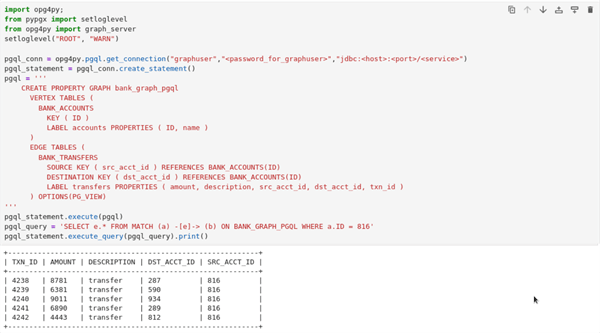
Create and query a PGQL property graph using the OPG4Py Python API in a notebook cell using the following code.
import opg4py;
from pypgx import setloglevel
from opg4py import graph_server
setloglevel("ROOT", "WARN")

pgql_conn = opg4py.pgql.get_connection("<username>","<password_for_user>","jdbc:oracle:thin:@<host_name>/<service>")
pgql_statement = pgql_conn.create_statement()
pgql = '''
    CREATE PROPERTY GRAPH bank_graph_pgql
      VERTEX TABLES (
        BANK_ACCOUNTS
          KEY ( ID )
          LABEL accounts PROPERTIES ( ID, name )
      )
      EDGE TABLES (
        BANK_TRANSFERS
          SOURCE KEY ( src_acct_id ) REFERENCES BANK_ACCOUNTS(ID)
          DESTINATION KEY ( dst_acct_id ) REFERENCES BANK_ACCOUNTS(ID)
          LABEL transfers PROPERTIES ( amount, description, src_acct_id, dst_acct_id, txn_id )
      ) OPTIONS(PG_VIEW)
'''
pgql_statement.execute(pgql
Figure: Creating and Querying a PGQL property graph in Jupyter Notebook
-
Visualize the query results using
PgqlGraphVisualizationinoraclegraphJupyter extension.-
Establish a connection to the database using the Python
oracledbdriver.import oracledb connection = connection=oracledb.connect( user=graphuser, password="<password_for_graph_user>", dsn="<hostname:port/dbservice>", print("Connection established successfully.") -
Run a PGQL query on your property graph and visualize the query results using the graph visualization extension.
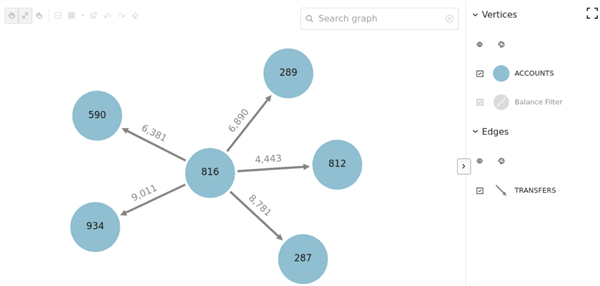
For instance, the following example shows the graph visualization of a PGQL query on the property graph created at step-4 using
PgqlGraphVisualizationin theoraclegraphJupyter extension.from pypgx import setloglevel from oraclegraph import GraphVisualization, PgqlGraphVisualization setloglevel('ROOT', 'WARN') vq = PgqlGraphVisualization("graphuser", "<password_for_graphuser>", "<host_name:port>/<service>") query=''' SELECT * FROM GRAPH_TABLE (bank_graph_pgql MATCH (a) -[e]-> (b) WHERE a.ID=816 COLUMNS (a.ID AS src_ac, e.AMOUNT AS amount, b.ID AS dest_ac) ) ''' graph_query = vq.visualize_query(query) defaults_feature = { "interactionActive": True, "1stickyActive": True } base_styles = { "vertex": { "label": "${properties.ID}", "size": 20 }, "edge": { "label": "${properties.AMOUNT}" } } rule_based_styles = [{ "stylingEnabled": True, "component": "vertex", "target": "vertex", "conditions": { "conditions": [{ "property": "BALANCE", "operator": "<=", "value": 5000 }], }, "style": { "color": "green" }, "legendTitle": "Balance Filter", "legendDisplayed": True } ] settings = { "numberOfHops": 2, "showLegend": True, "defaults": defaults_feature, "baseStyles": base_styles, "ruleBasedStyles": rule_based_styles } bank_graph = GraphVisualization(data = graph_query, settings = settings) bank_graph.height = 600 display(bank_graph)The preceding code produces the following visualization result:
Figure: PGQl Property Graph Visualization
-
-
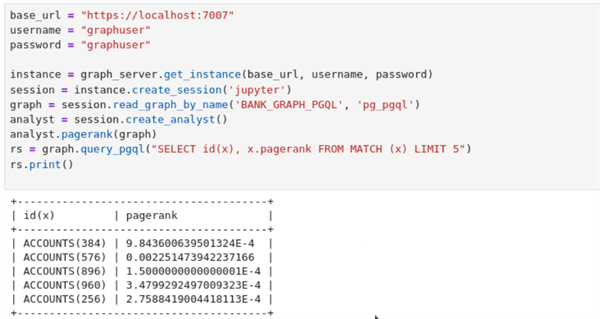
Load and analyze the property graph in the graph server (PGX).
The following example shows loading the PGQL property graph into the graph server (PGX) and running graph algorithms for analysis:
base_url = "https://localhost:7007"
username = "graphuser"
password = "<password_for_graphuser>"

instance = graph_server.get_instance(base_url, username, password)
session = instance.create_session('jupyter')
graph = session.read_graph_by_name('BANK_GRAPH_PGQL', 'pg_pgql')
analyst = session.create_analyst()
analyst.pagerank(graph)
rs = graph.query_pgql("SELECT id(x), x.pagerank FROM MATCH (x) LIMIT 5")
rs.print()
Figure: Running Graph Algorithms in Jupyter Notebook