Introduction to Property Graphs
Property graphs give you a different way of looking at your data.
You can model your data as a graph by making data entities vertices in the graph, and relationships between them as edges in the graph. For example, in a bank, customer accounts can be vertices, and cash transfer relationships between them can be edges.
When you view your data as a graph, you can analyze your data based on the connections and relationships between them. You can run graph analytics algorithms like PageRank to measure the relative importance of data entities based on the relationships between them (for instance, links between web pages).
-
What Are Property Graphs?
A property graph consists of a set of objects or vertices, and a set of arrows or edges connecting the objects. -
About the Property Graph Feature
The Property Graph feature delivers advanced graph query and analytics capabilities in Oracle AI Database or earlier Oracle Database versions. -
Running Graph Queries and Graph Analytics in the Database
This section provides an overview focusing on running graph pattern matching queries and graph algorithms (analytics) on property graphs in the database. -
Learn About the Graph Server (PGX)
The in-memory graph server layer enables you to analyze property graphs by running specialized algorithms using parallel in-memory execution. -
Developing Applications Using Graph Server Functionality as a Library
The graph functions available with the graph server (PGX) can be used as a library in your application. -
Security Best Practices with Graph Data
Several security-related best practices apply when working with graph data. -
About Oracle Graph Server and Client Accessibility
This section provides information on the accessibility features for Oracle Graph Server and Client.
What Are Property Graphs?
A property graph consists of a set of objects or vertices, and a set of arrows or edges connecting the objects.
Vertices and edges can have multiple properties, which are represented as key-value pairs.
Each vertex has a unique identifier and can have:
-
A set of outgoing edges
-
A set of incoming edges
-
A collection of properties
Each edge has a unique identifier and can have:
-
An outgoing vertex
-
An incoming vertex
-
A text label that describes the relationship between the two vertices
-
A collection of properties
For vertices and edges, each property is identified with a unique name.
The following figure illustrates a very simple property graph with two vertices and one edge. The two vertices have identifiers 1 and 2. Both vertices have properties name and age. The edge is from the outgoing vertex 1 to the incoming vertex 2. The edge has a text label knows and a property type identifying the type of relationship between vertices 1 and 2.
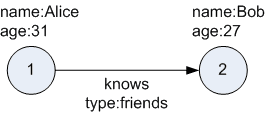
Description of the illustration two_vertices.png
A property graph can have self-edges (that is, an edge whose source and destination vertex are the same), as well as multiple edges between the same source and destination vertices.
A property graph can also have different types of vertices and edges in the same graph. For example a graph can have a set of vertices with label Person and a set of vertices with label Place, with different properties relevant to these two sets of vertices.
The property graph data model features and analytic APIs make property graphs a good candidate for use cases such as these:
-
Identifying influencers in a social network
-
Predicting trends and customer behavior
-
Discovering relationships based on pattern matching
-
Identifying clusters to customize campaigns
About the Property Graph Feature
The Property Graph feature delivers advanced graph query and analytics capabilities in Oracle AI Database or earlier Oracle Database versions.
This feature supports graph operations, indexing, queries, search, and in-memory analytics.
Graphs manage networks of linked data as vertices, edges, and properties of the vertices and edges. Graphs are commonly used to model, store, and analyze relationships found in social networks, cybersecurity, utilities and telecommunications, life sciences and clinical data, and knowledge networks.
Typical graph analyses encompass graph traversal, recommendations, finding communities and influencers, and pattern matching. Industries including telecommunications, life sciences and healthcare, security, media, and publishing can benefit from graphs.
The property graph features support those use cases with the following capabilities:
-
A scalable graph database.
-
Developer-based APIs based on SQL, PGQL (for older database versions), Java, and Python.
-
Graph Studio tool that includes a powerful Graph Explorer application for querying and visualizing graphs.
-
Notebook support through integration with Jupyter.
-
A parallel, in-memory graph server (PGX) for running specialized graph algorithms for analytics such as ranking, centrality, recommendation, community detection, and path finding. To run algorithms, you can connect to the graph server using a Jupyter notebook or using Java and Python clients.
Running Graph Queries and Graph Analytics in the Database
This section provides an overview focusing on running graph pattern matching queries and graph algorithms (analytics) on property graphs in the database.
SQL Property Graphs
The following figure lists the tools to work with SQL property graphs:
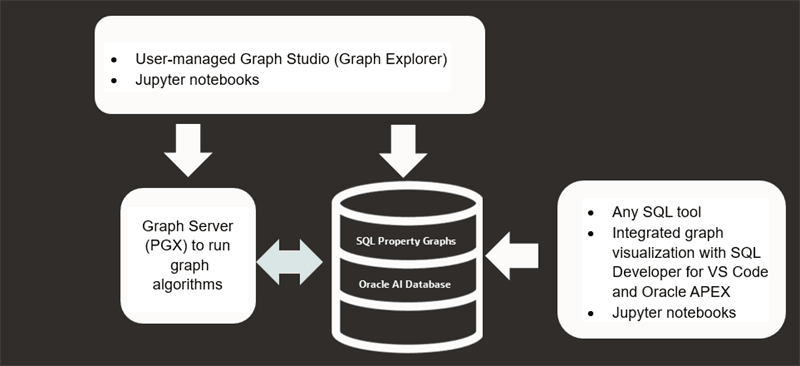
Description of the illustration sql_wf.png
The preceding figure describes the following two workflows using the tools:
-
Running Graph Queries:
You can create a SQL property graphs directly over existing database schema objects using a SQL DDL statement, and then run graph pattern matching queries using the
GRAPH_TABLEoperator. Since these queries execute in the database, you can use any SQL tool, SQL Developer extension for VS Code, Oracle APEX, or Jupyter notebooks. In addition, you can use the Graph Explorer interface in the user-managed Graph Studio to run graph queries and visualize the results. Interacting through graph visualization is also supported when using the SQL Developer extension for VS Code, Oracle APEX, and Jupyter notebooks. -
Running Graph Analytics:
Oracle Graph provides four in-built database algorithms that you can run directly within a SQL graph query. To run other specialized graph algorithms, you must load your graph into graph server (PGX). The graph server (PGX) is a mid-tier server that can run as a standalone server, or in a container like Oracle WebLogic Server or Apache Tomcat.
You can configure the graph server to periodically fetch data updates from the database to keep the graph synchronized.
See Also:
PGQL Property Graphs
The following figure lists the tools to work with PGQL property graphs:
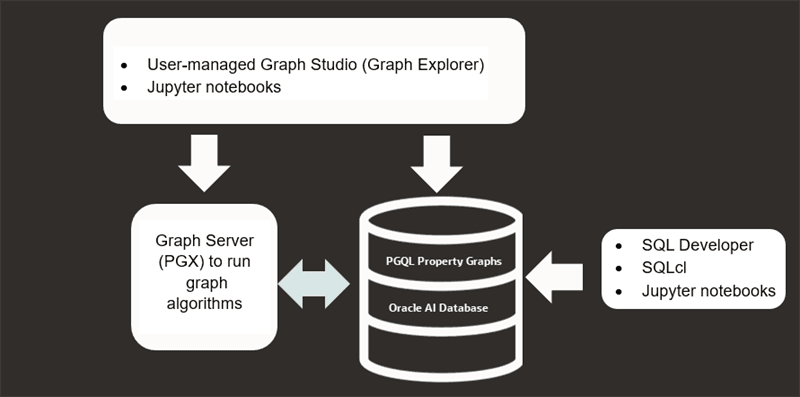
Description of the illustration pgql_wf.png
The preceding figure describes the following two workflows using the tools:
-
Running Graph Queries:
You can create a PGQL property graphs directly over existing database schema objects and then run graph pattern matching queries using PGQL queries using SQL client tools such as SQL Developer and SQLcl, or Jupyter notebooks. You can also run graph queries and visualize the results using Graph Explorer in the user-managed Graph Studio or in Jupyter notebooks.
-
Running Graph Algorithms:
You can load your graph into graph server (PGX) to run graph analytics.You can configure the graph server to periodically fetch data updates from the database to keep the graph synchronized.
Learn About the Graph Server (PGX)
The in-memory graph server layer enables you to analyze property graphs by running specialized algorithms using parallel in-memory execution.
It provides over 80 analytic functions. Examples of the categories and specific functions include:
-
Centrality - Degree Centrality, Eigenvector Centrality, PageRank, Betweenness Centrality, Closedness Centrality
-
Component and Community - Strongly Connected Components (Tarjan’s and Kosaraju’s). Weakly Connected Components
-
Twitter’s Who-To-Follow, Label Propagation.
-
Path Finding - Single source all destination (Bellman-Ford), Dijsktra’s shortest path, Hop Distance (Breadth-first search)
-
Community Evaluation - Coefficient (Triangle Counting), Conductance, Modularity, Adamic-Adar counter.
-
Overview of the Graph Server (PGX)
The Graph Server (PGX) is an in-memory accelerator for fast, parallel graph query and analytics. The server uses light-weight in-memory data structures to enable fast execution of graph algorithms.
Related Topics
Overview of the Graph Server (PGX)
The Graph Server (PGX) is an in-memory accelerator for fast, parallel graph query and analytics. The server uses light-weight in-memory data structures to enable fast execution of graph algorithms.
There are multiple options to load a graph into the graph server either from database or from files.
The graph server can be deployed standalone (it includes an embedded Apache Tomcat instance), or deployed in Oracle WebLogic Server or Apache Tomcat.
Design of the Graph Server (PGX)
The design of the graph server (PGX) is based on a Server-Client usage model. See Usage Modes of the Graph Server (PGX) for more details on the different graph server (PGX) execution modes.
The following figure shows the graph server (PGX) design:
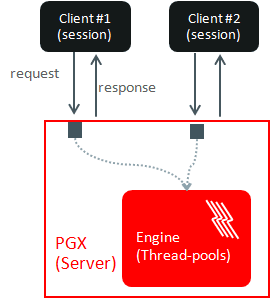
Description of the illustration pgx_design.png
The core concepts of the graph server (PGX) design are as follows:
-
Multiple graph clients can connect to the graph server at the same time.
-
Each client request is processed by the graph server asynchronously. The client requests are queued up first and processed later, when resources are available. The client can poll the server to check if a request has been finished.
-
Internally, the server maintains its own engine (thread pools) for running parallel graph algorithms and queries. The engine tries to process each analytics request concurrently with as many threads as possible.
Isolation Between Concurrent Clients
The graph server (PGX) supports data isolation between concurrent clients. Each client has its own private workspace, called session. Sessions are isolated from each other. Each client can load a graph instance into its own session, independently from other clients. Therefore, each client can load a graph instance (as well as its properties) into its own session, independently from other clients.
Usage Modes of the Graph Server (PGX)
This section presents an overview of the different usage modes of the graph server (PGX). The graph server can be executed in one of the following usage modes.
Remote Server Mode
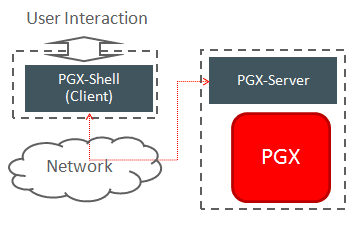
In the remote server mode, the main PGX execution engine is deployed as a RESTful application on a powerful server machine, and you can connect to it remotely from your machine using graph shell. Also, multiple clients can connect to the same graph server (PGX) at the same time and therefore the graph server is time-shared among these clients.
See Interactive Graph Shell CLIs for more information on the graph shell.
The following figure shows the graph server (PGX) in a remote execution mode:
Description of the illustration remote_usage_mode.png
The remote server mode is useful for the following situations where you want to:
-
Perform graph analysis on a large data set with a powerful server-class machine that has many cores and a large memory.
-
The server-class machine is shared by multiple clients.
See Starting the Graph Server (PGX) for instructions on how to start the graph server (PGX) in remote server mode.
Using Graph Server (PGX) as a Library
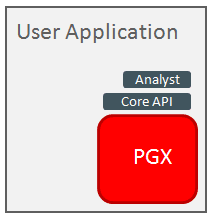
You can also include the graph server (PGX) as a normal Java library in your application.
The following figure shows the graph server (PGX) used as a library in an application:
Description of the illustration local_java_mode.png
The embedded mode is useful when you want to build an application having graph analysis as a part of its functionality.
See Using the Graph Server (PGX) as a Library for more information.
Deploying Graph Server (PGX) as Servlet Web Application
You can deploy the graph server (PGX) as a web application using Apache Tomcat or Oracle WebLogic Server.
See Deploying Oracle Graph Server to a Web Server for instructions to deploy the graph server (PGX) in Apache Tomcat or Oracle WebLogic Server.
Developing Applications Using Graph Server Functionality as a Library
The graph functions available with the graph server (PGX) can be used as a library in your application.
After the rpm install of the graph server, all the jar files can be found in /opt/oracle/graph/lib. In this case, the server installation and the client user application are in the same machine.
For such use cases, development and testing can be done using the interactive Java shell or the Python shell in embedded (local) mode. This means a local PGX instance is created and runs in the same JVM as the client. If you start the shell without any parameters it will start a local PGX instance and run in embedded mode.
See Using the Graph Server (PGX) as a Library for more information to obtain reference to a local PGX instance.
Security Best Practices with Graph Data
Several security-related best practices apply when working with graph data.
Sensitive Information
Graph data can contain sensitive information and should therefore be treated with the same care as any other type of data. Oracle recommends the following considerations when using a graph product:
-
Avoid storing sensitive information in your graph if that information is not required for analysis. If you have existing data, only model the relevant subset you need for analysis as a graph, either by applying a preprocessing step or by using subgraph and filtering techniques that are part of graph product.
-
Model your graph in a way that vertex and edge identifiers are not considered sensitive information.
-
Do not deploy the product into untrusted environments or in a way that gives access to untrusted client connections.
-
Make sure all communication channels are encrypted and that authentication is always enabled, even if running within a trusted network.
Least Privilege Accounts
The database user account that is being used by the graph server (PGX) to read data should be a low-privilege, read-only account. PGX is an in-memory accelerator that acts as a read-only cache on top of the database, and it does not write any data back to the database.
If your application requires writing graph data and later analyzing it using PGX, make sure you use two different database user accounts for each component.
Public Health Endpoint Security
Unless you run multiple graph servers behind a load balancer (Deploying Oracle Graph Server Behind a Load Balancer), it is a good security practice to disable the public endpoint of the graph server, which load balancers need to determine the health of the graph servers.
To disable the endpoint:
-
Locate the
WARfile of the graph server. If you installed the graph server via RPM, then the file is located at/opt/oracle/graph/pgx/server/pgx-webapp-<version>.war. -
Unzip the
.warfile into a location of your choice and then edit theWEB-INF/web.xmlfile inside the unzipped directory with a text editor of your choice. -
Locate the
pgx.auth.exceptionsparameter in the file. The list of public endpoints can be seen as shown:<init-param> <param-name>pgx.auth.exceptions</param-name> <param-value>isReady;isRunning;auth/token</param-value> </init-param> -
Remove the
isReadyendpoint from the list of public endpoints as shown:<init-param> <param-name>pgx.auth.exceptions</param-name> <param-value>isRunning;auth/token</param-value> </init-param> -
Save your changes, repackage the
WARfile and redeploy the file to its original location. -
Restart the graph server.
About Oracle Graph Server and Client Accessibility
This section provides information on the accessibility features for Oracle Graph Server and Client.
-
For information on addressing accessibility for the Java and Python command line interfaces, which are installed on Oracle Linux, see Working With Accessibility Features in Oracle Linux 8.
-
For information on keyboard shortcuts for the Java command line interface, which is built on top of the Java Shell (JShell), see Keyboard Shortcuts for JShell.
-
For information on addressing accessibility for the user-managed Graph Studio and Graph Visualization applications, which are based on Oracle JET, see About Oracle JET and Accessibility.