Quick Start: Create and Analyze PGQL Property Graphs Using SQL Tools and Graph Server (PGX)
This quick start shows how to define a PGQL property graph over relational tables using SQL tools such as Oracle SQL Developer or SQLcl and then load the graph into the graph server (PGX) server for advanced graph analysis.
The instructions assume that you have loaded the sample bank graph data provided with the graph server installation in the database tables (BANK_ACCOUNTS and BANK_TRANSFERS). See Using Sample Graph Data for more information.
-
Create a PGQL property graph using one of the following SQL tools of your choice.
- SQL Developer: Supported versions 23.1.1 and 26.2:
-
Right-click the Property Graph node and select Open PGQL Worksheet in SQL Developer.
-
Create a PGQL property graph by running the following
CREATE PROPERTY GRAPHDDL statement in the PGQL Worksheet:CREATE PROPERTY GRAPH bank_graph VERTEX TABLES ( BANK_ACCOUNTS LABEL ACCOUNTS PROPERTIES (ID, NAME, BALANCE) ) EDGE TABLES ( BANK_TRANSFERS SOURCE KEY (SRC_ACCT_ID) REFERENCES BANK_ACCOUNTS (ID) DESTINATION KEY (DST_ACCT_ID) REFERENCES BANK_ACCOUNTS (ID) LABEL TRANSFERS PROPERTIES (SRC_ACCT_ID, DST_ACCT_ID, AMOUNT, DESCRIPTION) ) OPTIONS(PG_PGQL)Figure: Creating a PGQL Property Graph Using SQL Developer
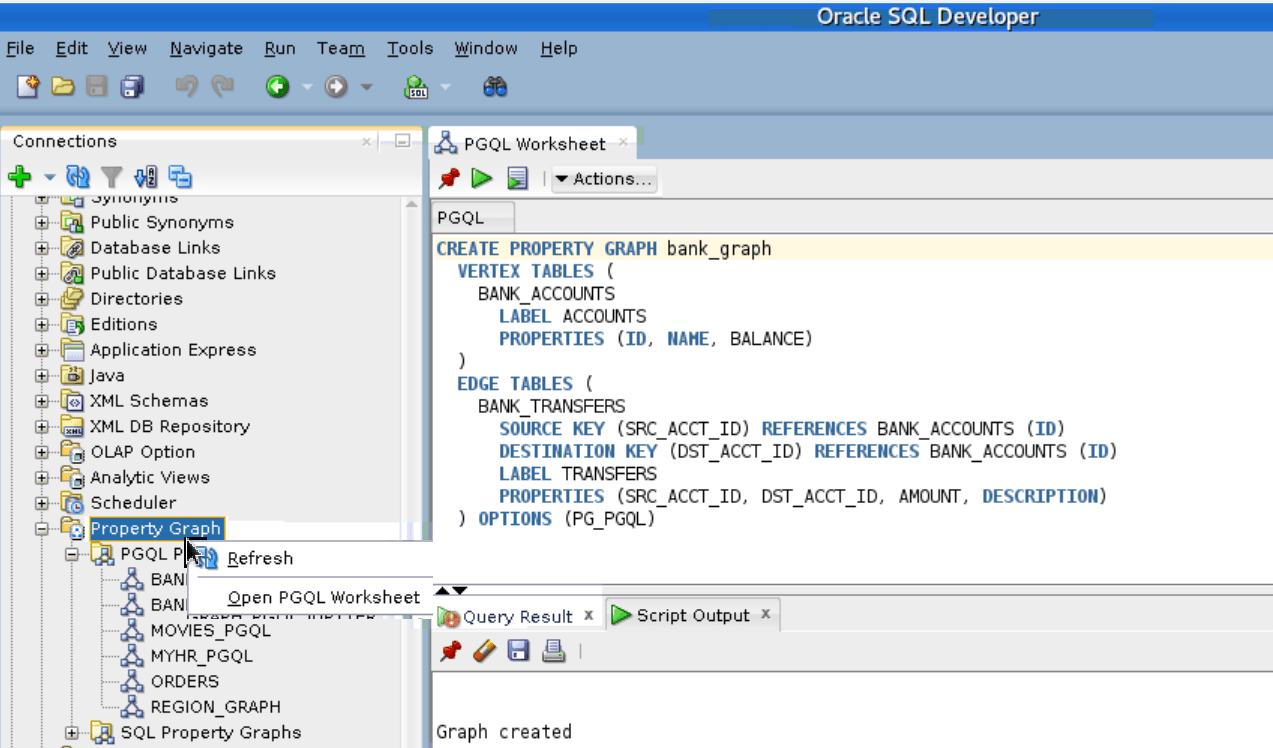
Description of the illustration qs_create_pgql_pg_sqldev.png
-
-
SQLcl:
Before you begin, ensure to install PGQL plug-in for SQLcl. See PGQL Plug-in for SQLcl in Oracle SQLcl User’s Guide for more information.
-
Start SQLcl with your database schema credentials and enable PGQL mode as shown:
SQL> pgql auto on; -
Create a PGQL property graph on the bank graph data tables.
PGQL Plugin version: 26.3.0
PGQL Auto enabled for schema=[null], graph=[null], execute=[true], translate=[false]
PGQL> CREATE PROPERTY GRAPH bank_graph
  2    VERTEX TABLES (
  3      BANK_ACCOUNTS
  4        LABEL ACCOUNTS
  5        PROPERTIES (ID, NAME, BALANCE)
  6    )
  7    EDGE TABLES (
  8      BANK_TRANSFERS
  9        SOURCE KEY (SRC_ACCT_ID) REFERENCES BANK_ACCOUNTS (ID)
 10        DESTINATION KEY (DST_ACCT_ID) REFERENCES BANK_ACCOUNTS (ID)
 11        LABEL TRANSFERS
 12        PROPERTIES (SRC_ACCT_ID, DST_ACCT_ID, AMOUNT, DESCRIPTION)
 13*   ) OPTIONS(PG_PGQL);

Graph created
-
- SQL Developer: Supported versions 23.1.1 and 26.2:
-
Ensure you have the necessary privileges to work using the graph server (PGX).
See Privileges and Roles in the Database for more information.
-
Load the graph into the graph server (PGX) using client shell CLIs. This will enable you to run a variety of different built-in algorithms on the graph and will also improve query performance for larger graphs.
Ensure you have the required privileges to work on the graph using the graph server (PGX). See Privileges and Roles in the Database for more information.
opg4j> var graph = session.readGraphByName("BANK_GRAPH",GraphSource.PG_PGQL)
graph ==> PgxGraph[name=BANK_GRAPH,N=1000,E=4996,created=1643308582055]
PgxGraph graph = session.readGraphByName("BANK_GRAPH",GraphSource.PG_PGQL);>>> graph = session.read_graph_by_name('BANK_GRAPH', 'pg_pgql') >>> graph PgxGraph(name: BANK_GRAPH, v: 1000, e: 4996, directed: True, memory(Mb): 0) -
Execute the PageRank algorithm as shown:
opg4j> analyst.pagerank(graph) $10 ==> VertexProperty[name=pagerank,type=double,graph=BANK_GRAPH]analyst.pagerank(graph);>>> analyst.pagerank(graph) VertexProperty(name: pagerank, type: double, graph: BANK_GRAPH) -
Query the graph to list the top 10 accounts by pagerank:
opg4j> String pgql ==> "SELECT a.id, a.pagerank FROM MATCH (a) ON BANK_GRAPH ORDER BY a.pagerank DESC LIMIT 10"
opg4j> var result = session.queryPgql(pgql)
opg4j> result.print()
+-----------------------------+
| id  | pagerank              |
+-----------------------------+
| 387 | 0.007292323575404966  |
| 406 | 0.0067300944623203615 |
| 135 | 0.0067205459831892545 |
| 934 | 0.00663484385036358   |
| 397 | 0.005693569761570973  |
| 559 | 0.0052584383114609844 |
| 352 | 0.005216329599236731  |
| 330 | 0.005093350408942336  |
| 222 | 0.004682551613749817  |
| 4   | 0.004569682370461633  |
+-----------------------------+
$18 ==> PgqlResultSetImpl[graph=BANK_GRAPH,numResults=10]
String pgql = "SELECT a.id, a.pagerank FROM MATCH (a) ON BANK_GRAPH ORDER BY a.pagerank DESC LIMIT 10"; PgqlResultSet result = session.queryPgql(pgql); result.print();>>> pgql = "SELECT a.id, a.pagerank FROM MATCH (a) ON BANK_GRAPH ORDER BY a.pagerank DESC LIMIT 10" >>> result = session.query_pgql(pgql) >>> result.print() +-----------------------------+ | id | pagerank | +-----------------------------+ | 387 | 0.007292323575404966 | | 406 | 0.0067300944623203615 | | 135 | 0.0067205459831892545 | | 934 | 0.00663484385036358 | | 397 | 0.005693569761570973 | | 559 | 0.0052584383114609844 | | 352 | 0.005216329599236731 | | 330 | 0.005093350408942336 | | 222 | 0.004682551613749817 | | 4 | 0.004569682370461633 | +-----------------------------+You can also publish the graph (
graph.publish()) with the newpagerankproperty and visualize that the graph query results in Graph Explorer. See Querying and Visualizing Graphs Loaded Into the Graph Server (PGX) for more information.