Quick Start for Working with SQL Property Graphs
This tutorial helps you get started on creating, querying, and running graph algorithms on a SQL property graph.
Before you begin:
-
Create the
BANK_ACCOUNTStable.CREATE TABLE IF NOT EXISTS BANK_ACCOUNTS ( ID NUMBER, NAME VARCHAR2(400), BALANCE NUMBER(20,2), CONSTRAINT BANK_ACCOUNTS_PK PRIMARY KEY (ID) );Insert the following data in
BANK_ACCOUNTS:INSERT INTO BANK_ACCOUNTS (ID, NAME, BALANCE) VALUES (66,'CAROL CITINO',51936.42); INSERT INTO BANK_ACCOUNTS (ID, NAME, BALANCE) VALUES (196,'AUGUST RUPEL',198172.15); INSERT INTO BANK_ACCOUNTS (ID, NAME, BALANCE) VALUES (205,'ROSEMARIE STEFANICH',180953.65); INSERT INTO BANK_ACCOUNTS (ID, NAME, BALANCE) VALUES (238,'ANNETTA JUBACK',95198.55); INSERT INTO BANK_ACCOUNTS (ID, NAME, BALANCE) VALUES (271,'LLOYD SHACKLEY',91041.44); INSERT INTO BANK_ACCOUNTS (ID, NAME, BALANCE) VALUES (297,'ELAINE MONCURE',19188.46); INSERT INTO BANK_ACCOUNTS (ID, NAME, BALANCE) VALUES (397,'SYBLE RADIN',144818.99); INSERT INTO BANK_ACCOUNTS (ID, NAME, BALANCE) VALUES (406,'JACKLYN NISKALA',97336.44); INSERT INTO BANK_ACCOUNTS (ID, NAME, BALANCE) VALUES (889,'JUSTIN MCCALLISTER',7042.78); INSERT INTO BANK_ACCOUNTS (ID, NAME, BALANCE) VALUES (980,'GUILLERMO REMSBURG',141602.69); -
Create the
BANK_TRANSFERStable:CREATE TABLE IF NOT EXISTS BANK_TRANSFERS ( TXN_ID NUMBER, SRC_ACCT_ID NUMBER, DST_ACCT_ID NUMBER, DESCRIPTION VARCHAR2(400), AMOUNT NUMBER, CONSTRAINT BANK_TRANSFERS_PK PRIMARY KEY (TXN_ID), CONSTRAINT BANK_TRANSFERS_SRC_ACCT_FK FOREIGN KEY (SRC_ACCT_ID) REFERENCES BANK_ACCOUNTS (ID), CONSTRAINT BANK_TRANSFERS_DST_ACCT_FK FOREIGN KEY (DST_ACCT_ID) REFERENCES BANK_ACCOUNTS (ID) );Insert the following data in
BANK_TRANSFERS:INSERT INTO BANK_TRANSFERS (TXN_ID,SRC_ACCT_ID,DST_ACCT_ID,DESCRIPTION,AMOUNT) VALUES (123,196,66,'transfer',7765); INSERT INTO BANK_TRANSFERS (TXN_ID,SRC_ACCT_ID,DST_ACCT_ID,DESCRIPTION,AMOUNT) VALUES (167,205,980,'transfer',6602); INSERT INTO BANK_TRANSFERS (TXN_ID,SRC_ACCT_ID,DST_ACCT_ID,DESCRIPTION,AMOUNT) VALUES (168,205,66,'transfer',3573); INSERT INTO BANK_TRANSFERS (TXN_ID,SRC_ACCT_ID,DST_ACCT_ID,DESCRIPTION,AMOUNT) VALUES (332,238,66,'transfer',9019); INSERT INTO BANK_TRANSFERS (TXN_ID,SRC_ACCT_ID,DST_ACCT_ID,DESCRIPTION,AMOUNT) VALUES (333,238,406,'transfer',1885); INSERT INTO BANK_TRANSFERS (TXN_ID,SRC_ACCT_ID,DST_ACCT_ID,DESCRIPTION,AMOUNT) VALUES (499,271,66,'transfer',8527); INSERT INTO BANK_TRANSFERS (TXN_ID,SRC_ACCT_ID,DST_ACCT_ID,DESCRIPTION,AMOUNT) VALUES (893,66,397,'transfer',2383); INSERT INTO BANK_TRANSFERS (TXN_ID,SRC_ACCT_ID,DST_ACCT_ID,DESCRIPTION,AMOUNT) VALUES (2329,406,397,'transfer',7884); INSERT INTO BANK_TRANSFERS (TXN_ID,SRC_ACCT_ID,DST_ACCT_ID,DESCRIPTION,AMOUNT) VALUES (2887,297,397,'transfer',8613); INSERT INTO BANK_TRANSFERS (TXN_ID,SRC_ACCT_ID,DST_ACCT_ID,DESCRIPTION,AMOUNT) VALUES (4660,889,66,'transfer',5715); -
Ensure that you have the required privileges to create and drop a SQL property graph. See Granting System and Object Privileges for SQL Property Graphs for more information.
-
Create a SQL property graph using the
CREATE PROPERTY GRAPHDDL statement.CREATE OR REPLACE PROPERTY GRAPH bank_sql_graph VERTEX TABLES ( BANK_ACCOUNTS KEY ( id ) LABEL accounts PROPERTIES ( id, name, balance ) ) EDGE TABLES ( BANK_TRANSFERS SOURCE KEY ( src_acct_id ) REFERENCES BANK_ACCOUNTS(ID) DESTINATION KEY ( dst_acct_id ) REFERENCES BANK_ACCOUNTS(ID) LABEL transfers PROPERTIES ( amount, description, src_acct_id, dst_acct_id, txn_id ) );On execution, the
bank_sql_graphgraph is created in the database. The graph is made up of one vertex graph element table (bank_accounts) and one edge graph element table (bank_transfers).See Creating a SQL Property Graph to learn the concepts of graph element tables, keys, labels and properties.
-
Run a SQL graph query, on the newly created graph, to list all the transactions between the accounts.
SELECT * FROM GRAPH_TABLE (bank_sql_graph
  MATCH
    (a IS accounts) -[e IS transfers]-> (b IS accounts)
  COLUMNS (a.id AS src_account, b.id AS dest_account, e.amount AS amount));
The preceding code shows the following output:
SRC_ACCOUNT  DEST_ACCOUNT  AMOUNT
-----------  ------------  ------
196          66            7765
205          980           6602
205          66            3573
238          66            9019
238          406           1885
271          66            8527
66           397           2383
406          397           7884
297          397           8613
889          66            5715
See SQL Graph Queries for more information.
-
Visualize the results of the preceding SQL graph query.
In order to visualize the output of a SQL graph query, the query must use the
VERTEX_IDandEDGE_IDfunctions to return the vertex and edge IDs. See Vertex and Edge Identifiers to learn more about theVERTEX_IDandEDGE_IDfunctions.For example, consider the following SQL graph query. The
COLUMNSclause uses theVERTEX_IDandEDGE_IDfunctions.SELECT id_a, id_e, id_b FROM GRAPH_TABLE ( BANK_SQL_GRAPH MATCH (a IS Accounts) -[e IS Transfers]-> (b IS Accounts) COLUMNS (vertex_id(a) AS id_a, edge_id(e) AS id_e, vertex_id(b) AS id_b ) )You can use one of the following options to visualize the graph query:
-
Using SQL Developer for VS Code Connection in FreeSQL
If you are using FreeSQL to run your SQL graph query and would like to visualize the results of your query, you will then need to use SQL Developer for VS Code to run the graph visualization.
-
Click Connect to the Database on the FreeSQL toolbar to retrieve your connection details.
-
Select Create a SQL Developer for VS Code connection to connect to your FreeSQL instance from VS Code.
-
Use the Graph Visualization extension for SQL Developer to visualize your graph results directly in VS Code.
Figure: Graph Visualization Using VS Code
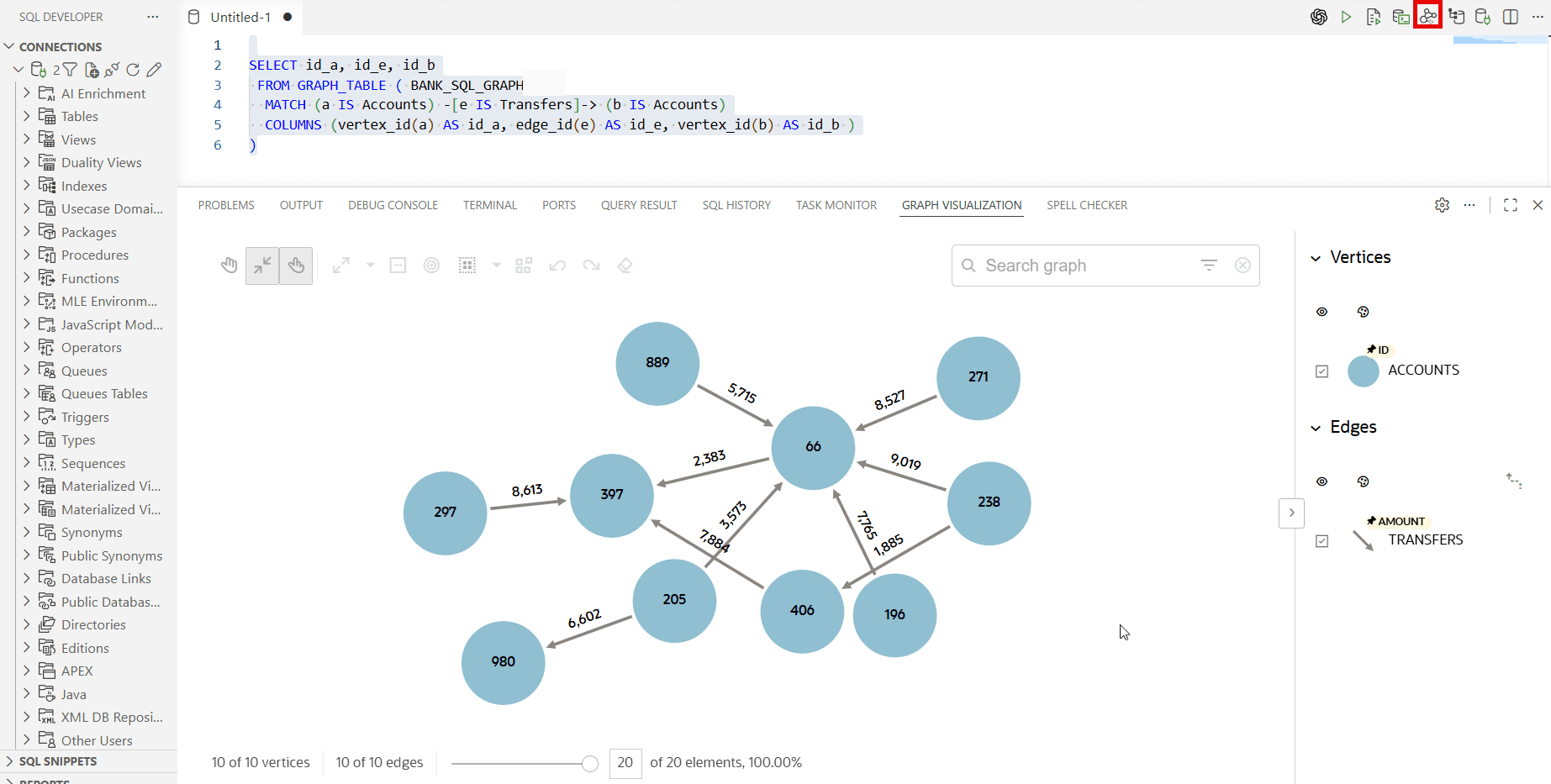
Description of the illustration freesql_viz.png
See Getting Started with the Graph Visualization Extension for VS Code for more information.
-
-
Using Graph Explorer
If you have installed the graph server (PGX), then you can visualize the preceding SQL graph query, using Graph Explorer.
Figure: Graph Visualization Using Graph Explorer
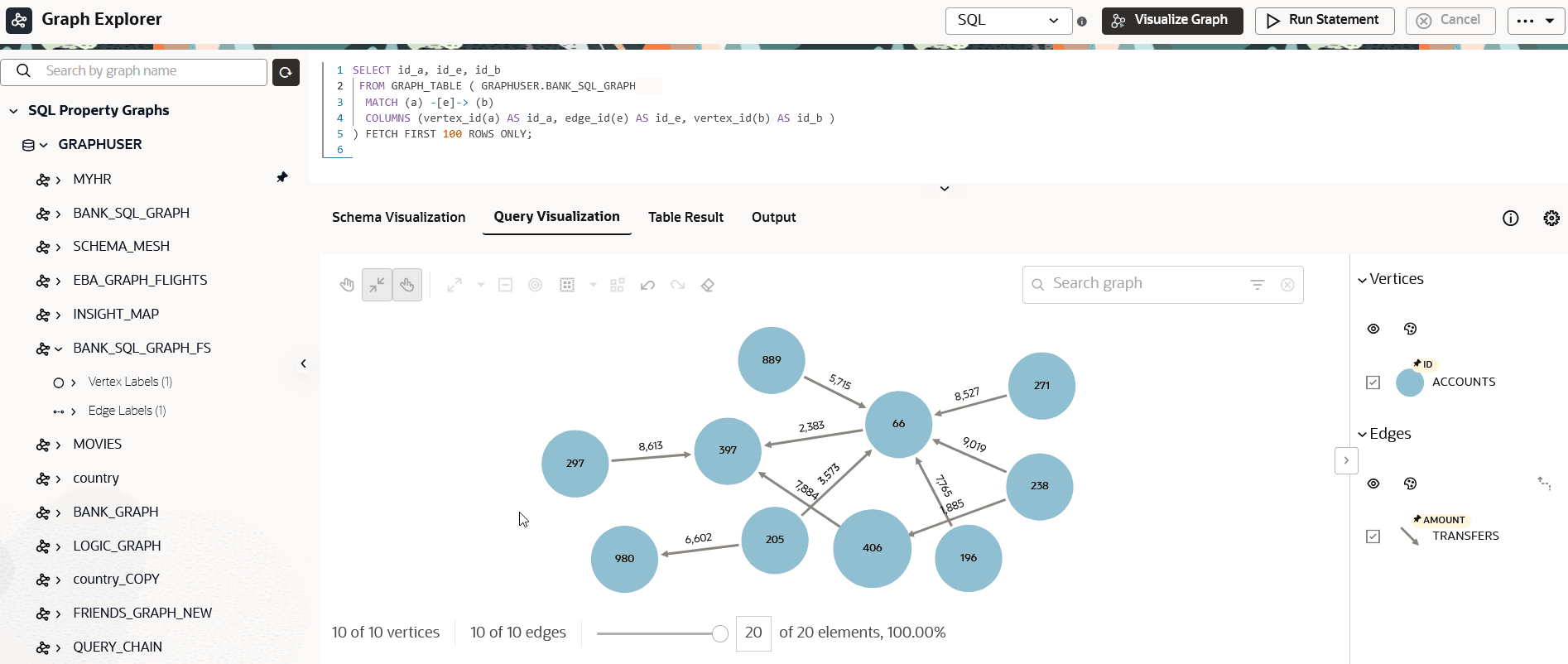
Description of the illustration qs_sql_graphviz.png
See Querying and Visualizing SQL Property Graphs in Graph Explorer for more details.
-
-
Run graph algorithm functions (GAFs) on the SQL property graph.
For instance, the following example runs the
DBMS_OGA.PAGERANKalgorithm on the graph and projects the id values ofBANK_ACCOUNTSvertices and their correspondingrankvalues.SELECT id, rank FROM GRAPH_TABLE( DBMS_OGA.pagerank( bank_sql_graph, PROPERTY(VERTEX OUTPUT rank), 10, 1.0, 0.85d, FALSE ) MATCH (a IS accounts) COLUMNS (a.id, a.rank) ) ORDER BY rank DESC, id DESC;The query returns the following output:
"ID"	"RANK"
 397	0.378375
  66	0.06600000000000002
 980	0.021375000000000005
 406	0.021375000000000005
 889	0.015000000000000003
 297	0.015000000000000003
 271	0.015000000000000003
 238	0.015000000000000003
 205	0.015000000000000003
 196	0.015000000000000003
See Running Graph Algorithm Functions in SQL Graph Queries for more information.
-
Alternatively, you can run the built-in graph algorithms using the graph server.
Connect to the database using graph shell CLIs or Java APIs and load the graph into the graph server (PGX):
opg4j> var jdbcUrl="jdbc:oracle:thin:@<host>:<port>/<sid>"
jdbcUrl ==> "jdbc:oracle:thin:@<host>:<port>/<sid>"
opg4j> var conn = DriverManager.getConnection(jdbcUrl,"<username>","<password>")
conn ==> oracle.jdbc.driver.T4CConnection@6ba645ae
opg4j> conn.setAutoCommit(false);
opg4j> var pgqlConn = PgqlConnection.getConnection(conn)
pgqlConn ==> oracle.pg.rdbms.pgql.PgqlConnection@3e8fe7db
opg4j> var instance = GraphServer.getInstance("https://localhost:7007", "graphuser", "<password>".toCharArray())
instance ==> ServerInstance[embedded=false,baseUrl=https://localhost:7007,serverVersion=26.1.0]
opg4j> var session = instance.createSession("mySession")
session ==> PgxSession[ID=41f2953e-c6b8-489f-bfec-0e08be0675ec,source=mySession]
opg4j> var graph = session.readGraphByName("BANK_SQL_GRAPH",GraphSource.PG_SQL)
graph ==> PgxGraph[name=BANK_SQL_GRAPH,N=10,E=10,created=1782127917004]
import java.sql.DriverManager; import java.sql.Connection; import java.sql.Statement; import oracle.pg.rdbms.pgql.PgqlConnection; import oracle.pg.rdbms.pgql.PgqlStatement; import oracle.pg.rdbms.pgql.PgqlResultSet; import oracle.pgx.api.*; import oracle.pg.rdbms.GraphServer; // Get a jdbc connection String jdbcUrl="jdbc:oracle:thin:@"+<host>+":"+<port>+"/"+<service>; conn = DriverManager.getConnection(jdbcUrl, <username>, <password>); conn.setAutoCommit(false); PgqlConnection pgqlConn = PgqlConnection.getConnection(conn); ServerInstance instance = GraphServer.getInstance("https://localhost:7007", "<username>", "<password>".toCharArray()); PgxSession session = instance.createSession("my-session"); PgxGraph graph = session.readGraphByName("BANK_SQL_GRAPH",GraphSource.PG_SQL);>>> pgql_conn = opg4py.pgql.get_connection("<username>","<password>", "jdbc:oracle:thin:@<host>:<port>/<sid>") >>> instance = graph_server.get_instance("https://localhost:7007","<username>","<password>") >>> session = instance.create_session("my_session") >>> graph = session.read_graph_by_name('BANK_SQL_GRAPH', 'pg_sql')Execute the PageRank algorithm as shown.
opg4j> var analyst = session.createAnalyst()
analyst ==> NamedArgumentAnalyst[session=0fb6bea7-d467-458d-90c3-803d2932df12]
opg4j> analyst.pagerank(graph, 1.0, 0.85, 10)
$3 ==> VertexProperty[name=pagerank,type=double,graph=bank_sql_graph]
Analyst analyst = session.createAnalyst(); analyst.pagerank(graph, 1.0, 0.85, 10);>>> analyst = session.create_analyst() >>> analyst.pagerank(graph, 1.0, 0.85, 10) VertexProperty(name: pagerank, type: double, graph: bank_sql_graph)See GitHub for more information on the built-in graph algorithms supported by the graph server (PGX).
Query the graph to list the accounts ordered by PageRank:
opg4j> var result = session.queryPgql("SELECT * "+
...> "FROM GRAPH_TABLE ( BANK_SQL_GRAPH "+
...> "MATCH (a IS ACCOUNTS) "+
...> "COLUMNS (a.ID, a.pagerank )) "+
...> "ORDER BY pagerank DESC, id DESC")
result ==> PgqlResultSetImpl[graph=BANK_SQL_GRAPH,numResults=10]
opg4j> result.print()
+------------------------------+
| ID    | pagerank             |
+------------------------------+
| 397.0 | 0.378375             |
| 66.0  | 0.066                |
| 980.0 | 0.021375000000000005 |
| 406.0 | 0.021375000000000005 |
| 889.0 | 0.015000000000000003 |
| 297.0 | 0.015000000000000003 |
| 271.0 | 0.015000000000000003 |
| 238.0 | 0.015000000000000003 |
| 205.0 | 0.015000000000000003 |
| 196.0 | 0.015000000000000003 |
+------------------------------+
$17 ==> PgqlResultSetImpl[graph=BANK_SQL_GRAPH_FS,numResults=10
PgqlResultSet = session.queryPgql("SELECT DISTINCT ID, pagerank "+ ...> "FROM GRAPH_TABLE ( BANK_SQL_GRAPH "+ ...> "MATCH (a IS ACCOUNTS) "+ ...> "COLUMNS (a.ID, a.pagerank )) "+ ...> "ORDER BY pagerank DESC, id DESC") result.print();>>> result = session.query_pgql("SELECT DISTINCT ID, pagerank "+ ... "FROM GRAPH_TABLE ( BANK_SQL_GRAPH "+ ... "MATCH (a IS ACCOUNTS) "+ ... "COLUMNS (a.ID, a.pagerank )) "+ ... "ORDER BY pagerank DESC, id DESC")) >>> result.print() +------------------------------+ | ID | pagerank | +------------------------------+ | 397.0 | 0.378375 | | 66.0 | 0.066 | | 980.0 | 0.021375000000000005 | | 406.0 | 0.021375000000000005 | | 889.0 | 0.015000000000000003 | | 297.0 | 0.015000000000000003 | | 271.0 | 0.015000000000000003 | | 238.0 | 0.015000000000000003 | | 205.0 | 0.015000000000000003 | | 196.0 | 0.015000000000000003 | +------------------------------+Optionally, to persist the results of your analysis, you can convert the
PgqlResultSetto aPgxFrameand store it in a database table as shown:opg4j> var rsFrame = result.toFrame() opg4j> rsFrame.write(). ...> db(). // select the format as relational database ...> name("DSFrame"). // name of the frame ...> tablename("data_frame_tbl"). // name of the table in which the data is stored ...> overwrite(true). // overwrite the table if it already exists ...> connections(16). // use 16 connections to store in parallel ...> store()PgxFrame rsFrame = result.toFrame(); rsFrame.write() .db() // select the format as relational database .name("NewFrame") // name of the frame .tablename("frame_tbl") // name of the table in which the data is stored .overwrite(true) // overwrite the table if it already exists .connections(16) // use 16 connections to store in parallel .store();>>> rsFrame.to_frame() >>> (rsFrame.write(). ... name("NewFrame"). # name of the frame ... db(). # select the format as relational database ... table_name("frame_tbl"). # name of the table in which the data is stored ... overwrite(True). # overwrite the table if it already exists ... connections(16). # use 16 connections to store in parallel ... store()) -
Drop the SQL property graph after running the graph queries using any SQL client.
DROP PROPERTY GRAPH bank_sql_graph;