4.7 Generate Annotations with AI
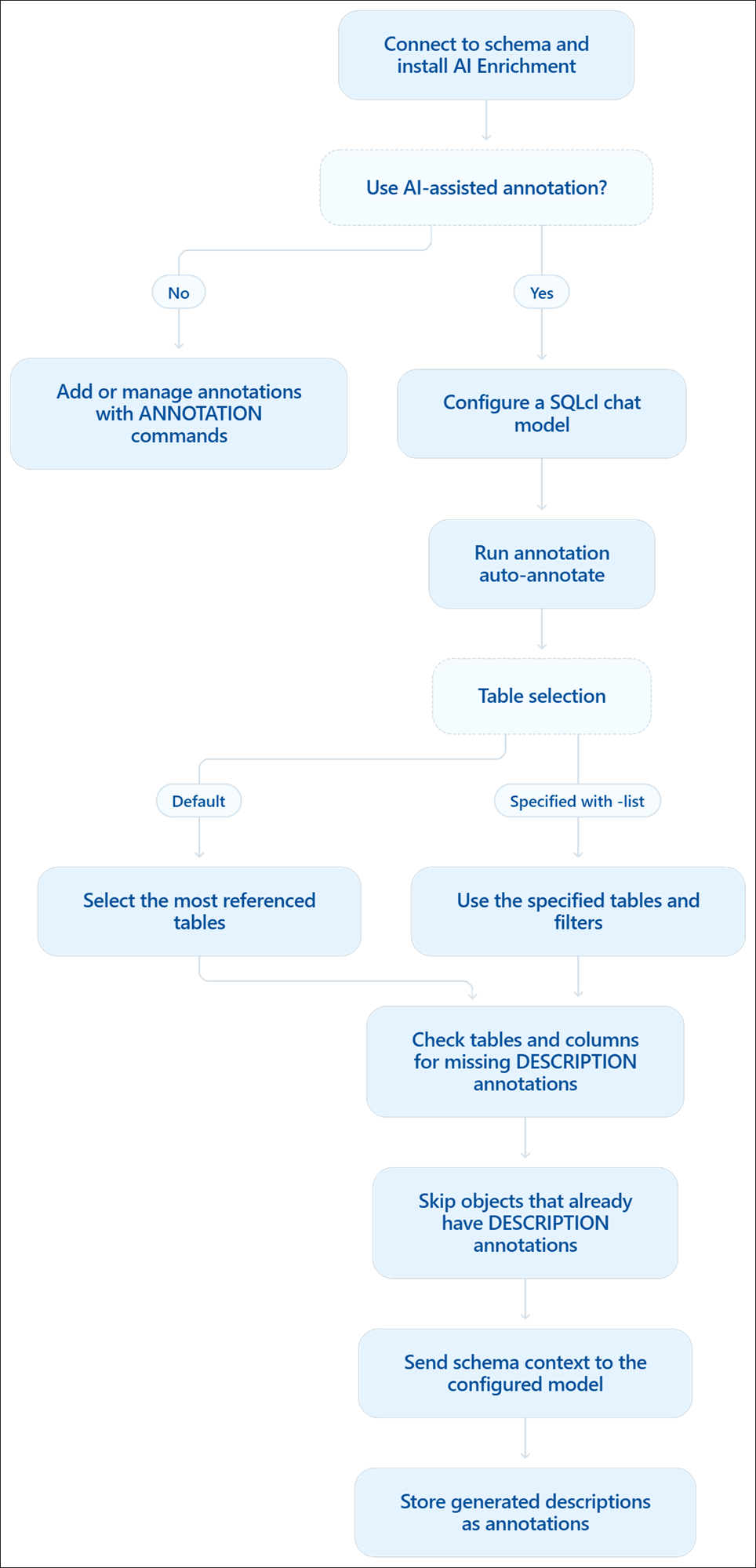
By default, SQLcl selects the most referenced tables in the current schema and checks the tables and their columns for missing DESCRIPTION annotations. SQLcl then builds the schema context, sends it to the configured LLM, and stores the generated descriptions as annotations. Objects that already have a DESCRIPTION annotation are skipped.
Syntax
annotation auto-annotate {OPTIONS}For descriptions of all options, see ANNOTATION.
4.7.1 Workflow for AI-Assisted Annotation
The following workflow diagram explains AI-assisted annotation, where SQLcl selects tables, checks for missing descriptions, and uses a configured chat model to generate annotations.
Figure 4-1 Workflow for AI-Assisted Annotation
4.7.2 Generate Descriptions Using the Default Selection
When the -list option is not specified, SQLcl selects the most referenced tables in the current schema. A table is considered more referenced when other tables point to it through foreign keys. For each selected table, SQLcl generates missing DESCRIPTION annotations for the table and its columns.
Example
annotation auto-annotate4.7.3 Generate Descriptions for Specific Tables and Filters
Use the -list option to specify the tables for which to generate annotations. When specified, this option overrides the default table selection and supports SQL-like filters for selecting multiple tables.
Examples
annotation auto-annotate -list SHOTS,PASSES,PLAYERSThis considers only the SHOTS, PASSES, and PLAYERS tables.
annotation auto-annotate -list 'SHOTS,MATCH_%' This considers SHOTS and all tables starting with MATCH_.
4.7.4 Exclude Tables After Selection
Use the -ignore-list option to ignore tables from the default selection or from a table pattern supplied with -list. If a table is selected in -list and then ignored in -ignore-list, it is ignored.
Examples
annotation auto-annotate -ignore-list AUDIT_LOG,TEMP_IMPORT This removes AUDIT_LOG and TEMP_IMPORT from the selected table set.
annotation auto-annotate -list 'SHOTS,MATCH_%' -ignore-list 'MATCH_DURATION'This adds SHOTS and all tables starting with MATCH_, then removes MATCH_DURATION from the selected tables.
4.7.5 Provide Guidance and Reference Files
Use the -prompt option to add instructions to the LLM.
annotation auto-annotate -list SHOTS -prompt 'Use concise descriptions for football analytics users. Add explanations for mathematical formulas for how numerical values are calculated' This tells the LLM to keep the generated descriptions concise and focused on the football analytics context, with explanations of mathematical formulas.
For longer guidance, use a prompt file:
annotation auto-annotate -prompt-file annotation-guidance.md For extra schema or business context, use reference files or URLs:
annotation auto-annotate -reference file.md,https://site.oracle.com/schemadoc.pdf The -list, -ignore-list, -prompt, -prompt-file, and -references options can be combined.