4 Typical Deploy Scenarios
Note:
For all the nodes involved in an Enterprise Manager for Oracle Tuxedo monitoring environment (including the machines on which Tuxedo applications, Enterprise Manager agents, Enterprise Manager OMS, and Enterprise Manager repository are running), it is highly recommended that you synchronize their clocks.4.1 Basic Monitoring
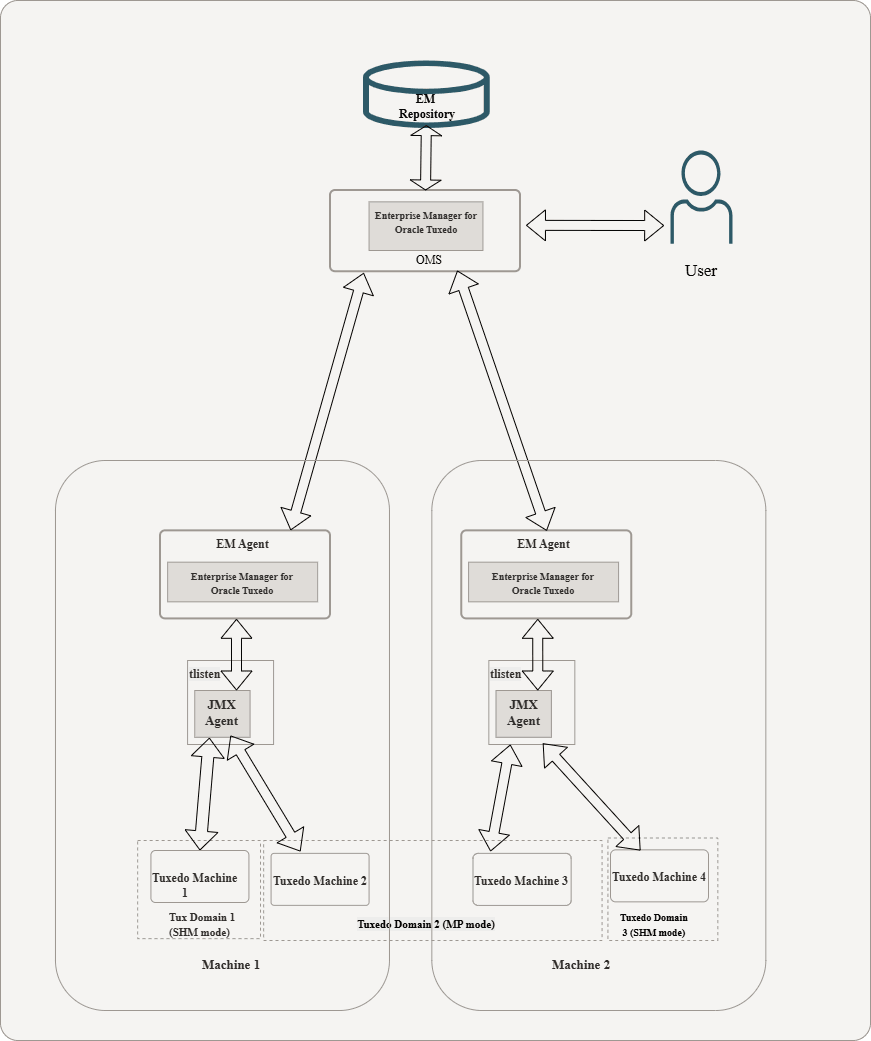
For performance and security considerations, if the Enterprise Repository agent supports the specific platform on which Tuxedo domains are running, it is recommended to deploy an Enterprise Repository agent on each physical machine that has Tuxedo domains monitored. The following figure shows a typical Enterprise Manager for Oracle Tuxedo deployment scenario:
Figure 4-1 Typical Enterprise Manager for Oracle Tuxedo Deployment Scenario
Parent topic: Typical Deploy Scenarios
4.2 Remote Monitoring From Enterprise Repository Agent
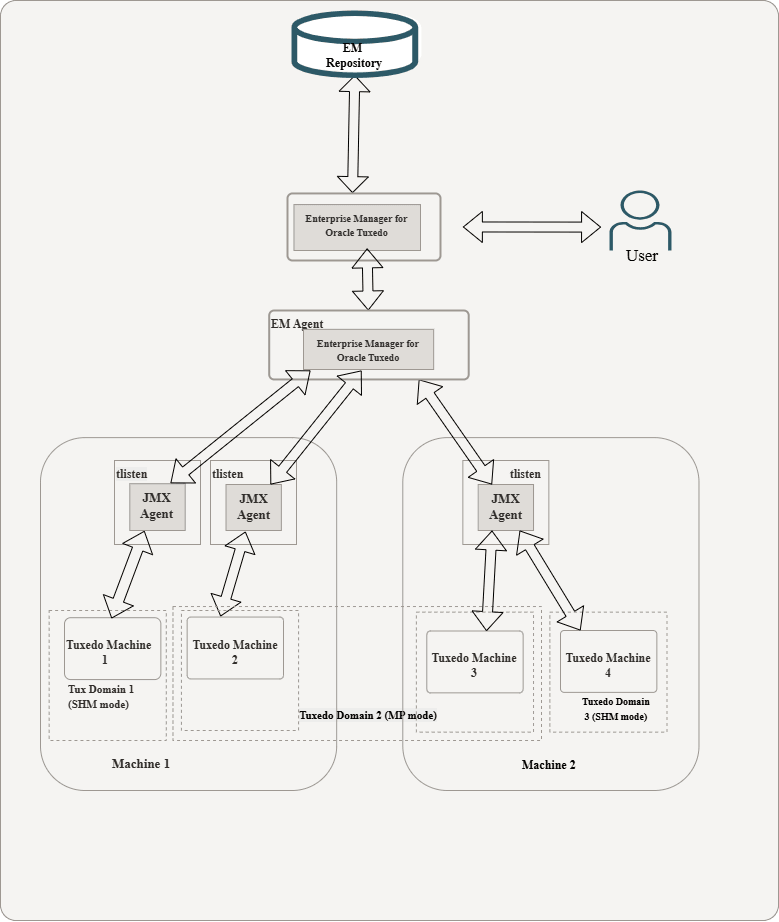
The following figure shows a scenario where Enterprise Repository agent is monitoring Tuxedo domains remotely. This deployment topology is useful for platforms supported by Tuxedo rather than by Enterprise Repository agent.
Figure 4-2 Remote Monitoring From Enterprise Repository Agent
Parent topic: Typical Deploy Scenarios
4.3 Multiple tlisten Processes on One Physical Machine
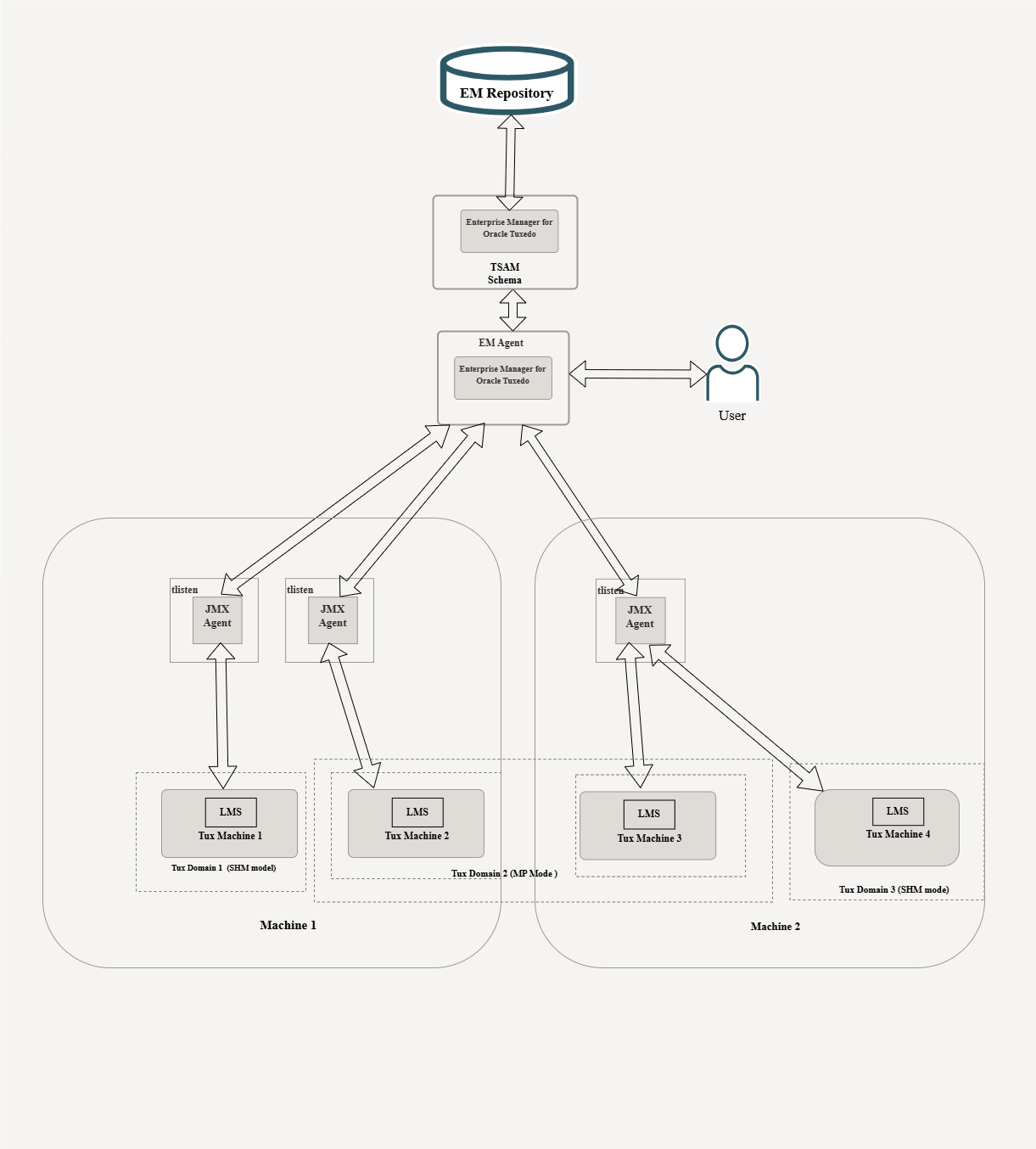
In some circumstances, you may need to deploy multiple tlisten instances on a physical machine for the following reasons:
- Security: Each
tlistenprocess starts as a different user with different privileges. - Administration: Each
tlistenprocess represents a different department.
The following figure shows how to deploy multiple tlisten processes on a physical machine.
Note:
tlisten process is able to interconnect with different Enterprise Repository agents respectively, no matter if it is running locally or remotely
tlisten Processes Running On a Physical Machine
Figure 4-3 Multiple tlisten Processes Running On a Physical Machine
Parent topic: Typical Deploy Scenarios
4.4 Multiple Agents and Clients Connecting to One tlisten Concurrently
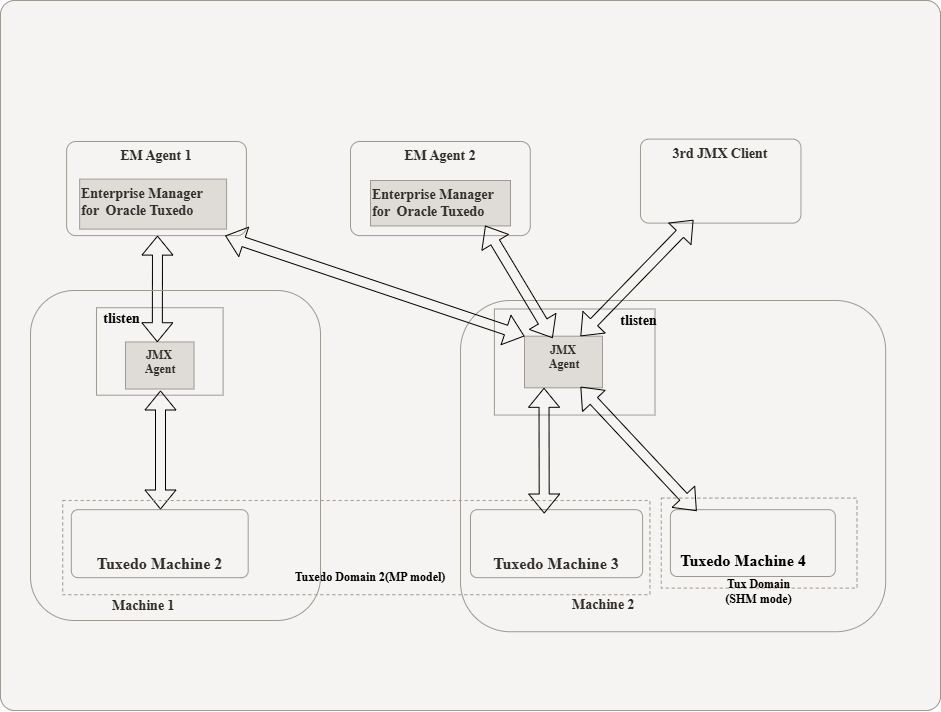
A tlisten process with JMX agent embedded is able to interconnect with multiple Enterprise Repository agents concurrently. The figure below shows a tlisten process running on Machine 2 is connected and monitored by EnterpriseManager Agent 1 and EnterpriseManager Agent 2 concurrently.
In this scenario, you can separate Enterprise Repository agents and Tuxedo Domains related to a tlisten process into two groups ( for example, EnterpriseManager Agent 1 monitors Tux Domain 2 and EnterpriseManager Agent 2 monitors Tux Domain 3).
You can also let Enterprise Manager Agent 1 and Enterprise Manager Agent 2 monitor both Tux Domain 2 and Tux Domain 3 at the same time.
Since JMX is a widely used and supported JRE standard, some third-party JMX clients or JMX connectors are potentially supported by Enterprise Manager for Oracle Tuxedo, which makes Tuxedo monitoring and management functionalities more flexible.
The following figure illustrates Multiple Agents and Clients Connecting to One tlisten concurrently:
Figure 4-4 Multiple Agents and Clients Connecting to One tlisten Concurrently
Note:
In this scenario, once an active domain has been discovered by Enterprise Manager for Oracle Tuxedo, even if the domain is down afterwords, the Enterprise Manager for Oracle Tuxedo still can discover it (unlesstlisten is rebooted).
Parent topic: Typical Deploy Scenarios