2.3.6 Credentials Page
For a security domain where the
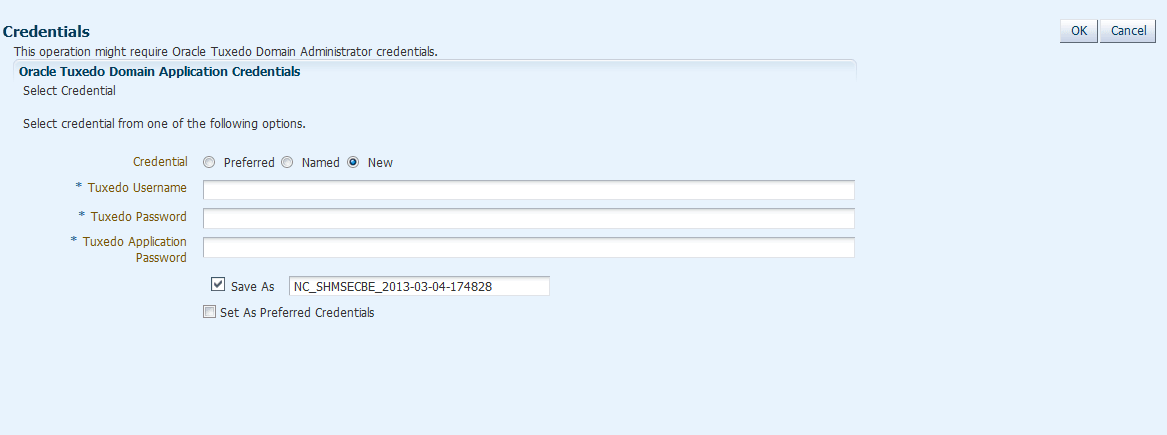
UBBCONFIG file SECURITY parameter is not NONE, when you first time perform high security-level operations (such as shutting up/down the domain, viewing log messages, modifying UBB, and so on in its target page or underlying targets page), the Credentials page appears as shown in below.
Figure 2-3 Credentials Page
To configure credentials, show in the image above do one of the following:
- Select New to create a new one. Set the following parameters:
- Tuxedo Username/Password/Application Password: These values are used to join Tuxedo applications.
- Save As: If this checkbox is selected, an Enterprise Manager credential is generated as well.
- Set As Preferred Credentials: If this checkbox is selected, the newly-created credential is saved as the Preferred one.
- Select Preferred or Named to load a previous-saved credential. Click OK.
Note:
- If Tuxedo Authentication and Authorization is APP_PW, even though Tuxedo does not use the Tuxedo Username and Tuxedo Password fields value to authenticate or authorize, you must input the two fields as place holders.
- The new created/selected credential is applied to subsequent Tuxedo administrative operations in the domain during the current session. To change the credential you need to log out of the Enterprise Manager console first.
- All the Named/Preferred Credentials can be managed by clicking Setup -> Security in the Enterprise Manager console.
Parent topic: Target Home Page Introduction