8.5.6 Deploying the Domain to Remote Machine
After completing all necessary configuration for the Tuxedo domain, do the following steps to deploy the domain to a remote machine:
- Click Save&Deploy in the Controls panel to deploy and boot the domain.
The new Tuxedo Domain target is created (in the following format)
<DomainId>:<PMID of master machine>:<domain IPCKEY>.Note:
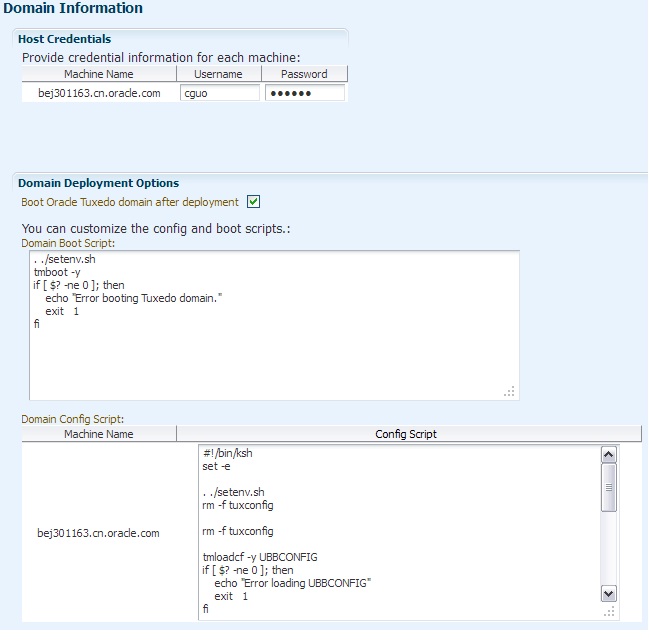
During every deployment process, all machine user credentials included in this domain are required. If the user credentials are inputted once, the retained ones are displayed. You must be a valid OS user on the target machine and have write privileges to the Application Home directory. The user must be in the same user group as the one who installed the Management Agent. - From the checkbox that indicates whether or not to boot the deployed domain, you can choose to customize the config and boot scripts for special requirements (for example, create
TLOG,QUE, orENVFILE).Figure 8-6 Domain Deployment Options
Note:
Because certain information may not be collected from an existing domain, when deploying new machines or special servers to the existing domain, you need to manually add extra script before deployment. - Enter the usernames and passwords, and click OK on the upper right corner to proceed to the deployment tracking page.
- Since the deployment is an asynchronous procedure, you need to
manually refresh in the page periodically, or set the auto refresh
rate at the upper right corner of the page.
When all the steps are successful, the domain has been deployed to the Application Home on the target machine, and booted. The last step of deployment is CheckDeployStatus, where the deployment status is checked and corresponding entries status in the domain editor is changed accordingly. If the deployment is successful, an automatic domain discovery is performed. The new discovered targets belonging to the domain can then be found in the All Targets and Tuxedo Summary page.
Parent topic: Deploying Application Packages to Tuxedo Domain