Oracle Zero Downtime Migration - Easy, Reliable Database Migration to the Cloud
Introduction
Oracle AI Database powers your most critical business workloads, offering reliable performance, scalability, availability, and security. As organizations shift from on-premises systems to the cloud, migrating Oracle AI Databases becomes a key part of your modernization strategy. Successful cloud migration starts with careful planning. Key considerations include:
- Assessing your current database environment
- Projecting your future data needs
- Choosing a cloud service that matches your goals
Cloud Migration Challenges
Each step in the migration process can introduce unique challenges. Here are some of the most common:
- Specialized Knowledge Gaps:
- While most Database Administrators know standard migration tools, moving to the cloud often requires expertise in many products like RMAN, Data Pump, Data Guard, GoldenGate, and Cloud CLI.
- Security:
- Migrating to the cloud may involve converting non-encrypted databases to encrypted environments. This step can demand additional security expertise.
- Version Management:
- Managing databases at different versions and patch levels requires careful planning and control during migration.
- Architecture Changes:
- Cloud migration may mean converting from single-tenant to multitenant databases. This shift can affect migration methods and availability.
- Ensuring Availability:
- The goal is to keep essential data available to users during cloud migration, no access gaps, no downtime.
- Platform Changes:
- Cloud databases run mostly on Linux. Migrating from other operating systems such as AIX, Solaris or Windows increases migration complexity.
- Licensing & Additional Costs:
- Some migration tools require extra licenses and add costs, making an already complex project even more challenging.
Cloud Migration Steps
In addition to these challenges, cloud database migration requires careful planning and a series of essential steps. Using the right tools at every phase helps protect data integrity, maintain security, and minimize downtime. These industry-standard steps outline best practices:
- Initial Backup or Export:
- Export or back up your database using tools such as Recovery Manager (RMAN) or Data Pump. The preferred method depends on your database version, source platform, and endianness.
- Secure Data Transfer:
- Transfer of data over secure connections and follow networking best practices to protect data integrity.
- Encryption:
- Oracle AI Databases on Oracle Cloud Infrastructure (OCI) use Transparent Data Encryption (TDE) by default. If your on-premises database is not encrypted, the migration process must include an encryption step.
- Restore and Instantiation:
- Restoration of the transferred data and instantiation of the target cloud database, typically with RMAN or importing via Data Pump.
- Source and Target Synchronization:
- Synchronize source and target databases to keep data online and coordinated. Normal tools for this task are Oracle Data Guard or GoldenGate.
- Application Switchover:
- Once synchronized, switchover of your application to leverage the new cloud database.
- Post-migration Tasks:
- Registration of the cloud database.
- Setup of required wallets.
- Applying patches and discrepancy fixing, and version management review.
- Further execution of quality checks and control tests to ensure a successful migration.
- Optional Tasks:
- Preparation for additional requirements such as cross-platform migrations (due to endianness differences), in-flight upgrades, or moving from single-tenant to multitenant deployments.
Oracle Zero Downtime Migration (ZDM)
Oracle Zero Downtime Migration (ZDM) is purpose-built to tackle all the challenges, steps and complexities discussed above. ZDM orchestrates each stage of the cloud migration journey, from initial assessment to final switchover, automating processes and minimizing risks at every step. By addressing each previously mentioned requirement, ZDM provides a comprehensive, end-to-end solution for your database migration, enabling near-zero downtime for your production systems. Your business stays up and running while your data moves securely in the background.
ZDM delivers secure, smooth migrations, following Oracle Maximum Availability Architecture (MAA) best practices and leveraging proven tools such as GoldenGate, Data Guard, RMAN, Data Pump, and Database Links, supporting physical, logical, and hybrid migrations.
Oracle ZDM migrates seamlessly to the following popular destinations:
- Exadata On-premises
- Oracle Database Appliance
- Base Database Service
- Exadata Database Service on Dedicated Infrastructure
- Exadata Database Service on Exascale Infrastructure
- Exadata Database Service on Cloud@Customer
- Autonomous AI Database (Dedicated and Shared)
- Multicloud platforms: Oracle AI Database@Azure, Oracle AI Database@Google Cloud, Oracle AI Database@AWS
Supported sources include:
- Oracle AI Database on Linux, Solaris, Windows, and AIX
- Single-instance, Oracle RAC One Node, and Oracle RAC databases
- Oracle AI Database Enterprise and Standard Edition
Supported Oracle AI Database versions include:
- 11.2.04
- 12.1.0.2
- 12.2
- 19c
- 21c
- 26ai
ZDM works with both non-CDB and CDB architectures, including CDBs with multiple Pluggable Databases (PDBs). ZDM lets you migrate non-CDB databases directly to PDBs, simplifying conversion and expanding your migration options. ZDM allows for cross-version migration, allowing you to migrate and upgrade your database with one unified workflow.
Overview
Oracle ZDM is a migration orchestrator, built following Maximum Availability Architecture (MAA) best practices. A standard Oracle ZDM deployment runs as a server. It interprets customer-provided configurations and directs the migration of databases to the cloud. Oracle ZDM never processes data directly. Instead, it coordinates the actions of source and target databases, as well as tools such as Data Guard and GoldenGate, depending on the migration method. Throughout migration, Oracle ZDM tracks progress, verifies each step, and ensures the process adheres to MAA best practices, minimizing downtime until the migration completes successfully.
You can install Oracle ZDM on any host that runs Oracle Linux 7, 8, 9, or Red Hat Linux 8 or 9.
ZDM’s server can run in a virtual machine at the source, the target, or any location with network access to all migration components. ZDM version 26.1 introduces the instant deploy feature, which allows you to optionally run ZDM locally at either the source or target, thus eliminating the need for installation and a dedicated ZDM server node.
ZDM is designed for simplicity, following a “single-button” approach. After installation, customers complete a response file and run a migration command. ZDM then manages the migration from start to finish.
- ZDM is light. It's downloadable binaries are less than 1 GB.
- ZDM is fully customizable through response file parameters set by the user, enabling many migration workflows and options.
- ZDM is flexible, allowing customers to pause and resume throughout the migration process.
What's New in Oracle Zero Downtime Migration 26.1
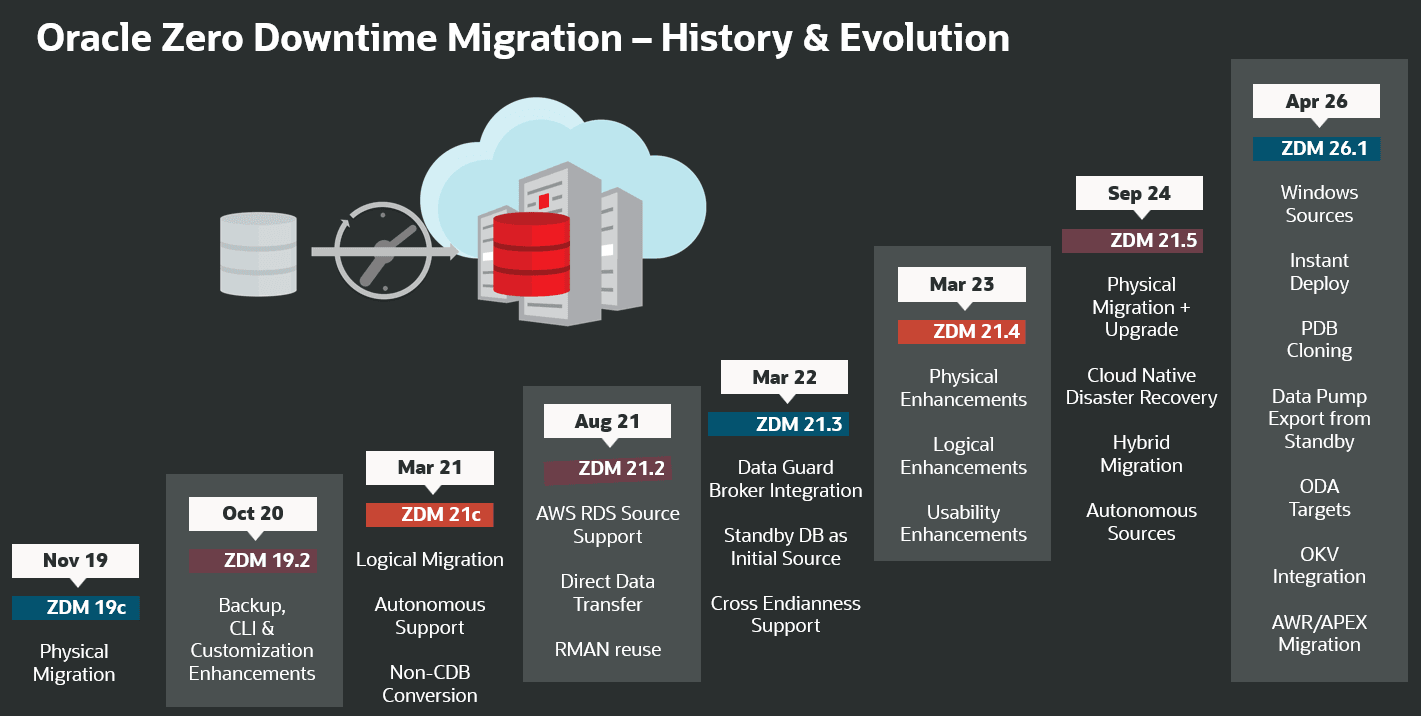
Figure 1. Oracle Zero Downtime Migration - History & Evolution
ZDM Instant Deploy
ZDM now supports a new no-install option: Instant Deploy. Customers can deploy ZDM locally on either the source or target database server without additional installation. This benefits users who need single migrations or work in environments where adding extra virtual machines is restricted. All features remain available in this mode. Physical, logical, and hybrid migrations are supported, and users can use the same response file configurations and parameter choices as before.
A new physical migration mode now lets users migrate databases without a response file. Instead, users provide just a few extra parameters directly with the migration command. To enable physical migration without supplying SSH details, ZDM introduces a new authentication plugin, this plugin runs needed modules locally, regardless of user type. Users don’t need to select the plugin manually; ZDM detects a local node in serverless mode and uses the plugin automatically.
New Migration Workflow: Physical Migration with PDB Cloning
ZDM introduces a new migration workflow: Physical Migration with Pluggable Database (PDB) Cloning. Customers can choose from three options: Cold, Hot, or Refreshable cloning, depending on their need for offline or online migration. Physical Migration with PDB Cloning is best suited for small to mid-size databases because ZDM uses database links for data transfer with this new workflow.
Cold PDB cloning is designed for environments where a longer downtime window is acceptable, and the database can be taken offline. It's ideal for test and development environments. Customers on source databases version 12.1 use this method, as it is the only available cloning option for them.
Hot PDB cloning minimizes disruption by allowing the source database to remain online during cloning. It's commonly used to clone test, development, or non-production environments. This method is available to customers using source databases version 12.2 or higher.
Refreshable PDB cloning is ideal for online migrations, as ZDM creates a clone and refreshes it regularly to keep it synchronized with the source database. This workflow supports production, test, and development environments, and is available on source databases version 12.2 and higher.
ZDM support for Source Databases on Windows Operating System
For years, ZDM has reliably supported source databases on Linux, Solaris, and AIX. Now, with release 26.1, ZDM adds support for databases hosted on Windows through logical migration. Organizations running databases on Windows can now migrate more easily and reliably using ZDM’s logical workflow. This broader operating system coverage gives customers more choice in migration technologies, resulting in smoother migrations and helps organizations future-proof their investments.
Data Pump Export from Standby Database
ZDM’s migration workflow automates both Data Pump and GoldenGate. Using primary databases for online migration creates challenges, especially with foreign key constraints. Offline migrations also have drawbacks. Exporting from the primary database disrupts production workloads, and large tables often cause “snapshot too old” errors.
ZDM’s latest release addresses these challenges by using snapshot standby databases as the source for Data Pump exports. This approach highly parallel exports avoid disrupting the primary database and lets you disable DBMS_SCHEDULER jobs if needed. It also eliminates the “snapshot too old” errors often seen with large tables.
ZDM support for new target platform: Oracle Database Appliance
ZDM has long supported migrations to Exadata On-Premises systems. The latest release adds Oracle Database Appliance as a new migration target for physical, logical, and hybrid migrations. With this addition, ZDM now covers all On-Premises Oracle Hardware, OCI, Cloud@Customer, and Multicloud environments.
Physical Migration Integration with Oracle Key Vault
ZDM has included Transparent Data Encryption (TDE) in its automated workflow from the first release, in line with all cloud security standards. Customers migrating unencrypted source databases automatically will finish the process with a TDE-enabled target at no extra cost.
Previously, customers using Oracle Key Vault (OKV) had to manually migrate keys and configure their target databases. With the latest ZDM release, OKV wallet migration is now fully automated and managed for all OKV users. Whether customers use OKV or file wallets, ZDM now automatically encrypts target databases with their chosen wallet type if OKV is a requirement for their deployment. These enhancements simplify secure migrations and ensure consistent encryption for every cloud target.
APEX Workspace Migration
Previously, APEX users had to migrate workspaces manually, often a time-consuming and error-prone task. Now, ZDM automates APEX workspace migration, minimizing downtime, ensuring accuracy, and preserving application integrity by using standardized procedures.
ZDM’s logical migration workflow now orchestrates APEX metadata migration from the source database using the APEX pack/unpack PL/SQL procedures. It extracts metadata from the source, stages it in a temporary table, then migrates it via Data Pump export/import. After import on the target, ZDM runs the APEX metadata import procedure to load data from the temporary table. ZDM then unpacks the metadata, configuring APEX in the target database and making it ready for use. Users can choose to migrate APEX metadata using a response file parameter.
Automatic Workload Repository Migration
Oracle Automatic Workload Repository (AWR) is the integrated performance diagnostic tool built into the Oracle AI Database. AWR collects and maintains performance statistics for optimizing database performance, and, regularly captures snapshots of system and session-level data and stores them for future analysis. With its latest release, ZDM introduces automated AWR report migration from source databases. This capability lets customers compare performance between source and target systems after migration, supporting comprehensive analysis.
Automated AWR migration uses the DBMS_WORKLOAD_REPOSITORY package and the AWR_EXP and AWR_IMP procedures. Migration is optional and controlled by a response file parameter. The workflow adds three phases:
- ZDM_EXPORT_AWR_SRC: ZDM runs AWR_EXP to extract AWR data to a file and starts a monitored export job. A log file is created for any troubleshooting.
- ZDM_TRANSFER_AWR_DUMPS_SRC: ZDM transfers the exported reports to a backup location chosen by the user.
- ZDM_IMPORT_AWR_TGT : ZDM uses AWR_IMP to import AWR data from the dump file into the SYS schema on the target database.
By automating AWR report migration, customers save time, reduce the risk of errors, and gain immediate access to actionable performance insights after migration.
Oracle Zero Downtime Migration Workflows
Physical Migration
Physical Offline Migration
Physical Offline Migration with a Backup Location
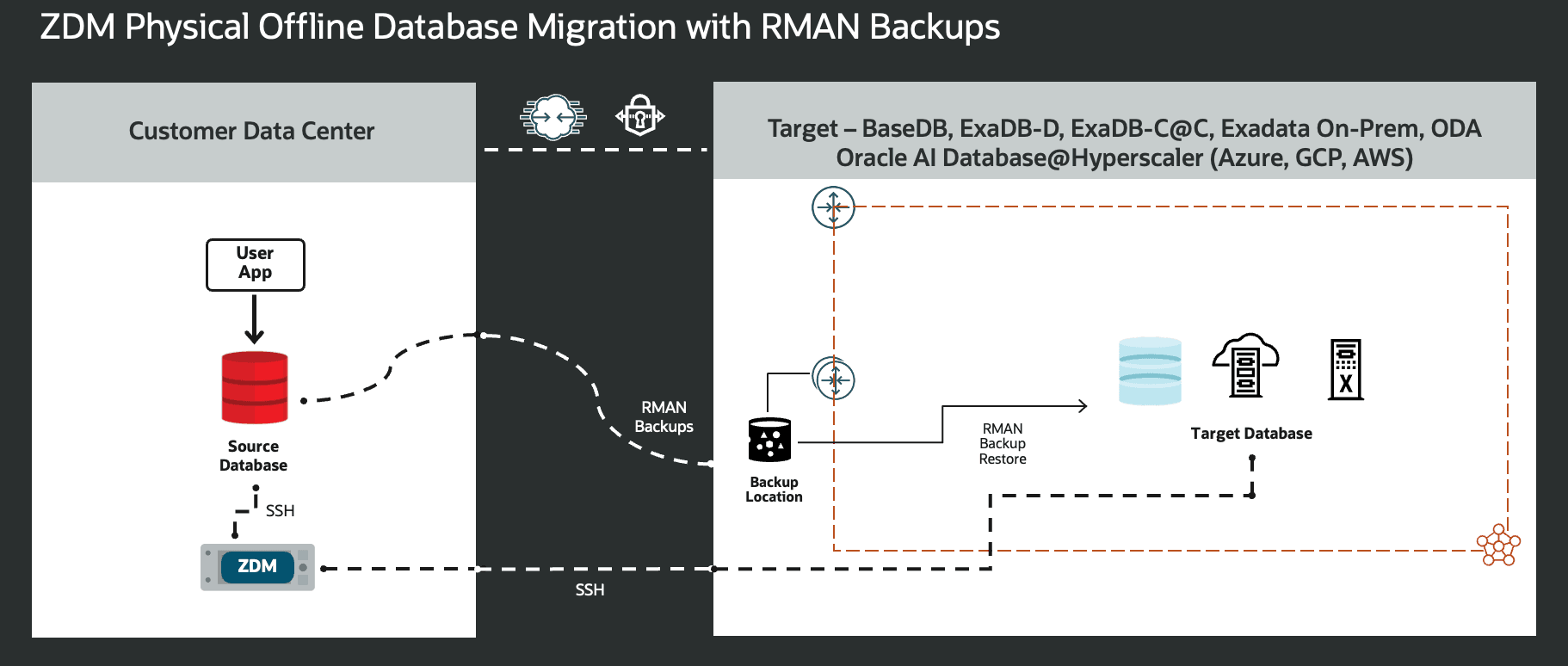
Figure 2. This is a High-Level Architectural overview showcasing the customer data center where the source database and ZDM’s server reside, and, all connectivity to the target Oracle AI Database needed for a Physical Offline Migration with a Backup Location.
A standard physical offline migration with a backup location includes/consists of the following steps:
- Download and configure ZDM.
- ZDM starts database migration.
- ZDM connects the source database to the backup location.
- ZDM orchestrates the transfer of database backup files.
- ZDM instantiates the target database.
- ZDM cleans up and performs post actions.
- Application is acquiesced by the user, and the connection string is updated.
Exadata On-premises, Oracle Database Appliance, Exadata Database Service on Cloud@Customer, Oracle Base Database Service, Exadata Database Service on Dedicated Infrastructure on OCI, Oracle AI Database@Azure, Oracle AI Database@Google Cloud, and Oracle AI Database@AWS support this workflow.
Physical Offline Migration with Cold PDB Cloning
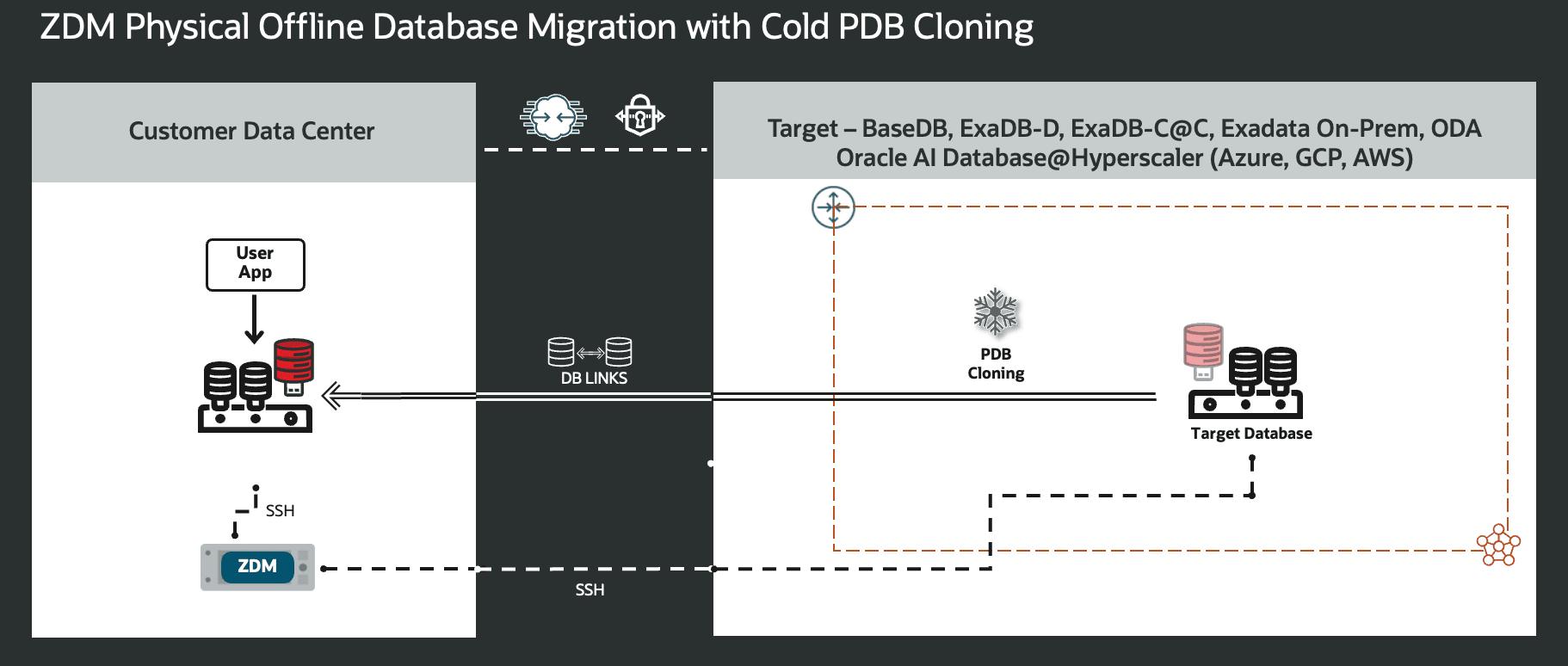
Figure 3. This is a High-Level Architectural overview showcasing the customer data center where the source database and ZDM’s server reside, and, all connectivity to the target Oracle AI Database needed for a Physical Offline Migration with Cold PDB Cloning.
A standard physical offline migration with cold PDB cloning includes/consists of the following steps:
- Download and configure ZDM.
- ZDM Starts Database Migration and creates a temporary user for cloning.
- ZDM creates or leverages existing DB Link.
- ZDM starts cold cloning a pluggable database.
- ZDM opens the target PDB and migrates services.
- ZDM performs post actions and cleans up.
- Application is acquiesced by the user, and the connection string is updated.
Exadata On-premises, Oracle Database Appliance, Exadata Database Service on Cloud@Customer, Oracle Base Database Service, Exadata Database Service on Dedicated Infrastructure on OCI, Oracle AI Database@Azure, Oracle AI Database@Google Cloud, and Oracle AI Database@AWS support this workflow.
Physical Offline Migration with Hot PDB Cloning
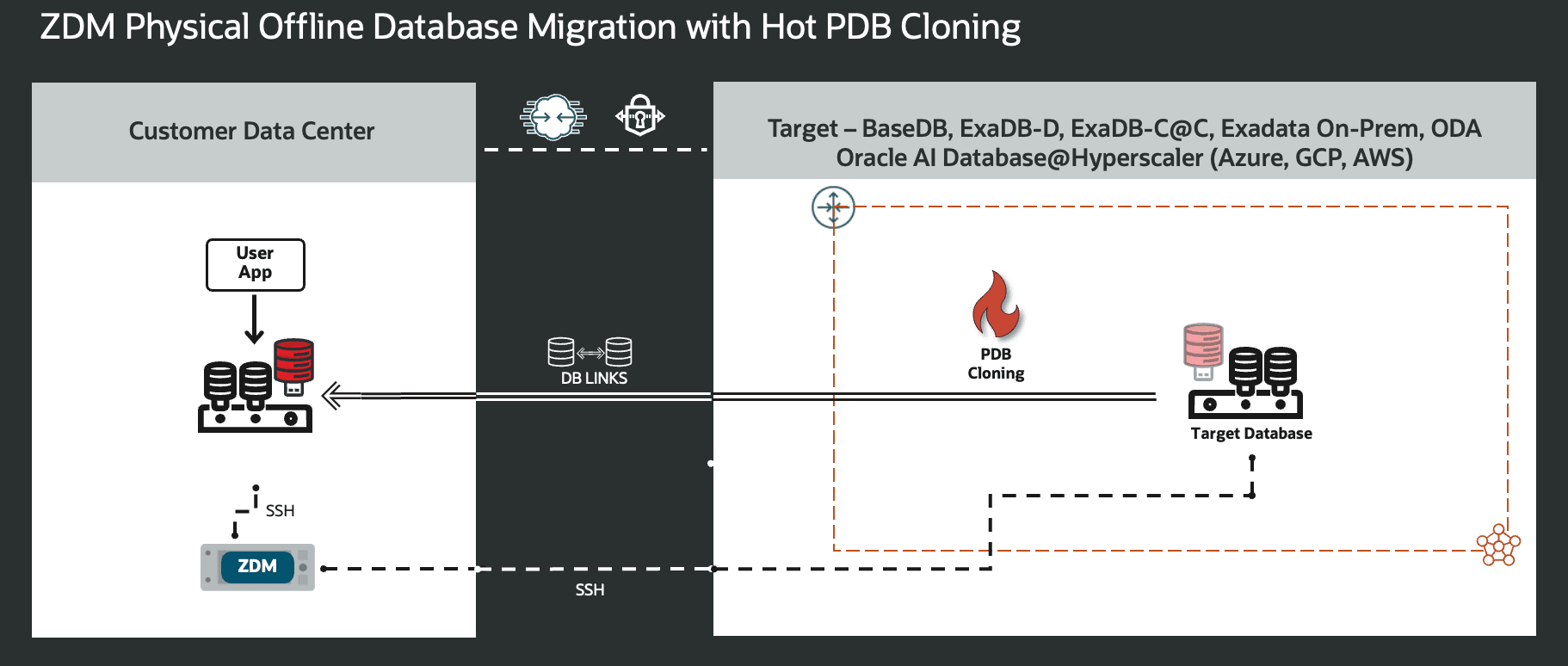
Figure 4. This is a High-Level Architectural overview showcasing the customer data center where the source database and ZDM’s server reside, and, all connectivity to the target Oracle AI Database needed for a Physical Offline Migration with Hot PDB Cloning.
A standard physical offline migration with hot PDB cloning includes/consists of the following steps:
- Download and configure ZDM.
- ZDM Starts Database Migration and creates a temporary user for cloning.
- ZDM creates or leverages existing DB Link.
- ZDM starts hot cloning a pluggable database.
- ZDM opens the target PDB and migrates services.
- ZDM performs post actions and cleans up.
- Application is acquiesced by the user, and the connection string is updated.
Exadata On-premises, Oracle Database Appliance, Exadata Database Service on Cloud@Customer, Oracle Base Database Service, Exadata Database Service on Dedicated Infrastructure on OCI, Oracle AI Database@Azure, Oracle AI Database@Google Cloud, and Oracle AI Database@AWS support this workflow.
Physical Online Migration
Physical Online Migration with a Backup Location
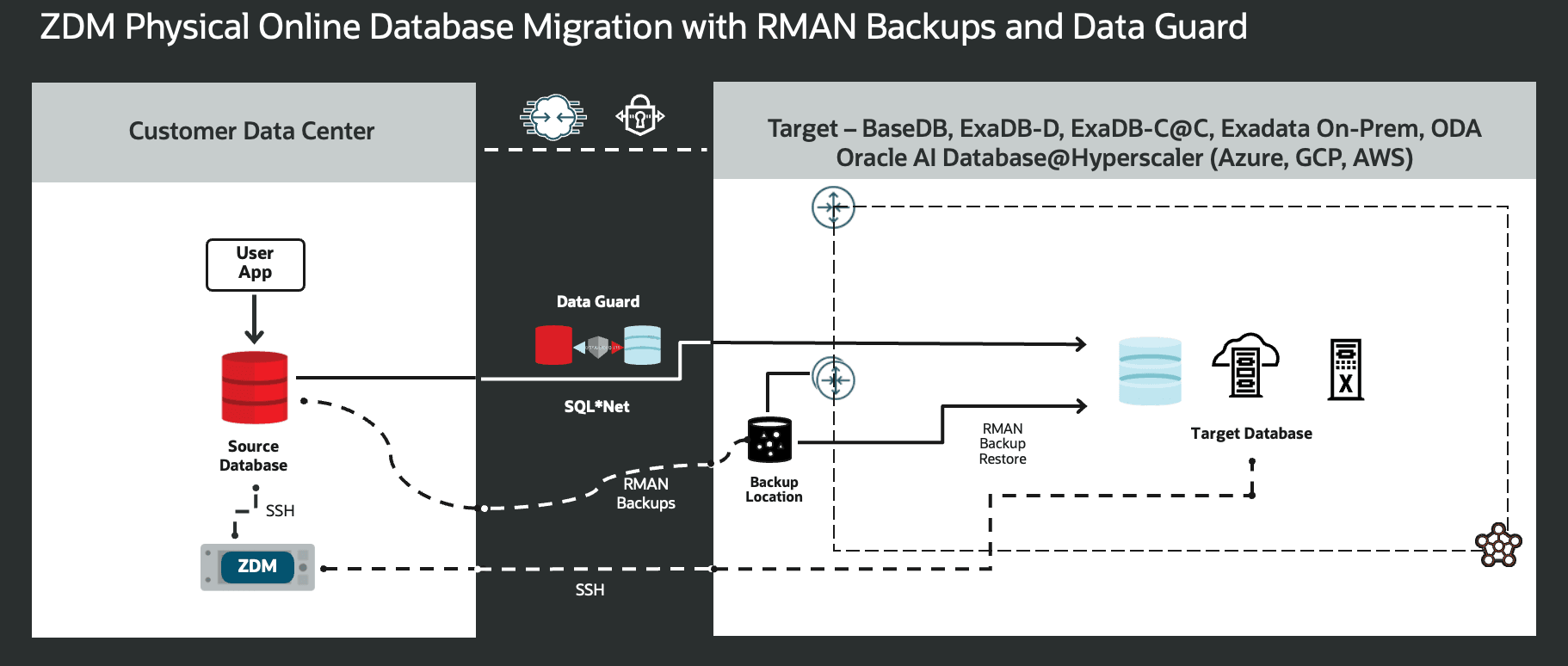
Figure 5. This is a High-Level Architectural overview showcasing the customer data center where the source database and ZDM’s server reside, and, all connectivity to the target Oracle AI Database needed for a Physical Online Migration with Backup Location.
A standard physical online migration with a backup location will take the following steps:
- Download and configure ZDM.
- ZDM starts database migration
- ZDM connects the source database to the backup location.
- ZDM orchestrates the transfer of database backup files.
- ZDM instantiates a standby database on the target.
- ZDM synchronizes primary and standby.
- ZDM switches over and swaps roles.
- ZDM finalizes the migration process.
Exadata On-premises, Oracle Database Appliance, Exadata Database Service on Cloud@Customer, Oracle Base Database Service, Exadata Database Service on Dedicated Infrastructure on OCI, Oracle AI. Database@Azure, Oracle AI Database@Google Cloud, and Oracle AI Database@AWS support this workflow.
Physical Online Migration with Direct Data Transfer
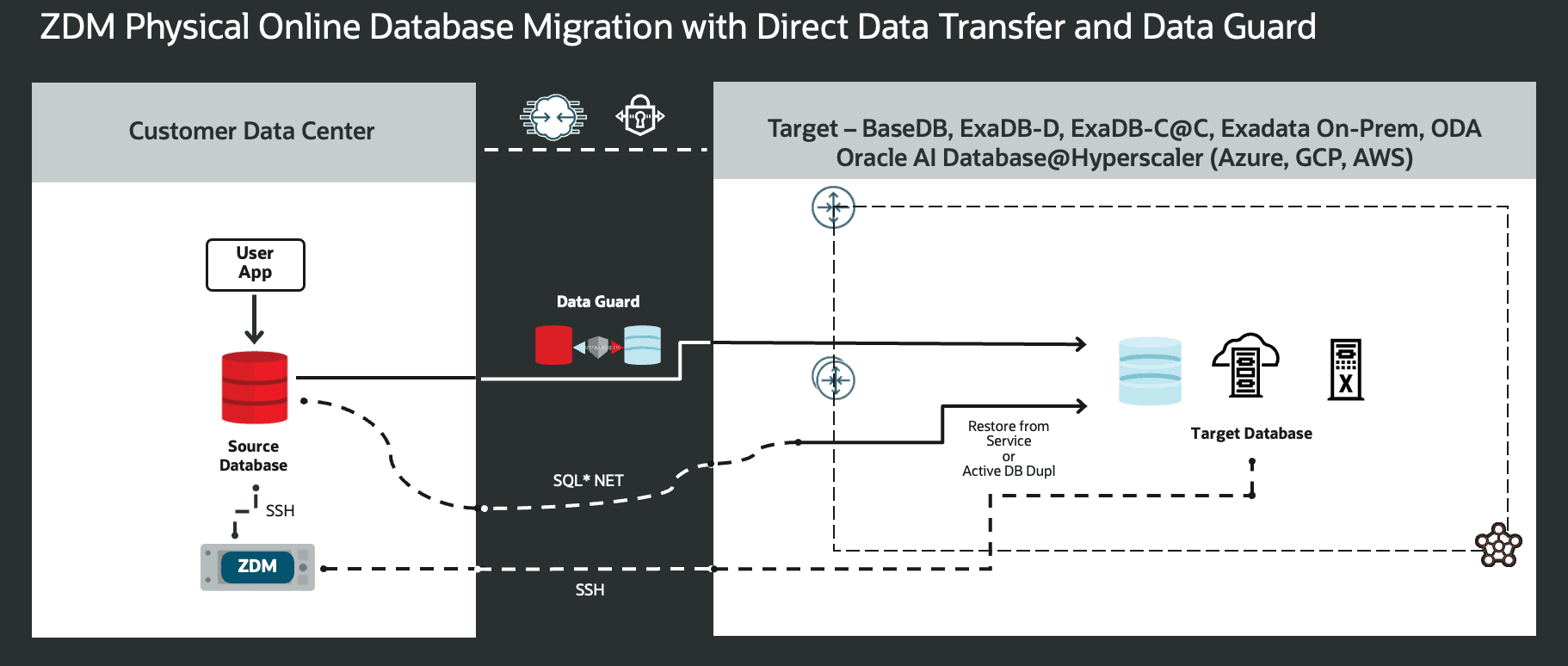
Figure 6. This is a High-Level Architectural overview showcasing the customer data center where the source database and ZDM’s server reside, and, all connectivity to the target Oracle AI Database needed for a Physical Online Migration with Direct Data Transfer.
A standard physical online migration with direct data transfer will take the following steps:
- Download and configure ZDM.
- ZDM starts database migration
- ZDM orchestrates a restore from service or active database duplication between source and target.
- ZDM instantiates a standby database on the target.
- ZDM synchronizes primary and standby.
- ZDM switches over and swaps roles.
- ZDM finalizes the migration process.
Exadata On-premises, Oracle Database Appliance, Exadata Database Service on Cloud@Customer, Oracle Base Database Service, Exadata Database Service on Dedicated Infrastructure on OCI, Oracle AI Database@Azure, Oracle AI Database@Google Cloud, and Oracle AI Database@AWS support this workflow.
Physical Online Migration with Non-CDB to PDB Conversion
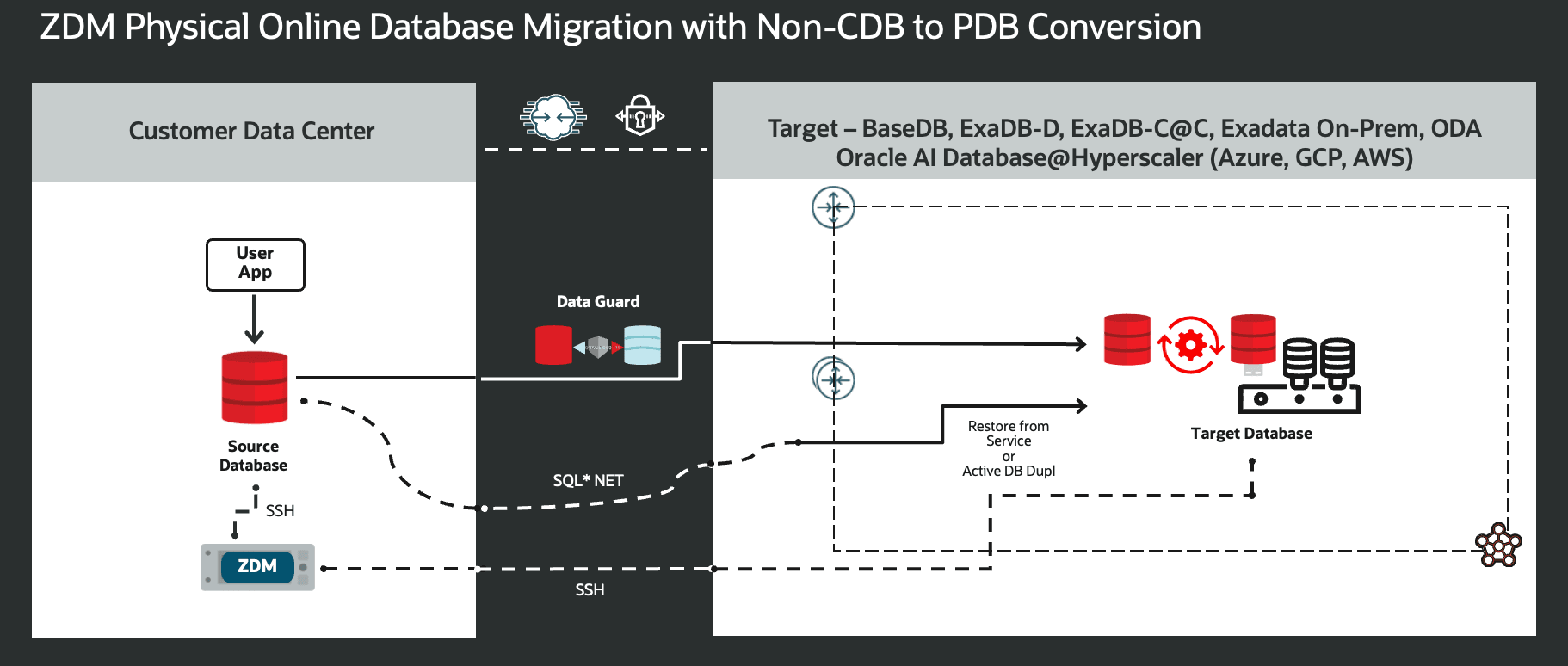
Figure 7. This is a High-Level Architectural overview showcasing the customer data center where the source database and ZDM’s server reside, and, all connectivity to the target Oracle AI Database needed for a Physical Online Migration with Non-CDB to PDB Conversion.
A standard physical online migration with Non-CDB to CDB conversion will take the following steps:
- Download and configure ZDM.
- ZDM starts database migration
- ZDM orchestrates a restore from service or active database duplication between source and target.
- ZDM instantiates an auxiliary temporary non-CDB database at the target
- ZDM synchronizes primary and auxiliary standby
- ZDM switches over and swaps roles
- ZDM performs post-validations
- ZDM performs an unplug/plug operation
- ZDM finalizes the migration process
Oracle Base Database Service, Exadata Database Service on Dedicated Infrastructure, Exadata Database Service on Cloud@Customer, Exadata On-premises, ExaDB-D on Oracle AI Database@Azure, ExaDB-D on Oracle AI Database@Google Cloud and ExaDB-D on Oracle AI Database@AWS support this workflow.
Physical Online Migration with Upgrade and Non-CDB to PDB Conversion
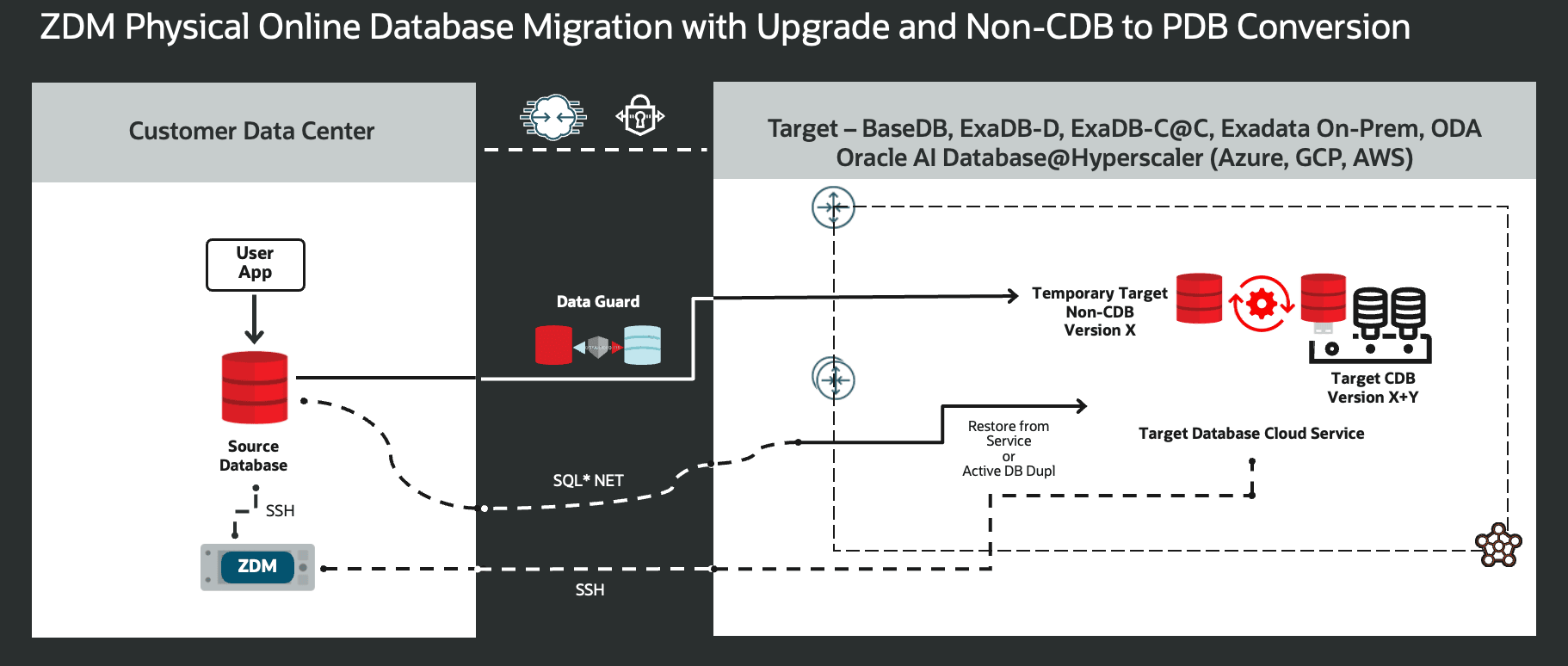
Figure 8. This is a High-Level Architectural overview showcasing the customer data center where the source database and ZDM’s server reside, and, all connectivity to the target Oracle AI Database needed for a Physical Online Migration with Upgrade and Non-CDB to PDB Conversion.
A standard physical online migration with upgrade and Non-CDB to PDB conversion will take the following steps:
- Download and Configure ZDM.
- ZDM starts database migration
- ZDM orchestrates the transfer of database backup files
- ZDM instantiates an auxiliary temporary non-CDB database at the target
- ZDM synchronizes primary and auxiliary standby
- ZDM switches over and swaps roles
- ZDM performs post-validations
- ZDM leverages AutoUpgrade to perform an upgrade plus an unplug/plug operation
- ZDM finalizes the migration process
Exadata On-premises, Oracle Database Appliance, Exadata Database Service on Cloud@Customer, Oracle Base Database Service, Exadata Database Service on Dedicated Infrastructure on OCI, Oracle AI Database@Azure, Oracle AI Database@Google Cloud, and Oracle AI Database@AWS support this workflow.
Physical Online Migration with Upgrade of a CDB
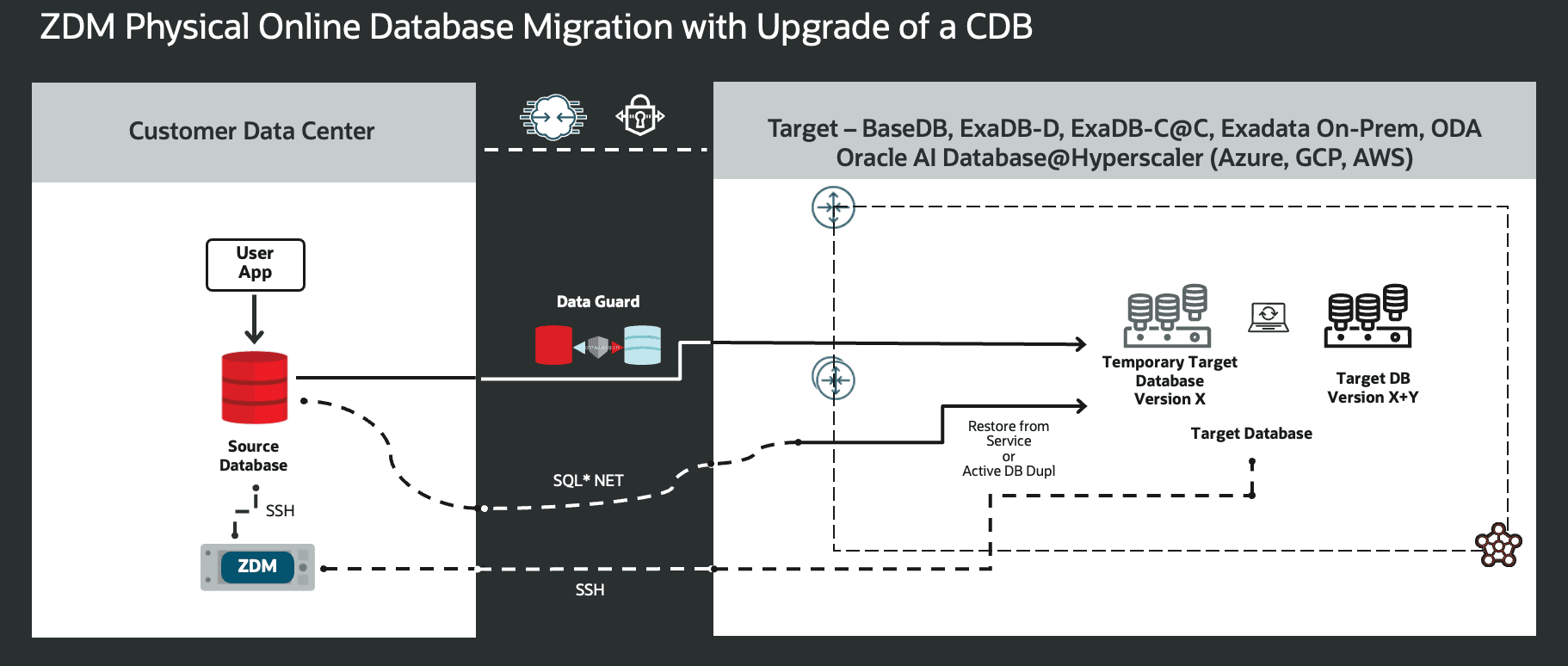
Figure 9. This is a High-Level Architectural overview showcasing the customer data center where the source database and ZDM’s server reside, and, all connectivity to the target Oracle AI Database needed for a Physical Online Migration with Upgrade of a CDB.
A standard physical online migration with an Upgrade of a CDB Database will take the following steps:
- Download and configure ZDM.
- ZDM starts database migration
- ZDM orchestrates the transfer of database backup files
- ZDM instantiates a target database of the same version as the source
- ZDM synchronizes primary and temporary same-version standby
- ZDM switches over and swaps roles
- ZDM performs post-validations
- ZDM performs an upgrade
- ZDM finalizes the migration process
Exadata On-premises, Oracle Database Appliance, Exadata Database Service on Cloud@Customer, Oracle Base Database Service, Exadata Database Service on Dedicated Infrastructure on OCI, Oracle AI Database@Azure, Oracle AI Database@Google Cloud, and Oracle AI Database@AWS support this workflow.
Physical Online Migration with Cloud Native Disaster Recovery
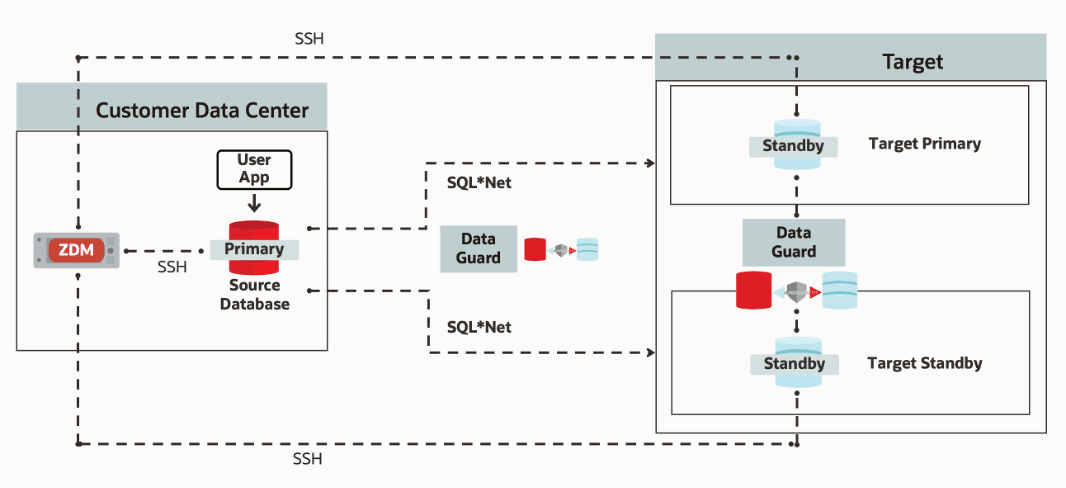
Figure 10. This is a High-Level Architectural overview showcasing the customer data center where the source database and ZDM’s server reside, and, all connectivity to the target Oracle AI Database needed for a Physical Online Migration with Cloud Native Disaster Recovery.
A standard physical online migration with Cloud Native Disaster Recovery Automation will take the following steps:
- Download and configure ZDM.
- ZDM starts database migration
- ZDM starts a restore from service operation
- ZDM instantiates a standby database on the target primary
- ZDM synchronizes primary and standby on the target primary
- ZDM starts a restore from service operation
- ZDM instantiates a standby database on the target standby
- ZDM synchronizes source and target standbys
- ZDM monitors switchover readiness
- ZDM performs switchover and swaps roles
- ZDM configures the target primary and restores the cloud broker configuration
- ZDM restores cloud broker configuration between cloud target primary and cloud target standby
- ZDM configures the target primary to ship redo logs to the target standby
- ZDM performs post-validations
- ZDM finalizes the migration process
Exadata On-premises, Oracle Database Appliance, Exadata Database Service on Cloud@Customer, Oracle Base Database Service, Exadata Database Service on Dedicated Infrastructure on OCI, Oracle AI Database@Azure, Oracle AI Database@Google Cloud, and Oracle AI Database@AWS support this workflow.
Physical Online Migration with Refreshable PDB Cloning
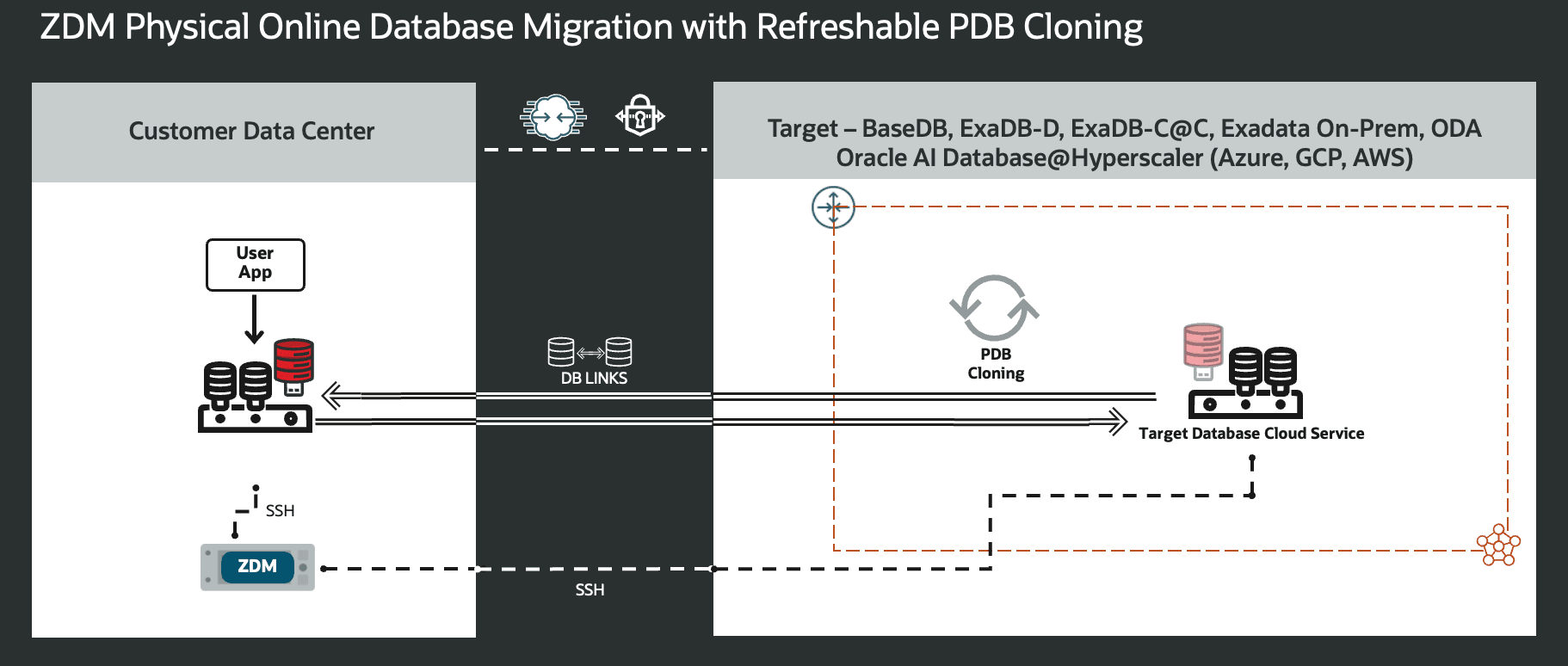
Figure 11. This is a High-Level Architectural overview showcasing the customer data center where the source database and ZDM’s server reside, and, all connectivity to the target Oracle AI Database needed for a Physical Online Migration with Refreshable PDB Cloning.
A standard physical online migration with Refreshable PDB Cloning will take the following steps:
- Download and configure ZDM.
- ZDM starts database migration and creates a temporary user for cloning.
- ZDM creates or leverages existing DB Link.
- ZDM starts refreshable cloning of a pluggable database.
The refresh interval is custom defined via response file; the default is sixty minutes. - ZDM opens the target PDB and migrates services.
- ZDM performs a readiness check and refreshes the target PDB a final time.
- ZDM creates a DB Link from the target PDB to the source.
- ZDM changes the target PDB to read-write mode and performs a switchover.
- ZDM performs post actions.
- ZDM completes the migration.
Exadata On-premises, Oracle Database Appliance, Exadata Database Service on Cloud@Customer, Oracle Base Database Service, Exadata Database Service on Dedicated Infrastructure on OCI, Oracle AI Database@Azure, Oracle AI Database@Google Cloud, and Oracle AI Database@AWS support this workflow.
Logical Migration
Logical Offline Migration with a Backup Location
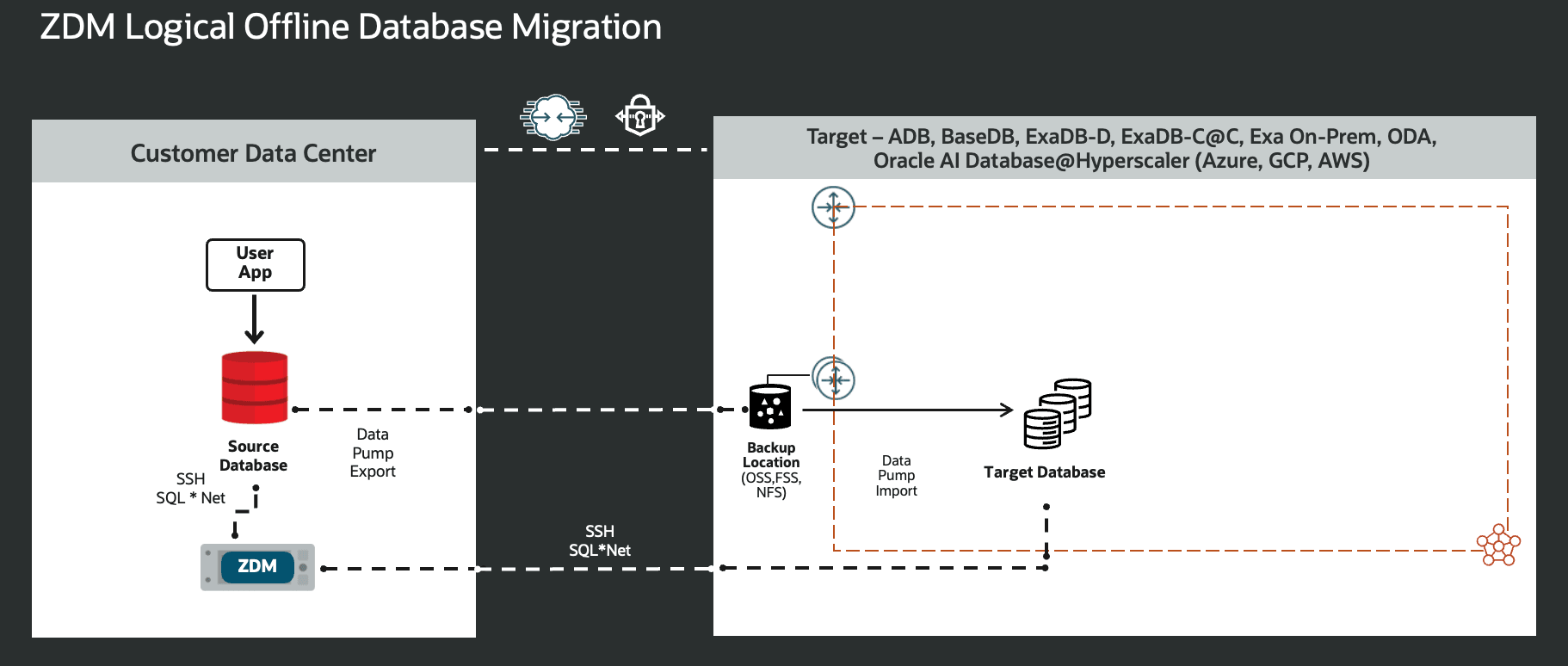
Figure 11. This is a High-Level Architectural overview showcasing the customer data center where the source database and ZDM’s server reside, and, all connectivity to the target Oracle AI Database needed for a Logical Offline Migration with a Backup Location.
A standard logical offline migration with a backup location will take the following steps:
- Download and configure ZDM.
- ZDM starts database migration.
- ZDM connects the source database to the backup location
- If the target is an autonomous AI database, ZDM will leverage the cloud pre-migration advisor to assess the source database and provide valuable insights.
- ZDM exports via data pump from the source to a backup location.
- ZDM imports data dump files from the backup location and sends them to the target.
- ZDM instantiates the target database.
- ZDM switches over and finalizes the migration process.
Oracle Base Database Service, Exadata Database Service on Dedicated Infrastructure, Exadata Database Service on Cloud@Customer, Exadata On-premises, Oracle Database Appliance, Autonomous AI Database on OCI, Oracle AI Database@Azure, Oracle AI Database@Google Cloud, and Oracle AI Database@AWS support this workflow.
Logical Online Migration with a Backup Location
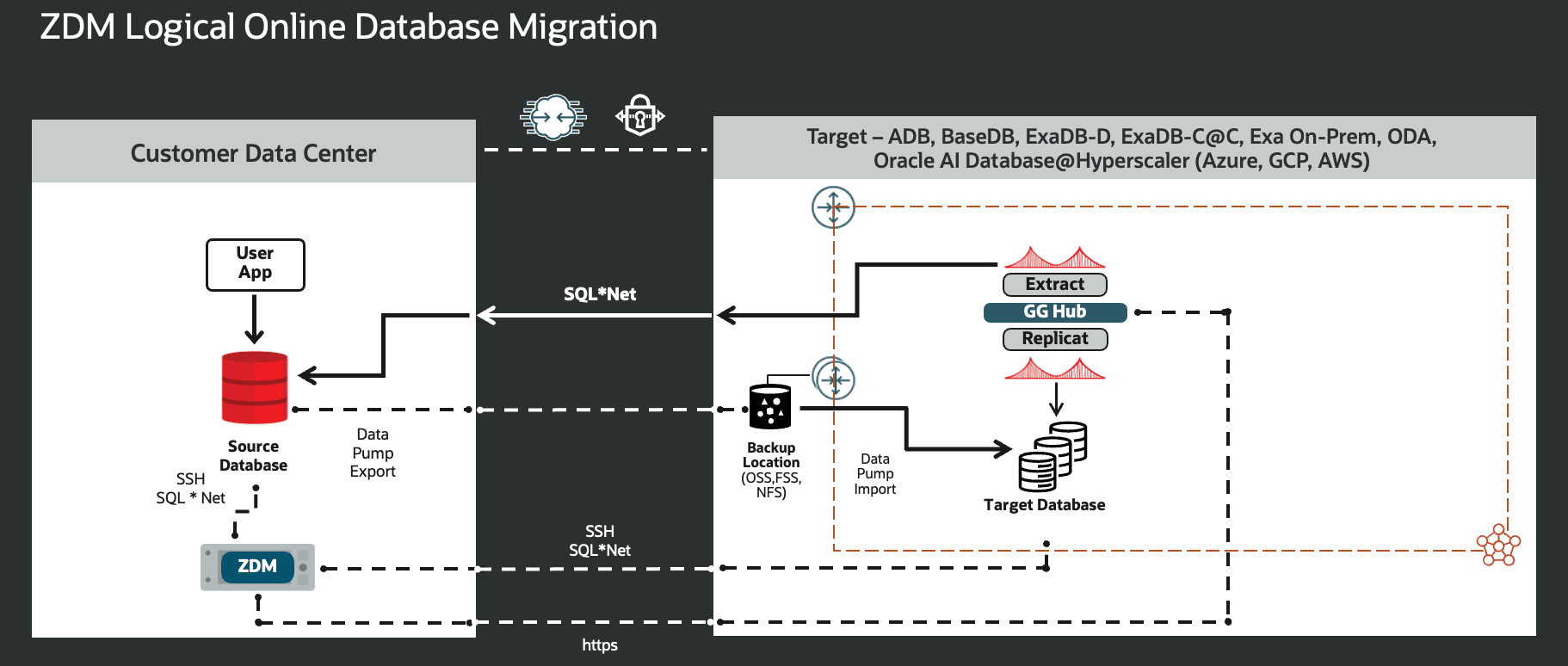
Figure 12. This is a High-Level Architectural overview showcasing the customer data center where the source database and ZDM’s server reside, and, all connectivity to the target Oracle AI Database needed for a Logical Online Migration with a Backup Location.
A standard logical online migration will take the following steps:
- Download & configure ZDM.
- ZDM starts database migration.
- ZDM connects to the source, target, and backup location.
- If the target is an autonomous AI database, ZDM will leverage the cloud pre-migration advisor to assess the source database and provide valuable insights.
- ZDM configures GoldenGate and captures source transactions.
- ZDM exports via data pump from the source to a backup location.
- ZDM imports data dump files from the backup location and sends them to the target.
- ZDM configures GoldenGate and starts applying changes.
- ZDM switches over and finalizes the migration process.
Oracle Base Database Service, Exadata Database Service on Dedicated Infrastructure, Exadata Database Service on Cloud@Customer, Exadata On-premises, Oracle Database Appliance, Autonomous AI Database on OCI, Oracle AI Database@Azure, Oracle AI Database@Google Cloud, and Oracle AI Database@AWS support this workflow.
Hybrid Migration
Hybrid Offline Migration with a Backup Location
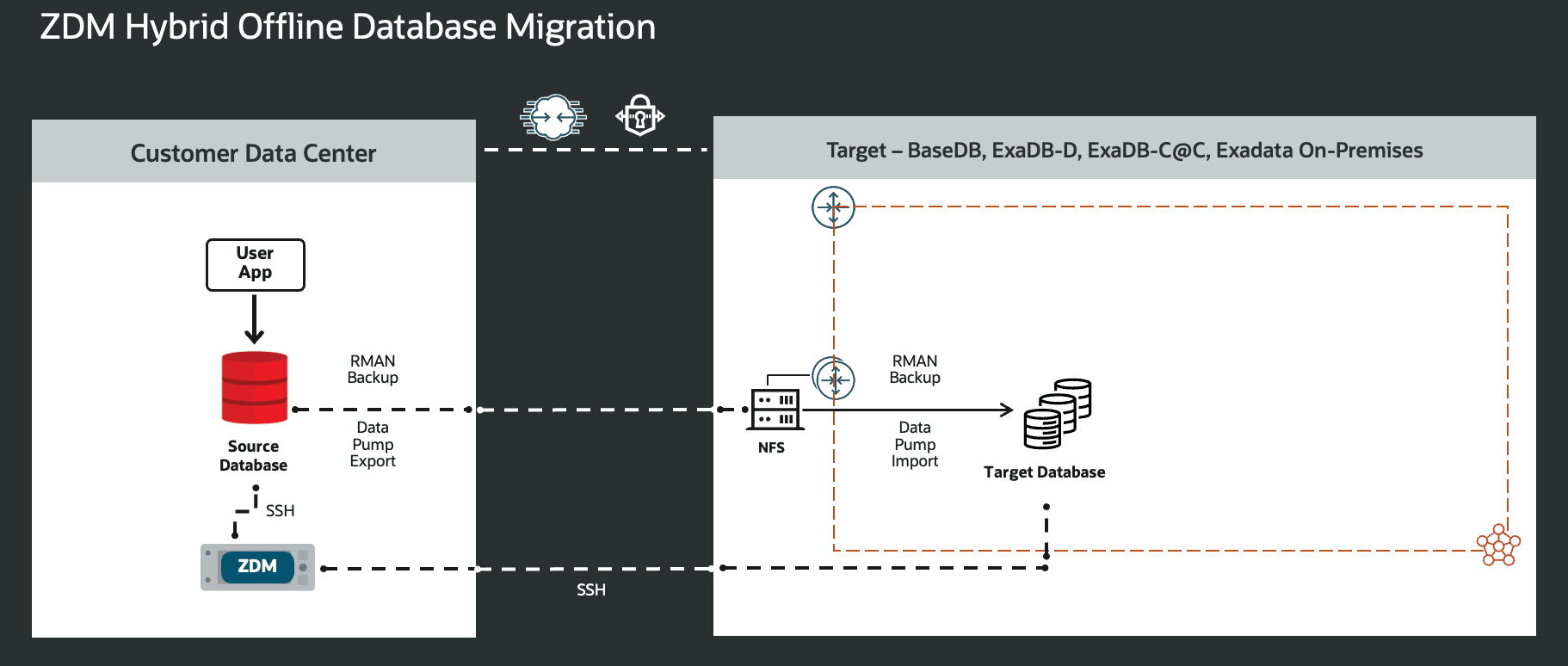
Figure 13. This is a High-Level Architectural overview showcasing the customer data center where the source database and ZDM’s server reside, and, all connectivity to the target Oracle AI Database needed for aHybrid Offline Migration with a Backup Location.
A standard Hybrid Offline migration will take the following steps:
- ZDM connects to the source, target
- ZDM orchestrates tablespace-level backups
- Performs a full backup of the tablespaces
- Performs an incremental backup of the tablespaces
- Copies wallet files as required
- ZDM performs a full restore of tablespaces as foreign tablespaces
- ZDM sets source tablespaces as read-only and performs final incremental backup
- Performs an incremental backup of the tablespaces and metadata export of the tablespaces using RMAN
- Copies wallet files as required
- ZDM exports metadata via Data Pump
- Export includes:
- Metadata, PL/SQL objects, and non-tablespaces data
- ZDM imports metadata and performs an incremental restore
- 1st Import of user metadata from data pump
- 2nd Incremental restore with RMAN + import of tablespace metadata generated by RMAN
- 3rd import of all other metadata (objects and non-tablespace data)
- ZDM performs post actions, cleans up, and finalizes
- Export includes:
Oracle Base Database Service, Exadata Database Service on Dedicated Infrastructure, Exadata Database Service on Cloud@Customer, Exadata On-premises support this workflow.
Conclusion
Oracle Zero Downtime Migration (ZDM), guided by Oracle Maximum Availability Architecture (MAA), helps you migrate Oracle AI Database workloads to the cloud while protecting availability, performance, and recoverability.
Oracle ZDM is designed around four core tenets:
- Simplicity: Automates migration workflows, reducing manual work and errors.
- Flexibility: Supports many database versions, platforms, and target architectures.
- Validation: Runs pre-migration and post-migration checks, supports evaluation mode and pausing/resuming in-flight.
- Cost: ZDM is available at no additional cost.
Organizations use ZDM to migrate Oracle AI Database workloads and modernize operations along the way. ZDM applies MAA principles in a repeatable workflow: automation reduces manual effort and error, and built-in checks make each run easier to plan, validate, and repeat, whether you’re moving one database or a fleet.
With ZDM 26.1, Oracle has continued to strengthen automation and operational guardrails, helping teams reduce friction during cutovers and spot issues earlier through clearer checkpoints. Rehearsals matter, and ZDM is built to make them practical, so your final run looks like your test run.
If you need customization, automation and stability, pair MAA’s availability patterns with ZDM’s repeatable execution. You get a migration approach designed for uptime, not one that hopes for it after the move.
For more information, visit Oracle Zero Downtime Migration's product page at https://www.oracle.com/database/zero-downtime-migration/
Oracle® Database, Oracle Zero Downtime Migration, Release 26.1
G54039-01
April 17, 2026