Table Hierarchies
The Oracle NoSQL Database enables tables to exist in a parent-child relationship. This is known as table hierarchies.
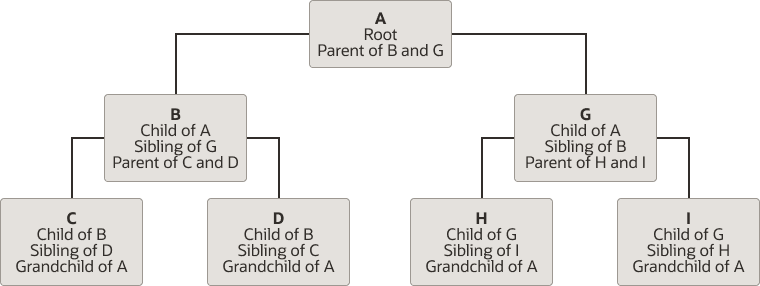
Description of the illustration table-hierarchy.png
Terminologies used in a table hierarchy:
-
Root Node:The topmost node of a tree or the node that does not have any parent node is called the root node. In the above diagram, A is the root node.
-
Parent Node:The immediate predecessors of a node are called its parent nodes. For example, in the above diagram, A is the parent of B and G.
-
Child Node: The immediate successors of a node are called its child nodes. For example, in the above diagram, B and G are children of node A.
-
Leaf Node:The node that does not have any child node is called a leaf node. In the above diagram, C, D, H and I are leaf nodes.
-
Ancestor: All the predecessor nodes on the paths from the root to that node are called its ancestor nodes. For example, in the above diagram, A and G are ancestors of H and I. A is the ancestor of G, H and I.
-
Descendant:All the successor nodes on the paths from that node to the leaf nodes are called its descendant nodes. For example, in the above diagram, H and I are descendants of A and G. G, H and I are descendants of A.
-
Sibling:Children of the same parent node are called siblings. For example, in the above diagram, B and G are siblings, as they are both children of node A. Similarly H and I are also siblings as they are children of node G.
Why do you need hierarchical tables in Oracle NoSQL Database?
Given that the Oracle NoSQL Database model includes arrays and maps, one may wonder why child tables are needed? Creating child tables is a way to achieve hierarchical data modeling. It optimizes scalability and performance as well as provides a way to easily perform scalable ACID transactions on collections of records.
-
For each parent row, it is possible to store matching child records inside an array or map within the parent row. However, this can lead to very large parent rows, resulting in degraded performance, especially given the append-only architecture of Oracle NoSQL Database, where each update creates a new version of the entire row. Child tables are recommended when a parent contains many/large child records, as they provide a scalable way to represent one-to-many or hierarchical relationships.
-
In Oracle NoSQL Database, ACID transactions (guaranteeing Atomicity, Consistency, Isolation, and Durability) are supported for records that are co-located on the same shard (that is, shard key values are the same). Hierarchical tables inherently achieve this co-location property as the child records inherit the parent table’s primary key, ensuring all records in the hierarchy are physically co-located on the same shard by design.
Note: The shard key is always a subset of the primary key.
-
By structuring your data as hierarchical tables, you can perform atomic transactions on the parent and any/all of its children together, maintaining strong data integrity for the entire hierarchy within Oracle NoSQL Database, while not sacrificing the scalability.
-
Hierarchical modeling ensures related data is managed together. It allows efficient retrieval of all child records for a parent using a single query, eliminating the need for multiple separate queries. For further details on the supported queries for hierarchical tables, see Joins.
Hierarchical tables in an Oracle NoSQL Database are :
-
Very efficient for write-heavy workloads.
-
More flexible for fine-grained authorization. Authorization is permission given to a user to access a resource. In a fine-grained authorization, the access rights given to a user for a resource may vary by conditions at run-time. In a hierarchical setup, access rights given to the parent table might be different from the access rights given to the child table, and so it is more flexible.
How do hierarchical tables work in an Oracle NoSQL Database?
The data store’s replication nodes are organized into shards. A single shard contains multiple replication nodes and a master node. A shard key is created to distribute data across the Oracle NoSQL Database cluster for scalability. Records with the same shard key are co-located for easy reference and access. In a hierarchical table, the child table inherits the primary key columns, which contains the shard key columns of its parent table. This is done implicitly, without including the parent columns in the CREATE TABLE statement of the child. All tables in the hierarchy have the same shard key columns.
Creating hierarchical tables
The create table statement allows for a table to be created as a child of another table, which then becomes the parent of the new table. This is done by using a composite name (a name_path) for the child table. A composite name consists of a number N (N > 1) of identifiers separated by dots. The last identifier is the local name of the child table and the first N-1 identifiers are the name of the parent.
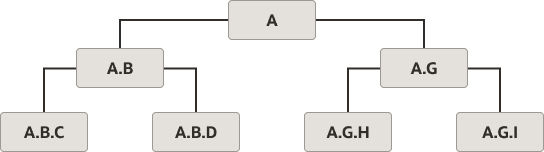
Description of the illustration semantic-representation-table-hierarchy.png
Semantics
The semantic implications of a parent-child relationship are the following:
-
A child table inherits the primary key columns of its parent table. This is done implicitly, without including the parent columns in the create table statement of the child.
For example, in the following Table hierarchy sample, table A.B has an extra column, called ida, and its primary key columns are ida and idb. Similarly, table A.B.C has 2 extra columns, ida and idb, and its primary key columns are ida, idb, and idc. The inherited columns are placed first in the schema of a child table.
-
All tables in the hierarchy have the same shard key columns, which are specified in the create table statement of the root table. So, in our example, the common shard key is column ida. Trying to include a shard key clause in the create table statement of a non-root table will raise an error.
-
A parent table cannot be dropped before its children are dropped.
-
When two rows RC and RP from a child table C and its parent table P, respectively, have the same values on their common primary key columns, we say that RP and RC match, or that RP contains RC. In this case, RP and RC will also be co-located physically, because they have the same shard key. Given that a child table always has more primary key columns than its parent, a parent row may contain multiple child rows, but a child row will match with at most one parent row.
Note: Oracle NoSQL Database does not require that all the rows in a child table have a matching row in the parent table. In other words, a referential integrity constraint is not enforced.
Example 1 - Table Hierarchy
The following statements create a table hierarchy, that is a tree of tables connected by parent-child relationships. A is the root table, A.B and A.G are children of A, and A.B.C is a child of A.B (and a grandchild of A).
CREATE TABLE A (ida INTEGER, a1 STRING, a2 INTEGER, PRIMARY KEY(ida))CREATE TABLE A.B (idb INTEGER, b1 STRING, a2 STRING, PRIMARY KEY(idb))CREATE TABLE A.B.C (idc INTEGER, b1 STRING, c2 STRING, PRIMARY KEY(idc))CREATE TABLE A.G (idg INTEGER, g1 STRING, g2 DOUBLE, PRIMARY KEY(idg))Table Hierarchy in a Multi-Region table:
You can create child tables in an existing Multi-Region architecture.
Example 2 - Table Hierarchy in a Multi-Region table - create table in two regions
Create the table users in two regions, FRA and LON.
CREATE TABLE users (
     id INTEGER,
     name STRING,
     team STRING,
     PRIMARY KEY (id))
   IN REGIONS FRA,LON
Under the users table, you can create a child table using this statement.
CREATE TABLE users.userdet (
       pan INTEGER,
       address STRING,
       email STRING,
       PRIMARY KEY(pan))
Specifying the REGIONS clause while creating a Multi-Region child table will result in an error as illustrated below.
CREATE TABLE users.userinfo (pan INTEGER, address STRING, email STRING, PRIMARY KEY(pan) IN REGIONS FRA,LON)Output:
Error handling command CREATE TABLE users.userinfo (
       pan INTEGER,
       address STRING,
       email STRING,
       PRIMARY KEY(pan) IN REGIONS FRA,LON): Error: at (5, 24) missing ')' at 'IN', at line 5:24
       rule stack: [parse, statement, create_table_statement]
You can view the description of the Multi-Region child table as shown below. Note that the child table automatically inherits the primary key columns of its parent table.
desc as json table users.userdet{
"json_version" : 2,
"type" : "table",
"name" : "userdet",
"id" : "63",
"parent" : "users",
"regions" : {
"2" : "FRA",
"1" : "LON"
},
"fields" : [{
"name" : "id",
"type" : "INTEGER",
"nullable" : false
}, {
"name" : "pan",
"type" : "INTEGER",
"nullable" : false
}, {
"name" : "address",
"type" : "STRING",
"nullable" : true
}, {
"name" : "email",
"type" : "STRING",
"nullable" : true
}],
"primaryKey" : ["id", "pan"],
"shardKey" : ["id"]
}