Log-Based Read-Only Cache Groups with TimesTen Replication
When log-based read-only cache groups are replicated by an active standby pair, the cache group's System Change Number (SCN) must also be replicated between the active and standby databases.
TimesTen active standby pair replication is configured to provide high availability, data recovery, and scalability in this architecture of read-only cache groups. This replication is similar to the trigger-based read-only cache groups. Failover scenarios differ based on the GoldenGate replicat’s connection to TimesTen.
When you decide to use replication, it's important to carefully consider whether to select direct or client/server mode for the GoldenGate replicat connection to TimesTen. A direct connection provides better performance but necessitates manual intervention during replication failover. On the other hand, a client/server connection is slower than direct but includes automatic failover capabilities in case of failure.
- Direct
- Client/Server
For details, see Choosing On-Box or Off-Box for Deployment of a GoldenGate Replicat Process.
TimesTen with GoldenGate in Direct Mode
In this configuration, the GoldenGate Replicat process has a direct connection with TimesTen. In direct mode, if the Active Master fails, GoldenGate Replicat does not automatically fail over to the Standby Master.
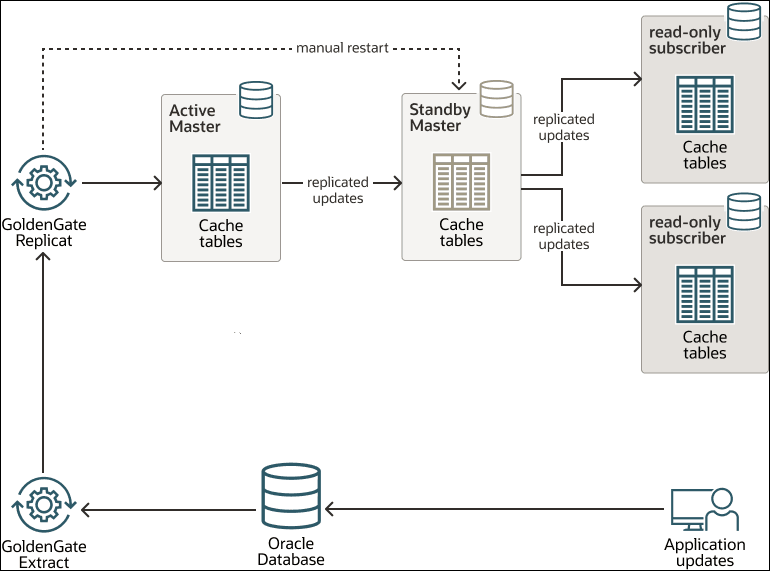
The image depicts a data replication architecture utilizing Oracle GoldenGate components, namely GoldenGate Extract and GoldenGate Replicat. TimesTen replication ensures high availability, data recovery, and scalability in this architecture.
At the core of the system is the Oracle database, where end users or applications perform regular application updates (such as insert, update, and delete operations). To ensure these changes are propagated to other systems for consistency and redundancy, the GoldenGate Extract component continuously captures the changes from the Oracle database. This captured data is then passed on to the GoldenGate Replicat process.
GoldenGate Replicat applies these extracted changes to the Active Master, which holds the primary replicated version of the data in cache tables for fast access. This setup does not support automatic failover. When the Active Master goes down, the direct connection from GoldenGate Replicat does not automatically failover to the Standby Master. The GoldenGate Replicat abends in case of failure, such as when the host running the TimesTen database is powered off.
The GoldenGate connection must be then switched manually to the Standby Master, after which the Replicat process needs to be restarted from the SCN where it previously abended. See Switching from Nonintegrated Replicat to Parallel Nonintegrated Replicat in the Microservices Architecture Documentation.
Note:
It is recommended to store the trail files generated by the GoldenGate capture process on a shared disk, enabling the Replicat process to access them and resume replication from the SCN where it previously abended.This architecture provides a robust and scalable solution for data replication and high availability, ensuring that business applications can continue to operate without interruption even in the event of failures.
TimesTen with GoldenGate in Client/Server Mode
In this configuration, the GoldenGate Replicat process has client/server connection with TimesTen.
In client/server mode, TimesTen automatically fails over GoldenGate
Replicat connections to the standby master if the active master fails.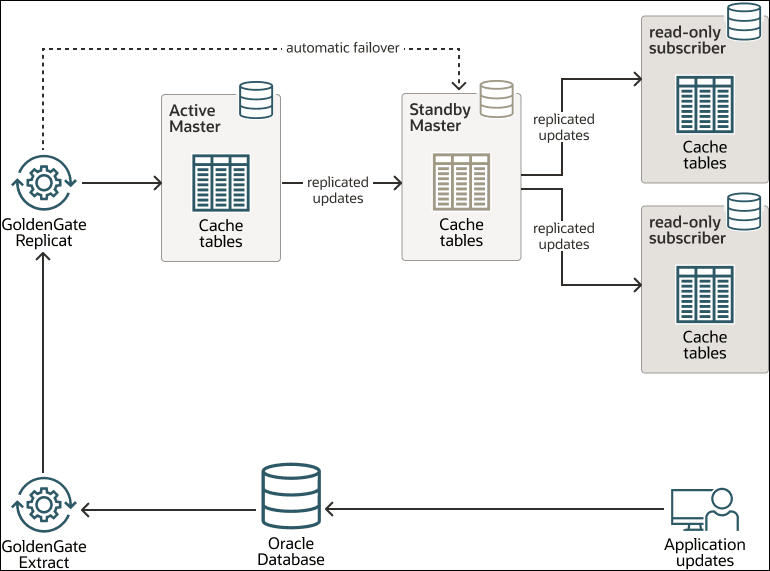
Note:
It is recommended to store the trail files generated by the GoldenGate capture process on a shared disk, enabling the Replicat process to access them and resume replication from the SCN where it previously abended.