Log-Based Read-Only Cache Groups with Active Data Guard
When using Active Data Guard (ADG) with the Oracle database, specify the
StandbyNetServiceName.
The current SCN is taken from the StandbyNetServiceName.
Manual and dynamic loads run on the primary database i.e Oracle database which is
specified in the OracleNetServiceName. See Using Cache with Data Guard.
Physical Standbys with GoldenGate Extract on the Primary Database
In this configuration, the GoldenGate Extract process reads directly from the primary database, resulting in an impact similar to that of a non-ADG setup. However, its effect on the primary database’s workload performance remains lower than that of the default trigger-based cache mechanism.
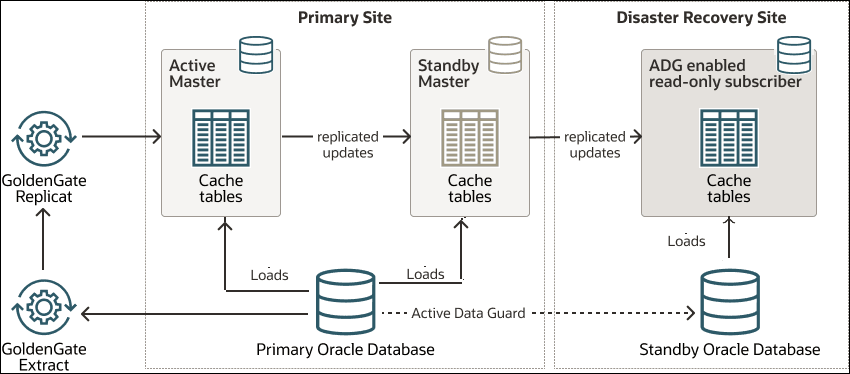
With the recommended configuration, if the primary site goes down, the primary Oracle database fails over to the standby Oracle database. To recover the read-only subscriber cache database in this disaster recovery scenario, you have to drop the active standby pair configuration from the read-only subscriber database. During failover, the cache functions as it does in a non-ADG configuration, meaning the standby Oracle database is promoted to the new primary database.
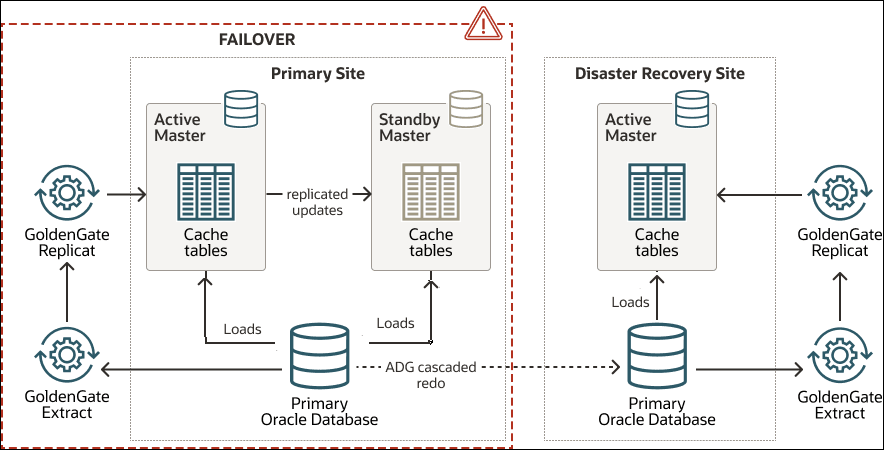
In this scenario, you must start the GoldenGate Extract process on the standby Oracle database using the failover SCN. Similarly, the Replicat process to the TimesTen subscriber which is now functioning as the active master database must also be started from the failover SCN.
Cascaded Standbys with GoldenGate Extract on a Downstream Mining RDBMS
GoldenGate recommends an alternative configuration for scenarios where running an Extract on the primary database causes excessive impact. In this setup, Active Data Guard enables cascaded redo, allowing the primary database's redo to be distributed to multiple downstream mining databases, including standby databases. See Downstream Extract for Oracle GoldenGate Deployment in the Oracle GoldenGate Microservices Architecture Solutions.
GoldenGate capture can then operate from the mining databases, with each site hosting its own mining database. In remote sites, each mining database receives forwarded redo logs either directly from the primary database or from a physical standby database.
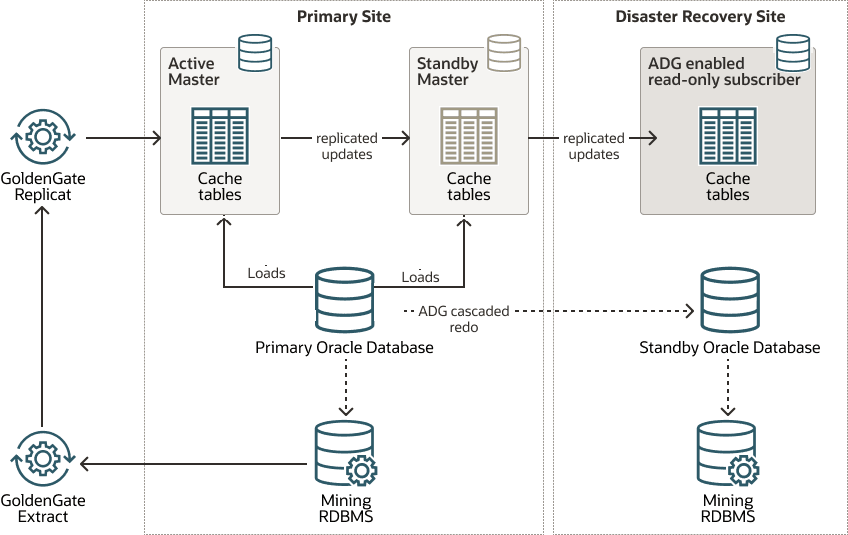
During failover, if the primary site goes down, the standby database is promoted to the new primary database, and the ADG cascaded redo is configured to switchover automatically to the new primary database. To recover the read-only subscriber cache database in this disaster recovery scenario, you have to drop the active standby pair configuration from the read-only subscriber database.
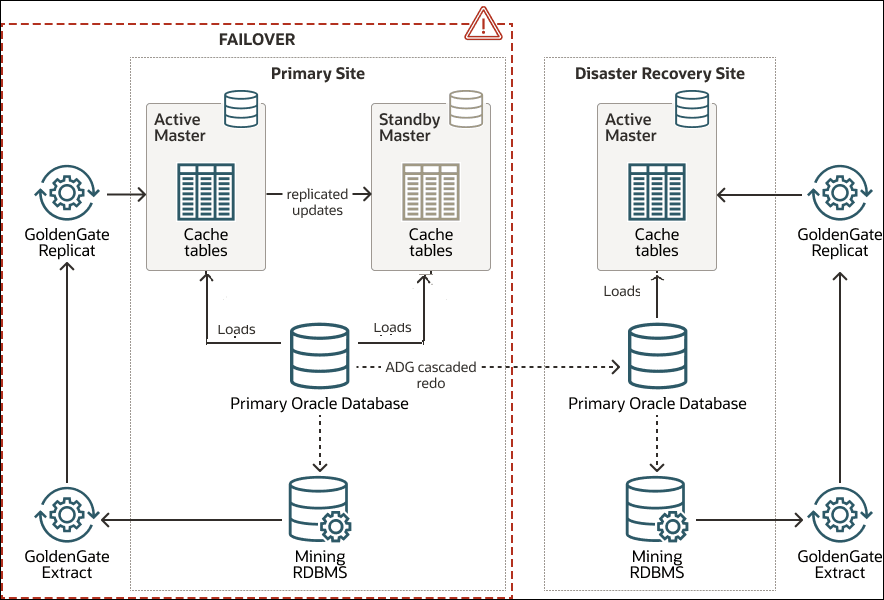
You must start the GoldenGate Extract process from the mining databases using the failover SCN. Similarly, the Replicat process to the TimesTen subscriber which is now functioning as the active master database must also be started from the failover SCN. For details, see Recovering from a Failure of the Active Database in the Oracle TimesTen In-Memory Replication Guide.