Can a guide work across multiple domains?
Well, actually no, but your users will think it does.
Let's explain, Guided Learning guides are running inside the browser. A key security policy that is always enforced by the browser is that no domain can access data from another domain; and hence the no. But what Guided Learning allows you to do is to create 2 guides, one for each domain, and link them with Guide Activation Conditions. Using this technique you can create, what would look to the end use, as a cross domain guide.
Prerequisites
- Guided Learning is embedded in both domains via javascript or a browser extension
- The same Guided Learning appId is used in both domains
Let's Do It
- Split the guide into 2 guides one for each domain. If you already have a guide with all steps, no problem, clone it and delete the relevant steps from each one.
- Add the following conditions to the second half of the guide:
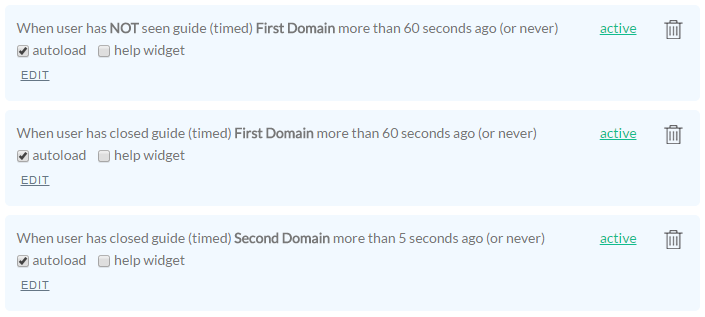
To make the explanation easier, in the example above, the first half of the guide is called First Domain and the second is called Second Domain
Notice there are two guides referenced in these conditions. The first 2 conditions reference the guide on the first domain and the last condition is referencing the guide on the second domain.
Let's explain the conditions one by one.
- Autoload this guide second domain if the user has seen the guide first domain less than 60 seconds ago (within the last minute).
- Autoload this guide if the user has closed the guide more than a minute ago. Or in other words if the user has not just recently closed the first domain.
- Autoload this guide if the user has closed the second domain guide more than 5 seconds ago or never. This condition is optional if you want the second domain guide to always launch no matter if it was recently closed or not.