Guide Feedback Widget does not Display
How to enable OGL Feedback in your environment:
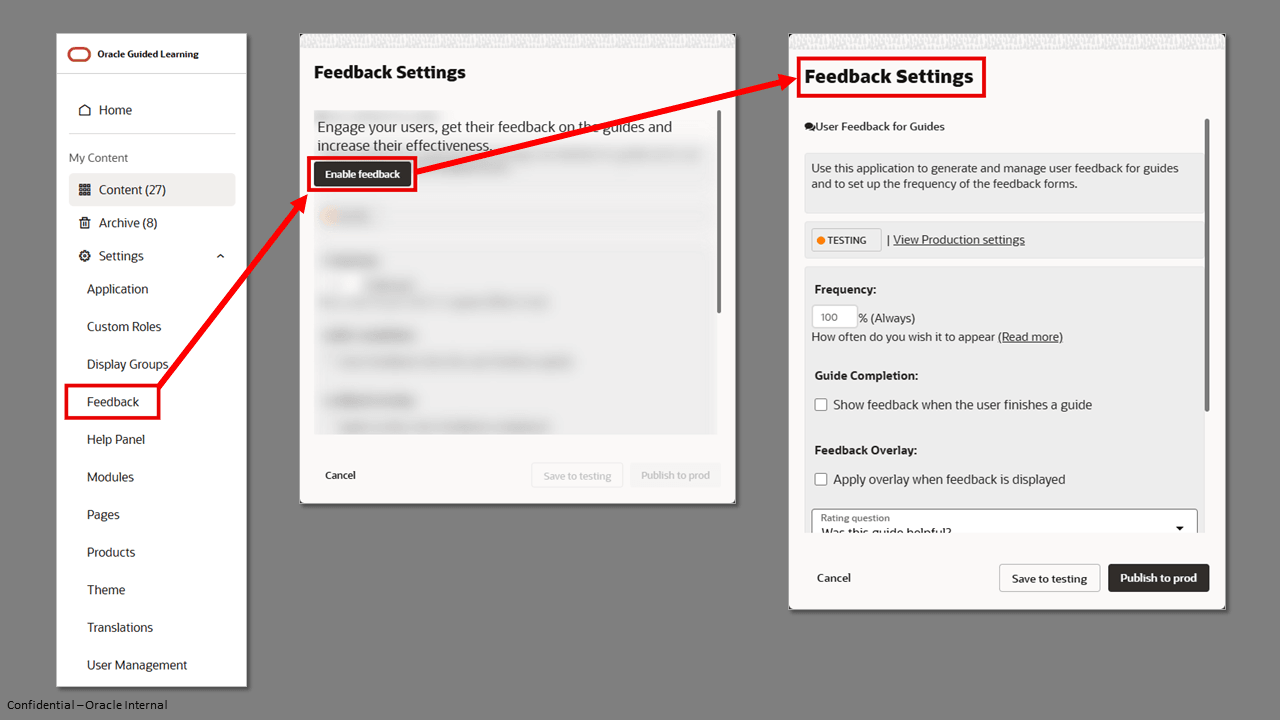
In order to avoid badly affecting the users' experience, Guided Learning runs several checks before displaying the feedback widget.
- Guided Learning will never display the widget twice for the same guide
- The widget will only display if more than 10 minutes passed since the last time the user saw the widget. That means that if the user provided feedback about a certain guide they will only see the widget again after more than 10 minutes.
- If the guide has just one tip, for example a 'Release Notes' notification, the widget will not display.
After all these conditions are met, Guided Learning will evaluate the frequency setting.

Frequency
Controls how frequently a user will be requested to provide feedback. Range 0% (Never) to 100% (Always). If set to 50%, this means there is a 50% probability that feedback will be requested from the user.
Key considerations:
Guided Learning runs several checks before displaying the request for feedback to the user, they are:
- OGL will never request feedback twice for the same guide, from the same user
- A request for feedback will only be displayed if more than 10 minutes have passed since the last time the user saw a request for feedback. That means if the user has provided feedback for Guide A, then they will see the request for Guide B only if 10 minutes have elapsed since they saw the request for Guide A
- If the guide has just one tip/step, for example, a 'Release Notes' notification, the request for feedback will not be shown to the user
- Only after all the above conditions have been met will frequency setting be evaluated
Guide Completion
If the "Show feedback when the user finishes a guide" checkbox is selected, the feedback dialog will be presented to users each time a user has completed the guide.
Note:
Enabling this setting will override any Frequency settings above. Do not enable this setting if you intend to set the frequency for feedback.