Help Widget Footer Customization
Instructions
Add the steps involved:
- Go to Help Widget Settings on the left had side of your OGL Console.
- In the URLs section, enter the text you want to appear for the link in the "text" field.
In the "url" field, enter the url of the site you wish to link to.
- Follow this url pattern: http://google.com
- Select the "add URL" link
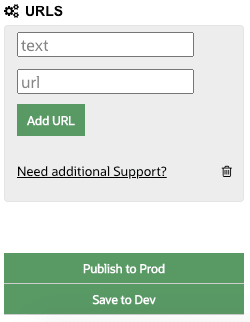
- After you click the "add URL" link, an entry for your link should appear with a garbage can next to it: You should end up with something that looks like this:
- After you click the "add URL" link, an entry for your link should appear with a garbage can next to it: You should end up with something that looks like this:
- Select the Save Settings button.
- The screen will refresh and you will be at the top of the Setup Help Widget page.
- Open the application with Guided Learning and open the Help Widget.
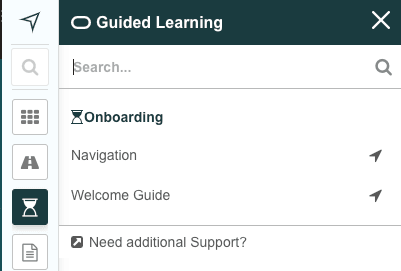
- You should now see a link at the bottom of the help widget like the one shown in the image below:
- You should now see a link at the bottom of the help widget like the one shown in the image below: