How to enable OGL Embed in APEX Applications
Overview
- How can I provide support (primarily self-service) for my users who need help navigating through my application and it’s functions (via Tours, Training Documentation etc.)
- How can I encourage and reinforce proper user behaviors (such as filling out processes correctly) for my user base to follow with minimal help.
- How can I augment my site, page analytics by also tracking user analytics on page, web elements and content.
- How can I announce and communicate new updates or maintenance during site downtime/upgrades OGL enables all this and more.
Note:
Licensing -To use OGL on APEX, you must be adequately licensed. Our Customer Success Services team can assist you with quotations and additional services that may be of interest for you.
To obtain a license please connect with the Oracle Customer Success Services, Oracle Guided Learning team https://www.oracle.com/customer-success/
(https://www.oracle.com/corporate/contact/ – Select Send a Message to Oracle Sales | Select Customer Success Services | Submit and enter details – Oracle Guided Learning APEX license.
If in doubt please also reach out to us on our Customer Connect page – https://community.oracle.com/customerconnect/categories/oracle-guided-learning.
For more information about Oracle Guided Learning you can visit our website – https://www.oracle.com/education/guided-learning/
OGL Deployment Methods
- Oracle Guided Learning Plug-in for APEX (Preferred) - This new method simplifies the process of enabling and configuring OGL in APEX applications.
- JavaScript Embed - Adding a JavaScript embed code into the page template of your APEX application.
- OGL Browser Extension - Install a custom browser extension to inject the necessary JavaScript embed code into your APEX application
- Oracle Guided Learning Plug-In for APEX Method (Preferred)
Currently, OGL is compatible for APEX applications and is enabled by either using our JavaScript embed code or through using a browser extension. While the functionality works fine, we have responded to the needs of APEX developers by simplifying the process of enabling and configuring OGL in our APEX applications through a new Plug-in component, which can be downloaded from APEX.WORLD.
This Plug-In allows you to create a Dynamic Action in APEX and:- Add your OGL details (APPID and Server)
- Allow user tracking – tracking of user behavior from OGL
- Choose your deployment environment – development or production
- And ignore any URL query parameters
You can then resume any further configuration in your OGL Console and of course start creating and deploying OGL content from your Console experience.
- JavaScript Embed Method
Note:
Pre-requisite - Ensure that Oracle APEX application is configured to use Friendly URLs. This will ensure page segmentation works fine. Go to "Edit Application Definition" => Enable Friendly URLsPerform the following steps to Embed OGL in your APEX Applications:
- Select the APEX app in which we need to embed OGL.

- Go to Page 0 (Global Page).

- Select Dynamic Action icon from Page 0.

- Right click on Page Load Action and Select Create Dynamic Action from the Events menu.The Dynamic Action configuration pane opens on the right pane.

- In the Dynamic Action configuration pane:
- Give a Name to the Dynamic Action for example "OGL Embed"
- Set Dynamic in Execution→Event Scope field
- Set Page Load in When→Event field
- Click Save.

- Create a TRUE Event under the newly created dynamic action ("OGL Embed" in this case).

- Select Execute JavaScript Code in Identification→Action field.

- Paste the OGL Embed code from the OGL Console in Settings→Code.
- To track the current logged in end use metric, uncomment the code
- iridize("api.fields.set", {user_id:apex.env.APP_USER});

- iridize("api.fields.set", {user_id:apex.env.APP_USER});
- To track the current logged in end use metric, uncomment the code
- Click Save.
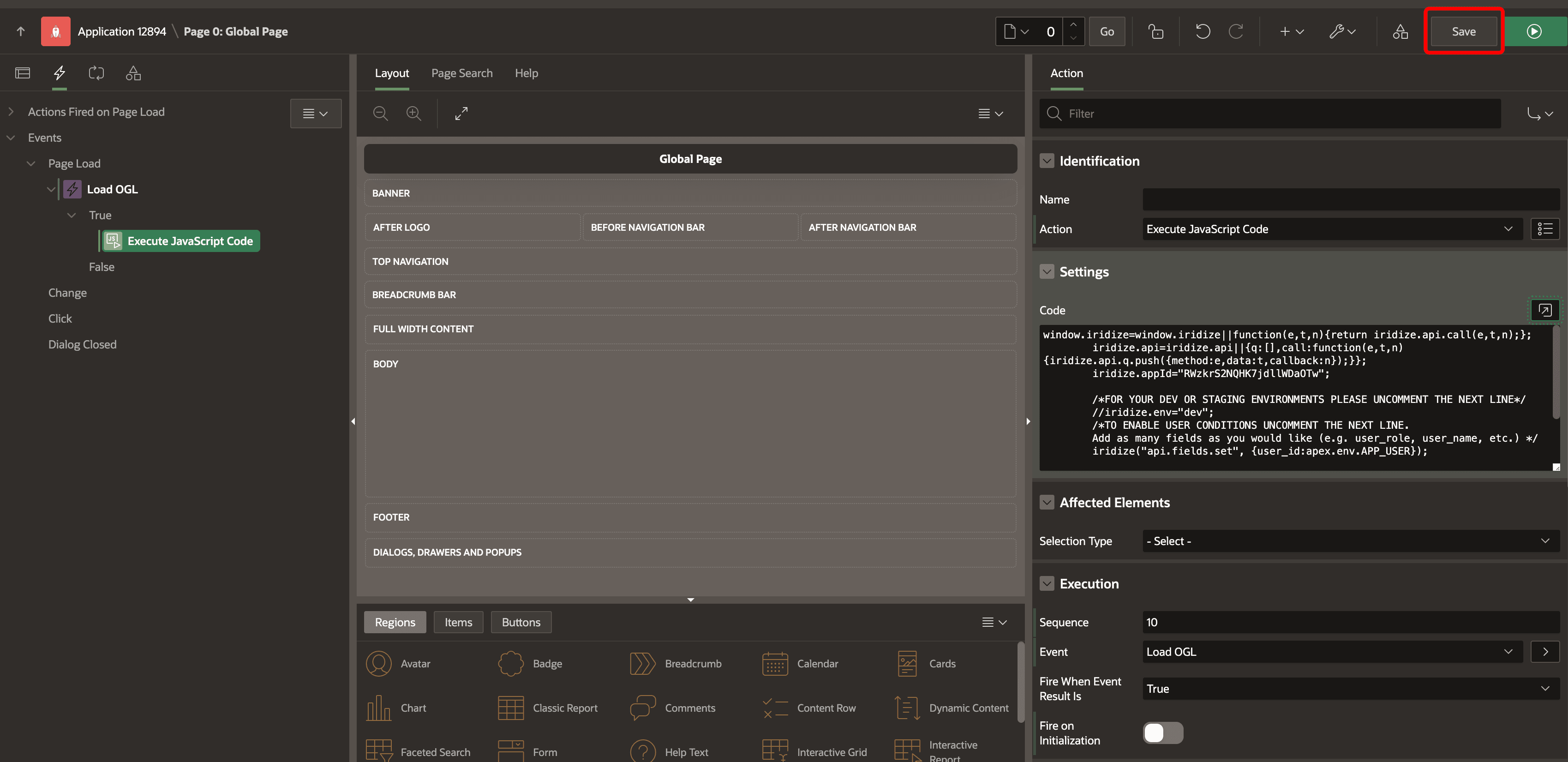
Now your APEX application is embedded with OGL.
- Select the APEX app in which we need to embed OGL.
- Browser Extension Method
To enable OGL in APEX applications using a custom browser extension, please contact your OGL Enablement Team or submit a service request with OGL Support to request this extension. (Link URL: https://help-education.oracle.com/apex/f?p=164:51:10523315353283::::APP_P_TYPE:PRM)