Why doesn't my guide show up?
If you have created a guide and it does not show up, look no further, you have come to the right place.
This article outlines a checklist that you can go over in order to get to the bottom of the issue.
Is Guided Learning embedded?
Before we do anything, let's make sure that Guided Learning is embedded on the page where the guide should appear.
The easiest way to verify that is to check if there are other guides displaying on this page. Even if the help widget appears it means Guided Learning is embedded properly.
If Guided Learning is not embedded you will need to update the JS in the Fusion instance.
Is the guide published?
Every Guided Learning guide has multiple revisions. This is important if you want to update a guide that is currently in production with new new content that is only available in your staging/UAT.
If your guide does not have a published revision it will not show in production at all.

[A draft guide is indicated by the orange DRAFT label]
If the latest revision of the guide is a draft you will only see you latest changes in the staging/UAT environment.
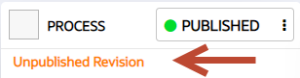
Unpublished Revision indicates that the latest revision of the guide is a draft.
In both situations, you will only see the guide in your staging/UAT environment. To see the guide in production click PUBLISH to publish any recent updates.