Review Host System Requirements for On-Premises Installation
This section applies to an on-premises Gateway installation. To review the requirements for deploying the Gateway on the Cloud, see Deploying the Gateway on Oracle Cloud Infrastructure
The software gateway can be installed directly onto a server (bare metal install) or within a supported virtual machine. The gateway includes a modified version of Oracle Linux 8. It can be installed in any environment which supports Oracle Linux 8 and meets the minimum specifications outlined in the following sections.
Note:
Visit the Oracle Linux certified hardware page to see a list of hardware servers that have been certified to run this version of Oracle Linux.Minimum System Requirements
If you would like to order a server from Oracle for the purpose of running the gateway, Oracle recommends the Gateway Server E6-2L. The gateway software has been certified on this server and has undergone extensive testing and tuning to ensure this configuration achieves the best performance and availability for your service offerings.
This server can be ordered through your Oracle sales representative or Oracle-authorized distributor.
To order the Gateway Server E6-2L, contact Sales Assistance at +1-888-672-2534.
If you do not wish to purchase the certified server from Oracle, you can use a server or Virtual Machine (VM) that meets the following requirements:
Advanced Services Gateway Minimum Host System Installation Requirements
| Category | On-premises Minimum | On-premises Recommended | Additional Details |
|---|---|---|---|
| CPU | 4 cores | 8 cores | The CPU must be 64-bit, x86 architecture (x64 or x86-64). The most common vendors for these processors are Intel and AMD. |
| Memory | 48 GB | 64 GB |
The recommended configuration supports up to eight (8) full-rack Oracle Engineered Systems (or equivalent products.) The minimum configuration is acceptable for a small installation that provides service for one (1) or (2) full rack Oracle Engineered Systems (or equivalent products.) The Gateway supports a maximum of 90 agents or up to 900 targets with status whichever is lower. |
| Storage |
1 disk >=1 TB (if using local storage) Assume that 15% of a local boot disk will be unusable. That will leave a safe margin of error. See “Gateway Storage Options” on page 15 for more information about usable space. |
6 disks >= 1 TB each |
Multiple disks are recommended to provide fault tolerance using RAID, which is supported by software. All disks must be of equal size. A mixture of differently sized disks in the same system is not supported. |
| Network |
One logical interface. Firewall ports opened. |
One logical interface. Firewall ports opened. |
Refer to Oracle Advanced Services Gateway Security Guide for details of the specific port and firewall requirements for the gateway to function properly. |
| Network Bandwidth |
10 Mb/s connection to the internet. Optimally, 100 Mb/s is required between the Gateway and the supported systems. |
10 Mb/s connection to the internet. Optimally, 100 Mb/s is required between the Gateway and the supported systems. |
- |
- The Gateway can be installed in one of the following
ways:
- Directly onto any server hardware that is supported by Oracle Linux 8.x and Unbreakable Enterprise Kernel (UEK) 7 (or later), or
- On Oracle VM, or
- On a VM that supports installation of Oracle Linux 8.x and Unbreakable Enterprise Kernel (UEK) 7 or later. For further information, see MOS KB 79373.
To review the Oracle Support position for Oracle products running on virtualized environments, see MOS KB 183395.
You can view a list of servers that have been certified to run on Oracle Linux from the Oracle Linux certified hardware page at:
http://linux.oracle.com/pls/apex/f?p=117:1:489726292744914
Note:
Due to incompatibility issues associated with installing the Gateway software on Cisco UCS servers, it is recommended that Cisco UCS servers not be used for the Gateway hardware.If the configuration shown in the table is not available, then contact your Oracle sales representative directly or via Oracle's Contact Us Page.
If the gateway is required for more than two full rack systems per site, then a custom configuration with more cores, disks, or memory is required and can be configured on the Oracle Store or ordered through your Oracle sales representative or Oracle-authorized distributor. The recommended configuration will support up to eight (8) Oracle Engineered Systems.
Network Requirements
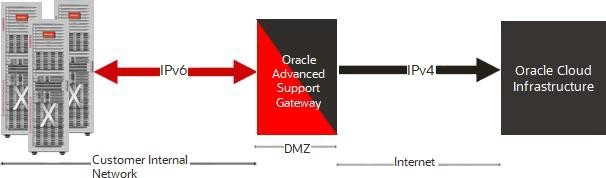
The Gateway server must have at least one interface configured with an IPv4 address that is used to communicate to the Internet and the Oracle endpoints. You can add more interfaces to the Gateway to support systems that are not accessible from the primary interface. These interfaces can support either IPv4 or IPv6.
Note:
When IPv6 addresses are added to the primary interface, you are not required to add a physically separate cable to support internal IPv6 networks and IPv4 communication to the Oracle endpoints.The diagram below depicts an example network configuration featuring an internal customer network and Oracle that incorporates both IPv4 and IPv6.
High Level Network Configuration and IPv4/IPv6 Distribution:
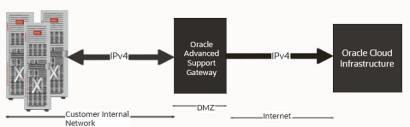
The diagram below depicts an example network configuration featuring an internal customer network and Oracle that uses only IPv4.
High Level Network Configuration and IPv4 Distribution:
Gateway Storage Options
The software gateway automated installation process can work with a wide variety of different disk configurations and make intelligent choices about how to utilize those disks. This topic explains the logic that is used for disk selection, volume creation, and partition creation.
Disk Selection Logic
The installation process makes certain assumptions when choosing the appropriate disk drives to use for installation of the operating system. The assumptions are as follows:
- Any device which is smaller than 100 GB in size is excluded. These are assumed to be removable storage such as USB drives.
- Any device that does not start with one of the following is
excluded because they are assumed to not be a disk drive:
- /dev/vd
- /dev/sd
- /dev/xvd
- /dev/mpath
- /dev/cciss
- /dev/nvme
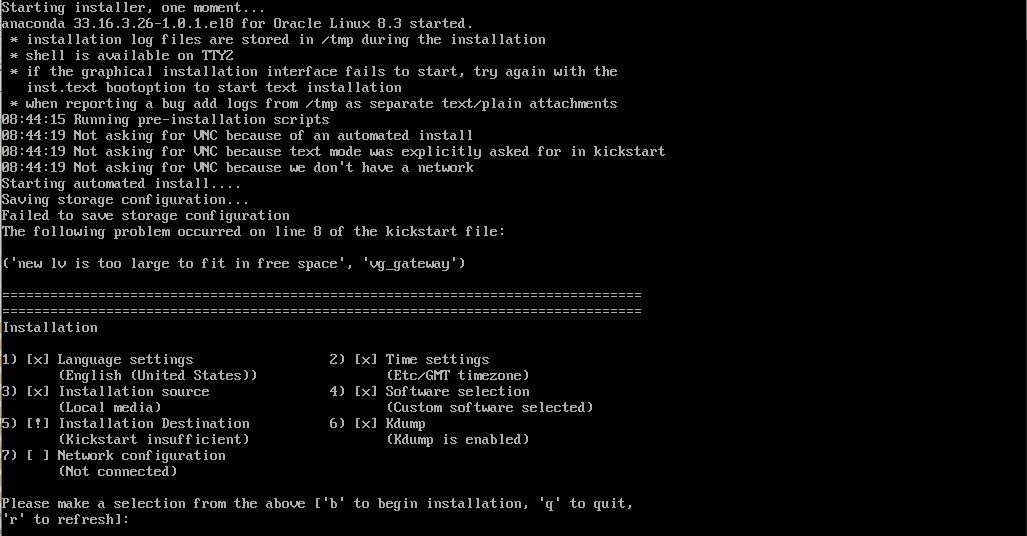
In the vast majority of cases, these assumptions are correct and the installation proceeds normally. But in certain configurations, the assumptions might be wrong, and the installation fails with a miscellaneous disk error.
If you see an error like the one below during installation, it is likely that your disks are different sizes and this is causing issues trying to setup the RAID. Check to make sure all your disks are the same size and then restart the install process.
Supported Local Disk Configurations
The software gateway supports systems with 1 to 6 disks. The number of disks available during installation affects the level of fault tolerance and performance that can be obtained. The
table below describes the way the installer provisions storage for each of the supported disk configurations.
Note:
The installer automatically sets up a software RAID configuration if it detects more than one disk.| Number of Drives | Minimum Size (Each Drive) | Disk Configuration | Fault Tolerance | Storage Capacity (s = size of each disk) |
| 1 | 1 TB | All storage on a single disk | None | s |
| 2 | 1 TB | RAID 1 (mirror) | Can survive a single drive failure. | s |
| 3 | 1 TB | RAID 1 (mirror or disks 1 and 2) plus disk 3 used for backups | Can survive a single drive failure. | s |
| 4 | 1 TB |
RAID 10 (mirror on disks 1 and 2, mirror on disks 3 and 4, striped across the 2 mirrored sets) |
Can survive 1 disk failure in each mirror set. For example: this configuration can survive a failure of disks 1 or 2 and 3 or 4, but not 1 and 2 or 3 and 4. |
2 x s |
| 5 | 1 TB | RAID 10 (mirror on disks 1 and 2, mirror on disks 3 and 4, striped across the 2 mirrored sets) plus disk 5 used for backups. | Can survive one disk failure in each mirror set and one additional failure. | 2 x s |
| 6 | 1 TB | RAID 10 (mirror on disks 1 and 2, mirror on disks 3 and 4, striped across the 2 mirrored sets) plus RAID 1 (mirror on disk 5 and 6) for backups. | Can survive one disk failure in each mirror set. Backup disk can be used to recover database should an entire mirror fail. | 2 x s |
Filesystem Sizes on the ISO
Filesystem sizes on the ISO are set to the following values:
- The /var partition is 100 GB.
This value should provide ample space for diagnostic uploads to Oracle Support for SRs.
- The /var/tmp partition is 40 GB.
This value should provide ample space for patch downloads and software upgrades.
- The /var/log partition is 20 GB.
This value should provide ample space for application logging.
- The /var/log/audit partition is 5 GB.
This value should provide ample space for audit specific logs.
- The /home partition is 32 GB.
This value should provide ample space for users' home directories for data collection and analysis within the environment.
- The /boot partition is 2 GB.
This value should provide ample space for future kernel updates.
- The /(root) partition is 50 GB.
This value should prevent any issues with running out of / partition space given that many
tmp files are created on the / filesystem.
- ORAHOME_MAX (with its value set to 256 GB) has been added.
If additional disk space is available (beyond the 1 TB minimum requirement specified in Supported Local Disk Configurations), the ORAHOME_MAX partition size will be set to the maximum value to provide more space for updates, upgrades, and so on.
Usable Space
This section provides some information on the amount of usable space on the gateway (a 300 GB disk does not have 300 GB of usable space.)
Use the fdisk command to view the partition table. There are other unmounted partitions that do not show up in df output (perhaps /swap, for example). For example, the file system uses some of the disk partition for metadata. Metadata consists of entities like file names, file
permissions, which parts of the partition belong to which files, and which parts of the partition are free. This might account for 2% of the partition. Space is also reserved for root and for the master boot record.
For example, on a sample gateway, the df -k command shows:
Filesystem                      1K-blocks     Used Available Use% Mounted on
/dev/mapper/vg_gateway-lv_root  51290592 16247684  32405084  34% /
Disk /dev/mapper/vg_gateway-lv_root: 50 GiB, 53687091200 bytes, 104857600 sectors
Note:
Approximately 4% of the disk storage is not usable. By allocating 15% of the disk as not usable, this should allow sufficient margin of error.