Solution-in-a-box: Deploying TimesTen on Oracle Database Appliance
Executive Overview
Oracle Database Appliance (ODA) is a family of simple, reliable, and affordable engineered systems from Oracle designed to be database servers. These engineered systems are certified configurations on hardware and software bundles running in an Oracle Database Appliance Virtualized Platform. Kernel-based Virtual Machine (KVM) is a mature type 2 host OS-based hypervisor technology that is available on ODA for user applications. Oracle Database Server is available on ODA and included as a separate database KVM called DB systems. This configuration lets you quickly deploy the databases and applications on ready-made optimized systems. You save time and money by simplifying deployment, maintenance, and support of high-availability database solutions through ODA systems.
Oracle TimesTen In-Memory Database (TimesTen) is an SQL relational in-memory database that provides ACID transactions and persistent data for the file system. Using a memory-optimized data layout and access method of the entire TimesTen database in memory and co-located with the user application, TimesTen provides extreme performance with high throughputs and low latency for user applications. For example, TimesTen can return a simple select query with a primary key to the user in under a few microseconds.
You can use TimesTen as a system of record or a read/write cache database to a backend Oracle database. By caching subsets of the data from an Oracle database to a TimesTen database, user applications against the TimesTen database can achieve unparallelled application response time. TimesTen automatically synchronizes data between TimesTen and Oracle databases. Applications access TimesTen databases using standard SQL and PL/SQL through JDBC, ODBC, ODP.NET, Oracle Call Interface (OCI), Pro*C/C++, Python, ODPI-C and Node.JS programming interfaces.
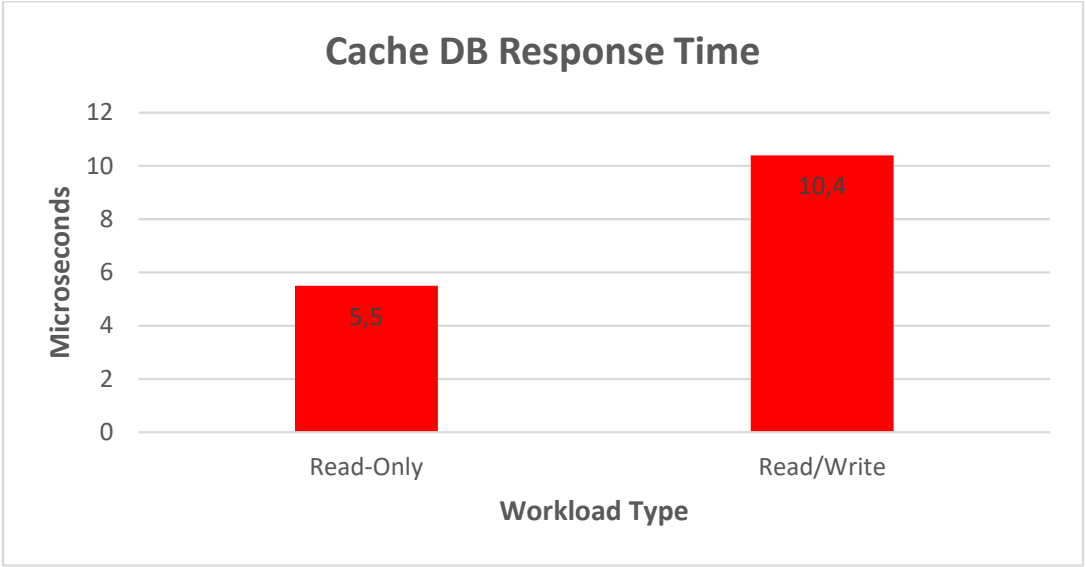
Combining the advantage of Oracle’s engineered systems with TimesTen as a solution-in-a-box enables you to meet your application performance goals while using a simple, low-cost, fully integrated system from one vendor. The following graph shows the average latency numbers of a TimesTen database on an ODA-X8-2-HA system for both read-only and read/write workloads using the TimesTen sample program, tptbm.
Description of the illustration mcp-24ca782175a97dfb46affa7bc7c3b07f.png
Figure 1. Caching performance of TimesTen on ODA-X8-2-HA system
System Architecture
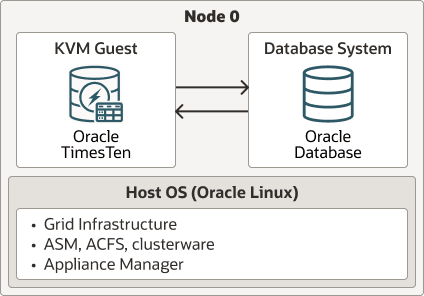
This technical paper outlines the process for setting up a TimesTen database as a cache database from the backend Oracle database on the ODA Virtualized Platform. The KVM guest machine is where user applications run on ODA. TimesTen can achieve the best performance when it is running in the same space as the user’s application. Therefore, you should deploy TimesTen in the KVM guest machine. The following image shows a TimesTen database and an Oracle database layout in ODA.
Description of the illustration mcp-444483d967f869a7af5873e16b1e5f5b.png
Figure 2. Architecture for cache data from an Oracle database to a TimesTen database on ODA
Deploying TimesTen cache database
To cache data from an Oracle database to a TimesTen database on ODA, follow these steps:
- Create an application KVM guest environment in ODA. See Create an application VM with Linux Operating System.
- Ensure HugePages are enabled in the KVM guest environment for the TimesTen database. Follow the configuration steps for configuring HugePages listed under Deploying Oracle TimesTen In-Memory Database on Oracle Database Appliance KVM.
- Follow the Operating System Pre-requisites in the TimesTen Installation, Migration and Upgrade Guide to complete the system library and user group requirements in the KVM.
- Create a DB system on ODA and deploy the Oracle database. Take note of entries in
tnsnames.oraand the Oracle database system user/password to use for setting up cache in the TimesTen database later. - Download the latest TimesTen Release 22.1.1 for Linux x86-64 from Oracle Software Delivery Cloud (OSDC) onto the KVM guest host. You may need to configure proxy server to connect outside of your company network to access the TimesTen software on OSDC.
- Follow the steps in the TimesTen documentation to Install TimesTen and create a TimesTen instance in the KVM guest environment.
Create a TimesTen database. Refer to Getting Started with Cache Guide for more details.
For this step, you must prepare the Oracle and TimesTen databases for cache operations. For more information on the preparation procedures, see Chapter 4, “Prepare the Databases for Cache Operations,” in the Getting Started with Cache Guide.
To prepare the database user and permissions in the Oracle database, users have the following options to accomplish the tasks:
- Connect to the Oracle DB as database user SYSTEM from the KVM. Remote login using SQLPLUS utility as database user SYSTEM from the KVM system to the DB system. This method is recommended because the
grantCacheAdminPrivileges.sqlscript as part of the TimesTen installation resides locally on the KVM. - Connect to the Oracle DB as database user SYSTEM locally on the DB system. You log onto the DB system as OS user first and then connect to the Oracle database as database user SYSTEM locally. For this method, you need to transfer the
grantCacheAdminPrivileges.sqlscript from thetimesten_home/install/oraclescriptsdirectory of the TimesTen instance on the KVM to the DB system.
- Connect to the Oracle DB as database user SYSTEM from the KVM. Remote login using SQLPLUS utility as database user SYSTEM from the KVM system to the DB system. This method is recommended because the
To configure TimesTen as a system of record rather than a cache database, follow the steps outlined for the standalone TimesTen database tasks for more details.
Reference
Contact Us
For more information about Oracle TimesTen In-Memory Database, Call +1.800.ORACLE1 or visit oracle.com. Outside North America, find your local office at: oracle.com/contact.
blogs.oracle.com · facebook.com/oracle · x.com/oracle
Copyright and Trademarks
Copyright ©2025, Oracle and/or its affiliates. This document is provided for information purposes only, and the contents hereof are subject to change without notice. This document is not warranted to be error-free, nor subject to any other warranties or conditions, whether expressed orally or implied in law, including implied warranties and conditions of merchantability or fitness for a particular purpose. We specifically disclaim any liability with respect to this document, and no contractual obligations are formed either directly or indirectly by this document. This document may not be reproduced or transmitted in any form or by any means, electronic or mechanical, for any purpose, without our prior written permission.
Oracle, and Java are registered trademarks of Oracle and/or its affiliates. Other names may be trademarks of their respective owner.
Oracle® Database, Solution-in-a-box: Deploying TimesTen on Oracle Database Appliance, Latest
G63944-01
November 2026
Copyright © 2026, Oracle and/or its affiliates.
Primary Author: Jean-Francois Verrier, Venkat Maddali, Paul Tsien, Krisztian Fekete, Hagen Herbst, Bin Yan
Secondary Author: Prakash Jashnani, Aparna Kamath
Contributors: Khyati Agarwal, Alok Anand